How to change the name for promoted articles? | Community
Skip to main content

How to change the name for promoted articles?

  • June 17, 2022
  • 5 replies
  • 0 views

Hello,

I believe it is possible to change the name promoted articles on the homepage to Helpdesk Support for example?

 

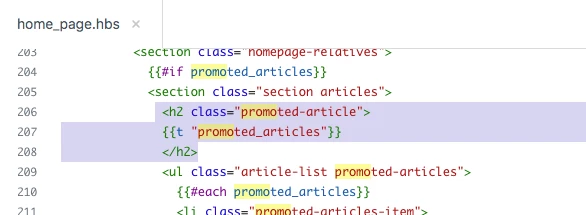
I can see this on the edit code page on the home page but can someone please advise of the script you have to change it to and on what pages to make this change?

Thank you.

Kind Regards,

Anton


5 replies

Ifra
  • June 17, 2022

Hi Anton Van der meyden, you can change it on the home_page.hbs but if you want to change the title via JS code then just copy and paste it to your script.js file.

document.querySelector("h2.promoted-article").innerText = "WRITE YOUR TITLE HERE";


h2.promoted-article: Your class name may be different.


You can directly change it on home_page.hbs file.


  • Author
  • July 5, 2022

@ifra

Hi Ifra,

Thank you for your help.

Kind Regards,

Anton


  • September 8, 2022

Hi @ifra - my home page's code looks a little different and the above guidance doesn't work. Any ideas on how to change the word "promoted" based on my code (see below)?

<div class="container">
  <section class="section knowledge-base">
    
     {{#if promoted_articles}}
      <section class="articles">
        <h2>{{t 'promoted_articles'}}</h2>
        <ul class="article-list promoted-articles">
          {{#each promoted_articles}}
            <li class="promoted-articles-item">
                <a href="{{url}}">
                  {{title}}

Ifra
  • September 9, 2022

Hi Breanne Brock , :)

Change the name of your title then do the following:

Current Code:

<div class="container">
  <section class="section knowledge-base">
    
     {{#if promoted_articles}}
      <section class="articles">

      <h2> {{t 'promoted_articles'}} </h2>

        <ul class="article-list promoted-articles">
          {{#each promoted_articles}}
            <li class="promoted-articles-item">
                <a href="{{url}}">
                  {{title}}


Update Code:

<div class="container">
  <section class="section knowledge-base">
    
     {{#if promoted_articles}}
      <section class="articles">

      <h2> WRITE YOUR TEXT HERE </h2>

        <ul class="article-list promoted-articles">
          {{#each promoted_articles}}
            <li class="promoted-articles-item">
                <a href="{{url}}">
                  {{title}}


OR

If you want to show the title in multiple languages then you can use Dynamic Placeholder.

https://support.zendesk.com/hc/de/community/posts/4581644213658-Dynamic-Content-in-Guide-Search-Placeholder-


With the DC Placeholder:

<div class="container">
  <section class="section knowledge-base">
    
     {{#if promoted_articles}}
      <section class="articles">

    <h2> {{dc 'custom_text}} </h2>

        <ul class="article-list promoted-articles">
          {{#each promoted_articles}}
            <li class="promoted-articles-item">
                <a href="{{url}}">
                  {{title}}


If any confusion feel free to share :)

Thanks

Team


  • September 9, 2022

Thank you, @ifra! I really appreciate it!