

Hi,
I'm trying to add some padding with the cells with the following table, but it isn't working :(
Could someone help me with this, thank you.
<table class="wysiwyg-text-align-center" style="height: 308px; width: 1024px;" border="1" width="1024" cellpadding="20px">
<tbody>
<tr style="height: 22px;">
<th style="height: 22px; width: 89.809px;" scope="col"> </th>
<th style="height: 22px; width: 207.569px;" scope="col">Phone Lead</th>
<th style="height: 22px; width: 209.896px;" scope="col">MC Corporate Site Lead</th>
<th style="height: 22px; width: 209.896px;" scope="col">Quick Quote</th>
<td style="height: 286px; width: 282.24px;" rowspan="13">
<img src="/guide-media/01H65C8VM7BQ3NYADDMKZ54W7Z" alt="Example of ALA page.png">
</td>
</tr>
<tr style="height: 22px;">
<td style="height: 22px; width: 81.7882px;">
<strong>Field 1</strong>
</td>
<td style="height: 22px; width: 199.549px;">First Name</td>
<td style="height: 22px; width: 201.875px;">First Name</td>
<td style="height: 22px; width: 201.875px;">First Name</td>
</tr>
<tr style="height: 22px;">
<td style="height: 22px; width: 81.7882px;">
<strong>Field 2</strong>
</td>
<td style="height: 22px; width: 199.549px;">Last Name</td>
<td style="height: 22px; width: 201.875px;">Last Name</td>
<td style="height: 22px; width: 201.875px;">Last Name</td>
</tr>
<tr style="height: 22px;">
<td style="height: 22px; width: 81.7882px;">
<strong>Field 3</strong>
</td>
<td style="height: 22px; width: 199.549px;">Email</td>
<td style="height: 22px; width: 201.875px;">Email</td>
<td style="height: 22px; width: 201.875px;">Email</td>
</tr>
<tr style="height: 22px;">
<td style="height: 22px; width: 81.7882px;">
<strong>Field 4</strong>
</td>
<td style="height: 22px; width: 199.549px;">Phone</td>
<td style="height: 22px; width: 201.875px;">Phone</td>
<td style="height: 22px; width: 201.875px;">Phone</td>
</tr>
<tr style="height: 22px;">
<td style="height: 22px; width: 81.7882px;">
<strong>Field 5</strong>
</td>
<td style="height: 22px; width: 199.549px;">Postcode</td>
<td style="height: 22px; width: 201.875px;">Postcode</td>
<td style="height: 22px; width: 201.875px;">Postcode</td>
</tr>
<tr style="height: 22px;">
<td style="height: 22px; width: 81.7882px;">
<strong>Field 6</strong>
</td>
<td style="height: 22px; width: 199.549px;">
Notes<br>
(Loan type, Amount to borrow, deposit available, date of purchase.)
</td>
<td style="height: 22px; width: 201.875px;">
Notes<br>
(Loan type, Amount to borrow, deposit available, date of purchase.)
</td>
<td style="height: 22px; width: 201.875px;">
Notes<br>
(Loan type, Amount to borrow, deposit available, date of purchase.)
</td>
</tr>
<tr style="height: 22px;">
<td style="height: 22px; width: 81.7882px;">
<strong>Field 7</strong>
</td>
<td style="height: 22px; width: 199.549px;">
<p>Car Loans</p>
<p>
OR<br>
Commercial Loans
</p>
<p>
OR<br>
Construction Loans
</p>
<p>OR</p>
<p>Personal Loans</p>
<p>OR</p>
<p>Residential Loans</p>
<p>OR</p>
<p>Reverse Mortgage</p>
<p>OR</p>
<p>SMSF</p>
</td>
<td style="height: 22px; width: 201.875px;">
<p>Car Loans</p>
<p>
OR<br>
Commercial Loans
</p>
<p>
OR<br>
Construction Loans
</p>
<p>OR</p>
<p>Personal Loans</p>
<p>OR</p>
<p>Residential Loans</p>
<p>OR</p>
<p>Reverse Mortgage</p>
<p>OR</p>
<p>SMSF</p>
</td>
<td style="height: 22px; width: 201.875px;">
<p>Car Loans</p>
<p>
OR<br>
Commercial Loans
</p>
<p>
OR<br>
Construction Loans
</p>
<p>OR</p>
<p>Personal Loans</p>
<p>OR</p>
<p>Residential Loans</p>
<p>OR</p>
<p>Reverse Mortgage</p>
<p>OR</p>
<p>SMSF</p>
</td>
</tr>
<tr style="height: 22px;">
<td style="height: 22px; width: 81.7882px;">
<strong>Field 8</strong>
</td>
<td style="height: 22px; width: 199.549px;">Franchise Code (e.g. NSW-1015)</td>
<td style="height: 22px; width: 201.875px;">Franchise Code (e.g. NSW-1015)</td>
<td style="height: 22px; width: 201.875px;">Franchise Code (e.g. NSW-1015)</td>
</tr>
<tr style="height: 22px;">
<td style="height: 22px; width: 81.7882px;">
<strong>Field 9</strong>
</td>
<td style="height: 22px; width: 199.549px;">Phone</td>
<td style="height: 22px; width: 201.875px;">Internet</td>
<td style="height: 22px; width: 201.875px;">Internet</td>
</tr>
<tr style="height: 22px;">
<td style="height: 22px; width: 81.7882px;">
<strong>Field 10</strong>
</td>
<td style="height: 22px; width: 199.549px;">Phone</td>
<td style="height: 22px; width: 201.875px;">MC Corporate Site</td>
<td style="height: 22px; width: 201.875px;">MC Corporate Site</td>
</tr>
<tr style="height: 22px;">
<td style="height: 22px; width: 81.7882px;">
<strong>Field 11</strong>
</td>
<td style="height: 22px; width: 199.549px;">Phone</td>
<td style="height: 22px; width: 201.875px;">SEO Direct Corporate Site</td>
<td style="height: 22px; width: 201.875px;">Quick Quote</td>
</tr>
<tr style="height: 22px;">
<td style="height: 22px; width: 81.7882px;">
<strong>Field 12</strong>
</td>
<td style="height: 22px; width: 199.549px;">Phone</td>
<td style="height: 22px; width: 201.875px;">CTA box Contact Us</td>
<td style="height: 22px; width: 201.875px;">Quick Quote</td>
</tr>
<tr style="height: 22px;">
<td style="height: 22px; width: 81.7882px;">
<strong>Example Ticket</strong>
</td>
<td style="height: 22px; width: 199.549px;"> </td>
<td style="height: 22px; width: 201.875px;">
<a href="/agent/tickets/1019754" target="_self">Example of MC Corporate Site Lead</a>
</td>
<td style="height: 22px; width: 201.875px;">
<a href="/agent/tickets/1024975" target="_self">Example of Quick Quote Lead</a>
</td>
</tr>
</tbody>
</table>
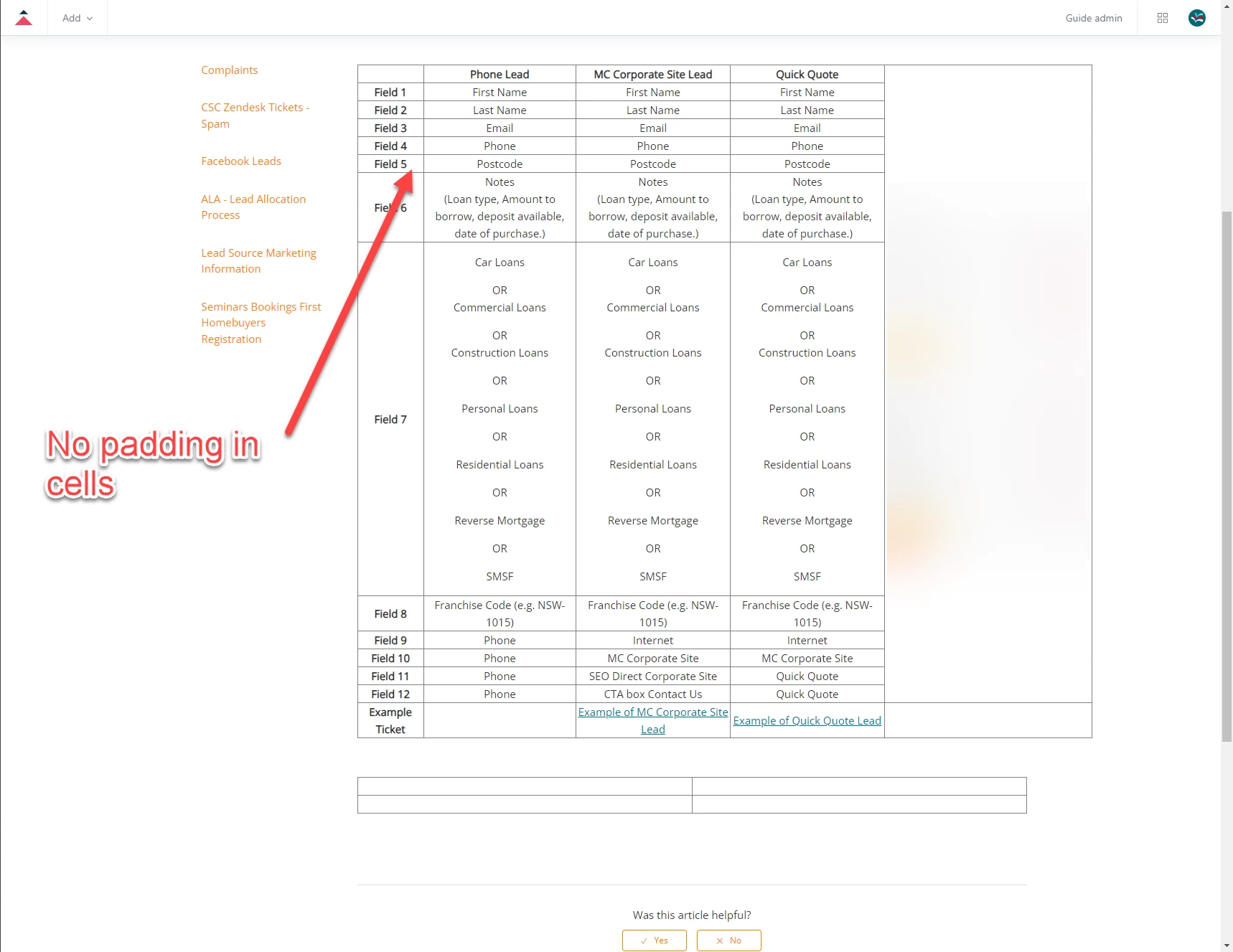

There is some level of HTML sanitization that takes place in help center articles so my guess would be that the
cellpaddingattribute is be included in that sanitization. My suggestion would be to add a class to the table element and manipulate the padding with some CSS directly in the help center code editor. For example, if you added a class of "table-padding" to the table element, you could target the table rows specifically with.table-padding tr { padding: 50px; }. Here's a link with a guide on how to use the help center code editor:https://support.zendesk.com/hc/en-us/articles/4408832558874-Editing-the-code-for-your-live-help-center-theme
I hope this helps! Feel free to reach out with any questions.
Tipene