
Hello, I was wondering if there is a way to show more than 24 promoted articles on the home page?
- Home
- Community
- Ask the community
- Knowledge
- Knowledge Base
- How do i show more than 24 promoted articles on the home page?
How do i show more than 24 promoted articles on the home page?
- October 21, 2021
- 25 replies
- 0 views
25 replies

- October 22, 2021
Hi Edwin, just copy and paste the below code at your home_page.hbs at the bottom and you can see all your promoted article would be showing on homepage:
{{#if promoted_articles}}
      <section class="articles">
        <h2>{{t 'promoted_articles'}}</h2>
        <ul class="article-list promoted-articles">
          {{#each promoted_articles}}
            <li class="promoted-articles-item">
                <a href="{{url}}">
                  {{title}}

                  {{#if internal}}
                    <svg xmlns="http://www.w3.org/2000/svg" width="16" height="16" focusable="false" viewBox="0 0 16 16" class="icon-lock" title="{{t 'internal'}}">
                      <rect width="12" height="9" x="2" y="7" fill="currentColor" rx="1" ry="1"/>
                      <path fill="none" stroke="currentColor" d="M4.5 7.5V4a3.5 3.5 0 017 0v3.5"/>
                    </svg>
                  {{/if}}
                </a>
            </li>
          {{/each}}
        </ul>
      </section>
    {{/if}}
Note: The above promoted article code can be found in default Copenhagen Theme at Homepage file.
Thanks
Team Diziana

- Community Manager
- October 25, 2021
Hey Edwin,
It looks like @ifra provided a response but it didn't carry over after our maintenance took place over the weekend. I'm copying her response below. Thanks for your help Ifra!
Hi Edwin, just copy and paste the below code at your home_page.hbs at the bottom and you can see all your promoted article would be showing on homepage:
{{#if promoted_articles}}
      <section class="articles">
        <h2>{{t 'promoted_articles'}}</h2>
        <ul class="article-list promoted-articles">
          {{#each promoted_articles}}
            <li class="promoted-articles-item">
                <a href="{{url}}">
                  {{title}}

                  {{#if internal}}
                    <svg xmlns="http://www.w3.org/2000/svg" width="16" height="16" focusable="false" viewBox="0 0 16 16" class="icon-lock" title="{{t 'internal'}}">
                      <rect width="12" height="9" x="2" y="7" fill="currentColor" rx="1" ry="1"/>
                      <path fill="none" stroke="currentColor" d="M4.5 7.5V4a3.5 3.5 0 017 0v3.5"/>
                    </svg>
                  {{/if}}
                </a>
            </li>
          {{/each}}
        </ul>
      </section>
    {{/if}}
Thanks
Team Diziana
- Author
- October 26, 2021
@ifra Thank you, i changed the name from "Promoted Articles" to "FAQs" would i need to change
<h2>{{t 'promoted_articles'}}</h2> to <h2>{{t 'FAQs'}}</h2>
https://support.vida.com/hc/en-us
Also just curious, would it be possible to add like a "Show more" button? I think showing all the articles would be too much. Maybe show the top 10 articles then users can click on the "Show more" button to show all the articles.
- October 28, 2021
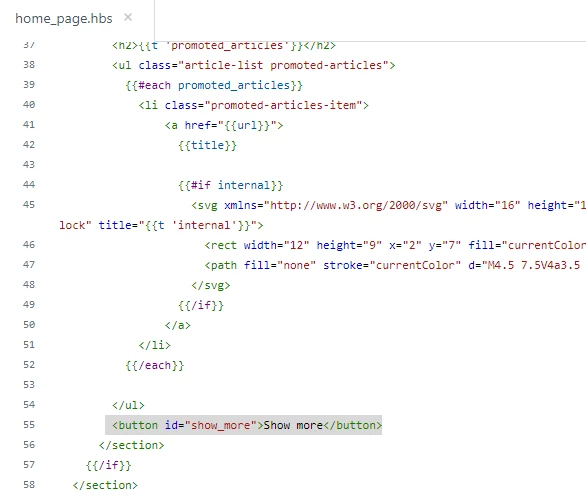
Hi Edwin, please follow the below steps to hide more than 10 promoted articles and to add show more button to show all promoted articles:
1). Copy and paste the show more button code inside the promoted articles code just after the <ul> tag on homepage (where you have added the promoted article code).
<button id="show_more">Show more</button>
Screenshot for the same:
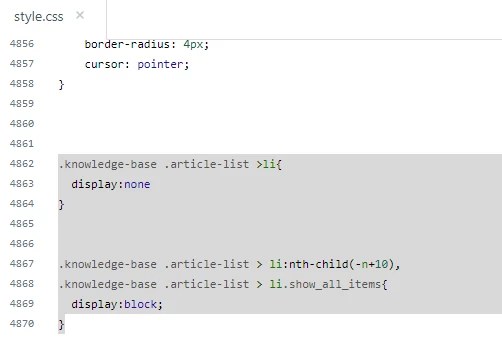
2). Copy and paste the below CSS code at the bottom on style.css file.
.knowledge-base .article-list >li{
  display:none
}


.knowledge-base .article-list > li:nth-child(-n+10),
.knowledge-base .article-list > li.show_all_items{
  display:block;
}
Screenshot for the same:
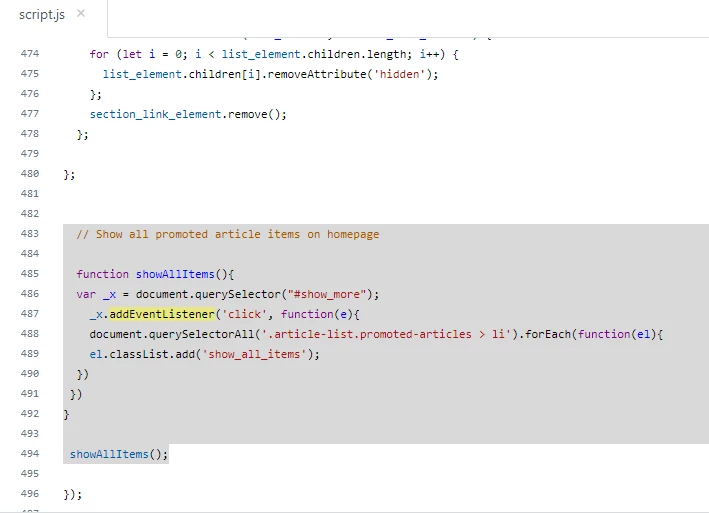
3). Copy and paste the script function on script.js file at the bottom but under the DOM function.
document.addEventListener('DOMContentLoaded', function() {

.............


 // Show all promoted article items on homepage - Start

function showAllItems(){
var _x = document.querySelector("#show_more");
_x.addEventListener('click', function(e){
document.querySelectorAll('.article-list.promoted-articles > li').forEach(function(el){
el.classList.add('show_all_items');
})
})
}

showAllItems();

// End


});
Screenshot for the same:
I know I'm too late to answer but.... :)
If any confusion, do let me know.
Thanks
Ifra Saqlain
- October 28, 2021
But the question for the title -
<h2>{{t 'promoted_articles'}}</h2> to <h2>{{t 'FAQs'}}</h2>
It's not possible, you can write FAQ under the <h2> tag or create Dynamic Content for this.
- Author
- November 1, 2021
@ifra thank you! It seems to not be working, i think the issue is that i dont have the DOM function
document.addEventListener('DOMContentLoaded', function() {
in the script.js file.
- November 2, 2021
See the issue in the console tab:

Now I have fixed your script code. Now you will have to do only the few below steps:
1). Remove your all script code from the script.js file.
2). Copy the below script code.
/*

 * jQuery v1.9.1 included

 */

$(document).ready(function() {

  // social share popups

  $(".share a").click(function(e) {

    e.preventDefault();

    window.open(this.href, "", "height = 500, width = 500");

  });

  // show form controls when the textarea receives focus or backbutton is used and value exists

  var $commentContainerTextarea = $(".comment-container textarea"),

    $commentContainerFormControls = $(".comment-form-controls, .comment-ccs");

  $commentContainerTextarea.one("focus", function() {

    $commentContainerFormControls.show();

  });

  if ($commentContainerTextarea.val() !== "") {

    $commentContainerFormControls.show();

  }

  // Expand Request comment form when Add to conversation is clicked

  var $showRequestCommentContainerTrigger = $(".request-container .comment-container .comment-show-container"),

    $requestCommentFields = $(".request-container .comment-container .comment-fields"),

    $requestCommentSubmit = $(".request-container .comment-container .request-submit-comment");

  $showRequestCommentContainerTrigger.on("click", function() {

    $showRequestCommentContainerTrigger.hide();

    $requestCommentFields.show();

    $requestCommentSubmit.show();

    $commentContainerTextarea.focus();

  });

  // Mark as solved button

  var $requestMarkAsSolvedButton = $(".request-container .mark-as-solved:not([data-disabled])"),

    $requestMarkAsSolvedCheckbox = $(".request-container .comment-container input[type=checkbox]"),

    $requestCommentSubmitButton = $(".request-container .comment-container input[type=submit]");

  $requestMarkAsSolvedButton.on("click", function () {

    $requestMarkAsSolvedCheckbox.attr("checked", true);

    $requestCommentSubmitButton.prop("disabled", true);

    $(this).attr("data-disabled", true).closest("form").submit();

  });

  // Change Mark as solved text according to whether comment is filled

  var $requestCommentTextarea = $(".request-container .comment-container textarea");

  $requestCommentTextarea.on("keyup", function() {

    if ($requestCommentTextarea.val() !== "") {

      $requestMarkAsSolvedButton.text($requestMarkAsSolvedButton.data("solve-and-submit-translation"));

      $requestCommentSubmitButton.prop("disabled", false);

    } else {

      $requestMarkAsSolvedButton.text($requestMarkAsSolvedButton.data("solve-translation"));

      $requestCommentSubmitButton.prop("disabled", true);

    }

  });

  // Disable submit button if textarea is empty

  if ($requestCommentTextarea.val() === "") {

    $requestCommentSubmitButton.prop("disabled", true);

  }

  // Submit requests filter form in the request list page

  $("#request-status-select, #request-organization-select")

    .on("change", function() {

      search();

    });

  // Submit requests filter form in the request list page

  $("#quick-search").on("keypress", function(e) {

    if (e.which === 13) {

      search();

    }

  });

  function search() {

    window.location.search = $.param({

      query: $("#quick-search").val(),

      status: $("#request-status-select").val(),

      organization_id: $("#request-organization-select").val()

    });

  }

  $(".header .icon-menu").on("click", function(e) {

    e.stopPropagation();

    var menu = document.getElementById("user-nav");

    var isExpanded = menu.getAttribute("aria-expanded") === "true";

    menu.setAttribute("aria-expanded", !isExpanded);

  });

  if ($("#user-nav").children().length === 0) {

    $(".header .icon-menu").hide();

  }

  // Submit organization form in the request page

  $("#request-organization select").on("change", function() {

    this.form.submit();

  });

  // Toggles expanded aria to collapsible elements

  $(".collapsible-nav, .collapsible-sidebar").on("click", function(e) {

    e.stopPropagation();

    var isExpanded = this.getAttribute("aria-expanded") === "true";

    this.setAttribute("aria-expanded", !isExpanded);

  });

  var ticketForm = location.search.split('ticket_form_id=')[1];

  if(ticketForm == 1500001057501) {

      $('#request_subject').val('Account Cancellation Request');

      $('#request_subject').parent('.request_subject').hide();

  }

 // Show all promoted article items on homepage - Start

function showAllItems(){

var _x = document.querySelector("#show_more");

_x.addEventListener('click', function(e){

document.querySelectorAll('.article-list.promoted-articles > li').forEach(function(el){

el.classList.add('show_all_items');

})

})

}

showAllItems();

// End

});4). Test and then any issue, do let me know. I know it'll definitely work.
Thanks
Ifra Saqlain
- Author
- November 2, 2021
@ifra Thanks, i just copied and pasted the script to the script.js file. I also had to edit the home_page.hbs and now the "show more" button shows up. There are a couple of issues now:
1. The show more button does not work. I added the 11th article and it still shows up with the rest of the articles.
2. The spacing and position of the "show more" button does not look right. I think the button should be in the middle of the FAQ section and also the button should be lowered a little bit so its not touching the line. 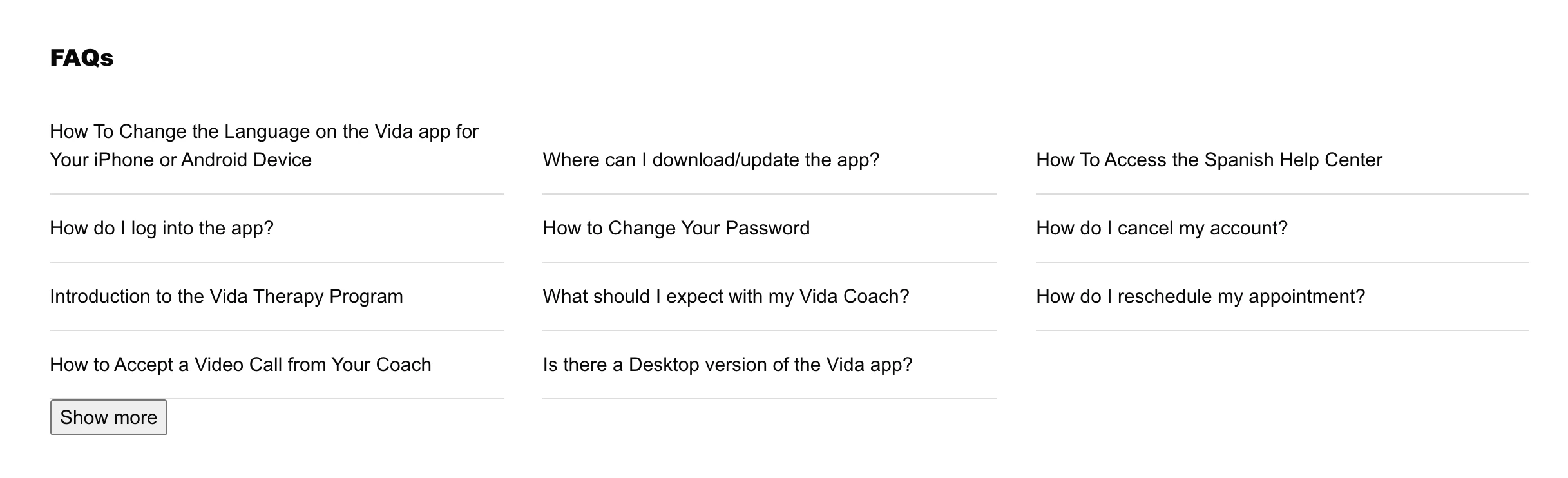
- November 2, 2021
It's working, I checked on your homepage:
Before clicking: Is there a Desktop version of the Vida app? this article hidden now.
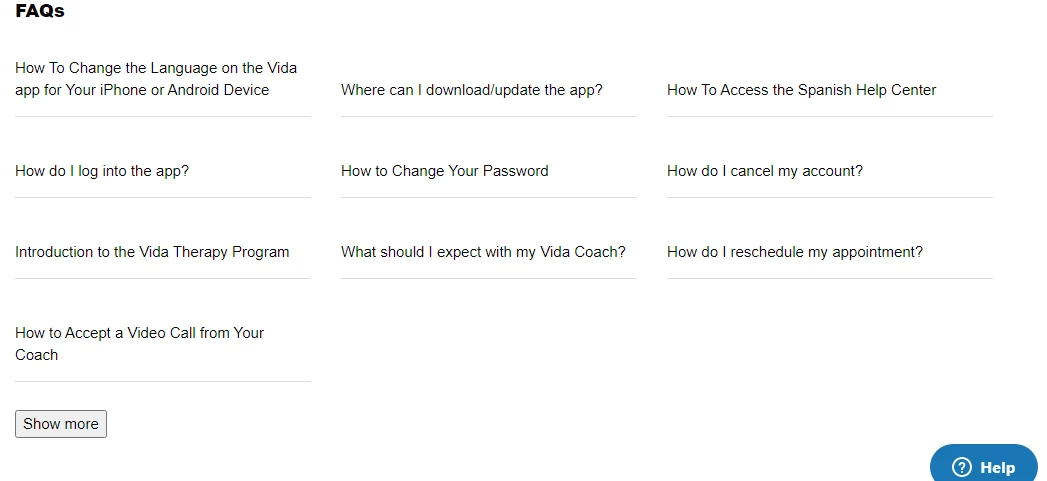
After Clicking: Showing now
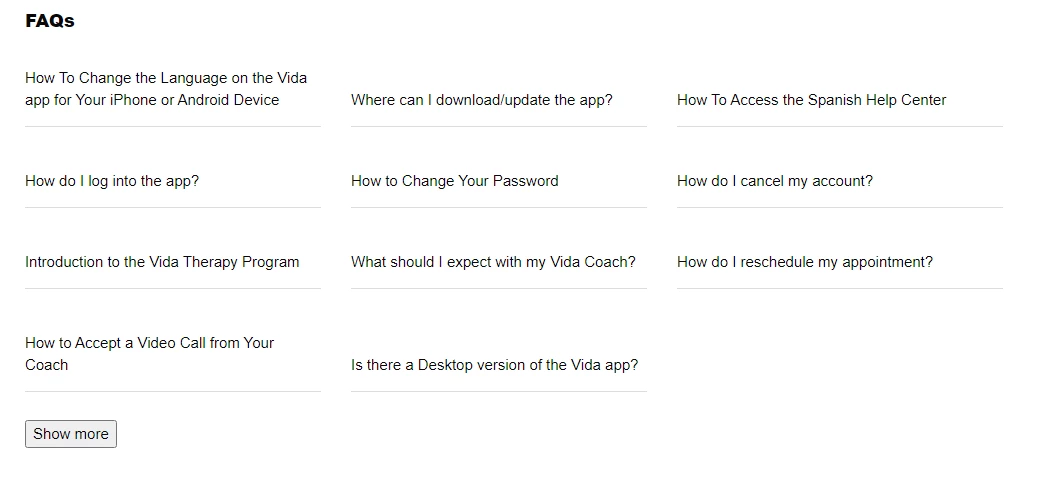
And button color, position, you can set it via CSS by yourself or send me the UI of button so I'll update the button style and share the code here.
Thanks
- Author
- November 2, 2021
@ifra ok and would it be possible to include a button that says "Shoe Less" once the "Show More" button is clicked?
- November 3, 2021
Yes, it's possible via JS.
Replace your button script code which I provided before with the new below:
function showAllItems(){
var _x = document.querySelector("#show_more");
document.querySelector("#show_more").innerHTML = 'Show more';

_x.addEventListener('click', function(e){
document.querySelectorAll('.article-list.promoted-articles > li').forEach(function(el){
el.classList.add('show_all_items');
   document.querySelector("#show_more").innerHTML = 'Shoe less';
})
})
}


showAllItems();
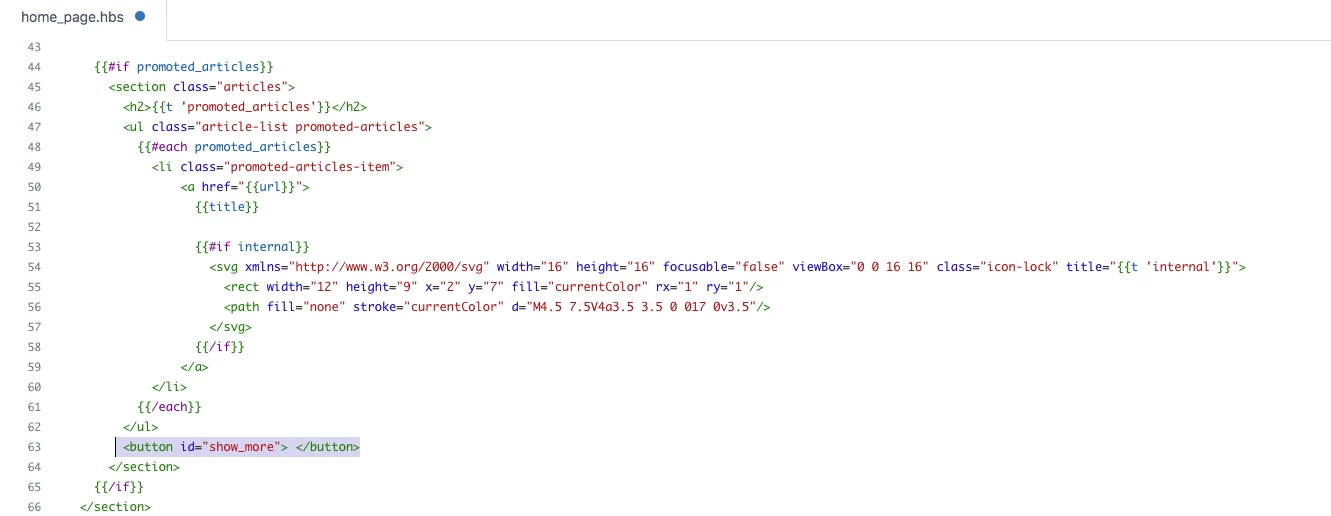
Now, go to your home_page.hbs file and remove the hard coded text from the button and your current button would be empty, see below:
<button id="show_more"> </button>
Screenshot for the same:
Thanks
Ifra Saqlain

- August 16, 2023
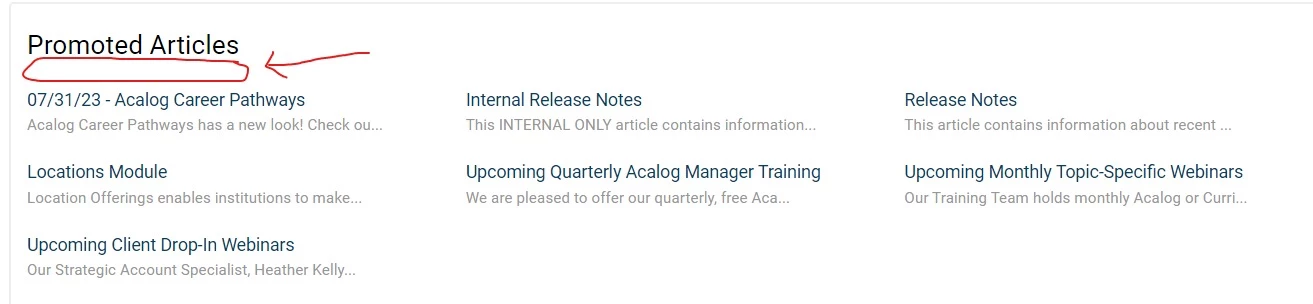
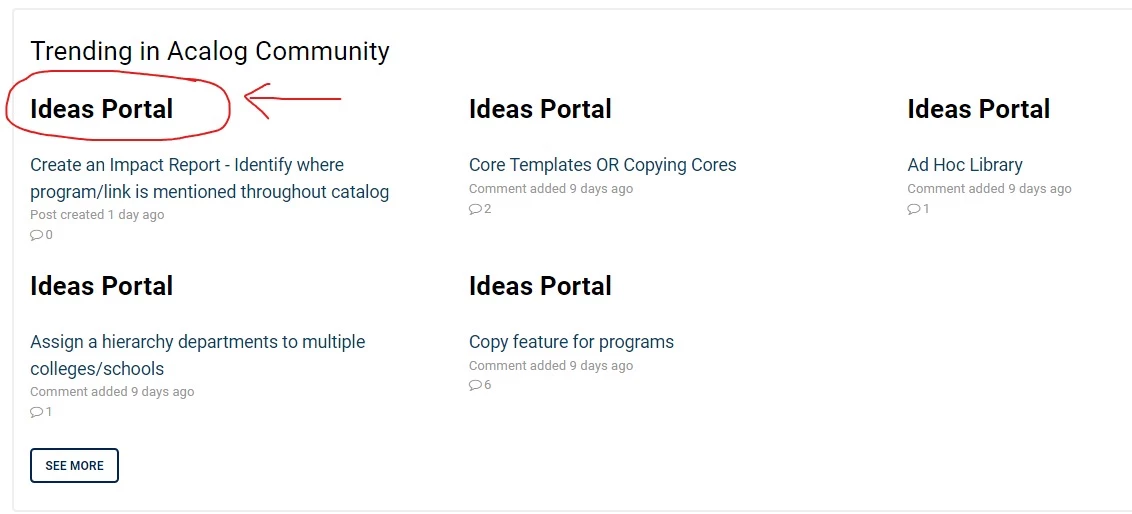
I was trying to have the section title appear above the linked article title. Similar to a section title that appears on a 'Trending in Community' post on the homepage.
- August 17, 2023
Hi Courtney Diaz,
Welcome to Cmmunity!
here is your solution:
i). Go to the home_page.hbs file. Make sure your Promoted article's code should have some more code which is checking the categories , sections and article and then your promoted article's code to be inside it as I shared below.
ii). Promoted articles code with section title.
 <h2>{{t 'promoted_articles'}}</h2>
{{#if categories}}
{{#each categories}}
{{#each sections}}
<section class="articles">
    <h3>
       {{name}}
    </h3>
    {{#if articles}}
    <ul class="article-list promoted-articles">
        {{#each articles}}
        {{#if promoted}}
        <li class="promoted-articles-item">
            <a href="{{url}}">
                {{title}}

                {{#if internal}}
                <svg xmlns="http://www.w3.org/2000/svg" width="16" height="16" focusable="false" viewBox="0 0 16 16"
                    class="icon-lock" title="{{t 'internal'}}">
                    <rect width="12" height="9" x="2" y="7" fill="currentColor" rx="1" ry="1" />
                    <path fill="none" stroke="currentColor" d="M4.5 7.5V4a3.5 3.5 0 017 0v3.5" />
                </svg>
                {{/if}}
            </a>
        </li>
        {{/if}}
        {{/each}}
    </ul>
    {{/if}}
</section>
{{/each}}
{{/each}}
{{/if}}
iii) Go to your script.js file and add this line of code.
$('.promoted-articles:not(:has(li))').parent(".articles").hide();
iv). Make sure your document_head.hbs file must have JQuery CDN.
<script src="https://ajax.googleapis.com/ajax/libs/jquery/3.6.4/jquery.min.js"></script>
Output:
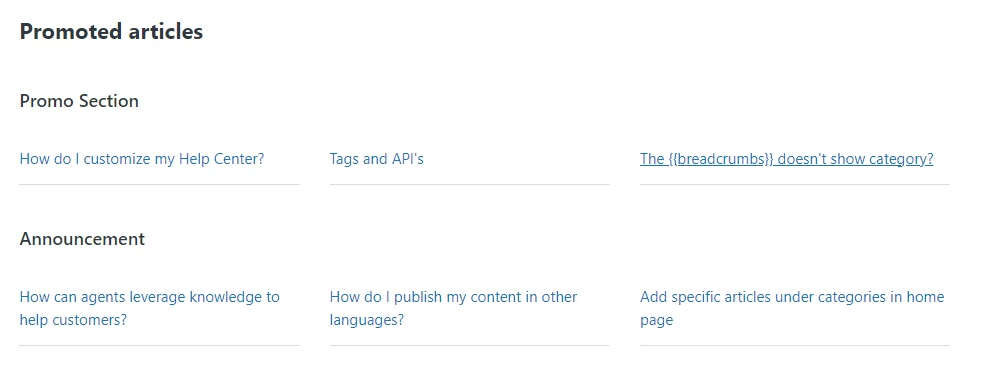
Try and if any confusion feel free to ask :)
Thanks
- August 17, 2023
@ifra Apologies for the additional questions, and I GREATLY appreciate the additional code. I am not a coder by any means, so would this code you provided need to replace the current code or would this just need to be added?
- August 17, 2023
@Courtney Diaz, Please don't apologies, it's a community forum where people communicate to each other for their queries and their issues...
This place is for you, please feel free to ask any question related to your Zendesk , we will always be there. We are just like your friends :)
Whenever I need help , I come to the community and ask to help. I'm just like you...
- August 17, 2023
Yes, that code need to be replaced otherwise you will have two sections of promoted articles :)
Please make sure about the classes or you can share your current code here so I'll check the class name and I'll provide the new code then you will only need to copy and paste to your home_page.hbs
- August 17, 2023
@ifra Thank you so much! Here is the current code string, I may have copied some extra, but here is what appears between the two areas on our home page.
{{#is settings.toggle_promoted_articles 'yes'}}
<section class="community-recent-activity">
<h3> Promoted Articles <h3>
<ul class="promoted-articles__list row">
{{#each promoted_articles}}
<li class="promoted-articles-item column column--xs-12 column--sm-6 column--md-4">
<a class="promoted-articles-item__title" href="{{url}}">{{title}}</a>
<p class="meta">{{excerpt body characters=50}}</p>
{{/each}}
</li>
</ul>
</section>
{{/is}}
{{#is settings.toggle_category_tree 'yes'}}
<div class="category-tree" id="category-tree">
{{#each categories}}
<section class="category-tree-item">
{{#if ../has_multiple_categories}}
<h2 class="category-tree-item__title">
<a class="category-tree-item__title-link" href="{{url}}">{{name}}</a>
</h2>
{{/if}}
<div class="category-tree-item__sections row clearfix">
{{#each sections}}
<section class="column column--sm-6 column--md-4 section">
<h3 class="section__title">
{{#if internal}}
<span class="fa fa-lock" title="{{t 'internal'}}"></span>
{{/if}}
<a class="section__title-link" href="{{url}}">{{name}}</a>
</h3>
{{#if articles}}
<ul class="article-list">
{{#each articles}}
<li class="article-list-item {{#if promoted}}article-list-item--is-promoted{{/if}}" >
{{#if promoted}}
<span class="fa fa-star" title="{{t 'promoted'}}"></span>
{{/if}}
<a class="article-list-item__link" href="{{url}}">{{title}}</a>
</li>
{{/each}}
</ul>
{{#if more_articles}}
<a href="{{url}}" class="btn btn--default see-all-articles">
{{t 'show_all_articles' count=article_count}}
</a>
{{/if}}
{{else}}
<p>
<i><a href="{{url}}">{{t 'empty'}}</a></i>
</p>
{{/if}}
</section>
{{else}}
<div class="column column--xs-12">
<p>
<i><a href="{{url}}">{{t 'empty'}}</a> </i>
</p>
</div>
{{/each}}
</div>
{{#if more_sections}}
<p>
<a class="btn btn--default" href="{{url}}">{{t 'see_all_sections'}}</a>
</p>
{{/if}}
</section>
{{/each}}
</div>
{{/is}}
</div>
{{/if}}
- August 18, 2023
Hi @courtney13
I believe you only need to replace this part:
{{#is settings.toggle_promoted_articles 'yes'}}<section class="community-recent-activity"><h3> Promoted Articles <h3><ul class="promoted-articles__list row">{{#each promoted_articles}}<li class="promoted-articles-item column column--xs-12 column--sm-6 column--md-4"><a class="promoted-articles-item__title" href="{{url}}">{{title}}</a><p class="meta">{{excerpt body characters=50}}</p>{{/each}}</li></ul></section>{{/is}}
To be safe, instead of replacing that just modify the first and last lines of the above to this.
{{!--#is settings.toggle_promoted_articles 'yes'}}
and
{{/is--}}
Then add the code from Ifra below it.
- August 18, 2023
Hi Courtney Diaz,
@Walter explain in the right way, you only need to replace only with promoted article code.
I have add update the code so now just copy the given code and paste there.
{{#is settings.toggle_promoted_articles 'yes'}}
      <section class="community-recent-activity">
        <h3> Promoted Articles </h3>

       {{#if categories}}
      {{#each categories}}
      {{#each sections}}
      <section class="articles">
    <h3>
       {{name}}
    </h3>
    {{#if articles}}
    <ul class="promoted-articles__list row">
        {{#each articles}}
        {{#if promoted}}
        <li class="promoted-articles-item column column--xs-12 column--sm-6 column--md-4">
            <a class="promoted-articles-item__title" href="{{url}}">
                {{title}}
            </a>
          <p class="meta">{{excerpt body characters=50}}</p>
        </li>
        {{/if}}
        {{/each}}
    </ul>
    {{/if}}
      </section>
      {{/each}}
      {{/each}}
      {{/if}}
      </section>
{{/is}}- August 18, 2023
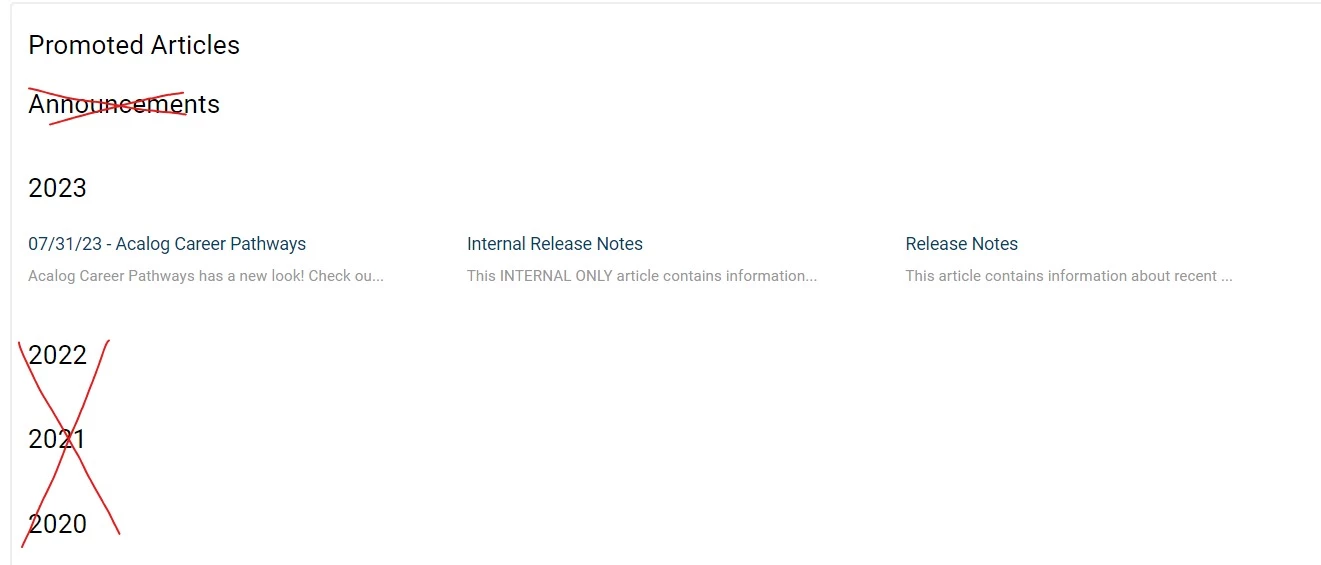
Hi @ifra, I greatly appreciate the code provided. However when I replaced the previous code with it (which is working, so again thank you!), it is now pulling in every section title, not just the titles for the articles that are being promoted. Which is creating a MASSIVE list on he homepage.
Any way to limit it to only the titles that are associated to a promoted article? Thanks
- August 18, 2023
Hi Courtney Diaz, add that script code which I shared above:
script.js file--
$('.promoted-articles__list:not(:has(li))').parent(".articles").hide();
JQuery CDN need to be added to document_head.hbs file.
<script src="https://ajax.googleapis.com/ajax/libs/jquery/3.6.4/jquery.min.js"></script>
- August 18, 2023
Hi @ifra, I did add the script you provided, but it is still pulling in every section title, not just the titles for the promoted articles.
- August 18, 2023
Please share your help center public URL here so I can see the issue. After solving the issue you can delete from here.
- August 18, 2023
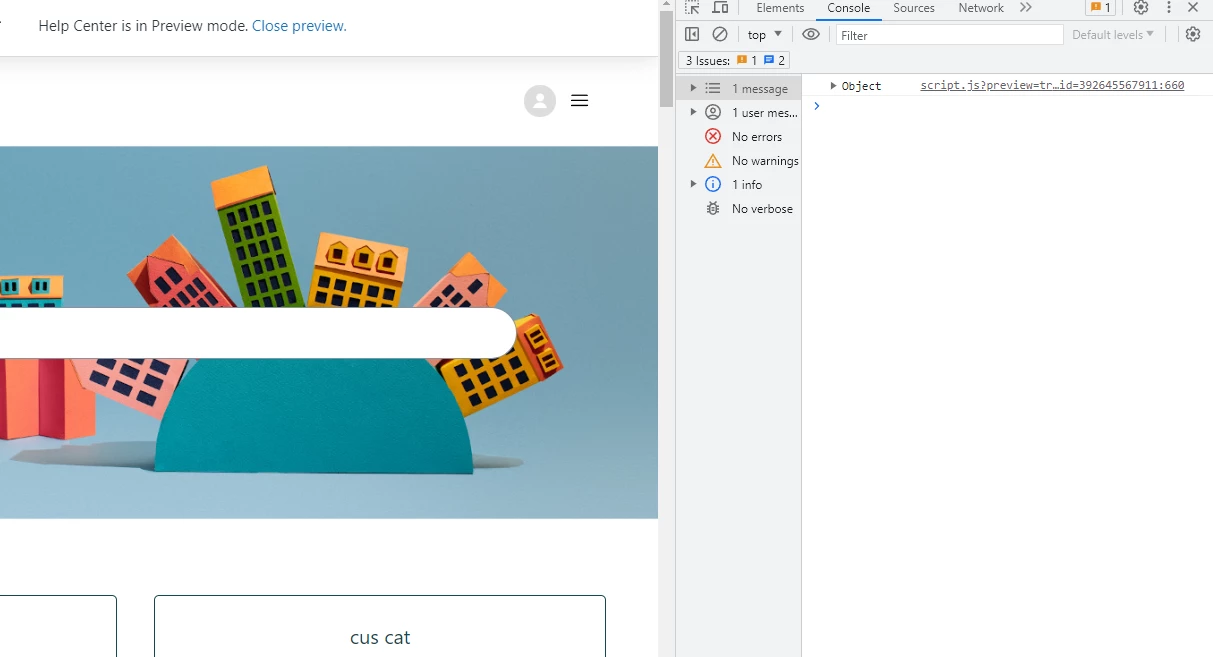
@ifra unfortunately, our sites are not public. I would need to have you registered, and it may kick you out as these are sites that are for our current client base, and if your email domain doesn't authenticate against a registered domain, it won't let you in. I greatly appreciate all of your help thus far.
Login to the community
No account yet? Create an account
Enter your E-mail address. We'll send you an e-mail with instructions to reset your password.
Scanning file for viruses.
Sorry, we're still checking this file's contents to make sure it's safe to download. Please try again in a few minutes.
OKThis file cannot be downloaded
Sorry, our virus scanner detected that this file isn't safe to download.
OK