How do I make the wholw nav bar at the top one colour | Community
Skip to main content

How do I make the wholw nav bar at the top one colour

  • October 12, 2022
  • 14 replies
  • 0 views

@ifra

Hello,

Could you assist me please with getting the whole nav bar at the top one color? When I change the header color in CSS it only changes the inside part. What class in CSS do I need to update to make the outside color change too in the nav bar? I would like the background color to be different as this is linked to the header from the color section.

Thank you.

Kind Regards,

Anton

14 replies

Ifra
  • October 12, 2022

Hi Anton Van der meyden :),

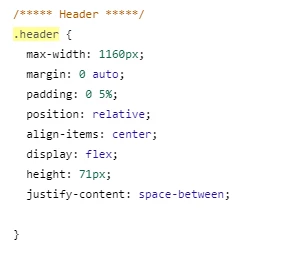
pick the main wrapper class of header, see how I did:


Here, header class is parent class so CSS would be :

.header  {background-color: black }


If you have custom theme then your header parent class would be different (or may be):

.header-wrapper {background-color: black }

OR

.header-outer {background-color: black }


If you share the URL of HC then I can share exact code.

If any confusion feel free to ask.


Team


  • Author
  • October 13, 2022

@ifra

Hello Ifra,

Thank you for the reply.

It is not live yet to share the URL but I will play with what was suggested above to see if I can get it to work.

Thank you.

Kind Regards,

Anton

Laura55
  • May 10, 2023

Hello,

Here is my workaround for this, as I use the standard theme:

1. The header color, as per the pic above, shows only the boxed container. That means that the left and right sides were some other container. 

2. Turns out that's actually the body of the page. So if you had ".body { background-color: #000000" in the CSS, you will have a fully black page. Then turning .container white overrides .header even with !important.

3. Instead, I added a gradient from black to white at 180 linear degrees, since the transition is hidden by the hero image anyway. 

4. Here's what you can do!

- copy the following code and edit the colors if necessary. Mine was for a black header and white body.

background: rgb(0,0,0);
background: linear-gradient(180deg, rgba(0,0,0,1) 0%, rgba(0,0,0,1) 18%, rgba(255,255,255,1) 18%);

- create a .body class in styles.css and paste the code there

Tadaaaa! Hope this helps. 


  • Author
  • June 21, 2023

@laura55

Thank you for your reply.

@ifra

Hello

I tried what you shared but it only change inside the wrapper and not the outside.

Here is the URL to the HC. Can you please assist on how to change the whole header to blue for example?

https://hellocasino.zendesk.com/hc/en-us

Please share the script to use.

Thank you.

Anton


Ifra
  • June 21, 2023

Anton Van der meyden, 

Use this code:

.header,
.user-nav[aria-expanded="true"] {
background-color: blue;
}


Output:

Desktop -


Mobile -


  • Author
  • June 21, 2023

@ifra

Thank you for the quick reply.

It still only wraps on the inside.

In CSS under .header I have this at the moment when I add your code or back ground color here its only doing the inside wrapper.

or if i add here still get the same

Thank you.


Kind Regards,

Anton


  • Author
  • June 21, 2023

@ifra

I got it to work but there is a single white line between the header and the body which is linked to the background color.


Can you please assist on how I change this to red?

Thank you.

Anton


Ifra
  • June 21, 2023

Hey Anton,

Add this CSS to style.css file at the bottom area and then let me know if not works for you:

main {
display: flex !important;
flex-direction: column;
}

  • Author
  • June 21, 2023

@ifra

Thank you so much for your help.

This worked.

Have a nice day.

Kind Regards,

Anton


  • Author
  • June 22, 2023

@ifra

Hello,

Can you please assist me one more time?

How do I change the placeholder inside the search box to white and when someone types in the box it is white too?


Thank you.

Kind Regards,

Anton


Ifra
  • June 22, 2023

You can use this code:

.search input[type="search"]::placeholder,
.search input[type="search"]:focus,
.search input[type="search"]:active,
.search input[type="search"]{
color:#FFFFFF
}

  • Author
  • June 22, 2023

@ifra

Thank you for this it has changed the placeholder text to while.

When some types in the search box can this also be white?

Kind Regards,

Anton


Ifra
  • June 22, 2023

Anton code, I shared above, will work for the same I have tested it.


  • Author
  • June 23, 2023

@ifra

Thank you for all your help.

Kind Regards,

Anton