How can I change the description text color of the ticket field? | Community
Skip to main content

How can I change the description text color of the ticket field?

  • November 18, 2019
  • 6 replies
  • 0 views

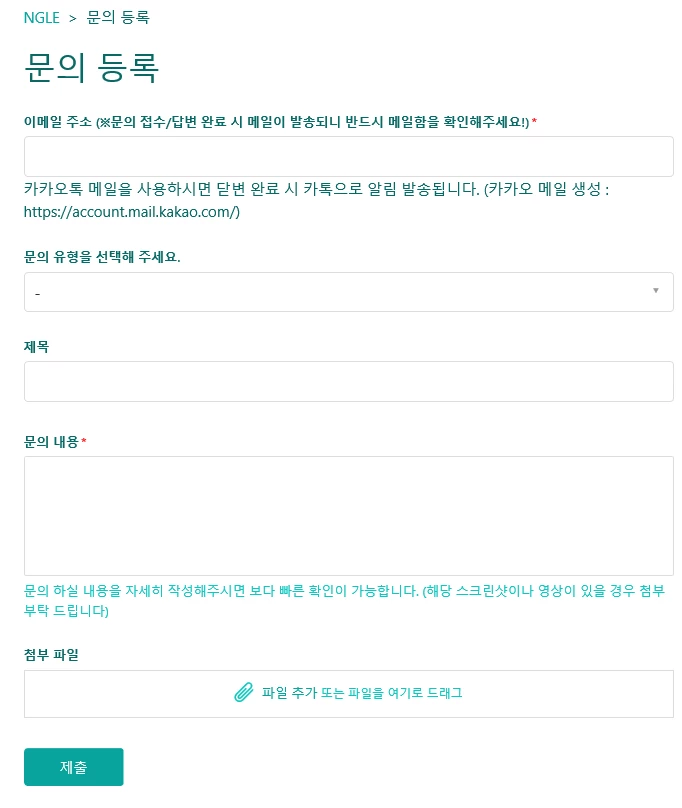
https://ngletest01.zendesk.com/hc/ko/requests/new

This is Help center in practice.

The attached file has a text color of #32CEC7.

How can I change the color of text since I set this and that?
6 replies

Trapta
  • November 18, 2019

Hi @병훈 오,

Try adding the below code at the bottom of your style.css file:

p#request_description_hint {color: #888;}

  • Author
  • November 18, 2019

Get solved !


But the other side of Ticketfield has a bright overall color.

Can't you lighten these colors?


Brett13
  • Community Manager
  • December 6, 2019

Hey 병훈 오,

Any chance you could provide a screenshot of the bright overall color you're referring to?

That may help determine if there's a fix or not.

Thanks!


  • October 6, 2021

how to make the below font in red? p#request_Training Group Owner_hint {color: #FF0000;}  - NOT WORKING


Cheeny
  • October 10, 2021

Hi Anita,

This is part of the Advanced Customization in guide where you need to edit your theme code. In Guide, click the Customize design icon () in the sidebar > On the theme you want to edit > click Customize to open it > Click Edit code.

Please note that Zendesk does not support or guarantee the code. Zendesk also can't provide support for third-party technologies such as JavaScript, jQuery, or CSS. Please post any issues you have in the comments section or try searching for a solution online.


  • November 4, 2025

I know that this issue has long past for many, but I have been searching for a solution to this for awhile now, and nothing I could find was working. 

We are using an edited Copenhagen theme as a base and editing the CSS for this. 


Note: This will apply to all forms for the brand/help desk you are customizing and are for all hints/descriptors in their specific categories - This is NOT for changing the color of a single hint/descriptor. 


What has worked for me is appending the following code to the end of the style.css page (note this color code is for red, you can change the color code to whatever you need). 

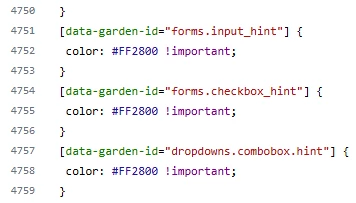
[data-garden-id="forms.input_hint"] {
 color: #FF2800 !important;
}

To replicate this, if it does not work for you for any reason you may need to find the correct “ID” for the code to work with. 
- Navigate to your form in the help desk by going to submit a ticket.
- Right click on the “hint” text/description of the form field and click “inspect” (do not highlight text, just right click).
- This will bring up DevTools in your browser and highlight the relevant area of information.
- Here you look for the relevant ID to plug into the code above. 

Attempting to use the “class” instead did not work. 


You may ALSO need to add additional code for different types of form field hints such as:
data-garden-id="forms.checkbox_hint"
data-garden-id="dropdowns.combobox.hint"

I am unsure how many different IDs there are, but during testing the three of these seemed to alter all of the text I was trying to change the color of. 

If you use all three, your code should look something like this: 


I am not sure why this is not available for a quick customization (like the normal font color or the brand font color are), but I hope that this can help someone else who has also been pulling their hair out over this! :)