Hiding a ticket form on the 'submit a request' page | Community
Skip to main content

Hiding a ticket form on the 'submit a request' page

  • August 12, 2021
  • 102 replies
  • 0 views

Show first post

102 replies

  • June 20, 2023

Hello.

I successfully used these instructions to remove my form from the form-selection-list.

https://support.zendesk.com/hc/en-us/community/posts/4409217680410/comments/4409692632474

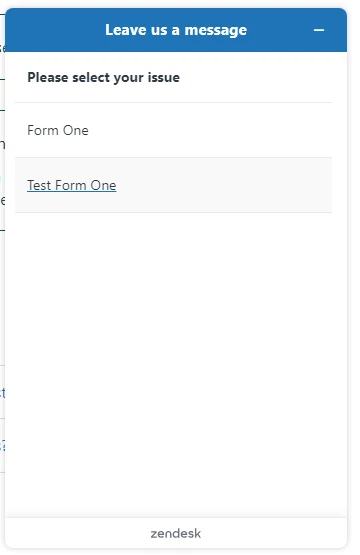
However the form still appears in the Web Widget as a selectable form.  How can I remove it from the Web Widget, also?


Ifra
  • June 21, 2023

Hi Gavin・ギャビン,


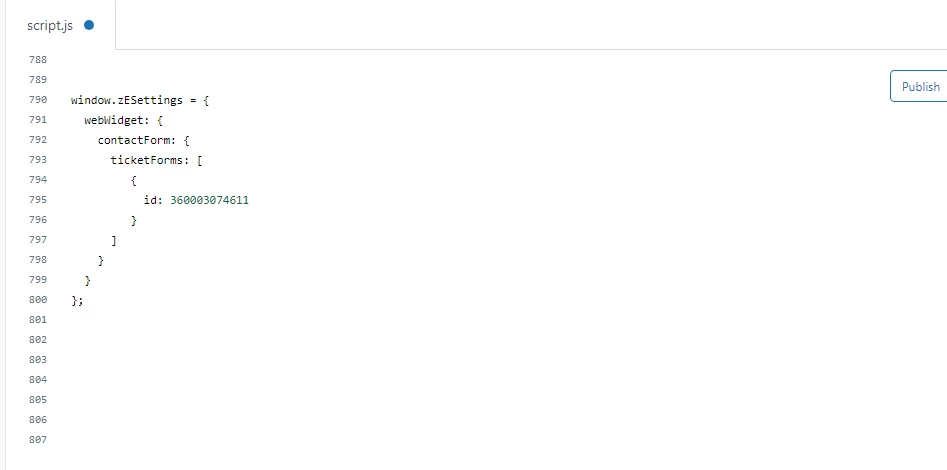
You can do like this, I have 6 forms but I want to show two forms in my web widget so I added the IDs only for two forms:

window.zESettings = {
  webWidget: {
    contactForm: {
      ticketForms: [
         { id: 360003074611},
         { id: 360001547211},
      ]
    }
  }
};


Output:


{ id: 360003074611},
{ id: 360001547211},

These both are my form's Ids which I wanna show.


  • June 21, 2023

Thanks @ifra

Does this go into the script.js file?

What if we want to do the inverse?  We have about a dozen forms, and only want to hide one or two of them.  Is there a way to say "hide these forms" instead of "show these forms"?


Ifra
  • June 21, 2023

Gavin・ギャビン, I understand your concern  but I took the reference from here:

https://developer.zendesk.com/api-reference/widget/settings/


and I haven't other idea instead of this so I shared this with you.


Yes, this code is added to script.js file.


  • June 29, 2023

My case isn't exactly what's being described here, but I think you all may be able to help me.

I need to hide a ticket form from the New Request page's source. The solutions shared here are excellent at hiding ticket forms from the New Request form dropdown via Javascript, but Javascript loads after the fact - which means all of those hidden forms are still plainly visible via the page source, even if they're not in the dropdown.

My company tests beta software so I need to hide those hidden forms from every possible vector (and a page's source is always just a click away), but I can't find a way to remove form links/IDs from the page source. I've determined this all comes back to the "{{request_form wysiwyg=true}}" helper, but any attempts to remove it or recreate the New Request page without it results in all ticket forms breaking entirely. 

Anybody know how I can plug this leaky helper?


Hannah12
  • August 15, 2023

@ifra Saqlain, is there a way to hide a form tile in the Guide? I tried using the coding above and was not able to remove this from our support portal:


https://rpmtest.zendesk.com/hc/en-us


Ifra
  • August 16, 2023

Hi Hannah Lucid :)

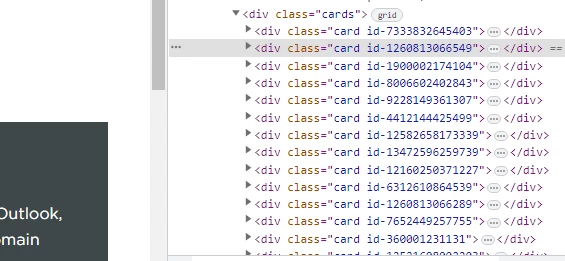
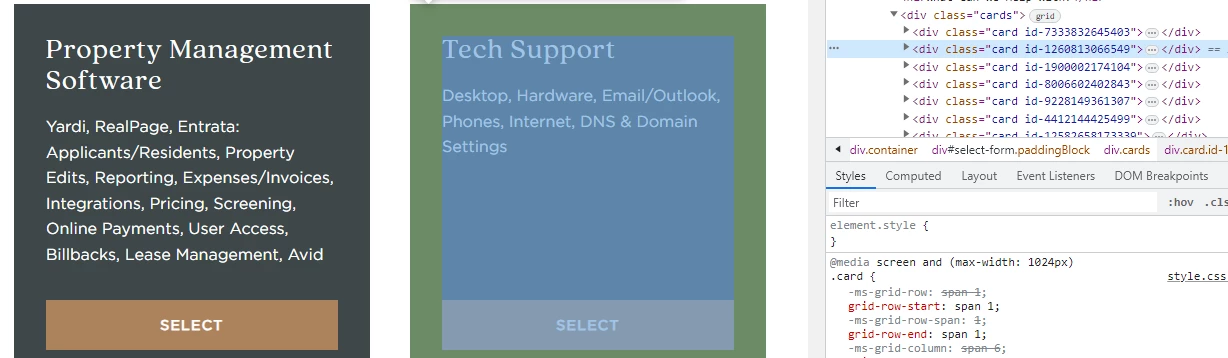
Your form tiles have a unique id in the code:


So, pick a class-name which tile you wanna hide as I'm selecting second form:


Copy the class name of second form tile:


seconf form-tile class-name : id-1260813066549


Now, go to the source files and add CSS code to your style.css file at the bottom, your form title will be hide

.id-1260813066549 { 
display:none
}


Any form tile you wanna hide, just pick the class-name and hide via CSS as I did above.


Or, If you wanna hide your tile from specific users so you can do like this:

Go to your script.js file and add the given code at the bottom area.

if(HelpCenter.user.role == 'anonymous') {
document.querySelector(".id-7333832645403, .id-9228149361307, .id-1260813066549").style.display = "none";
}


OR


if(HelpCenter.user.role == 'anonymous') {
document.querySelector(".id-7333832645403").style.display = "none";
document.querySelector(".id-9228149361307").style.display = "none";
document.querySelector(".id-1260813066549").style.display = "none";
}


If any confusion feel free to ask :)

Thanks


Hannah12
  • August 16, 2023

@ifra that worked. You are AWESOME.


  • August 24, 2023

@ifra

I have been able to hide a ticket from from the drop-down selector using the following code...

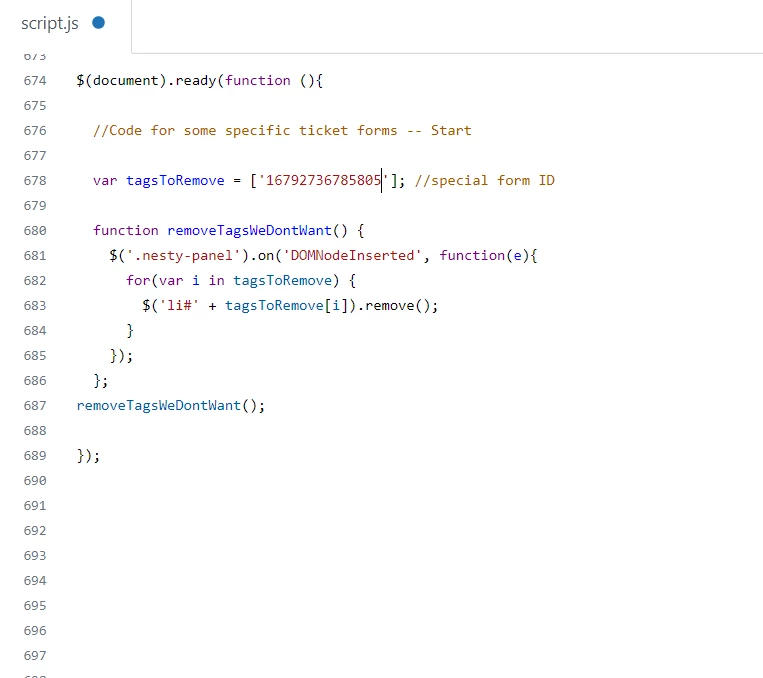
$(document).ready(function (){

  //Code for some specific ticket forms -- Start
  
  var tagsToRemove = ['16792736785805']; //special form ID
  
  function removeTagsWeDontWant() {
    $('.nesty-panel').on('DOMNodeInserted', function(e){
      for(var i in tagsToRemove) {
        $('li#' + tagsToRemove[i]).remove();
      }
    });
  };
removeTagsWeDontWant();

HOWEVER - this is now generating a "deprecated" error in the Chrome browser console...

jquery.min.js:2 [Violation] Listener added for a synchronous 'DOMNodeInserted' DOM Mutation Event.
This event type is deprecated (https://w3c.github.io/uievents/#legacy-event-types) and work is underway to remove it from this browser.
Usage of this event listener will cause performance issues today, and represents a risk of future incompatibility.
Consider using MutationObserver instead.

I see the recommendation is to use MutationObserver instead, however I'm not skilled enough to implement this on my own.  Do you have updated recommended code to hide a form?


Ifra
  • August 25, 2023

Hi Gavin,

I have read your query.

Closing brackets are missing at the end of code, please add the  brackets and then still you get the same issue please let me know.

$(document).ready(function (){

  //Code for some specific ticket forms -- Start
  
var tagsToRemove = ['16792736785805']; //special form ID
  
  function removeTagsWeDontWant() {
    $('.nesty-panel').on('DOMNodeInserted', function(e){
      for(var i in tagsToRemove) {
        $('li#' + tagsToRemove[i]).remove();
      }
    });
  };
removeTagsWeDontWant();
});


Thanks


Ifra
  • February 2, 2024

Hi Ester,

use the given code:

$(document).ready(function (){
  var currentLanguage = $('html').attr('lang').toLowerCase();
if(currentLanguage === "es-es") {
  //Code for some specific ticket forms -- Start
  
var tagsToRemove = ['000000000000000']; //special form ID
  
  function removeTagsWeDontWant() {
    $('.nesty-panel').on('DOMNodeInserted', function(e){
      for(var i in tagsToRemove) {
        $('li#' + tagsToRemove[i]).remove();
      }
    });
  };
  

removeTagsWeDontWant();
   
 }
});


Note: 000000000000000 remove this and add your form ID which you wanna hide.


If any issues feel free to ask :)

Thanks


  • August 2, 2024

Hi Ifra,

I've used your original code for some time now and it worked great. For some reason, today it stopped working in Chrome. Not sure why this is happening as the only changes we made were to add tags as we go, and haven't done that in recent memory. Do you have any ideas? Thanks
Code using for reference:

$(document).ready(function() 
{
 var tagsToRemove = ['XXXXXX','YYYYYY'];
 removeTagsWeDontWant();
 
 function removeTagsWeDontWant() 
 {
   $('.nesty-panel').on('DOMNodeInserted', function(e)
   {
     for(var i in tagsToRemove) 
     {
       $('li#' + tagsToRemove[i]).remove();
     }
   });
 }


Ifra
  • August 2, 2024

Hi Eric,


Give me some time, I'll get back to you soon.


Thanks


  • August 3, 2024

Hello, I learned that Chrome released an update on 7/23/24, where mutation event 'DomNodeInserted'  is no longer supported by Chrome. This has caused an issue with this set up in our instance and now a client can see a form that was originally hidden from them. 


Is there an updated script we should use in this case? 

Reference Link:  https://developer.chrome.com/blog/mutation-events-deprecation


Here is the current script we have and was working originally:


<script>
 // Generic function to remove form option from form selection dropdown
 function removeFormOption(formID) {
   $('#request_issue_type_select option[value="' + formID + '"]').remove();
   $('.nesty-panel').on('DOMNodeInserted', function(e) {
       $(this).children('ul').children().remove('#' + formID);
   });
 }


  • August 5, 2024

Hello Eric, same for me. Worked fine until now, but now it's not working anymore. That's my code : 


I personally use a theme from Lotus, I'll also message them just in case.

var tagsToRemove = ['XXXX'];

function removeTagsWeDontWant() {
 $('.nesty-panel').on('DOMNodeInserted', function(e){
   for(var i in tagsToRemove) {
     $('li#' + tagsToRemove[i]).remove();
   }
 });
};
removeTagsWeDontWant();

Thank you.


  • August 6, 2024

We got an updated script that seems to work. Not sure how, and there might be a more elegant way of writing it, but it seems to work. Hope this helps:

  var tagsToRemove = ['thing_1','thing_2','thing_3'];
 removeTagsWeDontWant();
 
 function removeTagsWeDontWant()
 {
   const removeNodes = (node) => {
     for (let i = 0; i < node.childNodes.length; i++) {
       const wasRemoved = removeNodes(node.childNodes[i]);
       if (wasRemoved) {
         i--;
       }
     }

     if (node.nodeType === 1 && tagsToRemove.includes(node.getAttribute("id"))) {
       node.parentNode.removeChild(node);
       return true;
     }
     return false;
   };

   const observer = new MutationObserver(mutationList =>
     mutationList.filter(m => m.type === 'childList').forEach(m => {
       m.addedNodes.forEach(removeNodes); 
     }));  
   document.querySelectorAll('.nesty-panel').forEach(panel => observer.observe(panel,{childList: true, subtree: true}));
 }


  • August 7, 2024

So once we hide the other forms and then what if we want to access the hide form for our internal access on admin side then how can we access them. 


  • August 7, 2024

Eric, you're the man! Thank you, it works for me too 😊

(It just lacks the last } , it's just a copy-paste issue I believe! For the others that might be impacted)


  • August 13, 2024

Hello,


Does anyone know the code from removing one of the forms from the front page instead pleaase? We still need to rest to show.  It's just that we are giving a direct link to one of the forms and don't want others using it.


Hannah12
  • August 13, 2024

@katrina15  - you can use this code. Replace 12345 with your form id that you want to hide. This will go at the bottom of the Style.css:

.id-12345 { 
 display:none
}


Jahn11
  • August 14, 2024

Thank you @eric13  - works for me as well and I didn't know about the chrome update hence some fields are reflecting to the end users. 

Thanks a lot for this! 


Jihoon11
  • August 14, 2024

To. Eric Norris


The code you wrote seems to be a solution for "Hide Specific Dropdown Values".

https://support.zendesk.com/hc/en-us/community/posts/6101512122650-Hide-Specific-Dropdown-Values


Your code works really beautifully for the above issue. However, when I use :: in the options field of the ticket to give it a hierarchy, the hidden options don't hide the first level.

Do you know anything about this issue?


Jihoon11
  • August 14, 2024

to. Eric Norris

I found a way, even though I'm clumsy.
I changed the IF statement in your code like below. Then I was able to remove the ticket field name .

Thank you~!

if (node.nodeType === 1 && tagsToRemove.includes(node.getAttribute("id")) || node.innerHTML === "option value") {

  • August 14, 2024

@hannah12 Thanks Hannah I did try this and unfortunately it's still showing on the front page.


Roee11
  • April 16, 2025

Hey There

When I am using the js it indeed removes the unwated form, how ever it keeps the drop down and I don't want a drop down.

I just want the form to be opened directly on my default form.

How am I doing it?