Hide and Show Div Elements | Community
Skip to main content

Hide and Show Div Elements

  • March 21, 2022
  • 26 replies
  • 0 views

Hi,

I have a very urgent query and any help will be greatly appreciated. It is regarding formatting the homepage according to the user's organization.

We have built a tiled layout homepage using div classes.

Tile 1 - Service Requests, Tile 2- Report an issue, Tile  3 - A cloud-based platform for our end users (both internal and external.

I want to know how can I hide or show certain tiles based on user type/org? Please help.

Many thanks in advance. 


26 replies

Ifra
  • March 22, 2022

Hey Johnny J  :)

Can you share the screenshot of your query?

Thanks


  • Author
  • March 22, 2022

Hi Irfa,

Thanks for replying. 

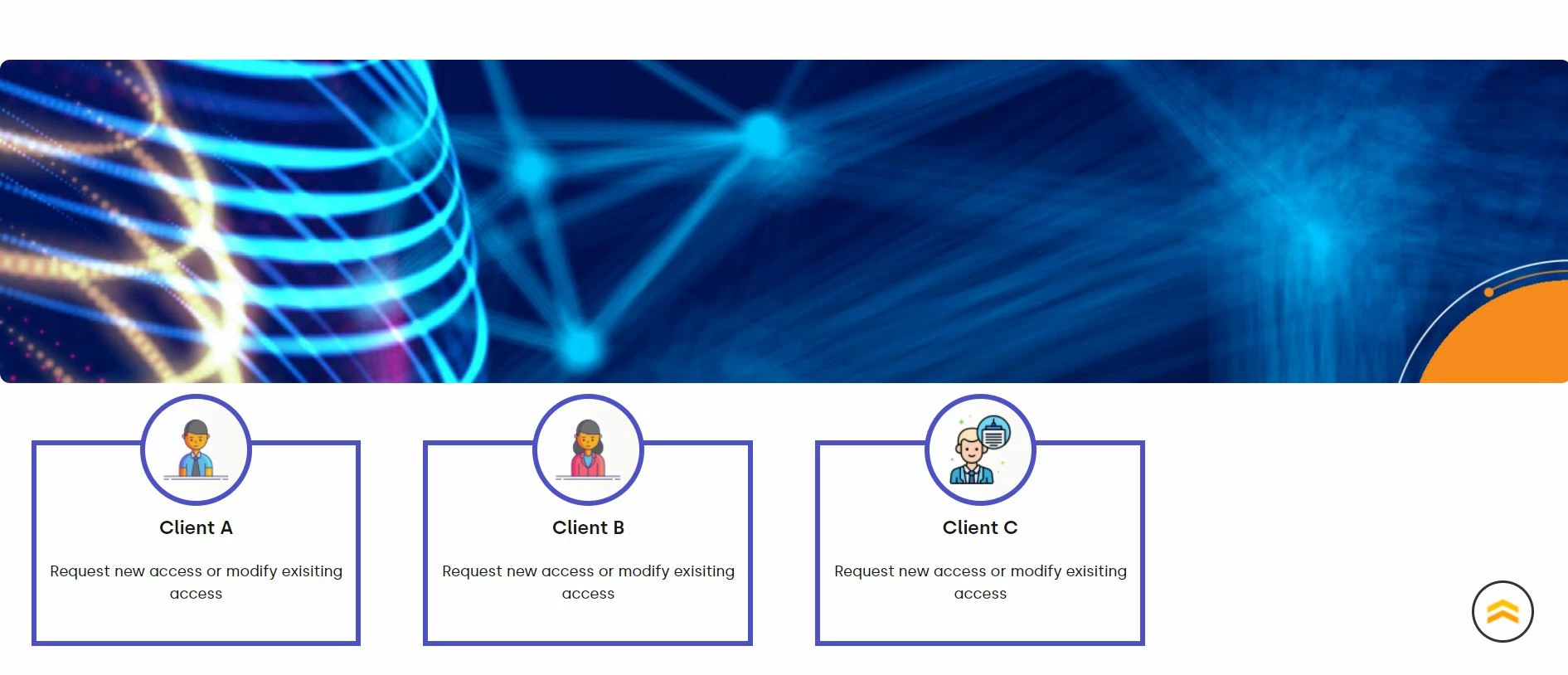
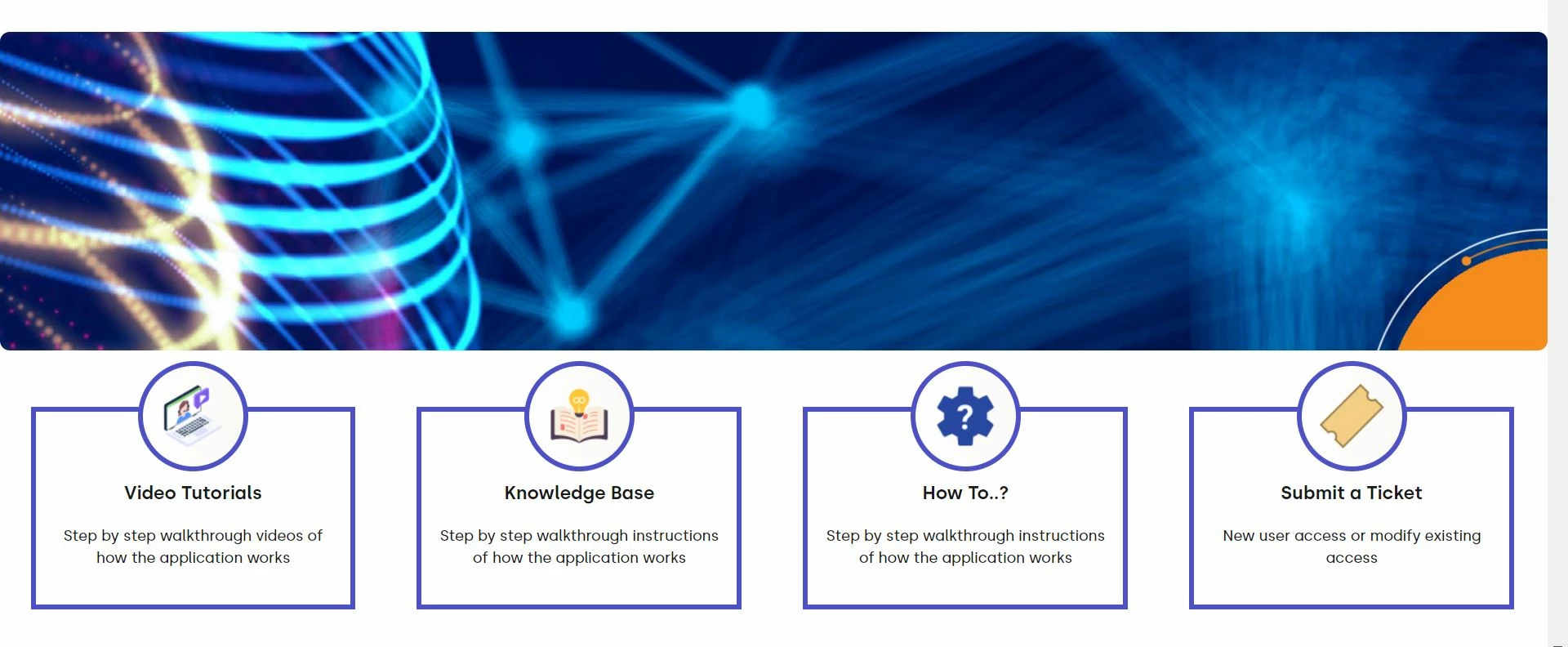
Attaching screenshots of the "homepage tiles" and "submit a ticket" tile.

Under "submit a ticket" tile, we have created sub tiles - Client A, Client B & Client C. We want Client A to see only Client A tile, likewise for Client B & C. 

How do we achieve this? Here is the test help center URL: Here is the test help center's URL for your reference: https://ocpsupport1.zendesk.com/hc/en-us/p/ocp_requests I hope this would help. 

Please let me know if you need more details.


Many thanks,


Ifra
  • March 22, 2022

I'm at the office. After some hours, I'll get back to you.


  • Author
  • March 22, 2022

@ifra Sure, thanks


  • Author
  • March 23, 2022

@ifra hey there, hope you had a chance to look at this?


Ifra
  • March 23, 2022

Hey Johnny,

I know It's too late,  I was trying to solve your query, my sandbox isn't setup as yours but I have found something for you, you can try this. You will need to modify the below code to hide /show the divs, you can check the organization with the JS code:

https://support.zendesk.com/hc/en-us/articles/4408886229146-How-can-I-hide-ticket-forms-based-on-a-user-s-organization-


In that article, you will see the code which you can modify.

For the Submit a ticket tile:- Check the tile's anchor tag href's value with if condition.

// For Tile A

var tileA = $( "a[href*='#Dash-Services']");
$(tileA).hide();

if (HelpCenter.user.organizations.name === "ZENDESK"){
$(tileA).show();
}


// For Tile B

var tileB = $( "a[href*='#FIDO-Services']");
$(tileB).hide();


if (HelpCenter.user.organizations.name === "MYORG"){
$(tileB).show();
}


// For Tile C

var tilec = $( "a[href*='#OCP-Services']");
$(tilec).hide();

if (HelpCenter.user.organizations.name === "OCP"){
$(tilec).show();
}


Use the above code on script.js file.

Hope it would be helpful for you :)

Thanks

Team Diziana


  • Author
  • March 23, 2022

@ifra You are more than awesome:):)!! Thank you very much, this is very helpful. It worked just the way we wanted. I really appreciate it, thank you again:)

Sorry, just another quick question - can we create a duplication form field for end-user? something similar to this one - https://codepen.io/scottobooj/pen/QNPvpX


Ifra
  • March 24, 2022

That's amazing!


I think you can create and show/hide for different user's roles.

Read it: https://support.zendesk.com/hc/en-us/articles/4408834799770-Creating-conditional-ticket-fields


Okay, create two duplicate fields and show/hide according to the user's role.

$("FORM FIELD 1").hide();
if (HelpCenter.user.role=="end_user"){
$("FORM FIELD 1").show();
}


$("FORM FIELD 2").hide();
if (HelpCenter.user.role=="agent"){
$("FORM FIELD 2").show();
}


  • Author
  • March 24, 2022

@ifra Thank you for your quick response. But, sorry, what I meant was creating a dummy field of an existing field. For example, the end-user inputs some information into the description field, that information must be duplicated in another text field. Is that possible?

Just the same one as here in this, https://codepen.io/scottobooj/pen/QNPvpX, so whatever text is inputted in the original field (maxprice text field), is also captured in the dummy field (maxprice dummy text field). I hope I am clear enough now:), let me know if you have questions. Thank you for your help


Ifra
  • March 25, 2022

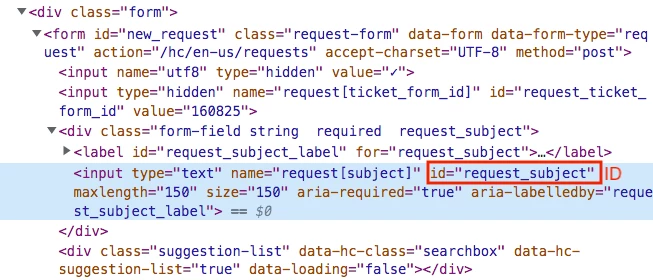
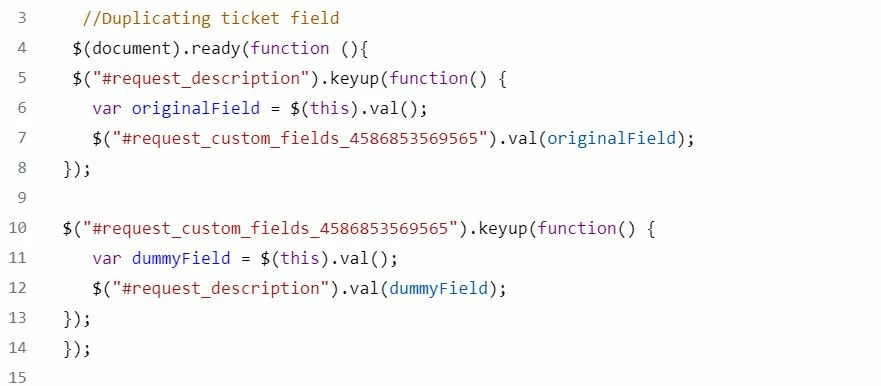
@Johnny J,   you can do this.  Create an input field in your support center, and you need to enter the ID of that field in the script code as I did.

See how I did, I replaced IDs with my field's ID and it's working.

$(document).ready(function (){
 $("#request_subject").keyup(function() {
 var originalField = $(this).val();
 $("#request_custom_fields_0000").val(originalField);  
});

$("#request_custom_fields_0000").keyup(function() {
 var dummyField = $(this).val();
   $("#request_subject").val(dummyField);  
});
});


Copy your field ID (Red Bordered) from inspect tool


#request_subject


#request_custom_fields_0000


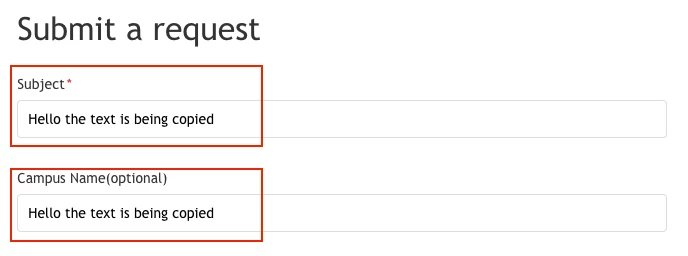
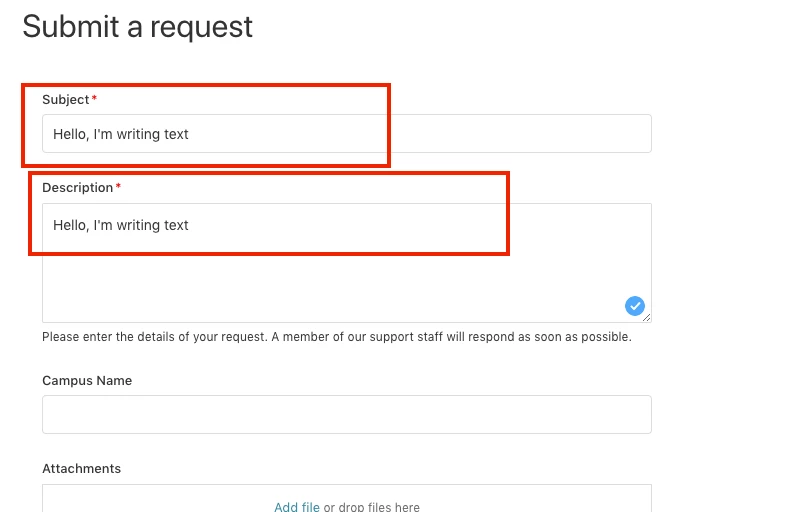
Output:


If any confusion do let me know :)

Thanks


  • Author
  • March 25, 2022

@ifra Thank you very much, this works well when we duplicate the subject field, but unfortunately, it doesn't work when I do the same with the description field, not sure why?


Can you please help?


Ifra
  • March 26, 2022

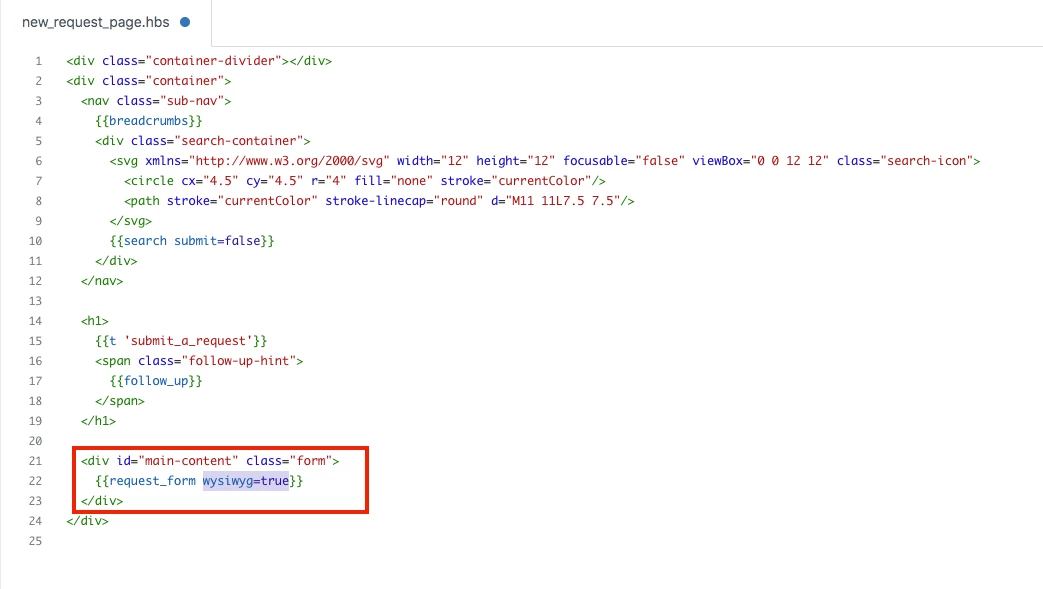
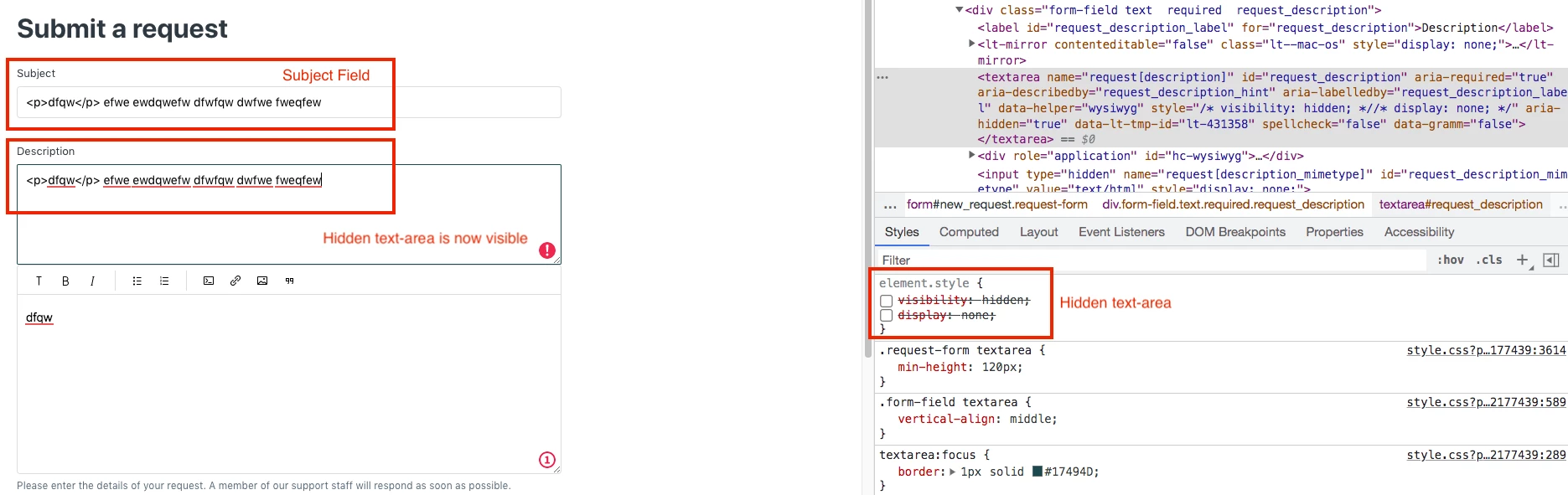
@Johnny J, it's because of the WYSIWYG editor in API V2 templating where your text area is being hidden and HC-WYSIWYG editor is being shown that's why it's happening. 

So the solution is from my side, currently, your code is with WYSIWYG:


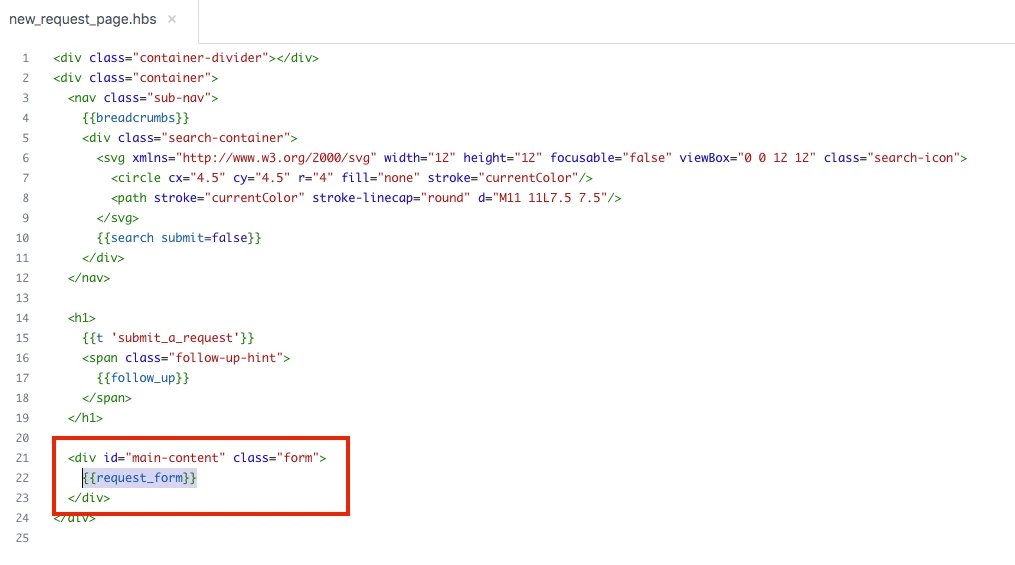
I remove this from {{request_form}}:


Now, the code is working as you want:


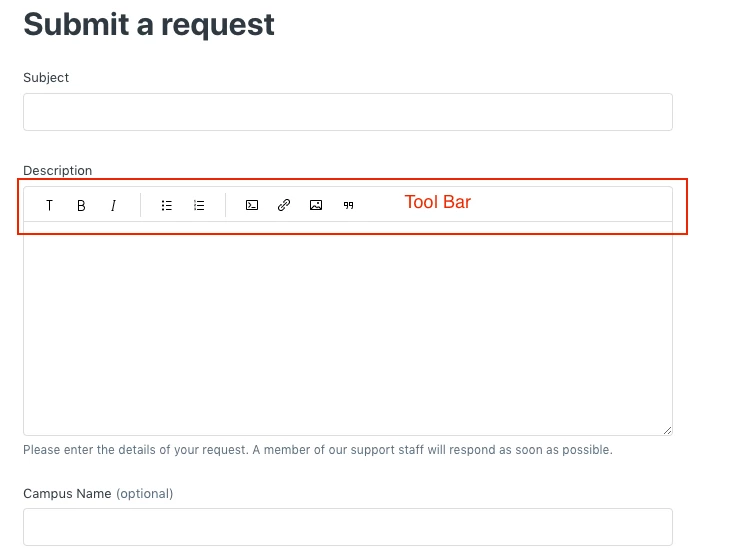
Before removing the WYSIWYG, a toolbar is showing in the description area:


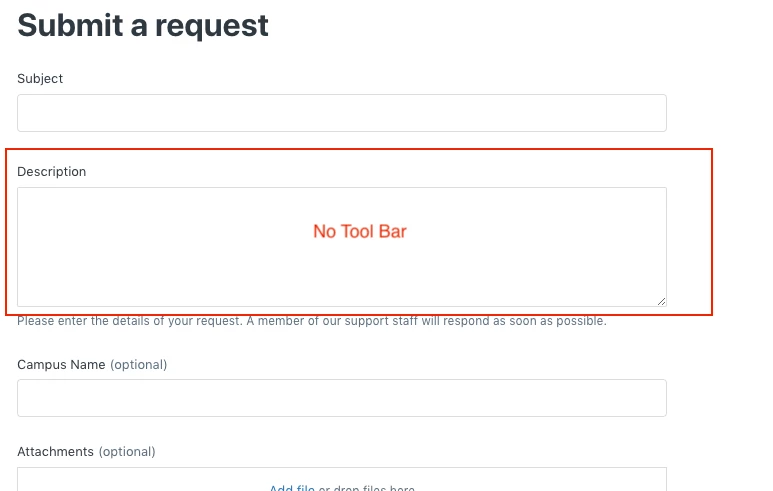
After removing the WYSIWYG, a toolbar is now hidden in the description area:


Before removing the WYSIWYG, a toolbar is showing in the description area

When I removed the CSS property from the hidden textarea:


Ifra
  • March 26, 2022

You can use this for WYSIWYG and modify the code:

 var _x = $('#request_description_ifr').contents().find('#tinymce').text(); 
console.log(_x);

  • Author
  • March 28, 2022

Hey Irfa,

Thank you so much, it works well as expected. yes, after removing WYSIWYG from {{request_form}}:

I really appreciate all your help:)


Sorry, where exactly should we add the below code in the script.js? Because when I tried it doesn't seem to be working.

 var _x = $('#request_description_ifr').contents().find('#tinymce').text(); 
console.log(_x);

Ifra
  • March 28, 2022

If you are okay with the helper {{request_form}} without toolbar in the form then there is no need to work with the below code :)

 var _x = $('#request_description_ifr').contents().find('#tinymce').text(); 
console.log(_x);


  • Author
  • March 29, 2022

Oh alright, thank you very much for all your help and support:) 


  • Author
  • April 1, 2022

Hey @ifra

Sorry to trouble you, I might need your help here again, for some reason the hide and div won't work now.

Only Tile OCP is visible for all user orgs. Tile Zonza is not showing up for other user orgs. What could be wrong here?

Added the below script to script.js:

var tileZonza = $( "a[href*='#Zonza-Client']");
$(tileZonza).hide();
 
if (HelpCenter.user.organizations.name === "Test Org."){
   $(tileOCP).show();
 } 


Thank you for your help.


Ifra
  • April 2, 2022

Okay, can you share the public URL, so I can see the issue in your JS?


  • Author
  • April 2, 2022

@ifra  This is not live yet, we are currently working in the UAT environment. 


Below is the URL:

https://ocpsupport1.zendesk.com/hc/en-us/p/ocp_requests

Please let me know if you need anything else.


  • Author
  • April 2, 2022

Ifra
  • April 4, 2022

Hi Johnny J, 

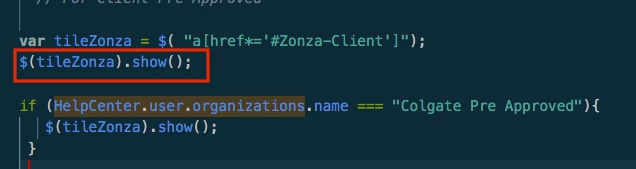
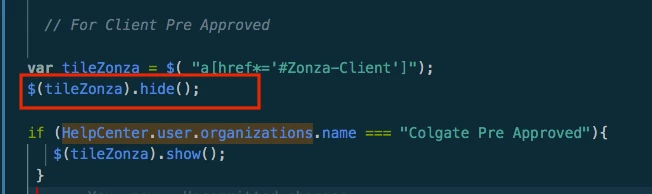
You changed the code hide() to show(), see in the below image:

Currently you have:


It should be:


Code should be:

var tileZonza = $( "a[href*='#Zonza-Client']");
$(tileZonza).hide();
 
if (HelpCenter.user.organizations.name === "Test Org."){
   $(tileOCP).show();
 } 


Thanks


  • Author
  • April 4, 2022

Hey Ifra,

Sorry for bugging you. yes, I had that code previously, but it didn't work, I even shared with you the same code on Apr 01:(

This one:

var tileZonza = $( "a[href*='#Zonza-Client']");
$(tileZonza).hide();
 
if (HelpCenter.user.organizations.name === "Test Org."){
   $(tileOCP).show();
 } 

I changed the code hide() to show() to check if it works, it didn't:(

Can you please help?

What we want is that users from Colgate Pre Approved org. must see only the OCP tile.

Users from Dyson Pre Approved & Mazda user orgs. must see both OCP and Zonza tiles.

All other Hogarth Users must see all the tiles (that is OCP and Zonza). 

Should I set create separate codes for each user org.? Is this possible?

Thank you for your help.


Ifra
  • April 4, 2022

I'll get back to you, at office yet :)


  • Author
  • April 4, 2022

Sure, thank you


  • Author
  • April 5, 2022

Hi @ifra any update on this, please?