Help Center - Dropdown lists inside a knowledge base article | Community
Skip to main content

Help Center - Dropdown lists inside a knowledge base article

  • August 16, 2021
  • 4 replies
  • 0 views

Lauren18

Is there a way to implement drop down lists within a Help Center article? Similar to this example:
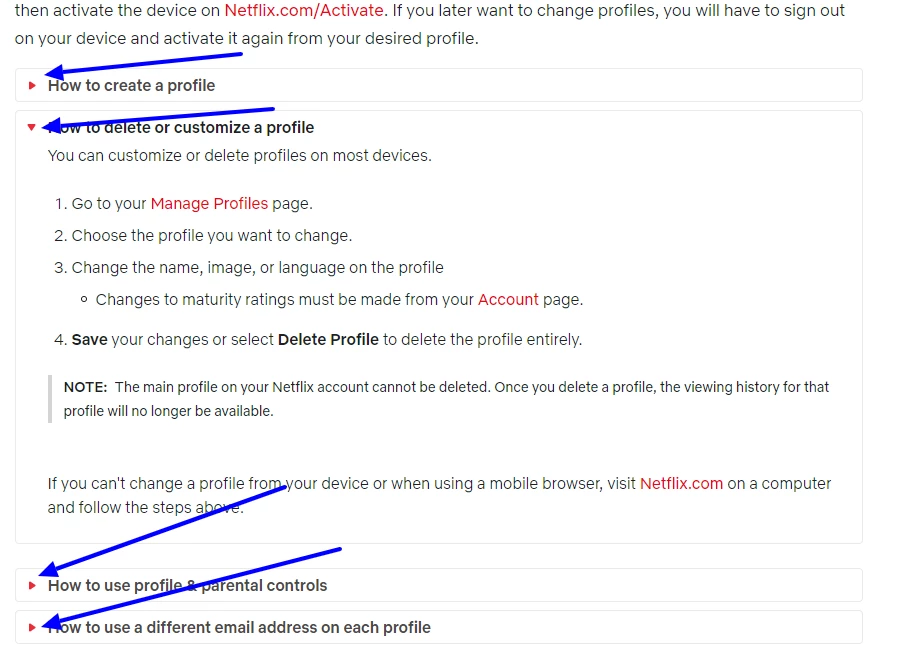

 Thank you.

4 replies

Ifra
  • August 17, 2021

Hi Lauren Raeder,

I think you should see the below link:


1). https://codepen.io/Gintoki006/pen/gQpjmy
2). https://dev.to/anitamaity/simple-accordion-menu-using-html-and-css-only-4i3c


You just need to add the HTML code inside the Source Code editor while creating the article.


Paste the copied code inside the editor.


then click OK button. You will get the view -


Now, copy the CSS code and paste it into the Stylesheet at the bottom area.


If any query let me know :)


Thanks

Team


Dave12
  • August 18, 2021

Hi Lauren –

Check out this newly-updated tip from one of our community moderators: Collapsible headers in articles or templates (accordions)


Lauren18
  • Author
  • August 18, 2021

Magnificent. Thank you, both!


Dave12
  • August 19, 2021

Glad to help, Lauren!