
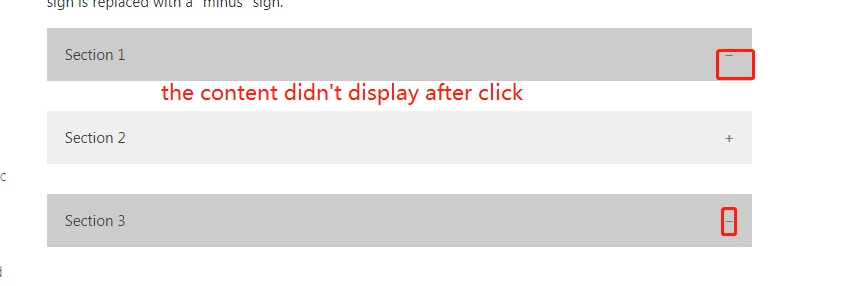
I am trying to do collapsable headers in my guide but for some reason it won't work - anyone got any ideas?
HTML:
<div id="accordion" class="panel-group">
<div class="panel panel-default">
<div class="panel-heading">
<h4 class="panel-title"><a href="#collapseOne" data-toggle="collapse" data-parent="#accordion2">Subhead</a></h4>
</div>
</div>
<div id="collapseOne" class="panel-collapse collapse">
<div class="panel-body">
<p>Text goes here</p>
</div>
</div>
</div>
CSS:
.collapse {
display: none;
}
.collapse.in {
display: block;
}
.collapsing {
position: relative;
height: 0;
overflow: hidden;
-webkit-transition: height 0.35s ease;
transition: height 0.35s ease;
}
.panel-heading {
padding: 10px 15px;
border-bottom: 1px solid transparent;
border-top-right-radius: 3px;
border-top-left-radius: 3px;
}
.panel-title {
margin-top: 0;
margin-bottom: 0;
font-size: 30px;
color: #af282f;
font-weight: bold;
}
.panel-title > a {
color: inherit;
Text-decoration: none;
}
.panel-title2 {
margin-top: 0;
margin-bottom: 0;
font-size: 20px;
color: #222223;
font-weight: bold;
}
.panel-title2 > a {
color: inherit;
Text-decoration: none;
}
.panel-title3 {
margin-top: 0;
margin-bottom: 0;
font-size: 15px;
color: #222223;
font-weight: bold;
}
.panel-title3 > a {
color: inherit;
Text-decoration: none;
}
.panel {
margin-bottom: 20px;
padding: 0 0 20px 0;
background-color: #ffffff;
border-radius: 4px;
}
.panel-body {
padding: 0 0 20px 20px;
}
.panel-body:before,
.panel-body:after {
display: table;
content: " ";
}
.panel-body:after {
clear: both;
}
.panel-body:before,
.panel-body:after {
display: table;
content: " ";
}
.panel-body:after {
clear: both;
}
.panel-group .panel {
margin-bottom: 0;
overflow: hidden;
}
.panel-default > .panel-heading {
color: #333333;
background-color: #f5f5f5;
}
.panel-description {
margin: -25px;
padding: 0;
}


Hey AirDroid,
Trapta may be able to point you in the right direction if you provide the code you're using. Any chance you could share that?