Guide Search Needs to show date of last article update | Community
Skip to main content

Guide Search Needs to show date of last article update

  • February 4, 2022
  • 8 replies
  • 0 views

Morgan12

Our Zendesk guide shows articles in search by their created date, not last updated date. So if an article was created 2 years ago, but just updated yesterday, it will show as an old article. Our users want to see when the most recent changes were made. We need to be able to search and have it show the last updated date, not the creation date. 

8 replies

Sam15
  • February 4, 2022

Hi @morgan12!

To change this, you will want to do the following:

  1. Go to Guide Admin -> Customize Design -> Customize (for whichever theme you're working with)
  2. On the customization page, select Edit code in the bottom-right
  3. On the code editing page, select search_results.hbs on the left sidebar
  4. In the search_results.hbs code, locate the following line: <span class="meta__item">{{date created_at}}</span>
  5. Either update the created_at part to be updated_at, or you can use <span class="meta__item">{{date updated_at}}</span> if you'd like to have both, etc.

There are two variables you can use - one is edited_at, the other is updated_at. Unfortunately, the documentation is not great at explaining the difference between the two. Hope the above helps!


CJ99
  • April 18, 2022

Is there any way to make the update_date reflect only the update for the language being searched/viewed? Currently it seems it shows the most recent update date for any translation of the article. 


Dane13
  • May 20, 2022
Hi CJ,
 
I have tried to use {{date edited_at}} and it's not showing the translation of the articles I have. Unfortunately, we can't directly help you on this concern as this is considered a form of customization that is outside our scope.

Info13
  • November 22, 2022

Is it possible to NOT show the 'last updated date' in the articles? 


  • November 23, 2022
Hi there,
 
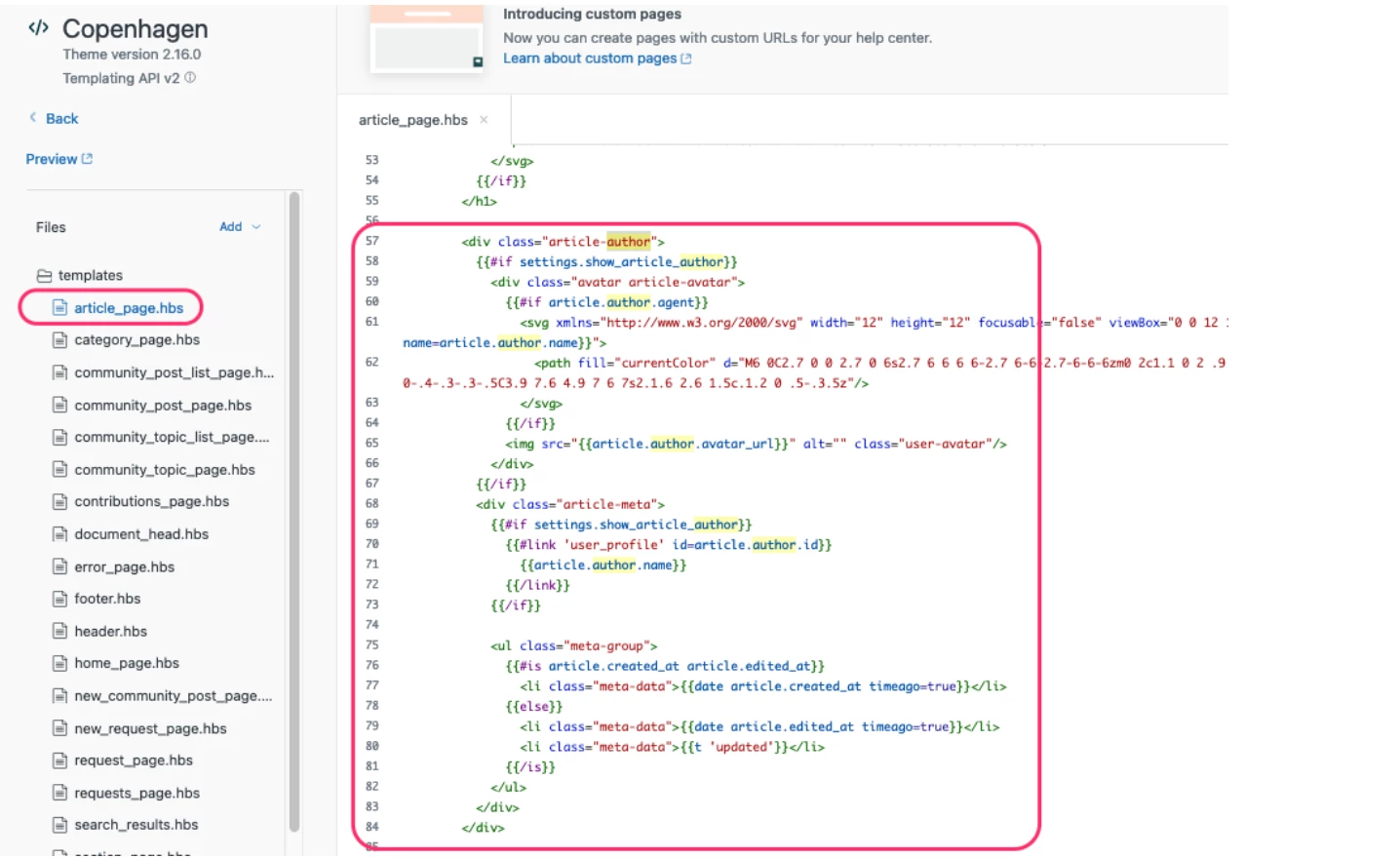
The code that displaying the date of the articles creation and update is located in the article-author div on theunder aritcle_page.pbs. You will find the below code, that contains all of the information displayed in an article including author, date, or timestamp on Help Center articles.
 
Remove this content or modify it to display the information that you would like.


For more information, please see this article: Editing the article's author, date, and timestamp
 

  • December 1, 2022

This is not helpful! Come on Zen. You should make this easier for end users. It's a simple need that many of us have. Think about your end users.


  • February 28, 2023

The code displayed in Sam's reply doesn't work.

I updated the "created_at part to be updated_at, " which gave me an error message when publishing.

I tried the code in Dane's reply and used edited_at, which worked great...


Brooke11
  • August 28, 2024

Came here looking for an answer to this exact question and @conny11 's comment was exactly what I needed. Thank you!