
Guide Content Block - table line break spacing - how to adjust? | Community
Skip to main content

Guide Content Block - table line break spacing - how to adjust?

  • November 29, 2024
  • 1 reply
  • 0 views

Fran11

Does anybody know how to adjust the text line break spacing (height) in a table, within a content block? (in yellow in below screenshot)
Line-height in the Content Block code will only adjust the line height of a continuous sentence, but not an actual line break (enter/return) .
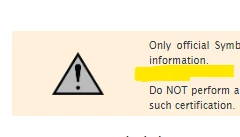
Many thanks for any feedback!

1 reply

Francis14
  • June 28, 2025
Hi Fran,
 
In HTML and CSS, line breaks created by pressing Enter/Return (e.g., <br> tags) don’t inherit the same line-height spacing as the rest of the text. To adjust the spacing around these line breaks inside a table's content block, you can try the following approaches:
 
  • Replace <br> with wrapped lines in <p> or <div> tags and add margin for spacing.
  • Example:

    <p style="margin: 0 0 8px 0;">First line</p>
    <p style="margin: 0;">Second line</p>
  • Styling <br> directly may not work reliably across platforms.
  • Using block elements with margin/padding is the most consistent method.