Guide Article - Displaying First Publish Date & Last Update Date | Community
Skip to main content

Guide Article - Displaying First Publish Date & Last Update Date

  • August 25, 2022
  • 6 replies
  • 0 views

I am trying to have the article to display both the first publish date and the last update date, But I do not seems to be able to do so, Ive tried to use / adjust the coding with reference to Tip: Display article revision date instead of publication date.

I've manage to hide it completely or change the fonts, which is not really what i wanted. 

Thanks 

6 replies

Ifra
  • August 25, 2022

Hey Vicky, you just need to modify your meta tag code at artcle-Page.hbs file.

i). Go to your article page.

ii). Find for the <ul class="meta-group">.

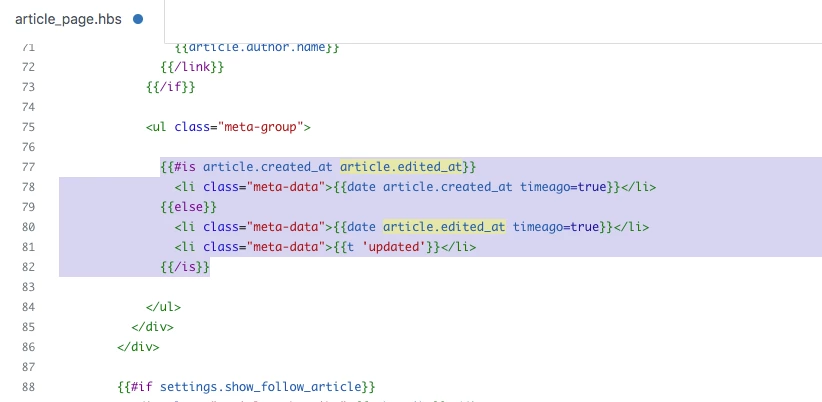
Default code:

{{#is article.created_at article.edited_at}}
<li class="meta-data">{{date article.created_at timeago=true}}</li>
{{else}}
<li class="meta-data">{{date article.edited_at timeago=true}}</li>
<li class="meta-data">{{t 'updated'}}</li>
{{/is}}

Screenshot for the same:


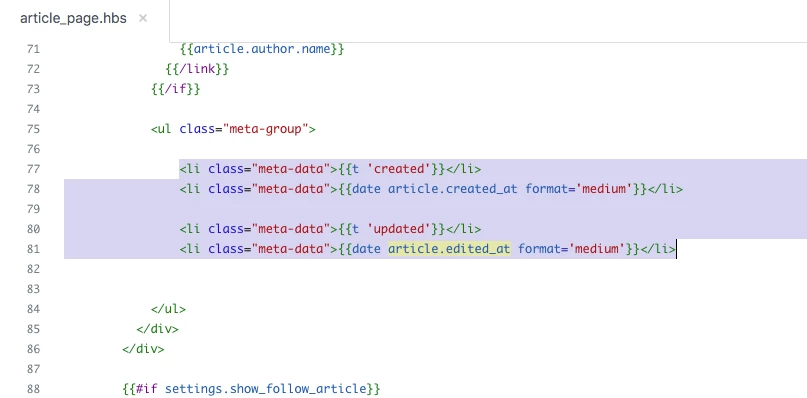
Updated code:

<li class="meta-data">{{t 'created'}}</li>
<li class="meta-data">{{date article.created_at format='medium'}}</li>
              
<li class="meta-data">{{t 'updated'}}</li>
<li class="meta-data">{{date article.edited_at format='medium'}}</li>

Screenshot for the same:


Output:


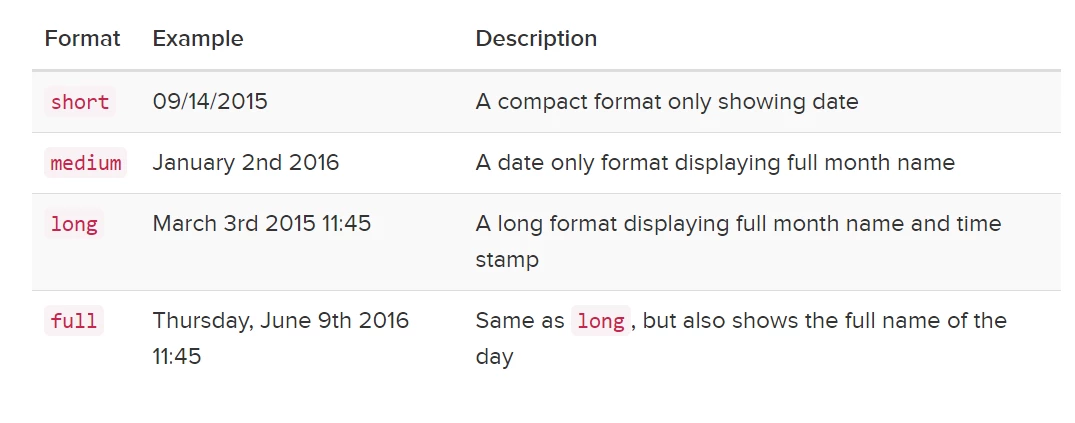
To change date format, update the format in the helper:

<li class="meta-data">{{date article.created_at format='medium'}}</li>


Thanks

Team


  • Author
  • August 25, 2022

It works exactly how I wanted ! Thank you so much ! 


Ifra
  • August 25, 2022

Cheers!


  • December 1, 2022

Hi, I'm sorry, but why does this have to be so complicated?? We shouldn't have to deal with code to simply display a revision date. You could add a button to ask if we want to display a new date, etc. I find this to be a big inconvenience, and for the amount of questions you've received pertaining to this topic, you should have changed it by now. This is in no way helpful for someone who just manages articles.


Fran11
  • November 29, 2024

is the “Created” date the initial Publishing date? or is it the date the article was created in draft?
If the latter then the actual initial publishing date could be days, weeks, months later than the initial creation date in draft, depending on when you want to publish initially.


Destiny
  • April 22, 2025
Hello Fran, 
 
Thank you for your question regarding the "Created" date and the initial publishing date of articles.
 
To clarify, the "Created" date typically refers to the date when the article was initially created in the system, which might be in a draft state. The actual initial publishing date can indeed be different, as it depends on when the article is made publicly available. This means that the article could be created and remain in draft for days, weeks, or even months before it is published.
 
If you need to verify these dates, you can check the article's metadata directly. This can be done using the Zendesk Help Center API. Specifically, you can use the following endpoint to retrieve detailed information about an article:
 
GET /api/v2/help_center/articles/{article_id}.json
 
Replace {article_id} with the actual ID of the article you want to retrieve. This will provide you with metadata including the creation date and the publication date.
 
If you have any further questions or need additional clarification, feel free to ask. We're here to help!