
Easy printing of articles | Community
Skip to main content

Easy printing of articles

  • November 18, 2021
  • 6 replies
  • 0 views

We are in the process of moving all our printed manuals and guides to Zendesk Guides. However, we still have many customers who prefer a printed manual.

If you just select print in the browers menu, the result is not good or usable.

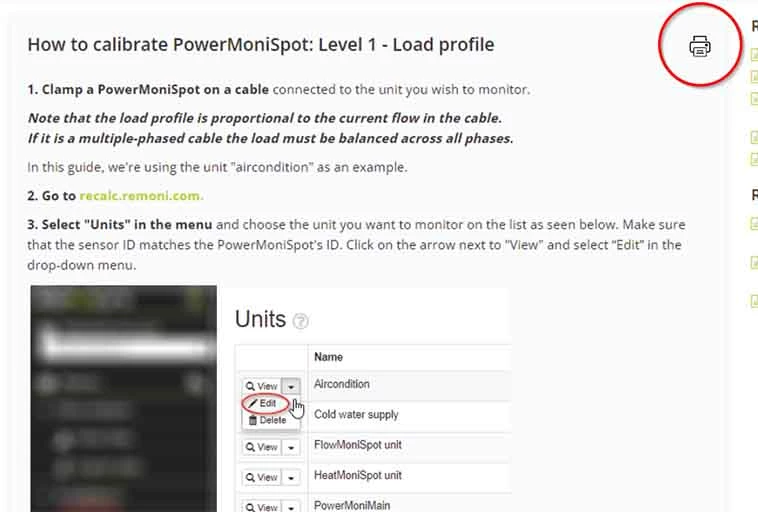
Is there a way to get a print article button on all articles?
Something like this?
6 replies

  • January 12, 2022

Yes, we need to be able to do this too. Our Help Center is locked down and we have an occasional need to provide a KB article to someone that does not have access (and we don't want to have access). Having the ability to print or save as a PDF an article it would be a huge help. I have found an app that will print all articles into a user manual but we need the ability to do this for one article at a time. If anyone has something setup and working I would love to hear about it! Thanks. 


  • January 12, 2022

Hi Maggie. Would you mind sharing the name of the user manual app that you found?  Thank you! 


  • January 12, 2022

Here is a link to the article I found. It actually exports to PDF but you could obviously print from there. 

https://support.zendesk.com/hc/en-us/community/posts/4409515201562-How-to-export-knowledge-base-content-from-your-Help-Center-as-PDF-no-coding-required-


  • January 12, 2022

Thank you! 


  • March 14, 2024

I'd like to add to this. I have to submit all articles for an internal compliance review and would love an easier way to print or save an article as a PDF, especially from the revisions page with the red line changes. 


Orsolya
  • August 29, 2025
Thank you so much for taking the time to provide us with your feedback here. I understand the request however at this time we are not able to commit to prioritizing this feedback. 
 
At this time we are going to close this post for comment and mark it as “Not Planned”. If you are interested in learning more about this and other features being built please make sure to check out our Community events and Zendesk Updates. Thank you again for your feedback and we appreciate you being a valuable Zendesk Community member.