Default search to show articles only | Community
Skip to main content

Default search to show articles only

  • June 14, 2022
  • 17 replies
  • 0 views

Gwyn11

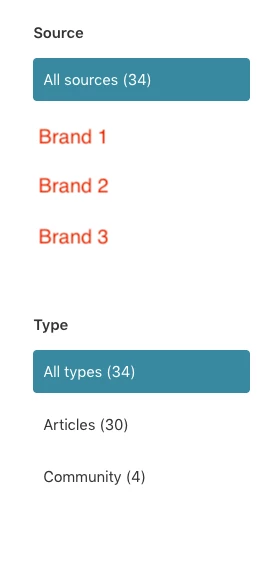
I need to be able to change the default setting in Guide search so that it shows articles only, rather than articles and community posts. I don't want to hide community comments completely, just change the default results. Is there a way to get this so that users can still select to include community posts using the left-hand menu?

This is the same a Jeff S' question here. Support also mentioned it may need coding, so any help with what I'd need to add would be greatly appreciated!

17 replies

  • June 14, 2022
Hi Gwyn,
 
It does require a bit of custom JS code. You'll want to take a look at the Help Center templating cookbook to get familiar with how to edit code within your Guide theme. This post also shows a bit of a demonstration on one way to achieve it. 
 
Hope this helps!
 
Erica

Ifra
  • June 15, 2022

Hi Gwyn Mabo :)


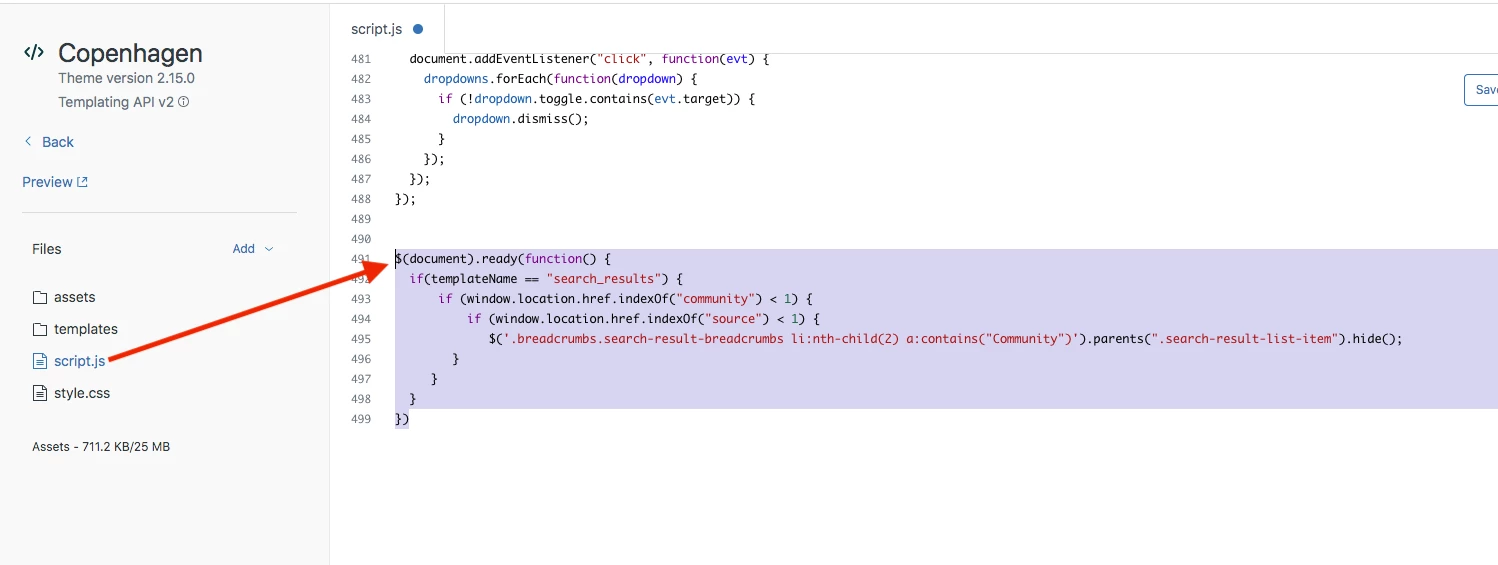
Copy and paste the given JS code to your script.js file:

  • It shows articles only, rather than articles and community posts.
  • Users can still select to include community posts using the left-hand menu.
$(document).ready(function() {
  if(templateName == "search_results") {
      if (window.location.href.indexOf("community") < 1) {
          if (window.location.href.indexOf("source") < 1) {
             $('.breadcrumbs.search-result-breadcrumbs li:nth-child(2) a:contains("Community")').parents(".search-result-list-item").hide();
        }
     } 
  } 
})


Screenshot:


Complete Guide: https://support.zendesk.com/hc/en-us/community/posts/4589496379162-How-to-exclude-Community-posts-from-Guide-search-results-


Thanks

Team


Gwyn11
  • Author
  • June 16, 2022

Thank you so much, Ifra! Which line would I paste this code into or does it not matter too much?


Ifra
  • June 16, 2022

Just copy the script code and paste it at bottom area to script.js file.

Screenshot:


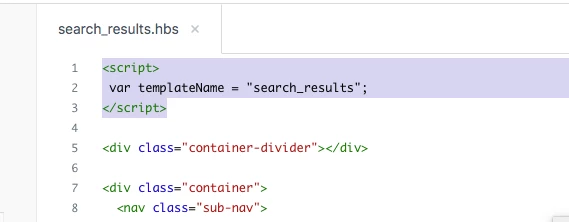
Add template name to the search results file:


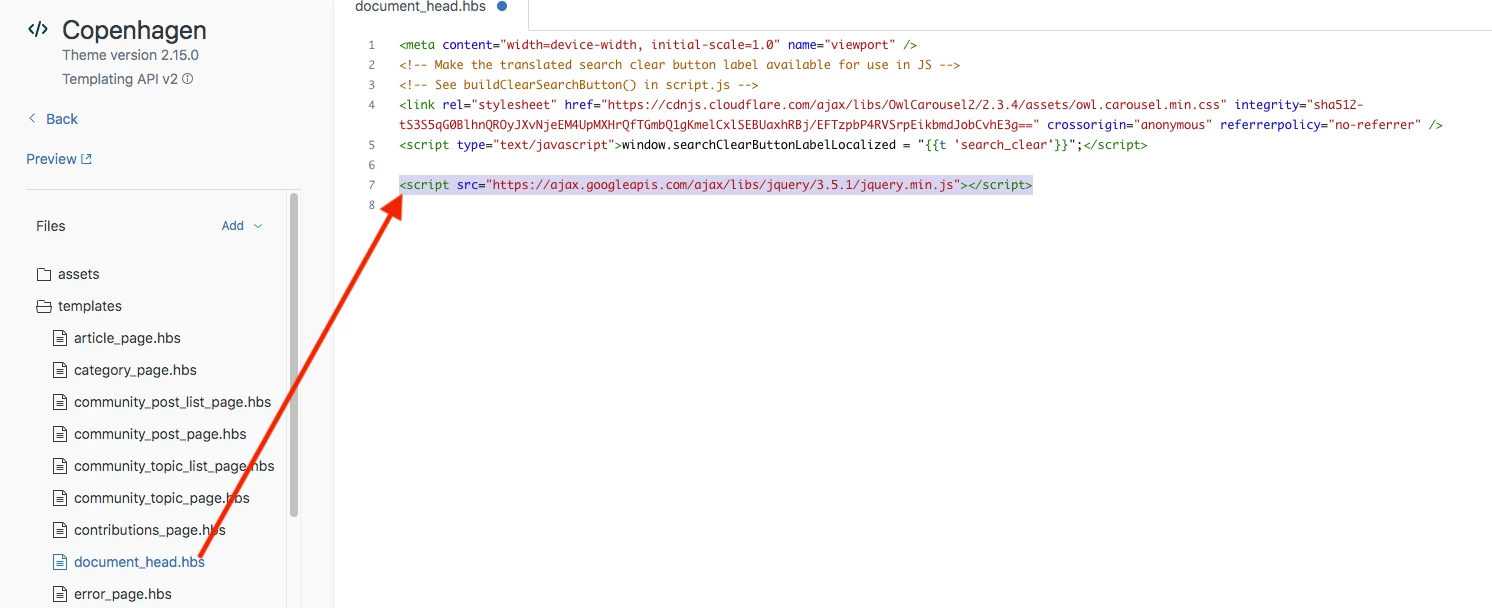
Copy the jquery CDN and paste it to the document_head.hbs file.

jquery CDN:

<script src="https://ajax.googleapis.com/ajax/libs/jquery/3.5.1/jquery.min.js"></script>


Screenshot:


  • June 17, 2022
Thanks Ifra! Appreciate you sharing your solution. 😊️

Ifra
  • June 17, 2022

 😊️


Gwyn11
  • Author
  • June 22, 2022

Hi Ifra, I've applied the code as instructed, but it hasn't changed the search results format at all. Is there anything else I've missed?


Ifra
  • June 27, 2022

@Gwyn Mabo, it's working for me, may be classes are different or something else. Can you share your URL of your HC?


Gwyn11
  • Author
  • June 27, 2022

Hi Ifra, I haven't edited the code on my live site, but a draft theme.


Ifra
  • June 28, 2022

If you didn't add the code in your live site then how can you get any kind of output for live as you want?

You added in your draft theme then you can see the output in your draft theme search results page not in your live site.


Gwyn11
  • Author
  • June 28, 2022

Hi Ifra, I wasn't using the live site to test it, I was using the preview version of the draft theme. I assumed (like it does with other changes viewed using the preview) that this would work.


Ifra
  • June 28, 2022

Hi Gwyn Mabo

Test like this:-

Search "What" in the search-bar.

Only articles would be list with what string not community posts.

But when you remove the added code (Given above) from script file then all posts would be shown (If exist with the 'what' string) as default results on the page.


Gwyn11
  • Author
  • June 28, 2022

Hi Ifra, that is exactly what I did, and it did not work I'm afraid.


Ifra
  • June 28, 2022

Hi Gwyn :),  is there any way I can see the bug in your theme?, then I can provide some solution.


Gwyn11
  • Author
  • June 29, 2022

Hi Ifra, more than happy for you to help out, what do I need to do?


Ifra
  • June 29, 2022

You should set your draft mode theme live, then share the URL here.


  • August 13, 2024

Instead of suggesting that we do custom javascript is it possible zendesk make a change to the search helper?
https://developer.zendesk.com/api-reference/help_center/help-center-templates/helpers/#search-helper

providing a filter option for either : unified,  knowledge_base, or community
linking the user directly to http://<domain>/hc/en-us/search?filter_by=<chosen_filter>&query=<query>" so we can default to showing knowledge_base articles but easily provide the option for community as well. 

A workaround I found was to create the following in order to override the searches default functionality.

 const manuallySearch = (event) => {
    event?.preventDefault();
    event?.stopPropagation();
    let query = document.getElementById('query').value;
    window.location.replace(`${window.location.origin}/hc/en-us/search?query=${query}&filter_by=knowledge_base&utf8=✓`);

    return false;
};

$(() => {
    let form = document.getElementsByClassName('searchbox_classname')[0];
    form.removeAttribute('action');
    form.addEventListener('submit', manuallySearch);
    form.addEventListener('keydown', (event) => event.key === 'Enter' && manuallySearch(event));
});