Customizing My Activities | Community
Skip to main content

Customizing My Activities

  • December 4, 2017
  • 18 replies
  • 0 views

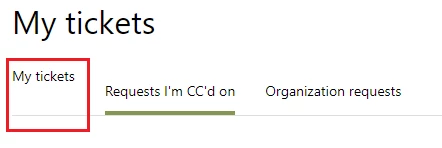
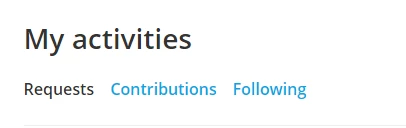
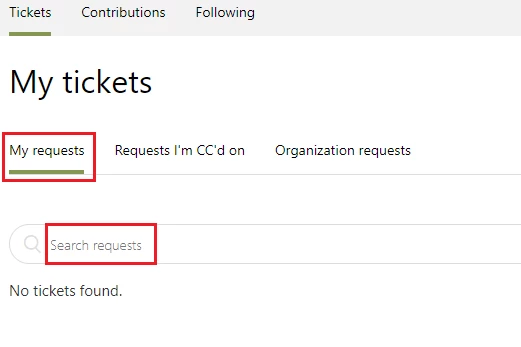
We are about to roll out Zendesk for our company, and we would like to replace 'requests' with 'tickets' on the 'My activities' page. I have managed to customize most of the text, but there are a couple of areas that I cannot manage to change (highlighted in the image below). Does anyone have any insight on how to change the text for those areas?  

Thanks!
This topic has been closed for replies.

18 replies

Vladan
  • December 4, 2017

Hi Joshua, you can make it on this way, just put this code on the very bottom of your the Requests HTML template:

<script>
$('ul.collapsible-nav-list li:first-child').text('My tickets');
$('input#quick-search').attr('placeholder','Search tickets');
</script>

  • Author
  • December 4, 2017

Thanks Vladan!

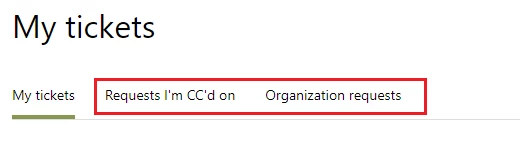
It did not work when added to the requests HTML page, but when added to the scrips.js file it worked, kind of. The search bar portion is fine, but the sub-nav gets wonky when navigating away from the 'My requests' to the other sub navs:


Not only is the formatting off, but it is no longer clickable. 

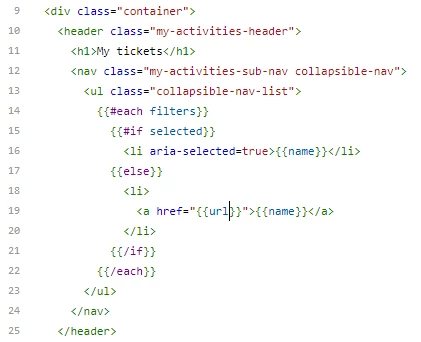
I think the code snippet that is responsible for the name is here:

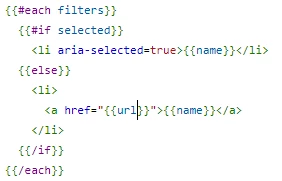
Specifically here:

I can get it so the selected sub-nav says 'My tickets,' but it does it for every currently selected sub-nav.

Thus far, I cannot figure out how to get that if-else statement to work the way I want.


Vladan
  • December 4, 2017

Ahh, I see, please try this one:

<script>
$('ul.collapsible-nav-list li[aria-selected="true"]:first-child').text('My tickets');
$('ul.collapsible-nav-list li:not([aria-selected="true"]):first-child a').text('My tickets');
$('input#quick-search').attr('placeholder','Search tickets');
</script>

  • Author
  • December 4, 2017

That worked! You're the best!


Vladan
  • December 4, 2017

Very glad that it helps! Thank you for your feedback and enjoy your even better Help Center! ;)


  • Author
  • December 5, 2017

Sorry to bother you again. I assumed that I would be able to update the other two sub-navs based on the script you provided, but everything I have tried has not worked. Do you happen to know how to change the others?


Vladan
  • December 5, 2017

np :) This one should work fine:

<script>

$('header.my-activities-header ul.collapsible-nav-list li:contains("CC")[aria-selected="true"]').text('CC tickets');
$('header.my-activities-header ul.collapsible-nav-list li:nth-child(2) a').text('CC tickets');

$('header.my-activities-header ul.collapsible-nav-list li:nth-child(3) a').text('Org tickets');
$('header.my-activities-header ul.collapsible-nav-list li:contains("Organization")[aria-selected="true"]').text('Org tickets');

</script>

Let us know the result! ;)


  • Author
  • December 5, 2017

It worked! I modified it a bit to be more consistent. Here is what I went with:

<script>
   $('ul.collapsible-nav-list li[aria-selected="true"]:nth-child(1)').text('My tickets');
   $('ul.collapsible-nav-list li:not([aria-selected="true"]):nth-child(1) a').text('My tickets');

   $('ul.collapsible-nav-list li[aria-selected="true"]:nth-child(2)').text('Tickets I am copied on');
   $('ul.collapsible-nav-list li:not([aria-selected="true"]):nth-child(2) a').text('Tickets I am copied on');

   $('ul.collapsible-nav-list li[aria-selected="true"]:nth-child(3)').text('Organization tickets');
   $('ul.collapsible-nav-list li:not([aria-selected="true"]):nth-child(3) a').text('Organization tickets');
</script>


My edit had an unintended consequence. The headers for the upper navs are changed. 


  • Author
  • December 5, 2017

In the end I went with this and all is working correctly:

<script>
   $('header.my-activities-header ul.collapsible-nav-list li:contains("My")[aria-selected="true"]').text('My tickets');
   $('header.my-activities-header ul.collapsible-nav-list li:nth-child(1) a').text('My tickets');

   $('header.my-activities-header ul.collapsible-nav-list li:contains("CC")[aria-selected="true"]').text('Tickets I am copied on');
   $('header.my-activities-header ul.collapsible-nav-list li:nth-child(2) a').text('Tickets I am copied on');

   $('header.my-activities-header ul.collapsible-nav-list li:nth-child(3) a').text('Organization tickets');
   $('header.my-activities-header ul.collapsible-nav-list li:contains("Organization")[aria-selected="true"]').text('Organization tickets');
</script>


  • December 6, 2017

Thanks for coming back to share what you figured out, Joshua!


  • March 22, 2018

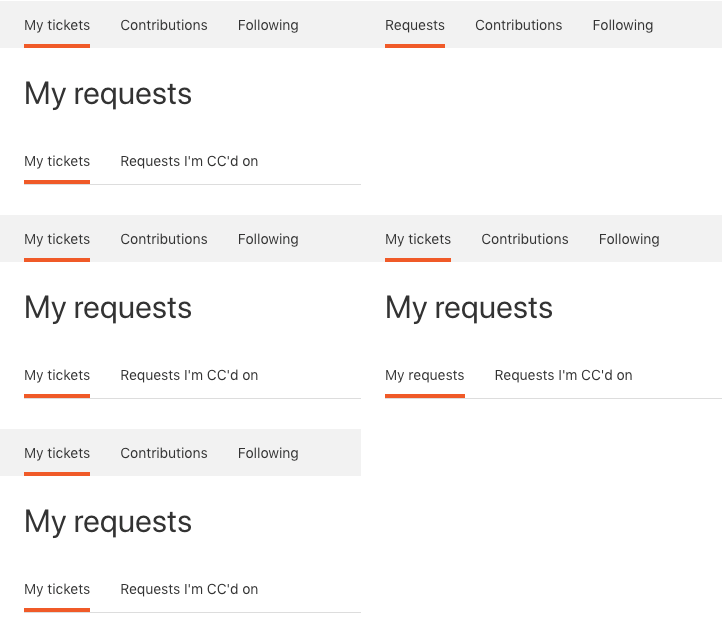
Is there a way to do this without using a script? The script runs a little late for my taste, so there's a brief moment where the original text is shown on the landing page before it changes. (This gif is kind of crappy because my page decided to take forever to load, but you can briefly see it at the end.)


Any advice would be great!


  • March 27, 2018

Hi Emily!

I'm afraid a script is the only way to go about making these changes. I don't think there's much to be done about any potential lag, but I'll check with our Community Moderators to see if they know of any tricks.


Trapta
  • March 28, 2018

Hi @Emily,

Try the below code and let us know the results.

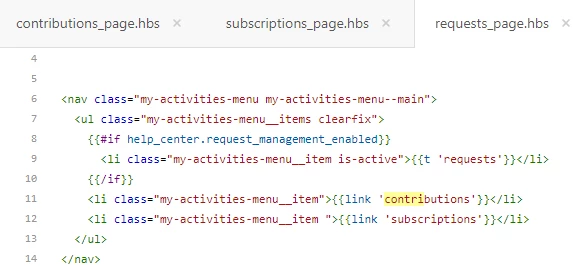
Go to your requests_page.hbs template and replace the code from line no.1 to line no.7 with -

<nav class="my-activities-nav collapsible-nav">
<ul class="collapsible-nav-list container">
<li aria-selected=true>My tickets</li>
<li>{{link 'contributions'}}</li>
<li>{{link 'subscriptions'}}</li>
</ul>
</nav>

and from line no.12 to line no.24 with -

<nav class="my-activities-sub-nav collapsible-nav">
<ul class="collapsible-nav-list">
{{#each filters}}
{{#if selected}}
<li aria-selected=true>
{{#is name 'My requests'}}
My tickets
{{else}}
Tickets I'm CC'd on
{{/is}}
</li>
{{else}}
<li>
<a href="{{url}}">{{name}}</a>
</li>
{{/if}}
{{/each}}
</ul>
</nav>

Thanks

Team Diziana


  • April 18, 2018

Hi, 

Where do we change the text for "Following"


Trapta
  • April 18, 2018

Hi @Chris,

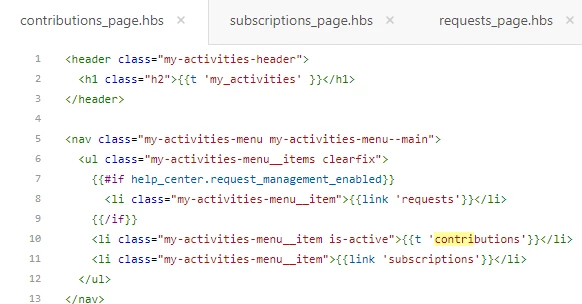
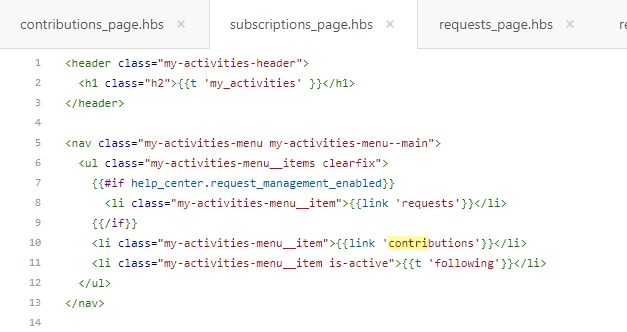
You need to update the code in contributions_page.hbs, subscriptions_page.hbs, requests_page.hbs and request_page.hbs in order to change the text 'Following' from all the templates.

Replace {{link 'subscriptions'}} with desired text in contributions_page.hbs, requests_page.hbs and request_page.hbs templates.

Replace {{t 'following'}} with desired text in subscriptions_page.hbs template.

Team Diziana


  • April 18, 2018

Thanks Trapta,

That hasn't worked. I changed the text but then nothing appears in it's place - any pointers?


and request_page.hbs does not have anything in for subscriptions


Trapta
  • April 25, 2018

Hi @Chris,

Sorry for the late response. I cannot see that you have changed the text as per the screenshots you have shared.

Once you will change the text, your code will look like -

From

<li class="my-activities-menu__item">{{link 'subscriptions'}}</li>

To

<li class="my-activities-menu__item">UPDATED TEXT</li>

Team Diziana


  • April 26, 2018

All good now - thank you