Customize Heading Text | Community
Skip to main content

Customize Heading Text

  • February 23, 2018
  • 2 replies
  • 0 views

I have three headings in our Help Center that I would like to change. Two of them are on the article pages:

Related articles
Recent articles

I just want to change the case so both words are capitalized:

Related Articles
Recent Articles

Also on the search results page I want to change

Knowledge base

to

Knowledgebase

I cannot for the life of me figure out how to do it, can anyone help me out?

This topic has been closed for replies.

2 replies

o2dis
  • February 23, 2018

Hello @Sherri Anderson,

If you are using Zendesk Copenhagen Theme. See below steps - 

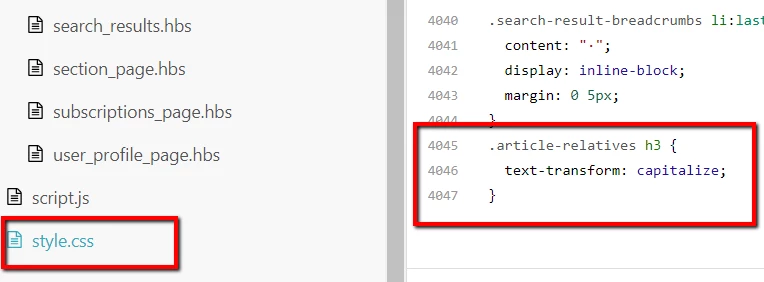
Go to the "style.css" editor tab and paste the below code on the bottom.

.article-relatives h3 { 
text-transform: capitalize;
}

For Search Result page see below steps

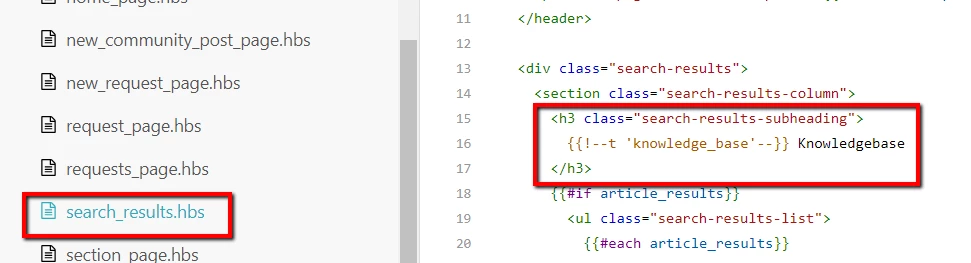
Go to the "search_results.hbs" editor file > Go to the line no. 16 > Comment the code and add your own text.

If you are using multi-language support in your Help Center you can also use the Dynamic Content.

Please let us know if face any issue.

Thanks

Customer Support Theme Team


  • Author
  • February 23, 2018

Well .... that was a little too easy. *blush

Thank you so much for your help! Worked perfectly!