Customise "no results" message | Community
Skip to main content

Customise "no results" message

  • December 29, 2023
  • 1 reply
  • 0 views

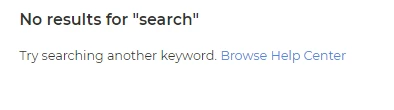
All of the knowledge base articles on our Help Center are locked behind sign-in, however the search bar is not. This means users can attempt to search from the landing page, even if they are not logged in. If they are not logged in the message below appears. In this example a user was not signed in and searched the word 'search'. A KB does exist however because the user is not signed in it suggests they try searching again. Can this message be customised? Rather than show "No results for "<search term>", we'd like the message to direct them to sign in to access the knowledge base 
1 reply

  • January 30, 2024

Hello @judy11

Upon reviewing your case, I think that a good workaround would be hiding the search bar for anonymous users, this way they would not be able to perform a search at all. 

You can use the HelpCenter.user.role parameter to check if a user is anonymous and based on that hide the search. I used this code in my case:


if (HelpCenter.user.role === 'anonymous') {
    var heroInnerDiv = document.querySelector('.hero-inner');
    if (heroInnerDiv) {
        heroInnerDiv.style.display = 'none';
    }
}


You can insert it in Guide Admin > Customize > Edit code > script.js, the result: