
I'm trying to hide and prepopulate Subject and Description of custom request form. My template is Copenhagen v4. Suggestions found on Zendesk support site don't work. My understanding is that v4 is based on React framework and so input fields do not have hardcoded CSS and are hardly to be addressed by jQuery. I managed to create a workaround by JS function searching for DIV enclosure of specific input field by label of this field. Unfortunately, it doesn't work when JS is put into script.js (not recommended anyways), or anywhere else, like assets, header template, etc. My suspicion is that JS can't access specific DOM object because it doesn't exist at the moment of running this script. Script is running probably before React is done with rendering.
So, my question is, did anybody faced the same issue (v4 is fairly new) or is able to suggest how to wait for renderer to finish and run JS afterwards? E.g., how to use React hooks (useEffect, useRef) in Copenhagen v4 theme?



Thanks for sharing your experiences and code snippets around customizing Copenhagen v4 request forms, especially on hiding and prepopulating Subject and Description fields.
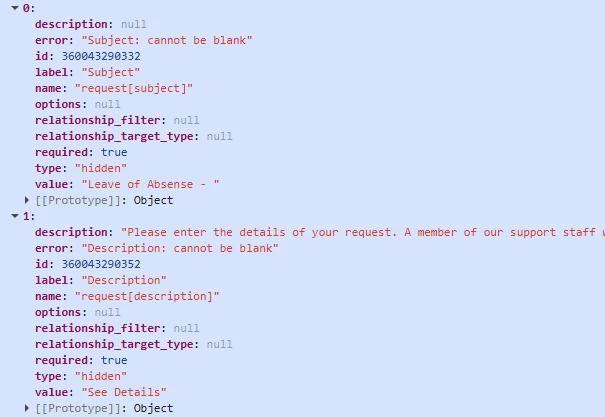
From what I'm seeing in this thread, the main challenge is that these fields are required by default and hiding them without properly setting their values causes submission errors like "Description cannot be blank." Also, because the forms are React-based, running JS scripts too early (before rendering) or externally (like script.js) won't work as expected.
A couple of suggestions that might help:
-
-
-
-
-
If anyone has successfully implemented this with cleaner code or a helper method, I’d love to see some practical examples!Set Field Values Before Hiding
Make sure you set the value of the field and then hide it, rather than only hiding. For example:
This prevents validation errors by ensuring a non-empty value.
Use React Hooks in Custom App Framework (If Possible)
If you’re able to use React code within the theme's App framework, a useEffect hook can help run your logic after the form renders:
Unfortunately, Copenhagen v4 may limit ability to directly add hooks in external JS, so check if you can inject React logic or extend the theme properly.
Conditional Logic by Form ID or Field Label
Since multiple forms are involved, try conditioning your code on the current form's ID or a unique identifier so you only modify one form:
Check Field Indexes Dynamically
Field indexes can vary depending on the form, so logging props.requestForm.ticket_fields and identifying the proper index for Subject and Description per form before applying changes is crucial.
Avoid Using External JS Script Files for DOM Manipulation
Since React renders asynchronously, DOM-based JS is unreliable. Try to interact with props/state inside the React lifecycle or theme templates.
Thanks again for the great collaboration here.