Copenhagen theme: Adding a second 'Sign In' for Staff/Agents | Community
Skip to main content

Copenhagen theme: Adding a second 'Sign In' for Staff/Agents

  • August 20, 2021
  • 5 replies
  • 0 views

I've had a request from our Support Manager asking for a second 'Sign In' to be added to the Header of our Support Guide sign in page for our customer's to use as we have Staff signing in with the Authenticator which our customers don't have yet. 

I can't find much online and when going to edit the header.hbs I find I can't see/find the script is either my CSS or JS file to add a new entry to set the hyperlink target:

HEADER.HBS
{{#link "sign_in" class="sign-in"}}
{{t 'sign_in'}}
{{/link}}

CSS
.nav-wrapper a.sign-in {
display: inline-block;
}


This topic has been closed for replies.

5 replies

Eric27
  • August 23, 2021

Hey Simon,

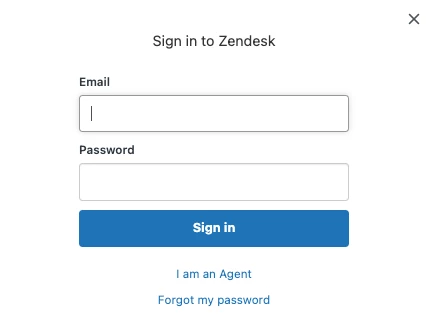
When clicking on 'Sign in' if you have external auth turned on for your team, you should see an option that says 'I am an agent' that they can click.


Are you not seeing this or did you mean something else by 'Authenticator'.

Thanks! 

Eric


  • Author
  • August 23, 2021

We have ours using the Microsoft Authenticator so it targets login.microsoftonline.com when the Sign-in button is clicked.


Eric27
  • August 23, 2021

Sure, so if that's turned on for your team and not for end users. Then shouldn't the "I am an agent" link which redirects your team to Microsoft solve your issue? Apologies if I'm missing something.

Eric


  • Author
  • August 23, 2021

That's cool,

The sys Admin who set it up has applied the MS Authenticator to all users. I was asked to see if we could have two sign in buttons and said I'd look into it but from what you've said this means we just need to change our security settings.


Eric27
  • August 23, 2021

Hey Simon,

Yeah, if you adjust your security settings so that Microsoft Auth isn't enabled for your end-users - you should be all set.

Have a wonderful day!

Eric Nelson | Manager - Developer Advocacy