Change navigation bar background color in Help Centre on mobile | Community
Skip to main content

Change navigation bar background color in Help Centre on mobile

  • May 30, 2023
  • 2 replies
  • 0 views

@ifra

Hello,

Can you please assist me with this?

In the Help Center, I have a navigation bar at the top with different hyperlinks to different pages as shown below.

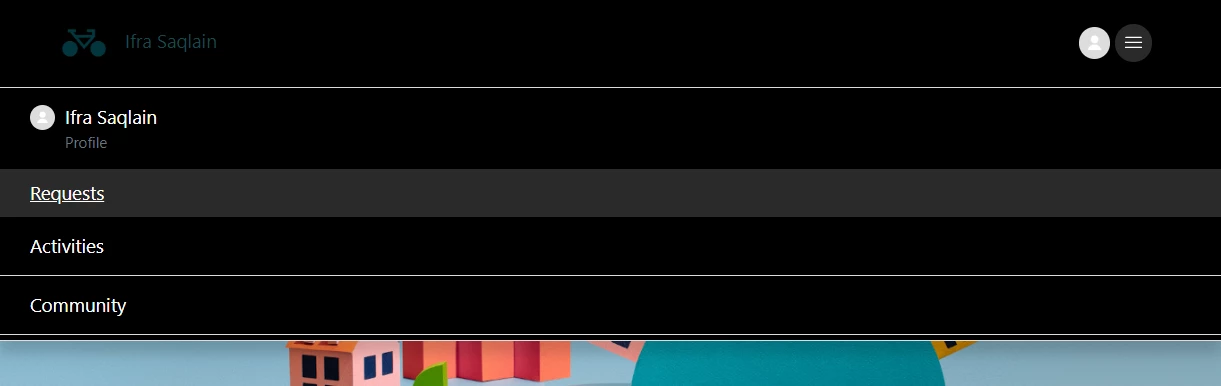
On mobile, this creates a drop-down box which is fine but as I have my hyperlinks color set to white this makes the hyperlinks become invisible.


Please see the screenshot below of the dropdown box.

I can't find in CSS where I can change the background color of the dropdown box that is created. 

Can you assist, please?

Thank you.

Anton

2 replies

Ifra
  • May 30, 2023

Hi Anton!,


Use the given code and you can change the colors in this:

.nav-wrapper-mobile .menu-list-mobile {
  background-color:#000;
}
.nav-wrapper-mobile .menu-list-mobile-items a:hover,
 .menu-button-mobile[aria-expanded="true"] .icon-menu{
  background-color: #2b2a2a !important;
}
.nav-wrapper-mobile .menu-list-mobile-items a,
.nav-wrapper-mobile .menu-button-mobile .icon-menu {
  color:#fff;
}

Screenshot:

  • Author
  • May 30, 2023

@ifra

Hello,

Thank you for the quick reply and your assistance.

Kind Regards,

Anton