Category number per row | Community
Skip to main content

Category number per row

  • April 23, 2022
  • 6 replies
  • 0 views

Chris58

From what I can tell the default number of categories per row on a home page is 3 for the Copenhagen theme. Is it possible to increase that number to 5 or more using either some kind of simple method, or does it require CSS/HTML? If so, has anyone tried this before?

Thanks,

Chris

6 replies

Ifra
  • April 23, 2022

Hi Christopher Lord,

Try this:

1). Go your style.css file.

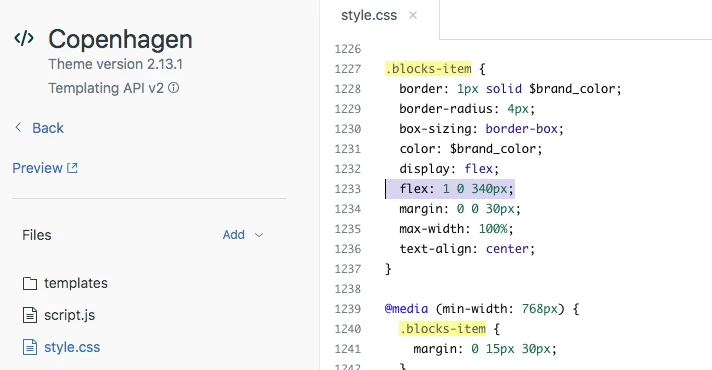
2). Find for  ".blocks-item ".

3). Decrease the flex-property:   flex: 1 0 340px to 1 0 180px.


4). See the customization I'm doing - flex: 1 0 180px for 5 categories in a row.


5). Change flex property - flex: 1 0 240px for 4 categories in a row.


6). Currently -  flex: 1 0 340px.


Thanks

Team


Chris58
  • Author
  • April 23, 2022

@ifra Thank you so much for that information! I'll try that!


Chris58
  • Author
  • April 24, 2022

@ifra that worked well, so thank you for that suggestion! Another question I had for you, or someone else, is how to spread out the category blocks more. Is there a way to have the categories more spread out so that they occupy more of the blank space to the right and the left of the categories? In the attached picture, the space next to the categories is empty on my screen (1080p), shown as the black line around the picture.


Ifra
  • April 25, 2022

Can you share the public URL of your HC, so I can share the exact solution?


Chris58
  • Author
  • April 25, 2022

@ifra thanks for asking. Unfortunately, as of now the site isn't public, and requires registration to utilize. 


Ifra
  • April 26, 2022

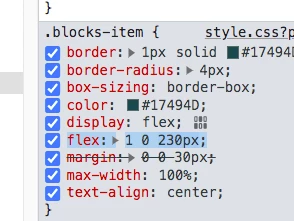
Okay, try - flex: 1 0 230px


or add the snippet at the bottom area:

@media (max-width: 1080px) {
  .blocks-item {
      flex: 1 0 280px;
  }
}


But, I think it's because of your container width.


Thanks