Adding category images to the Copenhagen Theme | Community
Skip to main content

Adding category images to the Copenhagen Theme


Show first post

114 replies

ModeratorWes

@Rob - lines 56 and 57 should be removed.  I removed those lines on the default theme and it did not effect the box in any kind of way.


  • February 2, 2017

@Wes back to the Curlybar Framework, I tried adding in the a href line with on line 45, is this what you meant?  Sorry I am such a noob but I appreciate your help making our site special??


ModeratorWes

@Rob - Yes but you will need to add </a> at the end of that line.  You may also can just use the curlybar as this might as work as well.

{{link 'new_request' }}


ModeratorWes

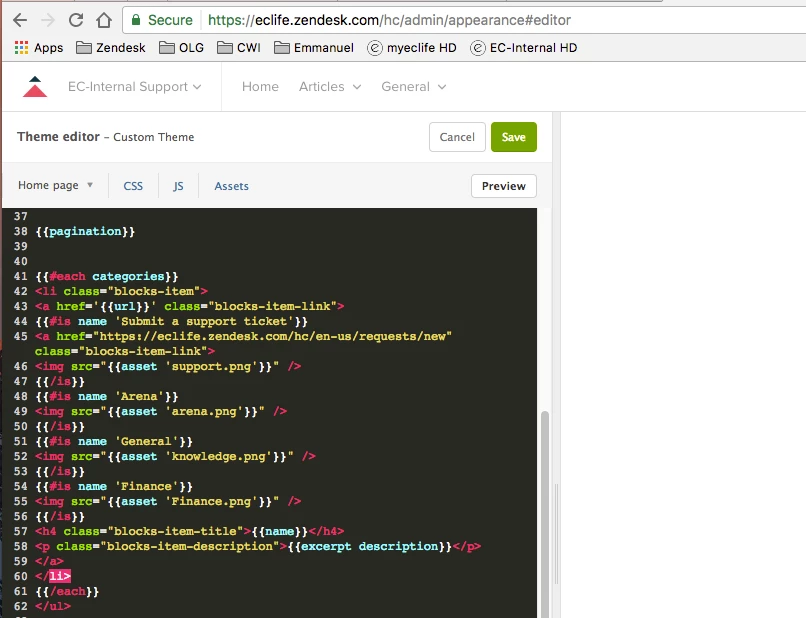
@Rob - don't think the above solution is going to work.  Can you copy and paste the code that's showing in the screenshot here so I can get it and modify it for you.


  • February 2, 2017

@Wes yeah it makes it non clickable

{{#each categories}}
<li class="blocks-item">
<a href='{{url}}' class="blocks-item-link">
{{#is name 'Submit a support ticket'}}
<a href="https://eclife.zendesk.com/hc/en-us/requests/new" class="blocks-item-link"> </a>
<img src="{{asset 'support.png'}}" />
{{/is}}
{{#is name 'Arena'}}
<img src="{{asset 'arena.png'}}" />
{{/is}}
{{#is name 'General'}}
<img src="{{asset 'knowledge.png'}}" />
{{/is}}
{{#is name 'Finance'}}
<img src="{{asset 'Finance.png'}}" />
{{/is}}
</a>
</li>
{{/each}}
</ul>


  • February 2, 2017

@Wes

When I replaced the original code it appears the restrictions I had placed no longer are working correctly.  Do these need added back in to the HTML as well some place?   I tried a little copy and paste and kept messing up the boxes.  


ModeratorWes

@Rob - overwrite your code with the code below.

<div class="container">
<section class="section knowledge-base">
<section class="categories blocks">
<ul class="blocks-list">
{{#each categories}}
{{#if ../has_multiple_categories}}
<li class="blocks-item">
{{#is name 'Submit a support ticket'}}
<a href="/hc/en-us/requests" class="blocks-item-link">
<img src="{{asset 'support.png'}}" />
</a>
{{else}}
<a href='{{url}}' class="blocks-item-link">
{{#is name 'Arena'}}
<img src="{{asset 'arena.png'}}" />
{{/is}}
{{#is name 'General'}}
<img src="{{asset 'knowledge.png'}}" />
{{/is}}
{{#is name 'Finance'}}
<img src="{{asset 'Finance.png'}}" />
{{/is}}
</a>
{{/is}}
</li>
{{else}}
{{#each sections}}
<li class="blocks-item {{#if internal}}blocks-item-internal{{/if}}">
<a href='{{url}}' class="blocks-item-link">
<h4 class="blocks-item-title">
{{name}}
{{#if internal}}
<span class="icon-lock" title="{{t 'internal'}}"></span>
{{/if}}
</h4>
<p class="blocks-item-description">{{excerpt description}}</p>
</a>
</li>
{{/each}}
{{/if}}
{{/each}}
</ul>
{{pagination}}
</section>

{{#if promoted_articles}}
<section class="articles">
<h3>{{t 'promoted_articles'}}</h3>
<ul class="article-list promoted-articles">
{{#each promoted_articles}}
<li class="promoted-articles-item">
<a href="{{url}}">
{{title}}
</a>
</li>
{{/each}}
</ul>
</section>
{{/if}}
</section>

Also in the CSS file find the below:

.blocks-item-link {
**remove** padding: 20px 30px;
}

If you want to talk about your Help Center in general or customization's feel free to come and hang out in my Slack channel.


  • May 26, 2017

Another great tip from Wes that works perfectly! I did have one question for anyone. If I add my own icons and font awesome icons, the font awesome ones have their automatic inverse color when you hover over them. How do I achieve the same for my personal asset icons? I've tried adding a div around my asset - 

<div id="gs">
{{#is id 115000011852}}

<img class="gs-icon" src="{{asset 'GS_icon_60.png'}}" /></div>

and adding to CSS

.gs: hover {
{background-image:src="{{asset 'GS_icon_inverse_60.png'}}";}
}

and 

.gs:hover { color:white;}

I know i'm probably making a silly mistake, but aside from creating a new font awesome icon, what's the best way to achieve this hover color change on an asset? 


  • June 8, 2017

Hi Wes,

First of all thanks for the code. But when i add this code to my HC and link my assets, no image appears above the category heading. Secondly, I do not have PNG icons instead I have SVG icons. So does this work with SVG icons.


ModeratorWes

@Tahreem - you add images the same, here is some example code where I added images that were svg.


{{#is name 'Getting Started'}}<img class="svg" src="{{asset 'Browser.svg'}}" />{{/is}}
{{#is name 'Sense App'}}<img class="svg" src="{{asset 'comment.svg'}}" />{{/is}}
{{#is name 'Sense'}}<img class="svg" src="{{asset 'padlock.svg'}}" />{{/is}}
{{#is name 'Sleep Pill'}}<img class="svg" src="{{asset 'heart.svg'}}" />{{/is}}
<h4><a href="{{url}}">{{name}}</a></h4>


  • August 9, 2017

@Wes, I followed this guide. But no images showes up for me. Am I missing something?

EDIT: I see that it gets poorly formated when I copy paste. Test this fiddle instead https://jsfiddle.net/58y0zj66/

<section class="categories blocks">
<ulclass="blocks-list">
{{#each categories}}
{{#if ../has_multiple_categories}}
<liclass="blocks-item">
<ahref='{{url}}'class="blocks-item-link">
{{#is name 'Abonnemang'}}
<imgsrc="{{asset '//p3.zdassets.com/hc/theme_assets/1083274/115000066685/Black-Fello-ICONS-2017-01.png'}}" />
{{/is}}
{{#is name 'Betalning'}}
<imgsrc="{{asset '//p3.zdassets.com/hc/theme_assets/1083274/115000066685/chat.svg'}}" />
{{/is}}
{{#is name 'Beställning'}}
<imgsrc="{{asset '//p3.zdassets.com/hc/theme_assets/1083274/115000066685/chat.svg'}}" />
{{/is}}
{{#is name 'Teknisk support'}}
<imgsrc="{{asset '//p3.zdassets.com/hc/theme_assets/1083274/115000066685/chat.svg'}}" />
{{/is}}
{{#is name 'Utomlands'}}
<imgsrc="{{asset '//p3.zdassets.com/hc/theme_assets/1083274/115000066685/chat.svg'}}" />
{{/is}}
{{#is name 'Artiklar'}}
<imgsrc="{{asset '//p3.zdassets.com/hc/theme_assets/1083274/115000066685/chat.svg'}}" />
{{/is}}
<h4class="blocks-item-title">{{name}}</h4>
<pclass="blocks-item-description">{{excerpt description}}</p>
</a>
</li>
{{else}}
{{#each sections}}
<liclass="blocks-item {{#if internal}}blocks-item-internal{{/if}}">
<ahref='{{url}}'class="blocks-item-link">
<h4class="blocks-item-title">
{{name}}
{{#if internal}}
<spanclass="icon-lock"title="{{t 'internal'}}"></span>
{{/if}}
</h4>
<pclass="blocks-item-description">{{excerpt description}}</p>
</a>
</li>
{{/each}}
{{/if}}
{{/each}}
</ul>
{{pagination}}
</section>

ModeratorWes

@Felix - Looks like you are calling your images incorrectly.

It should look like the following:  You don't need the full path to your image.

{{#is name 'Utomlands'}}
<img src="{{asset 'chat.svg'}}" />
{{/is}}
 
If this doesn't solve your issue please post the URL to your Help Center so I can inspect the code and see what's going on.

  • August 9, 2017

@Wes, Yes it was pathing error. Thanks!


ModeratorWes

@Felix - You're welcome and best of luck.


  • September 5, 2017

Hi Wes,

I got my images loaded but they are stretching and over lapping the other images and categories. How do I resize the image and the size of the category boxes for better display?  


Thanks

Westley


ModeratorWes

@Westley - You can resize the images via CSS.


  • December 16, 2017

HI there, 

I had this all setup and working perfectly until the last Zd theme update and the icons only show as an error. (see image attached) Could you advise as to the required adjustment? Thanks!


Trapta
  • December 16, 2017

Hey @Isabella V,

Looks like we already have a tip for this from one of our community members. Take a look - Adding images/icons into the Copenhagen Theme

Thanks


  • December 19, 2017

Thanks, Trapta. I tried to apply that, but something isn't quite right and I'm still getting the error images above. Please help! :) Here's my code: 

<section class="section hero">
<div class="hero-inner">
{{search submit=false instant=true class='search search-full'}}
</div>
</section>

<div class="container">
<section class="section knowledge-base">
<section class="categories blocks">
<ul class="blocks-list">
{{#each categories}}
<li class="blocks-item">
<a href='{{url}}' class="blocks-item-link">
<!--Images for categories Home Page -->
{{#is id 200400187}}<img class="" src="{{asset 'skillup_b.png'}}" />{{/is}}
{{#is id 200423338}}<img class="" src="{{asset 'innovation_b.png'}}" />{{/is}}
{{#is id 115002189847}}<img class="" src="{{asset 'timetable_b.png'}}" />{{/is}}
<!--End images for categories -->
<h4 class="blocks-item-title">{{name}}</h4>
<p class="blocks-item-description">{{excerpt description}}</p>
</a>
</li>
{{/each}}
</ul>
{{pagination}}
</section>

{{#if promoted_articles}}
<section class="articles">
<h3>{{t 'promoted_articles'}}</h3>
<ul class="article-list promoted-articles">
{{#each promoted_articles}}
<li class="promoted-articles-item">
<a href="{{url}}">
{{title}}
</a>
</li>
{{/each}}
</ul>
</section>
{{/if}}
</section>

{{#if help_center.community_enabled}}
<section class="section community">
<h2>{{t 'community'}}</h2>
{{#link 'community' class='community-link'}}
{{t 'join_conversation'}}
{{/link}}

{{#link 'community' class='community-link'}}
<div class="community-image"></div>
{{/link}}
</section>
{{/if}}

<section class="section activity">
{{recent_activity}}
</section>
</div>


Trapta
  • December 20, 2017

@Isabella V, can you share the URL of your HC or a screenshot of what exactly is happening so that I can help you in sorting it out? 

Thanks


  • December 20, 2017

@Trapta, yes, thanks. I added icons to the first three category boxes and it worked perfectly until the recent theme update. Now I get this: 


Trapta
  • December 20, 2017

@Isabella please share the HC url.

Thanks


  • December 20, 2017

Trapta
  • December 20, 2017

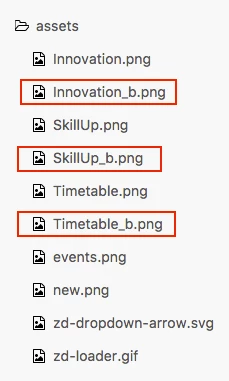
@Isabella do you have these assets in your HC?


  • December 20, 2017

Yes. @Trapta