Add description to the Attachments field for "Submit a request" form | Community
Skip to main content

Add description to the Attachments field for "Submit a request" form

  • April 15, 2016
  • 83 replies
  • 0 views

Show first post

83 replies

CJ99
  • June 2, 2022

I suspect the code posted in 2020 is no longer valid. The div listed is not where this text field lives, at least not for me. 


Dave12
  • June 2, 2022

CJ99
  • June 2, 2022

@dave12 No, I'm referring to the code in the comments on this article, for example: https://support.zendesk.com/hc/en-us/community/posts/4409515328538/comments/4409510181018
I have confirmed that jQuery is present in my document_head.hbs . 

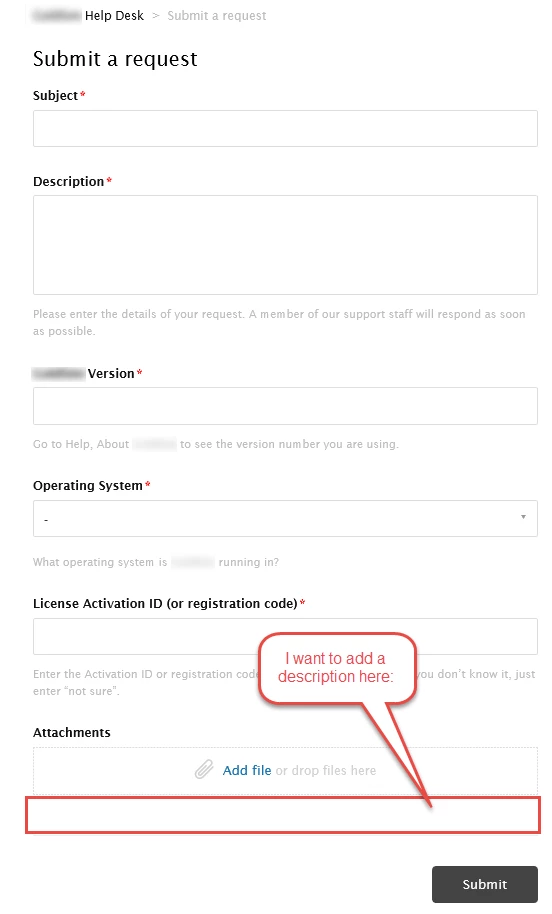
Here's a screenshot showing that the div id for "upload-dropzone" closes before the attachment text code even appears, which is why it doesn't work: 


I just haven't had a chance to figure out how to rewrite the JS to reference this class instead of the div ID. 


Dave12
  • June 4, 2022
Thanks for the clarification, CJ – you might be able to use this? https://www.w3schools.com/jsref/met_document_getelementsbyclassname.asp

  • March 3, 2023

Is it possible to either have multiple attachment fields or have the caption change based on which ticket form is being used?


Dane13
  • March 28, 2023
Hi Jack, 

Multiple attachment fields in a form is not natively available. However, you are able to alter your requests page through the altering of your theme on Guide and could likely achieve a similar result to the change you are looking to make. Please take note that customization of HC code is outside our scope. 

zbender
  • August 24, 2023

I am trying to check for form and a field drop down option is picked. And if those two options are picked then changes the text.

Here has what i have come up with

 if(window.location.href.indexOf("123412") > -1 && $('.form-field.request_custom_fields_112313.val() = "Eligibility Letter"') {
 $('div#upload-dropzone').parent().find('label').text('Attach copy of Letter (Required)')
 }


Bobby15
  • April 3, 2024

How can we change the description text based on the drop-down values we select? Is it possible to conditionally change the description at the bottom of attachment field?