Add description to the Attachments field for "Submit a request" form | Community
Skip to main content

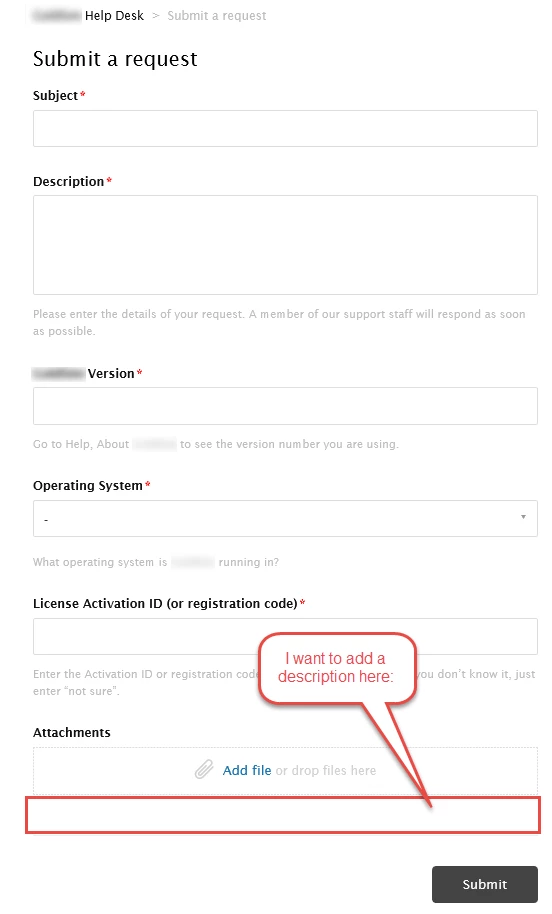
Add description to the Attachments field for "Submit a request" form

  • April 15, 2016
  • 83 replies
  • 0 views

Show first post

83 replies

Hi all, 

I see this post is 2 years old

I'm trying to insert a description in default form attachment

Is there any change ? I Can't see any text appearing in attach description, used all tips in thread but with no luck


Thanks in advance for help


Vladan
  • June 24, 2020

Hey Andrea, is you submit a ticket page visible outside? If yes, could you send me a link?

If not, please put your code here so I can check. Thanks! 


Yes is visible,

form is cutted in some part to make it easier embedding in website, but is visible to anonymous user

https://kasanova.zendesk.com/hc/it/requests/new 


Vladan
  • June 25, 2020

hey Andrea, thanks for the link. I just checked but I can't see the code there, is it already added?

Also, please include jquery in your page, just paste this code into the Document Head.

<script
src="https://code.jquery.com/jquery-3.5.1.min.js"
integrity="sha256-9/aliU8dGd2tb6OSsuzixeV4y/faTqgFtohetphbbj0="
crossorigin="anonymous"></script>

YESSSSS !

Great job Vladan, with your script everything works like a charm, text appears as expected.

Thank you very much, I am ready to publish, now


Cheers


Vladan
  • June 25, 2020

Glad to hear that, Andrea! Cheersss!


  • August 5, 2020

Hello Help desk team


Can someone guide me how to access my JS code to edit my attachment description field ? 


Grant21
  • August 5, 2020

@Maruthi Kavi I'm not from the Help Desk team but you should be able to edit your JS code from the Theme section (under edit code)

https://support.zendesk.com/hc/en-us/articles/115015722628-Editing-the-code-for-your-live-Help-Center-theme-Guide-Professional-and-Enterprise-


Nicole17
  • August 7, 2020

Thanks for jumping in, Grant!


  • September 22, 2020

I am very happy to report that @Vladan Jovic's suggested script worked perfectly for my needs:


<script> 
if(window.location.href.indexOf("123456") > -1) {
$('div#upload-dropzone').parent().find('label').text('Please attach your proof of purchase below')
}
// replace 123456 with the 'hardware fault' form ID
</script>


Mine is not for a hardware fault report, but I needed custom text for the attachments field on just ONE form, not all of them. And now I have it. Thanks Vlad!


Vladan
  • September 23, 2020

I'm very glad to hear that!
Thanks, Marci for your feedback! 


  • November 20, 2020

Hello all !

Using jquery to solve this sounds like a great idea. Any suggestion to implement the same strategy when the form is displayed inside the chat widget? (since the elements do not exist in the ready function, we cannot change them until they appear.

Thank you!!


Can anyone help me add a description to the subject field for a specific form? 
Thanks 


Hi Jonathan,

Looks like this question is answered by one of our community moderators in this post: https://support.zendesk.com/hc/en-us/community/posts/360037440134-How-to-change-the-name-of-the-subject-field-in-the-ticket-forms-.

Best,

Michael Froeming | Senior Customer Advocacy Specialist

NEW - Zendesk offers free, on-demand training for all of our products. Set up your account and start learning today at training.zendesk.com


  • August 3, 2021

Hello 6548232608 or anyone who can help !

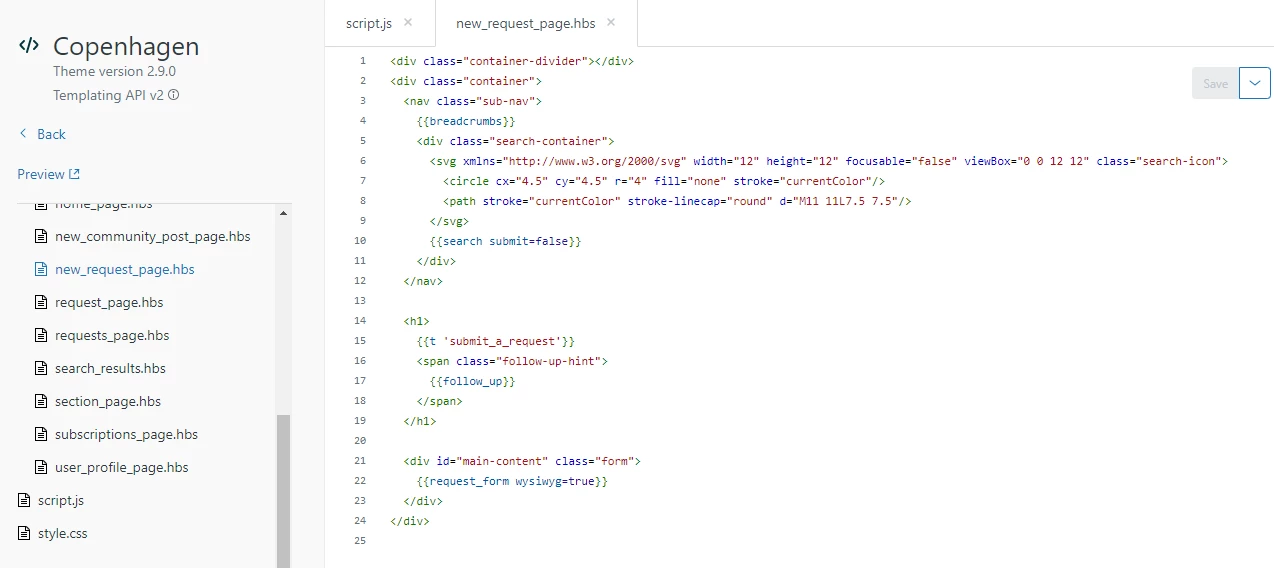
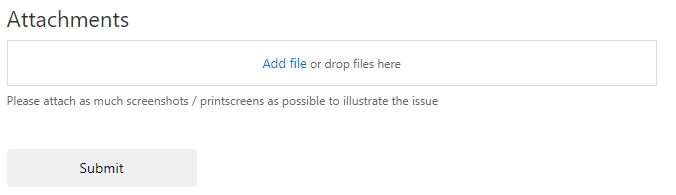
Unfortunately, none of the codes listed on this thread has helped me. It would be helpful to see a screenshot of the HTML code where you are pasting these codes. I would like to just add a description below the Attachments field (see 2nd picture of example I'm trying to produce). The 2nd picture is from the link 23938090508 provided. 


raphael12
  • January 27, 2022

@michael186 this page isn't available anymore..


Brett13
  • Community Manager
  • January 27, 2022
Hey Raphaƫl,
 
It looks like some images in that post you were linked were broken which is why it was hidden.

I've gone ahead and re-uploaded the images and made the post public so you should now have access.

Let me know if you continue to experience issues!

raphael12
  • January 28, 2022

@brett13 Thanks!!


raphael12
  • January 28, 2022

We tried this script (given in the first page of comments of this article, the aim is to change the name of the Attachment field in the form):

<script>
 if(window.location.href.indexOf("360003591018") > -1) {
 $('div#upload-dropzone').parent().find('label').text('Please attach your proof of purchase below')
 }
 // replace 123456 with the 'hardware fault' form ID
</script>

That worked for one of our Zendesk instances but it didn't work in another one (with the Copenhagen theme too and SSO) 

I put the whole new_request_page.hbs code below if anybody got a clue of where the issue might be coming:

<div class="container-divider"></div>
<div class="container">
  <nav class="sub-nav">
    {{breadcrumbs}}
    <div class="search-container">
      <svg xmlns="http://www.w3.org/2000/svg" width="12" height="12" focusable="false" viewBox="0 0 12 12" class="search-icon">
        <circle cx="4.5" cy="4.5" r="4" fill="none" stroke="currentColor"/>
        <path stroke="currentColor" stroke-linecap="round" d="M11 11L7.5 7.5"/>
      </svg>
      {{search submit=false}}
    </div>
  </nav>

  <h1>
    {{t 'submit_a_request'}}
    <span class="follow-up-hint">
      {{follow_up}}
    </span>
  </h1>

  <div id="main-content" class="form">
    {{request_form wysiwyg=true}}
  
  </div>
</div>
<script>
 if(window.location.href.indexOf("360003591018") > -1) {
 $('div#upload-dropzone').parent().find('label').text('Please attach your proof of purchase below')
 }
 // replace 123456 with the 'hardware fault' form ID
</script>


Thanks for looking

Amie11
  • January 30, 2022

hi @raphael12

Can you check the document_head.pbs page to confirm if there is a jquery script on there? If not, add the below jquery script to the document_head page and then see if the script to change the attachment field name from there

<script src="https://code.jquery.com/jquery-3.6.0.min.js" integrity="sha256-/xUj+3OJU5yExlq6GSYGSHk7tPXikynS7ogEvDej/m4=" crossorigin="anonymous"></script>


raphael12
  • January 31, 2022

Hi @amie11 ,

You solved my problem, thanks a lot! :-)

Kind regards,


raphael12
  • February 1, 2022

@amie11, sorry for disturbing, I don't understand it's not working anymore on the same form.

I didn't change the code but add and take off a form.

Both pieces of code are still in the same place, I don't understand..

I solved the issue by adding this one finally at the bottom of new_page_request.hbs

<script>
$('div#upload-dropzone').prev().text('New text');
// change New text
</script>

Amie11
  • February 2, 2022

hey @raphael12

Did you check to make sure this line in your code contains the correct ID still after you adjusted your forms? 

 if(window.location.href.indexOf("360003591018") > -1) {

Andrii20
  • February 3, 2022

Hey, is this code will work in any way? 

I've tried to paste that code to change the "Attachment" field in one of my forms, but it does not work:

<script> 
 if(window.location.href.indexOf("4420689591703") > -1) {
$('div#upload-dropzone').parent().find('label').text('Please attach your node logs')
 }
</script>

Is there any way to make the ticket unsubmittable if the user has not added the attachment? 


Tipene
  • February 7, 2022

Hi @andrii20,

While it's not possible to require the attachment field in your help center directly out of the box, here's a great user submitted example of how you could implement a required attachment to your request form:

https://support.zendesk.com/hc/en-us/community/posts/4409515169946-Requiring-a-ticket-attachment-if-a-particular-dropdown-option-is-selected

I hope this helps! Feel free to reach out with any questions.

Tipene