Add Button beside Submit button in Submit New request page | Community
Skip to main content

Add Button beside Submit button in Submit New request page

  • November 8, 2022
  • 6 replies
  • 0 views

David58

Hi there,

Just need help on where I can edit/ code to add another custom Button in Submit New Request Page? Appreciate any response thank you

6 replies

Greg29
  • November 9, 2022

Hi David! Since we render the button with the rest of the request form helper, you'll need to accomplish this with Javascript. The following example is only for illustration purposes, just to get you moving in the general direction. Note with the button "type" of "submit", it's going to inherit the styling and functionality of the submit button, so you'll want to change that to "reset" or "button" (with an associated function) and then handle the styling to match the submit by checking the style.css file.

Hope that gets you what you need!

<script>
document.body.onload = nextToSubmit;

functionnextToSubmit() {
let footer = document.getElementsByTagName("footer")[0];
let newButton = document.createElement("input");

// Add whatever you'd like here
newButton.innerHTML = "newButton";
newButton.type = "submit";
newButton.value = "New Button";

footer.appendChild(newButton);
}
</script>

David58
  • Author
  • November 14, 2022

Hi Greg,

thank you so much for your response. 
I just want to confirm on where I should place this script... Is it under new_request_page.hbs?


Greg29
  • November 15, 2022
Yep, that's correct!

David58
  • Author
  • November 23, 2022

Hi Greg,

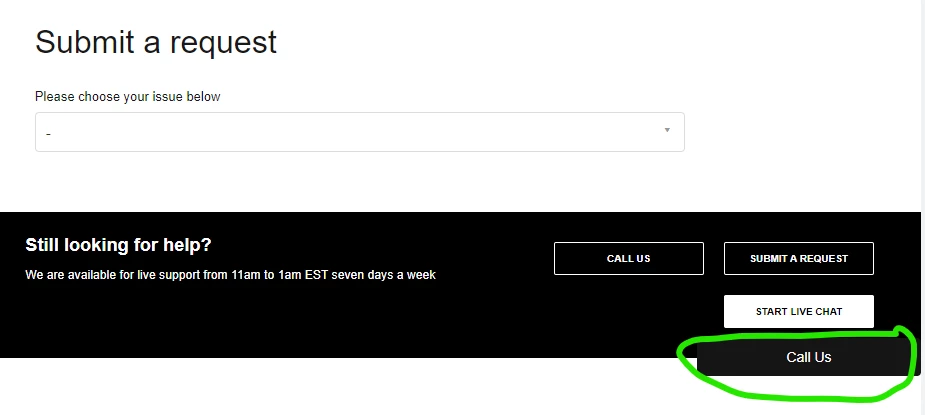
Additionally, I want o check why the button is showing on the page when the form page is loaded, as seen below. 

  What I am trying to achieve is that the button should be hidden and only shows when one of the drop down request category is chosen. As Shown below:
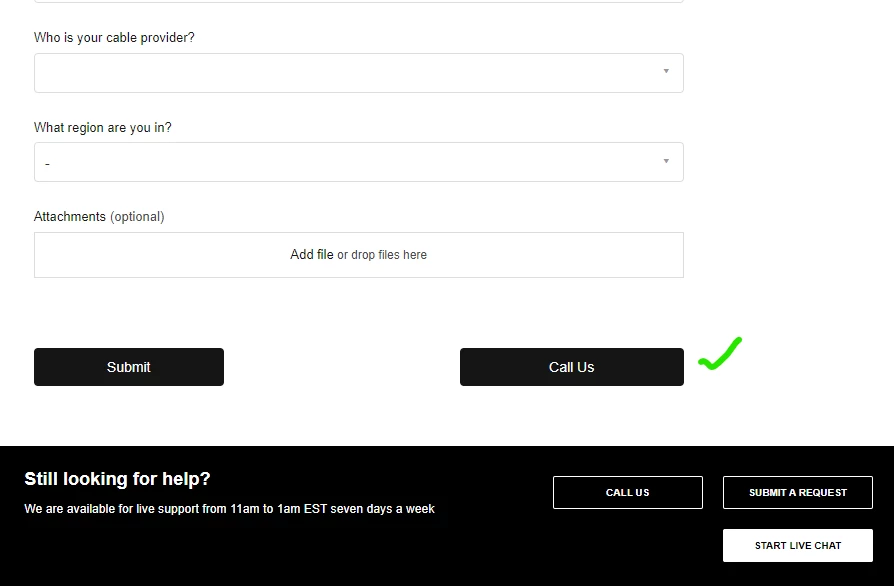


How do we achieve this? Thank you in advance and happy thanks giving.


David58
  • Author
  • December 2, 2022

Hi Greg,

Any Updates on this?

Thank you. 

Best regards,

David


Greg29
  • December 7, 2022

Hi David! I can't really tell specifically why something like that is happening in your code, as this would require us to troubleshoot custom code. The above example that I provided is for illustration purposes to get you in the right direction, not necessarily to provide a complete solution. If you don't have experience with development work, I would recommend bringing on a dev who can assist with this project.