Your Feedback on Zendesk Dark Mode | Community
Skip to main content
Accepted

Your Feedback on Zendesk Dark Mode

Related products:Ticketing system (Support)
  • March 24, 2025
  • 66 replies
  • 0 views

Shawna11

Dear Community, 


We are thrilled that Zendesk Dark Mode is now in your hands with our Zendesk Dark Mode EAP. We are thrilled to have you start trying this feature.


Please share your feedback with us here in the comments below to help us improve this feature! We appreciate you taking the time to share your insights. 

66 replies

Michael67
  • March 24, 2025

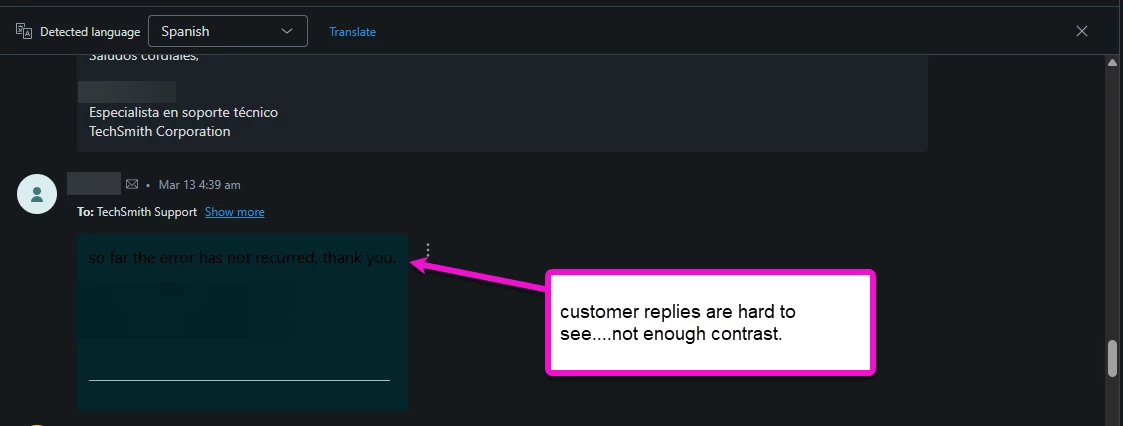
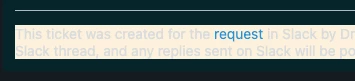
Customer replies are hard to see.  It's not this way on every ticket, but this one made it difficult.


David116
  • March 24, 2025

One of our agents noticed an email from a customer where their font was black.  That's hard to see in dark mode.  Anything that can be done about that?


Rianne
  • March 25, 2025

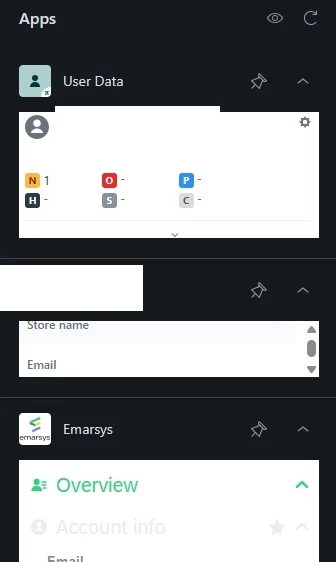
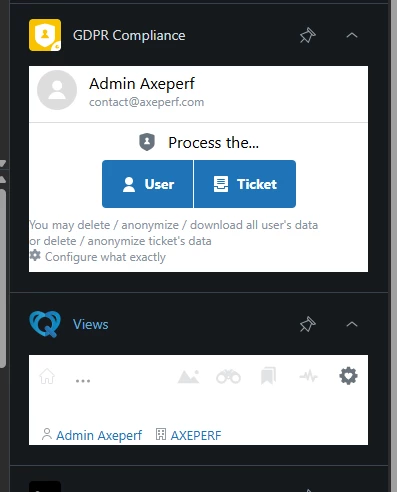
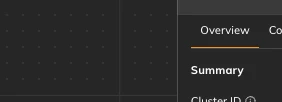
The apps in the side bar currently have a white background in dark mode, is that something that will be updated in the future? 


  • March 25, 2025

We are seeing similarly inconsistent performance for incoming messages. Black and blue text is not changed to white and it is very difficult to read against the forest green background.


  • March 25, 2025

Hi,


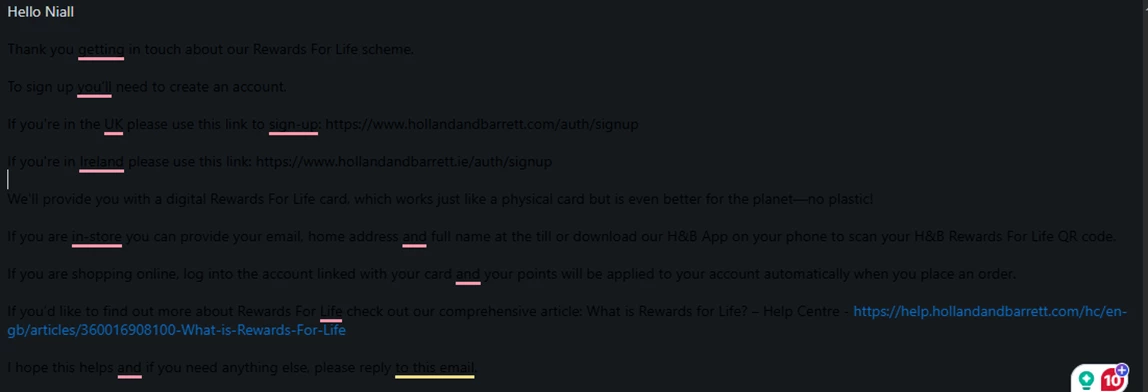
i have same feedback some customer comments are unreadable:


Also our Apps (especially the Custom ones) is their an API / Guidelin update to support dark mode, otherwise it looks quite ugly.


Janine12
  • March 25, 2025

One of our agents who uses a Mac noticed that “Match system appearance” doesn’t seem to work if the system is set to auto (depending on the time of day). Then it’s always dark, even if the system is in day mode.


Josh43
  • March 25, 2025

Absolutely thrilled we have a dark mode now!

I did want to also jump on the few other comments around apps. All of our custom sidebar/editor apps now look quite jarring. I haven't found any documentation (nor via testing random APIs) around being able to see what theme the user has selected. Ideally, an event listener via the Zendesk Apps Framework would be added so that when the user changes theme, our custom apps can also change theme on said event (in the meantime, I've added a theme switcher in all of our custom apps, but that's adding extra steps to make the UI looks nice).


Robert17
  • March 28, 2025

I have received similar feedback to the above:

  • Apps look awful on dark mode, as they are not fully changing their colour - including some Zendesk built apps like Jira.
  • Status colours do not have enough contract on dark mode.

  • March 31, 2025

We are happy to see that Dark Mode has been rolled out, as it has been a long-awaited feature for us! For the most part, it looks consistent, however, the absence of dark theme support for apps makes it a bit unsightly and detracts from the overall experience. Additionally, as there is no dark mode for Explore, the dashboards in the Reporting tab also have light background when dark mode is turned on.


We believe that if Dark Mode is available for Apps and for dashboards in Explore, the overall look and experience will improve significantly.  We have only been testing the feature, and we would like to implement it in all our instances, but at the moment, it seems a bit unfinished.


What we would like to see is Dark Mode available for apps and dashboards in Explore as well, so that when it is activated, the look and feel will be consistent throughout the Support product. 


Bogusz
  • March 31, 2025

Hey, all my conversation messages' “insides” are white, even though the conversation's display mode is set to “View in dark”:


Bogusz
  • March 31, 2025

Ian11
  • April 1, 2025

Same feedback, some macros are unreadable


  • April 2, 2025

Hello! Thanks all for your feedback so far using dark mode. A few answers for you all. 


  1. Apps: We are working hard to get the tooling available so your developers can make the apps work in dark mode. We're close and will be released with the GA May 1. 
  2. If you are seeing dark text in conversations: Reminder that there is a toggle in the Convo Log 3-dot menu where you're able to toggle on/off light mode when you're using dark mode. This usually happens when the message is from an email. 

Please feel free to tag me in a post if you're seeing other issues - thank you!


Brian50
  • April 9, 2025

For some tickets created from integration, text background color is auto adjusted & makes dark mode, bright mode:


Brian50
  • April 9, 2025

I also think a dark grey (#303030 ish) and off-white font color would be a little easier on the eyes:


Filip13
  • April 10, 2025

Hello, I would like to add that I am experiencing the same issue as the first one reported. Sometimes, the tickets are hard to read, and the contrast is not enough for the ticket to be readable. I have used dark reader extensions, and their contrast is much better with the same conversation. 


  • April 10, 2025

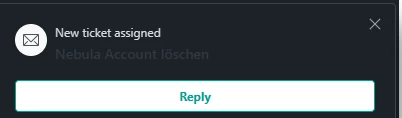
I found the Omni Channel Notification for new Ticket Assignment isn´t readable:

(Subject of Mail / Web Form Request)


Taylor22
  • April 10, 2025

The inconsistent colors on end-user replies and within the app panel are happening for us as well.


Stacy13
  • April 11, 2025

My agents are reporting that dark mode hurts their eyes.

“Initially, we were excited about the dark mode. I have dark mode turned on for my WhatsApp, Instagram and phone’s default theme as well. But din’t know it would not suit my eyes for Zendesk. But, its okay, light mode is cool.”


  • April 11, 2025

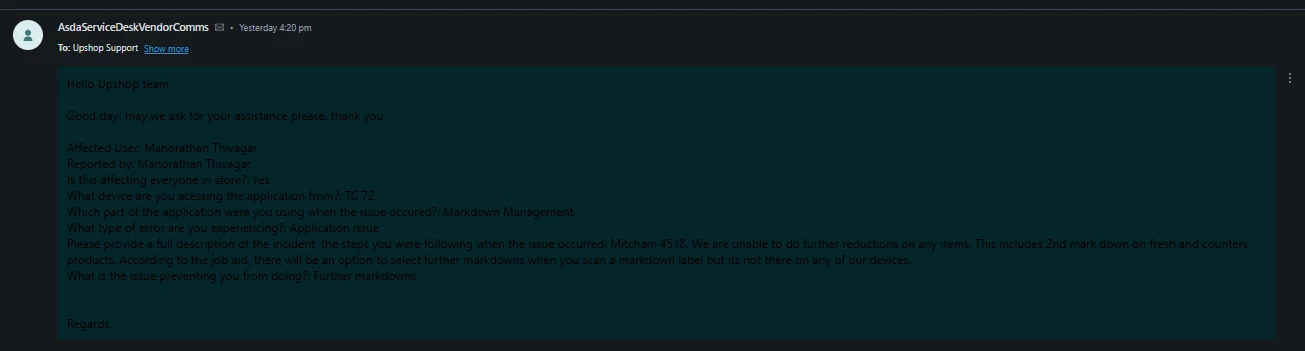
I can barely see customer replies. I can work with everything else, but this is very difficult. It is probably the most impacting issue with the beta Dark Mode. I'm a massive Migraine sufferer and would love to be able to use Dark Mode in Zendesk. Would really appreciate priority around this issue: 


Harper11
  • April 15, 2025

Hi @abbe — While I appreciate the attempt at a work-around, this isn't feasible: 


Reminder that there is a toggle in the Convo Log 3-dot menu where you're able to toggle on/off light mode when you're using dark mode. This usually happens when the message is from an email. 


I use Dark Mode because of extreme light sensitivity, migraines, and vertigo. The apps all still having white backgrounds, toggling between light and dark mode, and getting blasted in the eyeballs with white backgrounds whenever I move over to admin center is really killing the whole Dark Mode experience for me. I unfortunately had to go right back to light mode with my screen brightness turned all the way down after trying dark mode for just 5 minutes, because at least light mode is consistent and doesn't cause intermittent physical pain with all the switching back and forth between a comfortable dark screen and a blinding white one.


Please know that Dark Mode functionality is an accessibility issue. It's not just a “nice to have,” some of us need it to prevent headaches and other issues. Toggling back and forth is actually worse than not having Dark Mode in the first place..


  • April 16, 2025

@harper11 Thank you for that context and of course we realize that dark mode is an accessibility issue, not just a “nice to have.” We're so sorry you're having issues with the current email reader functionality and are looking into possible solutions. We'll keep you, and all, posted with what we're able to do to fix this issue for you. 


Sydney11
  • April 16, 2025

I have to echo @harper11's sentiment - when you turn on darkmode in OneNote for example, there is not a single page that will be white. It is consistent and you honestly forget that it was anything else. Alternatively, when you have Dark mode on that is only on certain pages, it really draws attention to where it isn't dark mode and it is jarring for your eyes - especially if you frequent those pages.


I already find it that way when I am working in other platforms (all in dark mode) then go to Zendesk which is all white. While this is a good start, it feels more like a demo and not actual core functionality. Hopefully this changes before it leaves EAP


  • April 25, 2025

The dark mode feels incomplete.  For example when working on a ticket, the “Submit as… ” button at the bottom right is still white which ends up being distracting to the overall UI.


  • April 27, 2025

Some feedback as I've used Dark Mode for a good while now whilst it's been enabled in our instance.

Third party applications don't seem to like it (Not a Zendesk issue but something to note), this leads to unreadable text sometimes or is straight up ignored.


Tickets that include custom CSS seem to override and make the tickets almost unreadable (might be able to do something potentially?). This seems to stem mostly from tables.


SLA Counter colours are too dark. They are a little harder to read when they're about to breach.