Stopping the reopening tickets by a ' Thank you ' response. | Community
Skip to main content
Accepted

Stopping the reopening tickets by a ' Thank you ' response.

Related products:Ticketing system (Support)
  • March 14, 2014
  • 72 replies
  • 0 views

Show first post

72 replies

Nicole17
  • September 27, 2018

Thanks, Tobias and David. 


  • February 25, 2019

+1


Rodger
  • October 7, 2019

Has there been an official resolution to this issue?


Pedro17
  • October 9, 2019

This is a complicated topic with some "hidden dangers" (see Heather's comment here, for example).

As Heather notes, the main problem with automatically resolving tickets based on words or expressions is that we could potentially risk ignoring a legitimate request for assistance.

Some ambiguous examples of customer replies/reopens:

  • Thanks a lot! but I still can't see the invoice
  • Have a great day, thanks for nothing!
  • I really appreciate your help! and how can I (...) 

This sort of automatic resolution could be a viable solution if the current comment's character length existed as a business rule condition, for example (e.g. if comment contains "thank" + if comment length less than 10 chars = solve ticket).

A suggestion for a different flow:

  • Tag tickets when they're Solved for the first time (e.g. first_solve)
  • Trigger for reopens would check (ALL conditions): if current user is end user + tag contains "first_solve" + reopens = 1 + comment is public; and (ANY conditions): words contain "thank appreciate ..."  = set ticket to on hold + optionally add another tag (e.g. first_solve_reopened)
  • Edit your SLA policies so that tickets with first_solve/first_solve_reopened won't have an SLA policy
  • You can also create a specific view for these tickets

Any suggestions or corrections to this workflow are most welcome -- I'm sure this is an inconvenience we all share!


Dan28
  • October 15, 2019

I agree with the "thank" + character length as a potential option.  I'd love to see this sort of solution in place as it would be far less likely that a 10 character response would be anything but a thank you vs a two paragraph thank you response.  

It would be interesting to see an AI approach here.  I imagine that this would be an awesome way to build upon satisfaction prediction models as well as I'd imagine that you could model comments that follow a solve that say thank you against the instance to get a pretty good understanding of the patterns that would indicate if a ticket should stay closed or re-open.  Especially if there was another question included alongside that comment.


Kevin73
  • January 31, 2020

This issue is bugging us at our company too. My idea is to offer a feature that includes a "Thank you!" button in the email after a ticket has been resolved, possibly side by side an accompanying friendly reminder that replying back to the email will only reopen the issue (and whatever other words are appropriate) and instead a "click will do the trick".


  • September 10, 2020

Just adding my 2¢. Created a trigger that replies to any email with "Thank You" or "Thanks" in the comment on a solved ticket. The reply has [Reopen] in the subject and asks them to resubmit if they do indeed need additional support. If a [Reopen] reply is received, it reopens that ticket. Seems to be working well.


Rodger
  • September 10, 2020

@shanepinnell - Wow, that is a great idea.  Would you be able to share some screen shots of the trigger set ups?  This could be the break though that we have been waiting for.


  • September 25, 2020

Hi all,

Just chiming in with the Zendesk perspective. The reason why we generally recommend against doing these kinds of triggers, is all too often there are false positives. When I was a customer advocate here for instance, many times customers would respond with something to the effect of "Thanks for the answer, but something else came up..." or "Thank you, but that's not exactly it". The customer frustration at that point if you solved their ticket out and they didn't notice for a few days and perhaps the ticket moves to a closed status and they have to start all over with someone else outweighs the inconvenience of having to re-solve those out in my opinion.

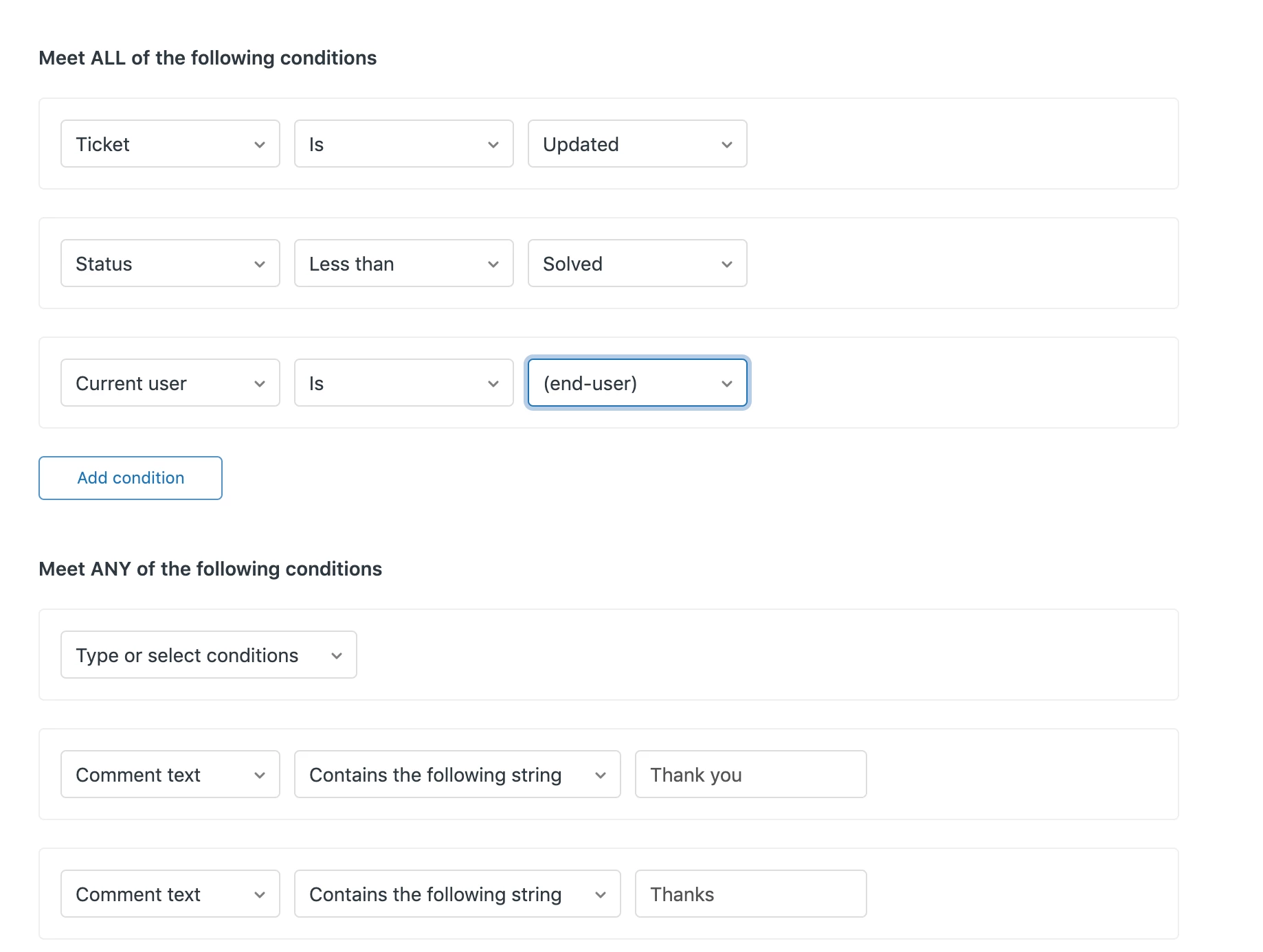
That being said, these triggers are definitely do-able. If you structured the conditions to work like this:

...and then for the actions you can solve the ticket out and send a message back, it would in theory work. I just wanted to put the previous disclaimer on there.

Please let us know if you have any further questions or concerns!


  • October 7, 2020

Precisamos de uma opção em que o agente possa determinar se o ticket reaberto gerou uma nova demanda (reabertura positiva) ou é relativo à demanda anterior e não há necessidade de considerar como reabertura de ticket (reabertura negativa)... ou algo do tipo...

Torço para que essa feature seja priorizada!


Tamir13
  • October 13, 2021

Yeah, I know that problem. It is kind of annoying when those reopened messages start to pile up. You can use this app on Zendesk's marketplace: https://www.zendesk.com/marketplace/apps/support/470124/thank-you-gpt


Scott52
  • October 25, 2021

The answer seems pretty simple to me, that is if Zendesk would do this question due diligence.  Just have an option to now allow tickets to be re-opened by anyone but an agent.  Once closed, closed for good and only can be re-opened by an agent.  Also have a response sent to the customer, editable at best, but at least "you've attempted to re-open a closed ticket...." etc etc.

Done, fixed, time to move on.  Now, will Zendesk respond by adding this feature?


Dave12
  • January 29, 2022

Hi Scott,

If you want that functionality, I think you can just achieve it using a single Trigger; no additional functionality needs to be added.

Under "Meet all of the following conditions", specify:

  • Ticket is Updated
  • Status changed from Solved
  • Status changed to Open
  • Current user is (end-user)

Then under actions, set Status to Solved, and email the requester with the text you suggest above and instructions on how to open a new ticket.

Then, if an end-user responds to a Solved ticket (which Zendesk would set to Open status), the Status will be set back to Solved and the requester will be notified. But an agent would be able to reopen the ticket. 


Mireille
  • March 11, 2022

A Zendesk colleague pointed me to this free app for my customers.  Perhaps it would work for others.  https://www.zendesk.com/marketplace/apps/support/470124/thank-you/ 


  • July 11, 2022

Suggestions:

 - AI to solve for the "should not be re-opened" situation

 - Create a new status option to turn on: The "Probably still solved" status


  • December 9, 2022

I would love to see a solution to this.  I end up reclosing a lot of tickets too.


  • March 28, 2023

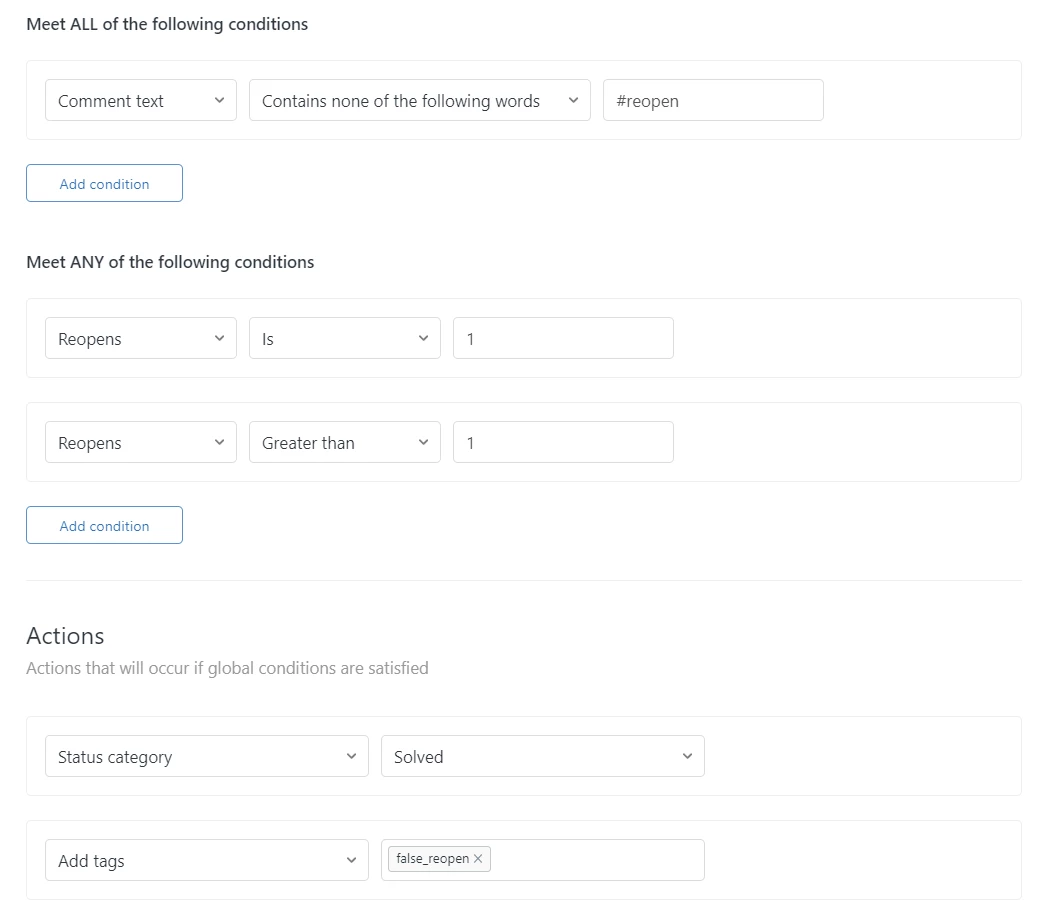
We found a solution that works well for us. Here is the process:

1) Agent solves a ticket.

2) Customer must use "#reopen" in their reply and explain why they still need help to reopen the ticket. This is communicated to the customer in the solved email. 

3) If "#reopen" is not included in the text, a trigger will fire to automatically push the ticket back to Solved and email the customer as to why their ticket was not reopened.

4) The trigger also adds a tag to the ticket called "false_reopen" so you can filter these false reopens out of your reporting. 

Trigger setup: 


We are still in the beginning phases of testing this out, but it seems to do the trick! Hopefully this helps out some folks! :)


Stacey12
  • June 2, 2023

Yeah, I know that problem. It is kind of annoying when those reopened messages start to pile up. You can use this app on Zendesk's marketplace: https://www.zendesk.com/marketplace/apps/support/470124/thank-you-gpt


Allen11
  • May 4, 2024

I created an automation via Zapier using a prompt in OpenAI, which is working wonders for us. I would highly recommend it.


  • July 10, 2024

Hey everyone, thank you for taking the time to provide us with this feedback. We apologize for the delay on our end in providing you with a response to your feature request.


This is a great feature request and I have added it to the backlog for future consideration. This means that we will think about adding it as a priority later in our planning cycle. We are going to leave this post open for comment to allow others to provide their feedback and use cases, however please note as is stated in our Community Guidelines that we can not commit to prioritizing any one piece of feedback we receive in the community. 


Gareth12
  • December 10, 2024

@allen11 Would you be able to share that Zap? I'd love to see it


Allen11
  • December 10, 2024

@gareth12 Sure here's how I did it.


  1. Create a trigger in Zendesk with the following conditions:
    1. Meet ALL of the following conditions
      1. Ticket status Changed from Solved
      2. Ticket status Changed to Open
    2. Actions
      1. Add tags “reopen_solved”
  2. Create a custom view in Zendesk with the following conditions:
    1. Tickets must meet all of these conditions to appear in the view
      1. Ticket status contains at least one of the following: Open
      2. Hours since status category open (calendar) is 1
      3. Tags contains at least one of the following: reopen_solved
  3. In Zapier, do the following:
    1. Step 1: Zendesk
      1. Event: New Ticket in View
      2. View: Select the view created in the previous step
    2. Step 2: Delay by Zapier
      1. Add a one-minute delay to ensure the trigger in step 1 occurs first.
    3. Step 3: Filter by Zapier
      1. Only continue if:
        1. Status Contains open; AND
        2. Tags Contains reopen_solved
    4. Step 4: Zendesk
      1. Event: Find Latest Comment
    5. Step 5: Filter by Zapier
      1. Only continue if:
        1. From Step 4, “Plain Body” Contains “thank you”; AND
        2. From Step 4, “Via Source From Address” Exists; OR
        3. From Step 4, “Plain Body” Contains “thanks”; AND
        4. From Step 4, “Via Source From Address” Exists
    6. Step 6: OpenAI
      1. Event: Send Prompt
      2. Model: gpt-3.5-instruct
      3. Prompt: "Review the first 255 characters of the message below from a customer. If the message is purely an expression of thanks without any indication that a reply or follow-up is needed, respond with 'TRUE'. Otherwise, respond with 'FALSE'. Note that any mention of an issue or request for assistance should lead to a 'FALSE' response. Here is the customer's message:

        "4. Plain Body"
    7. Step 7: Filter by Zapier
      1. Only continue if:
        1. From Step 6, Response Contains “true”
    8. Step 8: Zendesk
      1. Event: Update Ticket
      2. New status: Solved
      3. New Comment to add to the Ticket: “Zapier automatically updated the ticket status from Open to Solved because the customer was simply thanking us and a reply or follow-up is not needed.”
      4. Should the new Comment be public? No