Share Your Feedback on the New Jira Integration! | Community
Skip to main content
Accepted

Share Your Feedback on the New Jira Integration!

Related products:Platform: Apps & integrations
  • October 17, 2025
  • 18 replies
  • 0 views

Karan14

Hi Everyone,

We’ve launched a new Jira integration for Zendesk Support, designed to give you more flexibility, better performance, and a smoother workflow between Zendesk and Jira. Learn more about what’s changed.
 

If you’ve started using the new integration, we’d love to hear from you!

  • What’s working well so far?
  • Is there anything that could be improved?
  • Any features you’re excited about or would like to see added?

Your feedback is important and helps us make the integration better for everyone. 


Please post a comment to this thread with your thoughts, suggestions, or questions. We look forward to hearing about your experience!


18 replies

  • October 17, 2025

Are there any updates to field syncing in 1:Many scenarios or how the issue/link details are available in each system. Our use case is being able to create views/reports in each system that display linked ticket/issue details. Since the previous integration only stored the details (ID, status, etc.) within the respective widgets in each system, we created custom fields to sync the data we needed. Linking 1 Jira issue to Many ZD tickets works ok for us because the Jira issue can field sync with multiple ZD tickets. The syncing of Many Zendesk tickets to 1 Jira issue doesn't work for obvious reasons. 


So, if the linked issue/ticket details are stored as attributes in each system or field syncing has been enhanced, it would save us trying to develop a way to achieve what we need with action flows. 


  • October 20, 2025

@karan14 we have some concerns about the Jira Legacy Integration. We are using Jira Onpremise with Zendesk Integration APP and we're planning to migrate to the new software in 2026, and we need to use the Legacy integration while the migration is not complete. 
How can we ensure that legacy integration with Jira Server will continue to run smoothly? Do Zendesk has specifics orientation to us about this matter?


  • November 24, 2025

@karan14  I'm impatient and want to move to the new integration. If I uninstall the legacy integration will that de-link my Zendesk and Jira tickets?


Karan14
  • Author
  • December 8, 2025

Hi  @jacob50 

Thank you for your feedback. Yes, the new integration supports all scenarios: one-to-many, many-to-one, and many-to-many. This means one Zendesk ticket can be linked to multiple Jira issues, multiple Zendesk tickets can be linked to one Jira issue, or multiple Zendesk tickets can be linked to multiple Jira issues. In all these cases, fields will sync between Zendesk and Jira as described in the documentation
Please note, however, that the last synced value will always persist and  overwrite any previously updated values.


Thanks
Karan Shah
Product @ Zendesk


Karan14
  • Author
  • December 8, 2025

Hi @felipe28 

The new integration is only supported on Jira Cloud. Legacy integration will continue to be supported and is expected to run smoothly until we announce its deprecation. We will share updates soon regarding future plans and support for Jira Data Center and Server (on-premises) versions.

Thanks 
Karan Shah
Product @ Zendesk.


Karan14
  • Author
  • December 8, 2025

Hi @amanda49 
We have already started rolling out the in-product migration feature. Please do not disconnect from the legacy integration and follow the steps provided in the documentation. If you do not see the migration option yet, it will be enabled for you soon as the rollout progresses.

Thanks
Karan Shah
Product @ Zendesk 


  • December 18, 2025

The comment attribution in the new integration is very confusing. I installed the integration under my user, so any comment on a linked ticket now shows as being authored by me rather than the person who actually commented. This is a very confusing user experience as people are now directing conversations to me instead of those who are holding the conversations with them. The only option is to install the integration as a dedicated user to indicate the comments are “system” messages. Not intuitive.


Richard59
  • January 5, 2026

I'm seeing what appears to be broken images on the issue type when first opening the new integration at this time. This was previously displaying if the JIRA was a bug/problem/ so on.


Kārlis11
  • January 21, 2026

* UPDATE - all the visuals disappeared, added them back.


Thanks for the 2.0 update, I really appreciate the work going into proper integrations! 


That said, it seems like it wasn't user-tested at all, as there is a surprisingly long list of UX, functionality, and real estate problems (things take up way too much space), many of them even a step backwards from v.1. I'll try to stay constructive, though, so here we go:


Top section

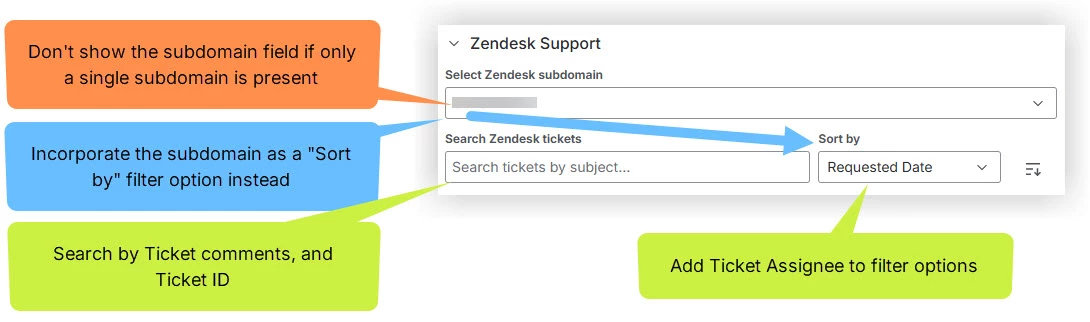
  • Don't show the Select Zendesk Subdomain field if only a single subdomain is present. In fact, if it works as a filter, add it as a ‘Sort by’ filter option instead.
  • The Search field is a missed opportunity, as you can only search by Subject (ironically, Subject is the only thing that's already shown in the collapsed tickets below). Oftentimes, you'd remember a specific phrase/term used on the ticket by the requester or by yourself, or QA/DEV departments would ask for a specific piece of information during an issue review meeting, and similar, so search by ticket comments would be great.  Search by ID would also be good for tasks with large amounts of linked tickets.
  • Add Ticket Assignee to filter options. Useful during meetings and calls when something has to be found quickly. 
  • Add a ‘Don't showsettings option for the entire top section. 


Linked tickets (collapsed)

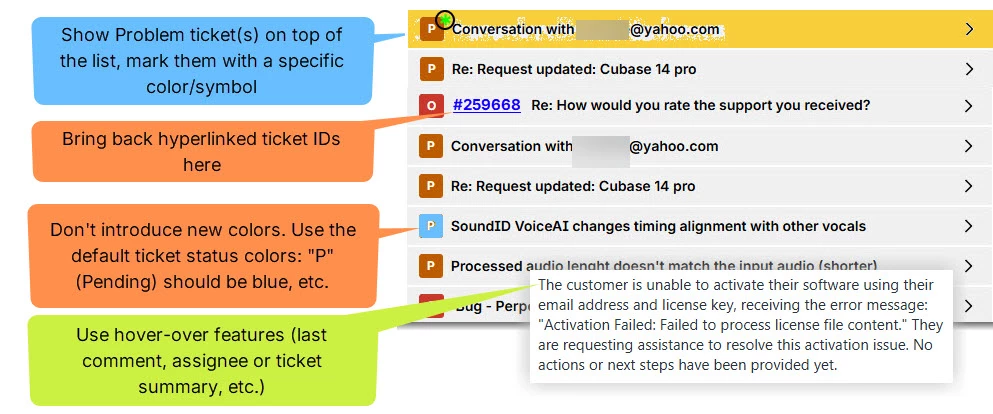
  • The removal of the hyperlinked ticket IDs from the subject line has been one of the worst changes for us. Finding things takes forever now (for example, a specific ticket ID mentioned in the Jira comments on the left; you now have to expand EVERY SINGLE TICKET to find the right one). Please bring back the Hyperlink ticket ID in the collapsed view ASAP! 
  • Don't introduce new colors for ticket statuses; it is a mess. If you have additional custom ticket statuses created, those should sync with the correct color too.
  • Mark the Problem ticket(s), and keep it on top. For us, every task tends to have a single Problem, with a bunch of Incidents linked, and I'm assuming many users use it in the same manner. To cover everyone's workflow, you could consider doing this for all four ticket types. The Problem ticket should remain on top; it is really important to be able to find it quickly.
  • There is a lot of useful hover-over stuff possible: Assignee, Last Updated, Requester Name, last comment, etc. In fact, this would be perfect for the AI ticket summary. Or at the very least, show the Subject in its entirety (often too long to show fully).


Linked tickets (expanded)

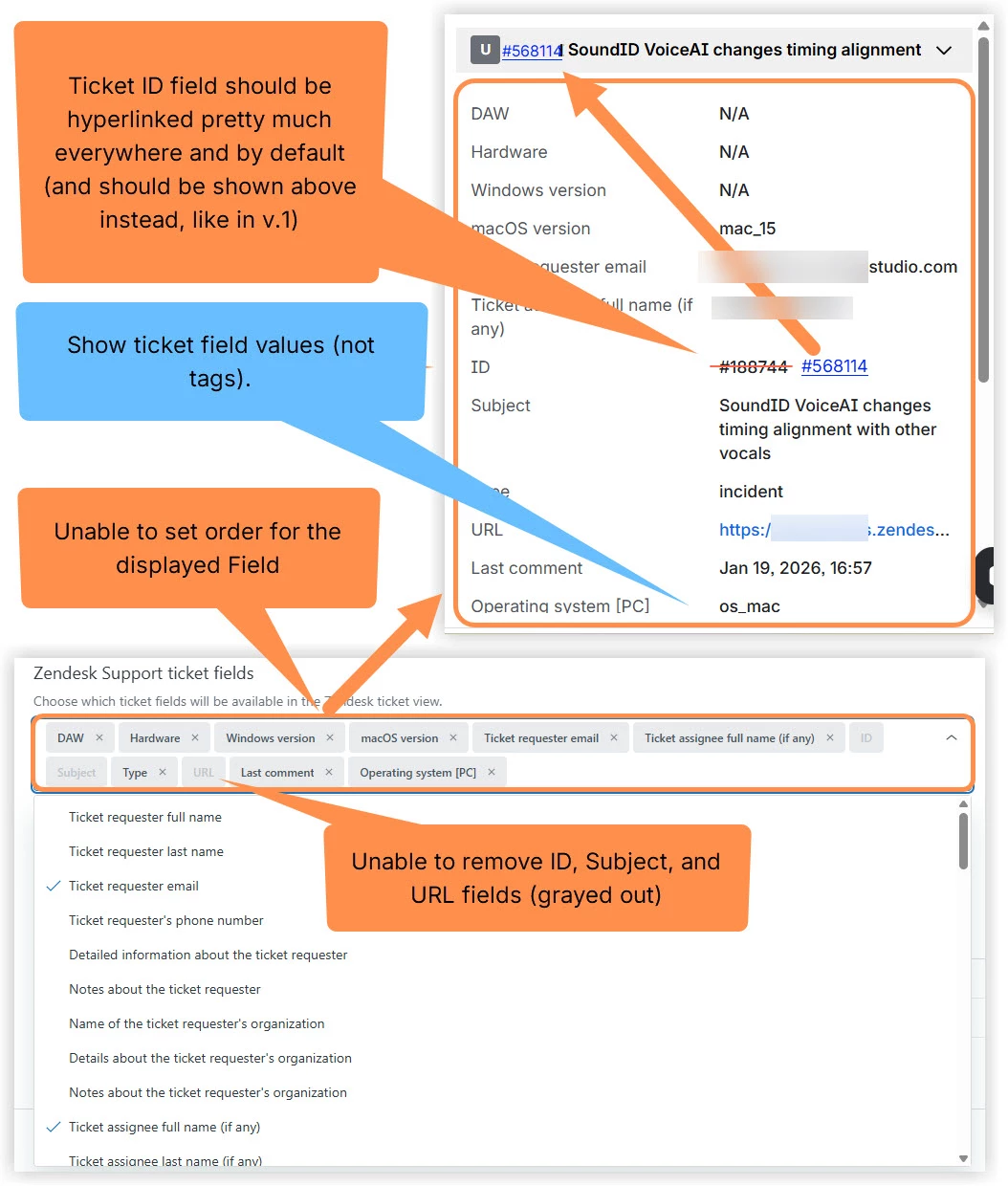
  • The displayed fields are a mess because it is impossible to arrange their order. If you remove them and add them again, the last one added will be on top - that's a kind of workaround, but it really seems like a bug. We should be able to change the order in the 'Zendesk support ticket fields’ (drag & drop, or another simple order-setting solution.
  • The ID, URL, and Subject fields are grayed out in those settings - impossible to remove them, can't rearrange order at all. There's no reason why they should be included and locked by default. For us specifically, I don't need them at all in here, as all three could be incorporated in the collapsed header (like it already was in v.1)
  • Wherever the ticket ID is displayed, it should be hyperlinked so that we don't have to use an additional URL field (again, real estate is precious).
  • For some reason, the field tags are shown instead of the actual field names/values for some fields. Looks like this is the case for all user-created fields.
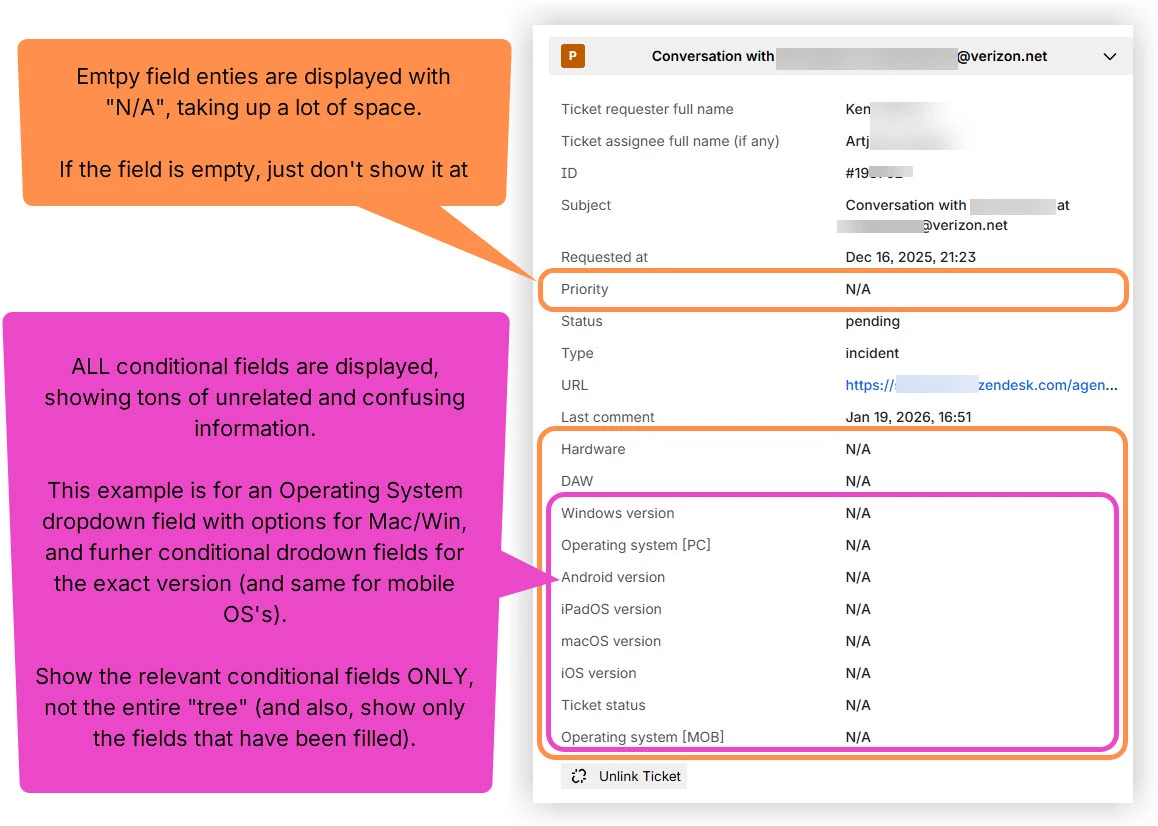
  • Furthermore, there is a ton of clutter due to all conditional fields being shown, again taking up a lot of real estate and confusing the viewer (for example, why would a “macOS version" field be present if “Windows" has already been specified in the conditional field before it; or why would an “Android version” field even pe present if project dealing with dekstop software products only, etc.).
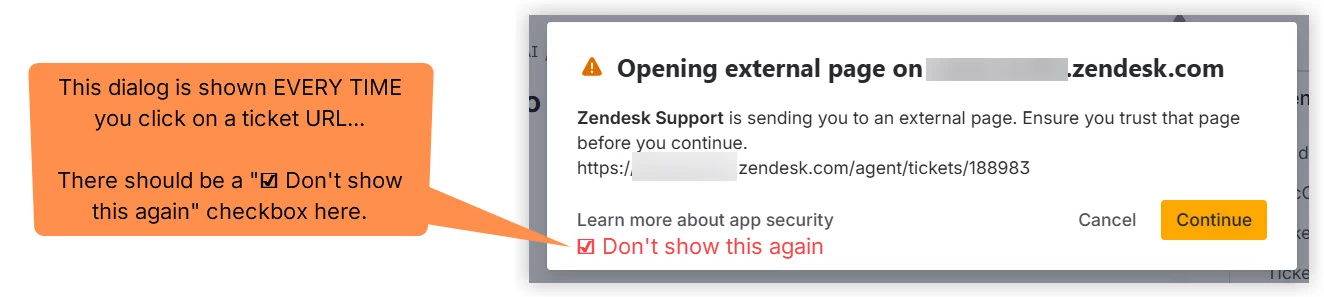
  •  The “Opening external page…” warning is shown literally EVERY TIME you click on a ticket URL… There is no option to dismiss it permanently - there should be a basic " ☑ Don't show this again" checkbox option here.


Zendesk Jira view

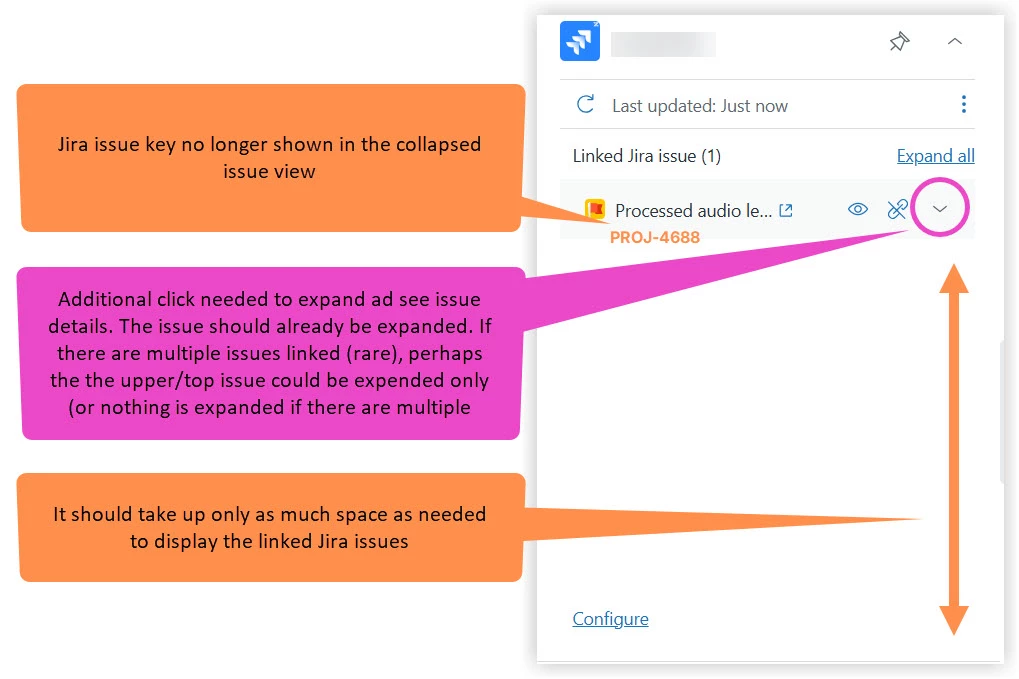
  • It takes up so much space… I thought it was common knowledge by now that the left and right sidebars for fields and apps are really precious real estate, and we all have a hard time squeezing in everything we want, optimizing it, rearraging it, and so on, just so we are able to save a few lines of space, making something important appear in the first fold, etc. Any app in the right sidebar that has unused space in it (in any state/view) should be fined… I'm only joking, but seriously… :))
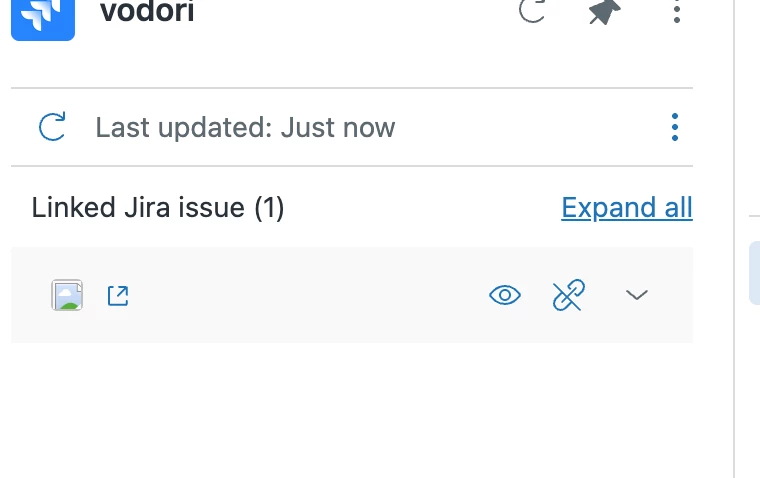
  • No longer seeing the Jira issue key for the collapsed linked issue - please bring it back ASAP! 
  • Extra click needed to expand issue details. It seems like some decisions have been made to optimize for several linked Jira issues. However, the reality is that 99% caes will have a single issue linked only, and it now takes another click to view it. If multiple issues are linked, you could expand the top one by default, or none.
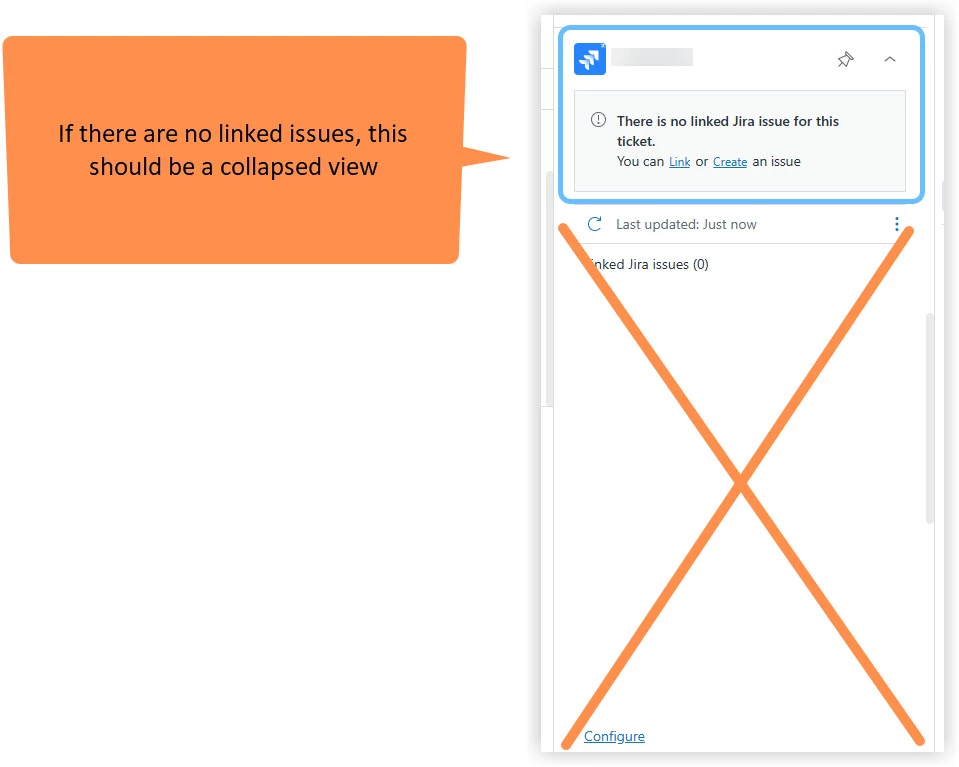
  • There should be a collapsed state if there are no issues linked. Showing the gray box only, with the Create and Link options. I do like that this gray box is minimal and tamed, but I did find the blue buttons for Create and Link easier to click on in v.1 


Most of this stuff is just common sense, so it seems there has been barely any user testing and very little design/UX consideration. It definitely feels like a Beta, where the correct color schemes simply haven't been implemented yet for ticket statuses, for example. 


That said, the foundation seems strong - it just needs a little love. Most items on this list are not difficult to get right; there isn't that much dev effort needed here. I haven't yet checked out the ZD <> Jira field mapping yet, so I'm sure this list will get longer. 


The Shopify integration has similar spacing issues, and is left unattended. I submitted a feature request for that years ago: showing the Shopify orders for the Zendesk user secondary email address(es) too, not just for the primary address. Super easy, support beneficial, and for context, we have a really cheap Stripe app that does this - it saves so much time. It's difficult to understand why they haven't been able to prioritize low hanging fruits like this. My hope is that they actually attend to it, and some functionality updates are also implemented. It is an “integration” after all, not some third-party app. 


  • January 22, 2026

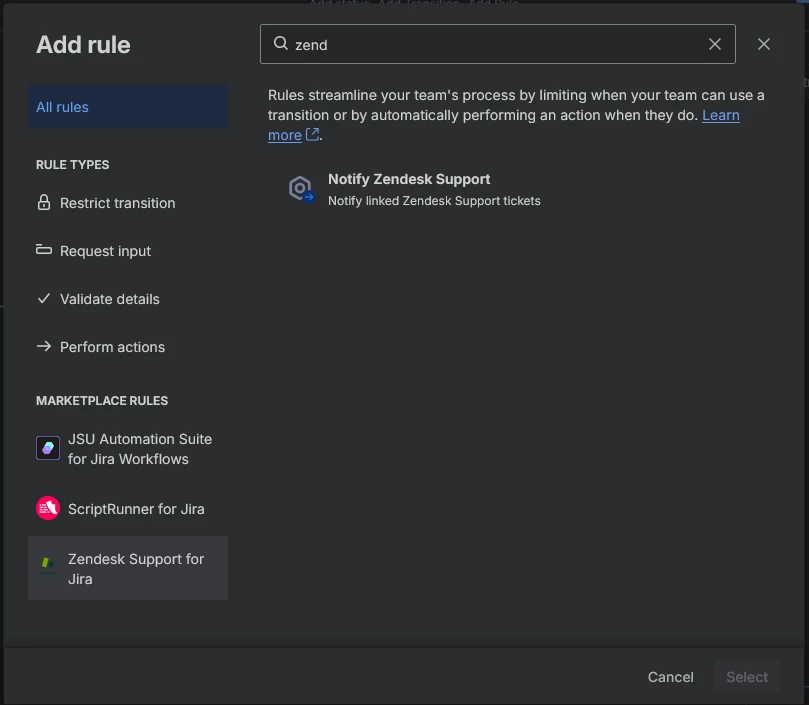
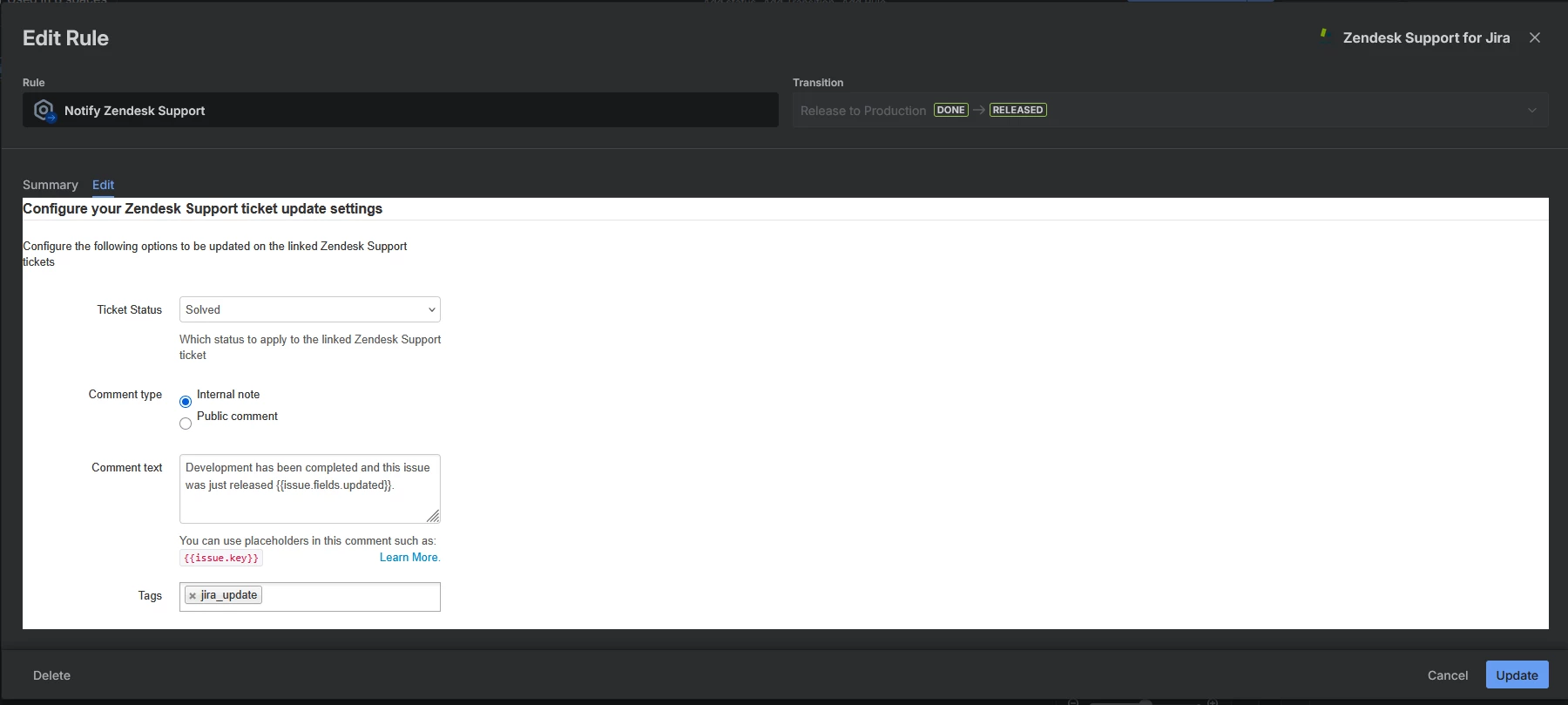
With the legacy app, we were able to add comments and change ticket status in Zendesk from Jira Worflows. The legacy app supported a Notify Zendesk Support rule for Workflows.


I don't see comparable functionality with the new app. How can this be achieved in the new app, and if it's not an option, will it be added?


  • January 28, 2026

We have constant issues with the integration not working. Everything looks like it's connected and Active, but if you go to actually use it to create or link a Jira work item we just get the message, “Error loading options (try again)”. This happens once a week or so… In order to resolve it, I have to disconnect the integration and set it up all over again.


Amjid
  • February 11, 2026

How come the Migration article is not available?  I need these steps to migrate?

https://support.zendesk.com/hc/en-us/articles/9931996900506-Migrating-from-the-legacy-Jira-integration


  • February 11, 2026

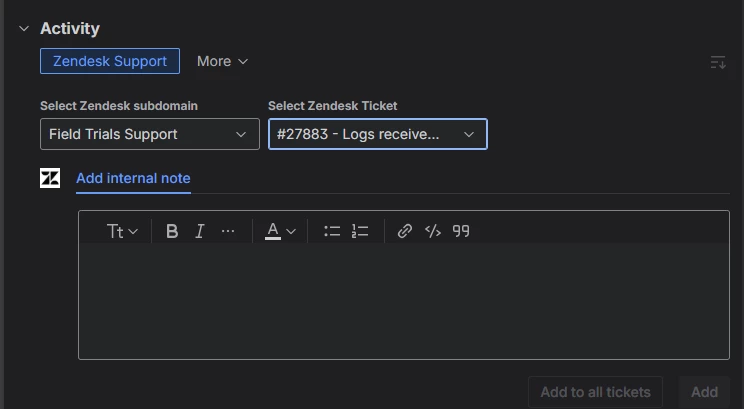
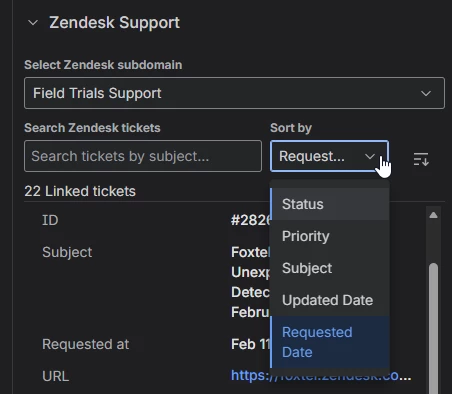
What is the sort logic in the activity pane? I don't understand. This needs the option to sort by request date so my devs can see the most recent ticket without going over to the support side pane.

no option here:


but there is one here?


  • February 24, 2026

Was there a problem with the rollout? I need the steps to migrate from the legacy integration but the article has disappeared: https://support.zendesk.com/hc/en-us/articles/9931996900506-Migrating-from-the-legacy-Jira-integration


  • February 24, 2026

Was the rollout paused? We have the legacy integration and I was able to make the instructions work in our sandbox but now the documentation is gone.


Amjid
  • February 25, 2026

Yes Rob the legacy migration is paused for now. Which is good gives us more time.


Andres22
  • March 5, 2026

The app integration frequently breaks where my agents cannot use it or view existing linked tickets:

This keeps happening frequently and uninstalling and re-installing doesnt always solve it.


  • March 17, 2026

Hi,
Any ideas when the app will be back up? I've been trying to fix a bug for a few months now, Zendesk supports answer was to tear it down and restart, but I can't: