Prioritize Bounced Email Notification | Community
Skip to main content
Accepted

Prioritize Bounced Email Notification

Related products:Ticketing system (Support)

Show first post
This topic has been closed for replies.

125 replies

Thijs12
  • September 10, 2024

We really need this feature!! 

+1 please. 


Scott12
  • October 7, 2024

WOW 7+ years this has been on the radar with no signs of it being completed. 


Melanie16
  • October 17, 2024

We also urgently need this feature and I can only agree with the previous speakers. Zendesk no longer responds at all. I have no understanding for that.


  • October 21, 2024

+1
We have the same problem as you.
It's a shame that Zendesk can't handle this, even though it was possible for simple email operations.

I understand that not all errors can be received by the mail sending server.I would like to be able to detect and notify you even if there is an error in the email sending server.
This issue is critical because Zendesk support primarily handles inquiries via email.

Please take immediate action.


Scott12
  • October 23, 2024

+1


Shawna11
  • Community Manager
  • October 25, 2024
Hello everyone thank you for continuing to engage on this thread and asking for an update. I reached out to our product team who confirmed that they are still working on, and prioritizing, this feature but due to unforeseen scheduling challenges this quarter the release of this had to be pushed. While we are unable to share an exact timeline at this moment we will reengage with this thread when we have more information! Thanks very much.

Scott12
  • October 25, 2024

Clearly all the hype over AI got the priority instead of the basics. 


  • October 25, 2024

Wow after over 7 years the news is that Zendesk praises our patience and continues to stretch it. 
Unfortunately, this is still extremely disappointing.


  • November 20, 2024

+1 for this feature to be added. It is rather unpleasant to speak with a customer who thinks that we just haven´t been following up on their tickets, but it turns out that the emails we sent through Zendesk bounced without notifying us.


Paul26
  • November 27, 2024

It's incredibly disappointing to see this pattern with Zendesk feature development, where critical features continue to get pushed aside for new cash grabs like AI. This feature is a basic function of ANY system that can generate emails and not having it has gotten us in trouble with some very important customers of ours. A simple misspelling in an email makes us look like we are ignoring our end users and impacts our CSAT and NPS scores. If Zendesk would take the time to prioritize and actually implement this feature it would have a meaningful impact on us and many other customers.


The fact that this has been floating around the forums for over a decade makes me think that there is no real interest in solving this for customers so Zendesk's higher-ups can focus the product and engineering teams on new services they can charge extra money for. Enough lip service about the feature being “worked on” and “prioritized" - give us a date when it will be delivered.


Scott12
  • November 27, 2024

@paul26 I wish there was a “love” button for comments. I couldn't agree more. 


  • December 17, 2024

Just chiming in that this is a long overdue necessity.


  • January 23, 2025

Chiming in here also. The months keep rolling by without this feature.


Richard11
  • January 24, 2025

Chiming in ⌛️⌛️


  • February 5, 2025

+1   Is there a potential ETA for this? October 2024 messages notes it was pushed but until when?


  • February 10, 2025

We need to explain in detail to our customers, who are using Zendesk for their business, the situation of the inability to detect error mail, a basic email function, before we can consider taking action.


This problem has been unresolved for a long time.


Please provide a definite timeframe and outlook for a resolution.


Scott12
  • February 10, 2025

  • February 11, 2025

Hi @scott12 and @kristie sweeney , I tried to leave a comment to the article https://support.zendesk.com/hc/en-us/articles/7917145637530-Understanding-email-delivery-failures-in-the-Zendesk-Agent-Workspace and ask a question, but my comment was not saved..

So here my question for the new functionality:

@kristie sweeney can you please give some more details on the Note:

“This feature applies to emails sent from a Zendesk support address (for example, support@yoursubdomain.zendesk.com or help@yoursubdomain.zendesk.com). Email delivery failure messages don't appear when an email is sent from an external support address you own and maintain outside of Zendesk.”


We have connected our external support email address XY@ourcompany.com with Zendesk.  XY@ourcompany.com is the support email our end-users know and use, we are forwarding emails from it to Zendesk, it is set as default in Zendesk, SPF and DNS records are setup and we reply/send emails from Zendesk only from XY@ourcompany.com.


Does this mean that if we use XY@ourcompany.com when sending outbound emails from Zendesk, we are not going to receive the delivery failure notices?


Unfortunately this would make the functionality unusable for us, so I hope this is not the case, or at least it is a planned update in progress.


Benjamin24
  • February 11, 2025

Hi @milena rusanova, sorry for the confusion there. We've updated that note to be clearer and it now states “Note: This feature does not currently apply to email sent via the Gmail Connector, Authenticated SMTP Connector, and Exchange Connector (EAP).”


Email Status will work for External Support Addresses set up via the Email Forwarding feature.  Based on your comment, it seems like your Support Addresses are set up via that Email Forwarding feature, so you should be covered.


  • February 11, 2025

Hi @benjamin24 thanks for releasing this feature. Can I check, does it also work for Side Conversations? That's where we have the biggest pain point on this, with no alerts when an email fails. Thanks


Benjamin24
  • February 12, 2025

Hi @jon45 at this first release Side Conversations will not be covered.  I'll take your feedback and chat with the Side Conversations team about this.  I agree, getting this feature included in Side Conversations will be important.


Jakub13
  • February 26, 2025

This has been live for the past few days. I noticed a glitch though

In some cases this note is visible right in the ticket

however in other cases it is only showing up in ticket events. I think it depends whether requester was notified via email sent by a trigger or automation, vs by an agent - but I might be wrong.

Zendesk please can you investigate this. This note would be very handy if it was always visible on the ticket level!


  • February 27, 2025

Hi, 


I can confirm that.
 

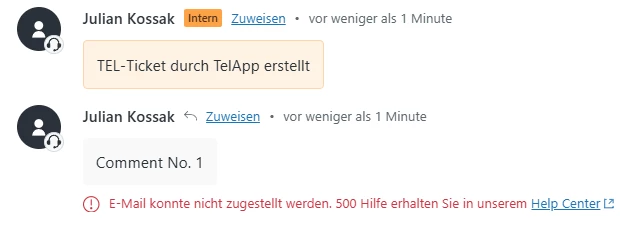
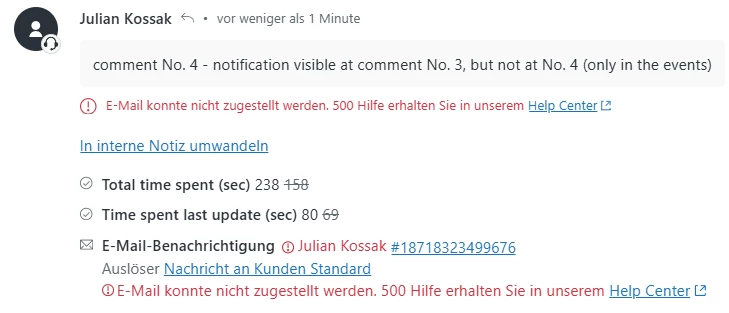
It seems there are two variations: In the case of the first message in the ticket to the requester that cannot be delivered, the delivery failure is displayed directly in the events AND in the ticket under the comment.


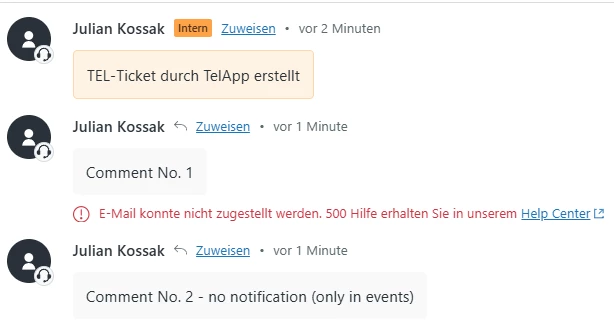
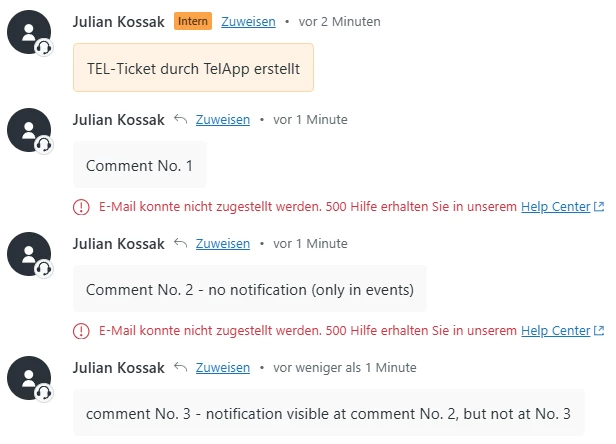
For each subsequent message to the requester, the delivery failure notification only appears after another update of the ticket (by refreshing the browser tab or sending another message, for example).
 

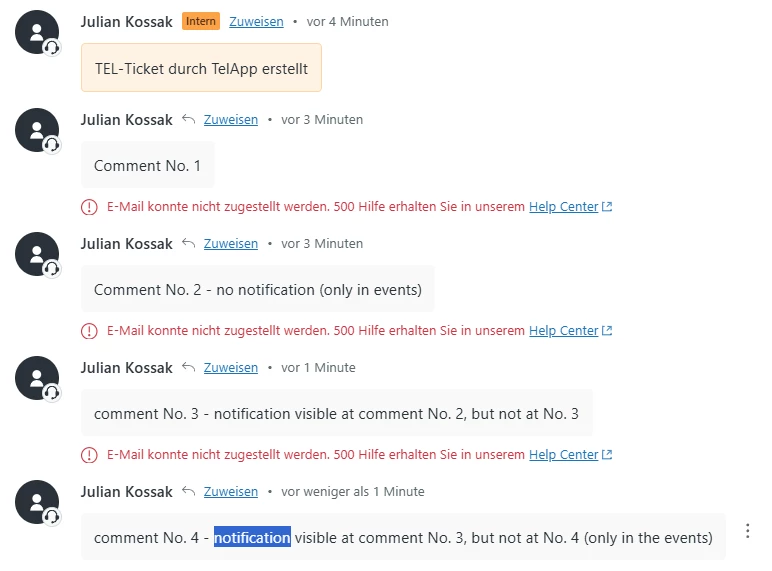
When multiple messages are sent to the requester, the delivery failure is always shown only up until the penultimate comment, never on the latest comment. At the latest comment the delivery failure is only shown in the ticket events and not visible in the ticket.


I put some screenshots in here for visualisation.


Please check and fix this display issue!


Thanks and regards,
Julian


  • February 27, 2025

P.S.: Like refreshing browser tab submitting the ticket also triggers the display of the deliverly failure notice in the ticket…
Seems that's the point: the newest comment triggers not the display of delivery failure when the ticket is updated…


Shawna11
  • Community Manager
  • February 27, 2025

Thank you for your feedback here, I've confirmed with our product team that this is not a glitch or bug, users need to refresh the screen to see the error. When you submit a comment on a ticket, it automatically refreshes the page, which is why you're seeing it on the penultimate comment but not the most recent.
 
At this time we are going to close this post for comment since this feature has been released. If you have further feedback for our product team about this feature area please go ahead and create a new feedback post in the Zendesk Community here for our teams to review. Thank you again for being a member of the Zendesk Community and sharing your insights!