Link user field with ticket field | Community
Skip to main content
Accepted

Link user field with ticket field

Related products:Ticketing system (Support)
  • February 24, 2016
  • 60 replies
  • 0 views

Show first post

60 replies

Benjamin27
  • February 22, 2019

As mentioned by Catherine and Mike, there is a more scalable solution available currently that doesn't require triggers per field value.

https://support.zendesk.com/hc/en-us/community/posts/209436647/comments/115005483587
https://support.zendesk.com/hc/en-us/community/posts/209436647/comments/360001750748


Sebastian13

I would like to see a way to do this the other way around. Without manual work. A ticket being able to update the usersetting. It seems there is no way currently. Would be good if a trigger or something could do that.


Brett13
  • Community Manager
  • February 22, 2019

Hey Sebastian,

What ticket field type are you trying to use to update a user field? If you're attempting to update a custom user field what type have you set up?

If you have any additional information to provide let me know as I'd like to do some testing on my end to see if we can come up with some sort of workaround.

Cheers!


Sebastian13

Hello Brett,


I want to update either the language field or the keyword field.

The thing is, that the automatic language recognition of zendesk is pretty randomly. So often the language is wrong which is why dc-language recognition is something we can't really use. However, we have a contact form field "preferred language". We can read the contents in there in a trigger. So we can serve the user with the language he awaits. However, that's only valid when that is the source of contact. When he sends an email we only would have the language in the account.

So the idea is to edit the user language once a ticket came through the contact form with preferred language, since we would know that this is the correct language. So rather than knowing the language in this single ticket, we would like to either edit the language itself in the user account or add a language tag there.

Best regards,
Sebastian


Brett13
  • Community Manager
  • February 28, 2019

Hi Sebastian,

Sorry for the delayed response!

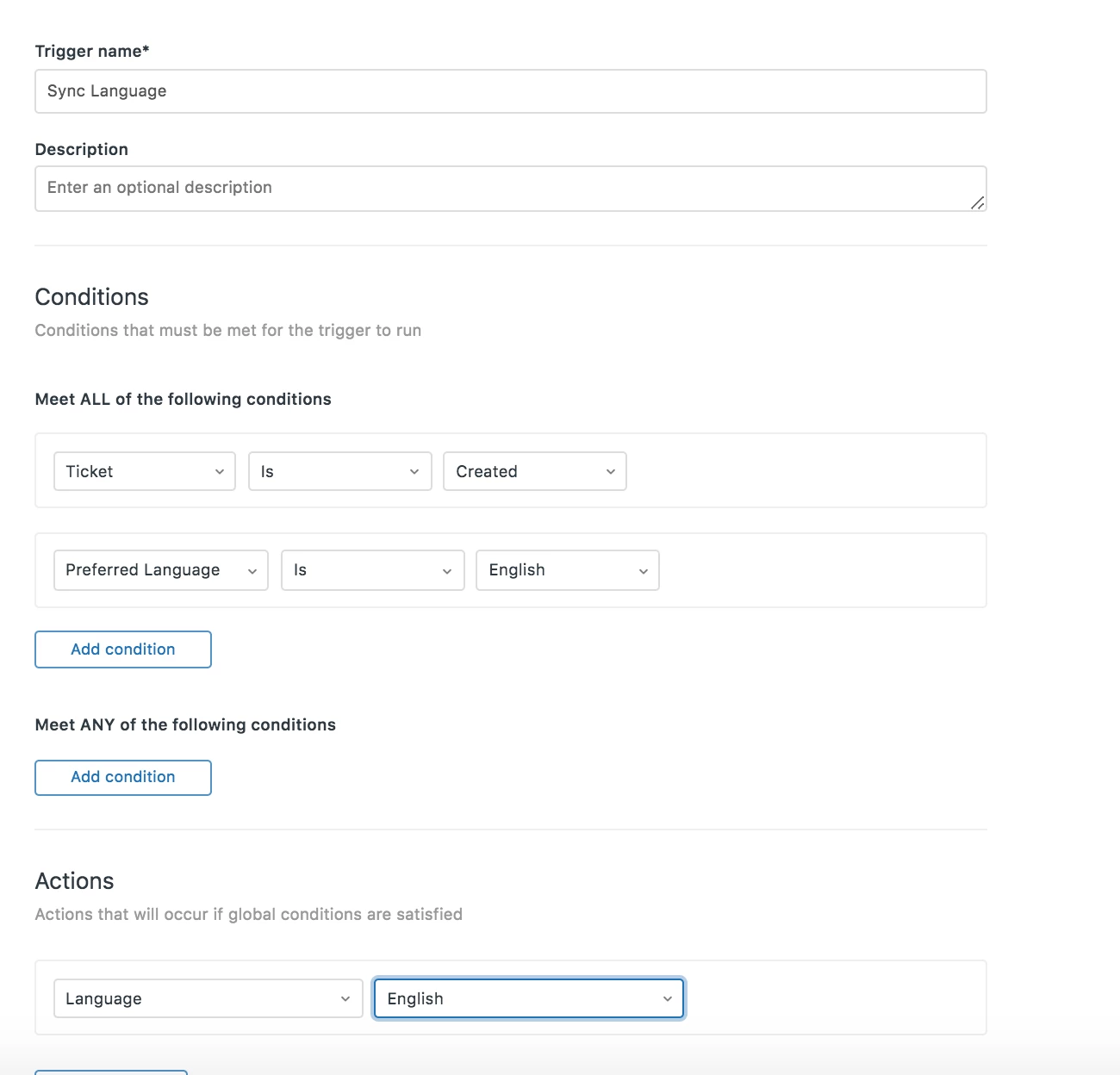
It looks like you can use a trigger to change the users language based on the field selected in your ticket form. Here's a sample screenshot below from my test account:


Keep in mind you'd have to create a separate trigger for each language you support but it's certainly possible as far as I can see. 

Let me know if this isn't the solution you are looking for.

Thanks!


  • May 22, 2019

Hi 

We have another use case for being able to update a user field from a ticket and that is for customer contact phone number. We often don't have a phone for our end users but would like to add a contact number field on the web form for our end users to enter a number in case we need to call them directly.

I cannot see a way of automating an update to their user phone number from a field on the ticket.  Are there any workarounds for this ?


  • June 14, 2019

I've tried both the trigger approach and simply having both fields and values exist on both the user and the ticket, but I can't get the ticket field values to update after the ticket has been raised. The ticket value is set correctly at the point of creation, based on the user field value, but if I subsequently change the user field again, the ticket field does not update, even if I have manual triggers set up to do this. Should this work?


Sebastian13

It only is set automatically for new tickets. Manual trigger should be able to read a user setting and write it in a ticket field. :thinking:.


  • August 7, 2019

A ticket tag for every individual user ID is a mess. We need User IDs transcribed over to the ticket so when we push information from the ticket to ProductBoard for our development team it includes the UserID as that helps them diagnose/solve. 


  • August 8, 2019

I would like to link a custom ticket field "Account_ID" to a custom User field "Account_ID". This is a text field, not a dropdown or a tag. 

+1 for this linking of ticket fields to user fields


  • October 18, 2019

I have the same problem with telephone numbers. As is not a drop down I can´t link both.


  • November 6, 2019

in another product, we already have this functional but i'm very sad for than we can't use in zendesk :(


  • November 7, 2019

I completely agree with this. However, we would like to be able to link things like Identifying numbers. Since everyone has a unique number we would not be able to use the trigger to edit a dropdown. 


  • November 7, 2019

I've talk about HelpDeskEddy - there is good tool to have multi-level lists


  • January 22, 2020

I work in an environment where one user can have multiple products, denoted by a unique product ID. If we could allow users to enter an ID on the ticket level and trigger a new user field to populate with unique values entered on the ticket level it would help us better understand the products our users have with us.


  • March 27, 2020

Hello Brett and Nicole, thank you for the communication. Wanted to add and get your thoughts on our scenario.

We have Shipping Address Fields on the User Record in ZD. We are trying to figure out how to display those fields on the Ticket Form we are using as we test with ZD.

It appears you can only display Ticket Fields, on the Ticket Form. But our process requires that we grab shipping information on the ticket, that can then sync back to the customer record in our ERP system.

Seems like we might be able to display these fields on a custom ticket we have a developer build. i do not think the tag/action scenario would work since shipping address fields are completely different for all users. unless im not connecting the dots in my mind properly.

Please add my vote to include native functionality where we can display User Fields on the Online Ticket Form.

Thanks,

Alex - Big Agnes Inc.


Larry14
  • April 15, 2020

I have the same need.  I have had a store location Ticket Field and now we have need to put that in the User record so we know their main store. We have 187 stores.  I don't want to have to add a new store (we're growing rapidly by acquisition) to two different field lists every time.  Is there an easier way?

Can I set a text user field to update from the pulldown Ticket field via trigger?


Hello togehter,

our Company has the same need: we need to tansfer our customer-number from the user field into the ticket field. Unfortunately, the before discussed solution by transfering the numbers with the help of a dropdown field is because of the huge and fast growing amount of our customer-numbers not practicable.

both fields are text-fields because of alphanumeric data.

Furthermore, we need the Information of our customer-number within our reporting, in order to evaluate the number of Tickets per store.

It would be very helpful to get a function of linking both Information fields, e.g. by trigger.

Thanks and Regards

Tobias


  • October 16, 2020

I just +1'd this thread. It's been 4 years with no development, but I've never understood why Zendesk doesn't have this capability in the first place. It seems like such an obvious thing -- if we want to know information on the ticket, we surely might want to connect that information with the user's account as well.

Many things have been mentioned in this thread already: the user's phone number, product IDs, information the dev team needs to take action. The number of use cases must be infinite.

The trigger idea only works if you want to update a ticket field, send a notification, or change the requester. We all want to update the user.

In our case, we ask the requester if they are a student, parent, teacher, or admin. We also ask for their first and last name and the school they are from, and a few other things, like the email address they used to create their account (which is often different from the one they are using to submit their ticket).

All of this information is needed to solve their ticket...and it's also needed for using other Zendesk features, like user segments. So it should all be associated with the USER when the request is submitted. Even something as mundane as their first and last name (different from Zendesk's built-in "Name" field...which is kludgy) has to be updated manually. We need to be able to fly through tickets, not spend time updating users manually as we go along.

We are now trying to set up Guide to allow certain user segments to edit and publish articles in the Help Center, and view (or not view) certain parts of the help center. For this, we need to have the user's role (student, teacher, etc). We have been updating this user field manually for a while now, but the ones that got missed we have no way of finding.  It would be so nice if those user accounts had all been tagged when the user submitted their first ticket.

I am going to investigate some developer options, but if I'm missing something obvious please do let me know. :)

Thanks!


Sebastian13

I use a trigger to update the user language based on a setting a user was chosing in the ticket. It can also be done the other way around.
I misuse a HTTP target and the Zendesk API. I don't instantly see why this shouldn't work with custom user fields as well. For information like teacher, phone number and so on.


  • December 2, 2020

@Sebastian Can you please tell us more about how you used the HTTP target and the Zendesk API to accomplish this? I am VERY interested in your method!


Sebastian13

Hi Marci,

Yes, here is how we ask the users for their preferred language and set it accordingly.

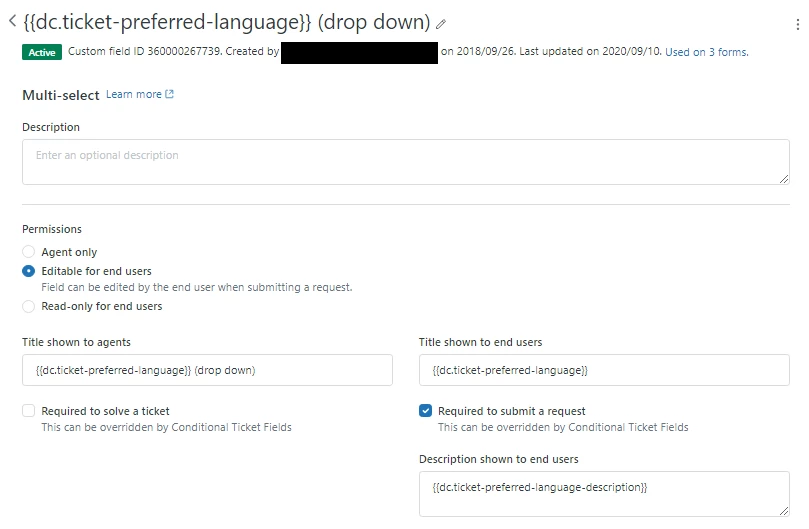
Users fill in a form field in the contact form where they can chose their preferred language.

It is defined like this:

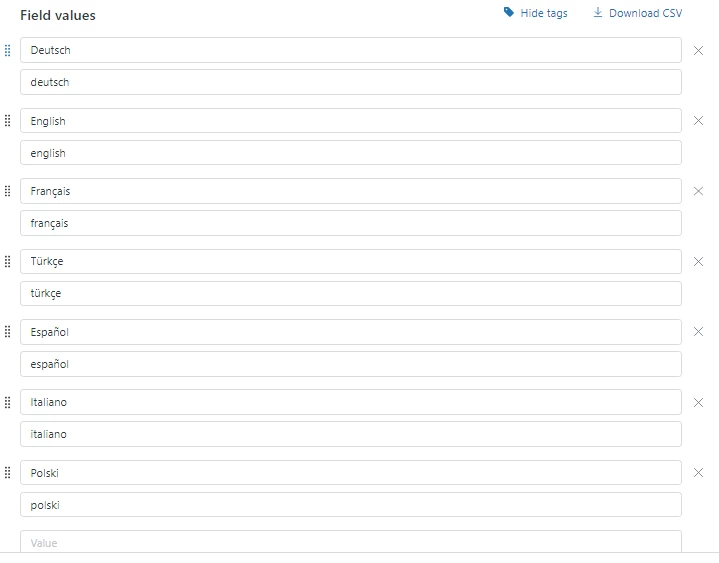
It has these values and keywords:

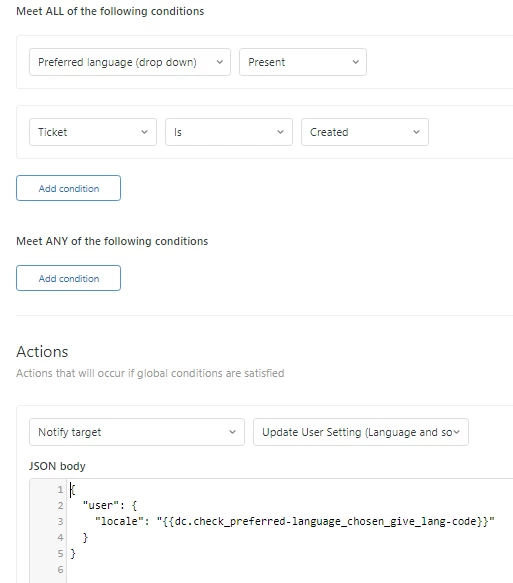
When the ticket comes in a trigger starts. 


I will show the chosen target later. That dynamic content field contains this:

{% if ticket.ticket_field_360000267739 contains 'magyar' %}{% assign lang='hu' %}{% endif %}{% if ticket.ticket_field_360000267739 contains 'español' %}{% assign lang='es' %}{% endif %}{% if ticket.ticket_field_360000267739 contains 'français' %}{% assign lang='fr' %}{% endif %}{% if ticket.ticket_field_360000267739 contains 'türkçe' %}{% assign lang='tr' %}{% endif %}{% if ticket.ticket_field_360000267739 contains 'deutsch' %}{% assign lang='de' %}{% endif %}{% if ticket.ticket_field_360000267739 contains 'english' %}{% assign lang='en' %}{% endif %}{{lang}}

So basically it sets the variable lang to the language we would prefer to serve the user out of the users choices. Then it prints the content stored in the variable so the json in the trigger contains a language code that zendesk can understand.

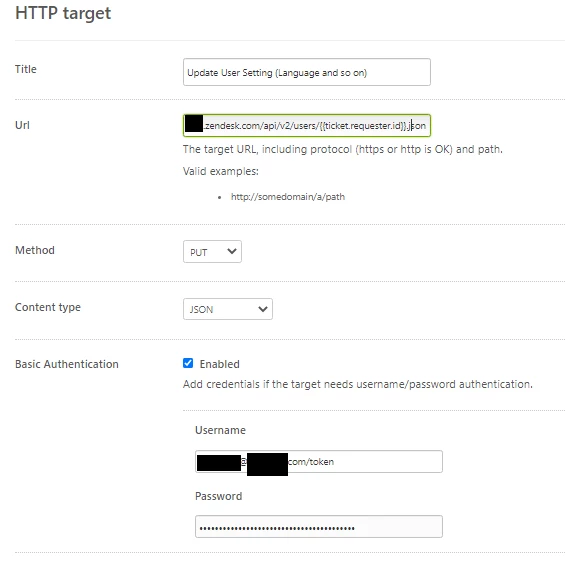
The JSON is sent through a HTTP target you can set up under Settings -> Extensions, like this:

The URL needs your companies zendesk subdomain. The target will send the JSON file to zendesk and zendesk changes the users profile data. The user setting is updated and the new setting stored before an agent is working on the ticket. That's all the magic already.


  • December 2, 2020

@Sebastian Thank you SOOO much for taking the time to write this up!!! I cannot wait to try it out!!!


  • December 3, 2020

 @Sebastian I have got this set up best I can, according to your example. It took a few tries to get a successful "send" of the HTTP target (the problem was that I had /token at the end of the admin email address as you do, but that was apparently not working right in my setup). 

However, I still haven't gotten a successful update to the user profile field. I have tried a dropdown field and a text field, but neither one is updating. I would also be pleased to have a tag added (that is really my ultimate goal here....) so I am going to mess around with that a bit.

I have a Google doc that shows screenshots of all my settings, so if you have time to review it and see if you notice any issues I'd really appreciate it!

https://docs.google.com/document/d/1Yy07NyjLD3ngY2uPURr9X4VYEGPFHKsphrCc4AU_7ZI/edit


  • December 3, 2020

Aside: I see that my last comment is pending approval, probably because I edited it about 10 times. It would really help if the Zendesk interface made it more clear which Sebastian I am tagging! There are many, and for some reason, the one who is mentioned most recently in this thread is just mixed in with all the others, so I have no way to identify which Sebastian in the list is the correct one.