Agent "Total Online Time" reporting. | Community
Skip to main content
Accepted

Agent "Total Online Time" reporting.

Related products:Reporting and analytics (Explore)
  • January 23, 2019
  • 127 replies
  • 0 views

Show first post

127 replies

  • October 19, 2022

The ability to drill into the agent activity from the Messaging dashboard or Live Data dashboard is all very well but how does this work in a real contact centre where they use wallboards? They want to see the various widgets as well as the agent status, number of message conversations being handled, etc. Not all contact centre staff can sit watching a dashboard on a screen - they also manage their team by walking around and this requires visibility of both the queues and the agent activity. Using Explore Messaging dataset is not real time so only useful for historical reporting.

Also where is the data for the agent status for the new omnichannel routing/agent status feature? The article says the data is available for reporting, but not in any dataset that I have been able to find.


  • November 23, 2022

@john86 @karen13

We are closing up on year 3 since the initial request, and with that also getting close to the end of Q4 which was the latest promised release for this functionality. I am not seeing it mentioned anywhere in the announcements and upcoming features.

Are we to assume that the dead silence since May means that this once again is on the ignore list, and that we might as well just start planning the project to switch to a supplier that actually bothers about their customers?


Jozef11
  • December 4, 2022

@david21

I saw that you had found an article about how to retrieve this information from the API. Are you able to provide a link to this article / some basic instructions? I'm sifting posts and the reference and don't see anything explicitly mentioning the daily stats, although I'm willing to sludge through making some API calls at the moment.


Jozef11
  • December 12, 2022

To answer my own comment, ZD support linked me to how to do it. I'll edit this comment once I figure out how to filter by date (unless somebody else knows) because that's the only thing I need now.

For anyone else who needs the info but doesn't frequently make API calls:

  1. In ZD, go to Admin Center > APIs > Zendesk API

  2. Add an API token and save it somewhere safe

  3. Create an account with or open Postman

  4. Create a new request in Postman

  5. To the right of the word GET, type this in and replace w/ your organization. The first part should match your ZD URL

    Ex: https://{organization}.zendesk.com/api/v2/channels/voice/stats/agents_activity.json

  6. Under Authorization > Type, select Basic Auth

  7. Under Username, type in and fill in your ZD login email and add "/token"

    Ex: john_doe@email.com/token

  8. Paste your API token into the Password section

  9. Hit send

The results will be the agent activity. Still unfamiliar with how to request for a specific day, so please reach out if you know!


Erkin
  • December 23, 2022

Any Update on this issue?


CJ99
  • January 3, 2023

@karen13 Can you please update us on the status of this? It's now Q1 23, and there has been no communication since we were told "Q4" of last year. 


  • January 6, 2023

@cj99

Considering how both Karen and John have gone completely quiet after giving misleading information about this topic several times, I think it's safe to assume that Zendesk never had any intention of actually providing this functionality.


Karen13
  • January 20, 2023

Hi all, 

I have provided an update on the Zendesk Talk: Allow Reporting on Agent Availability thread. I would like to highlight that we are constantly working on this release and that this work will remain a top priority for our team. We have faced some obstacles during development which has delayed our release but we want to reassure you that we have not dropped the development. This is a high priority roadmap item that is currently under bug fixing and we will announce an EAP launch date once that is complete.

Thank you for your cooperation, 

Karen


  • January 23, 2023

@karen13

I am sorry, but what?

The data is available through bothersome workarounds. It used to be available until we were all forced over to Explore. So what challenges do you guys have that makes it take 5 years to implement reporting of basic customer service metrics?

Also, what happened with the promise to skip EAP for this? Zendesk has been promising to be "on track" for release for every quarter last year, and every time the quarter has passed without further communication until we get these messages about how it is a "priority"?

What exactly is going on at Zendesk these days with the failure to implement basic CS reporting features and removing features that are already there against almost unanimous feedback that these features are in daily use?


Anastasia11

@karen13 i'm sorry but your "explanations" on the situation are unprofessional and ridiculous. 

You were promising us last year that this future will be implemented in Q1,Q2,Q3, Q4

Can you imagine that whenever you give us this false information - we inform our stakeholders accordingly and at the end after 250 comments from your customers in both threads and 5 years of "gathering feedback", planning and giving empty promises you are unable to launch this basic and vital reporting. 

Why this will be launched as EAP? Do you plan to launch this as another paid add-on??


  • January 24, 2023

@anastasia11

We are now looking at some of the alternatives. Several offer easy data migration and can be just as easily integrated with the rest of our systems. I have been looking in to making the business case for our management to switch to Enterprise, but thanks to the constant broken promises from the product managers in this and other threads on the same subject there is no case to make.

After more than a year of broken release date promises, and now reneging on the promise of skipping EAP if this feature is ever made available, there comes a point where one simply has to say stop and move on to somewhere that actually cares about customers.


  • January 24, 2023

In agreement with the other commenters here. We can definitely understand things being more complicated on the programming backend than it may appear on the front side of things, but you guys have dragged your feet years beyond a reasonable timeframe for a CRITICAL metric. You offer every imaginable phone call tracking metric and even track this very metric on a day-to-day basis, but somehow just finding a way to easily log this daily data historically is somehow a grueling project requiring years and years of work and quarterly promises that continue to get delayed into oblivion? 

It took years of you guys directing us to this blog post to "comment on our concerns" before it was even finally picked up for consideration. Gaslighting us into trying to buy the fact that this has been top priority and you're truly working on it at high-speed, is not appreciated. We're tired of ETA updates. Get it done. 


John86
  • January 26, 2023

Hey everyone,On Tuesday, February 7th at 11 AM CST, the product team will be hosting a PM Roundtable on Explore: Live Data and other features of Explore. We really want to hear from you and discuss what you would like to see improved. This is an opportunity to chat directly with product managers, so if you have feedback you want to share, please register today!
https://zdsk.co/3XTcpXR 


  • February 2, 2023

@john86

Would the product managers be more inclined to actually answer questions and concerns at this roundtable than you all have been in these threads regarding what we would like to see improved?


Jahn11
  • April 20, 2023

Hey @john86 and @karen13 - tried to check this  recent comment on the following announcement page for all the details  but it looks like the article have been removed or something?


Anne17
  • April 21, 2023
Hello Jahn,

the article has been unpublished since we have postponed the rollout.

Thank you for your understanding!
 

Kelli12
  • October 20, 2023

Any updates on this? I'm looking for historical agent status for chat specifically. I can see it in the Chat analytics but only on a daily level. There is no way to parse it out by time or summarize in aggregate (that I can see). 


  • October 23, 2023

@kelli12

You can get this data from the Chat Analytics by exporting to CSV. It will allow you to select some historical data as well.

@karen13 @john86

So, we are now a full 12 months removed from the last promised release date you guys posted in this specific thread. Q4 2022 was of course then moved to an unknown time with the promise that this was still a "top priority".

So with this being a top priority, and the data actually being available through very cumbersome workarounds, are we anywhere closer to seeing this feature actually appear anytime soon? At least somewhere around Q4 2025?


Kelli12
  • October 24, 2023

Thanks for trying @tom12, but exporting doesn't get me information on agent status (i.e. online, away, serving, etc.). 


  • October 24, 2023

@kelli12

What are you looking for exactly? This export will get you how much time they have spent in each available status per day.


Anastasia11

@Tom ideally we need to see agent statuses with timeframes during the shift (e.g. agent 1 was online from X to Y, on away from X too Y etc. ) also Chat analytics are not available if you're using messaging. 


Kelli12
  • October 24, 2023

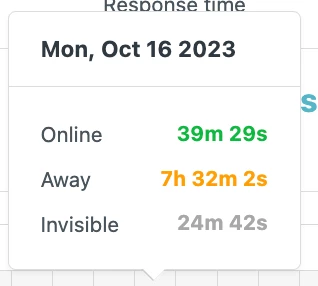
@tom12 When was an agent online waiting for a chat? When was that same agent listed as away? How much of agent's day was spent serving chats?

You can see some of this by hovering over each day, but you can't see an aggregate view or the exact times agents moved in and out of these statuses. You can see the below info in the dashboard, but not in Explore reporting at all from what I can find.


  • October 25, 2023

@anastasia11 @kelli12

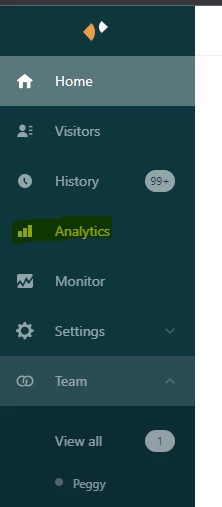
Open Zendesk Chat, and then on the left hand menu go to Analytics

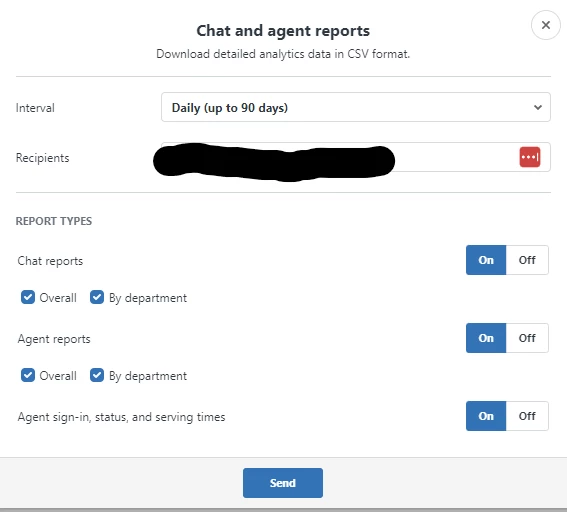
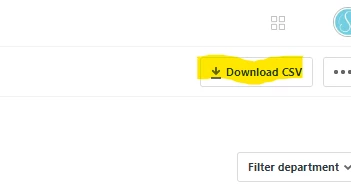
When on the Analytics screen, in the top right corner, you have the Download CSV button


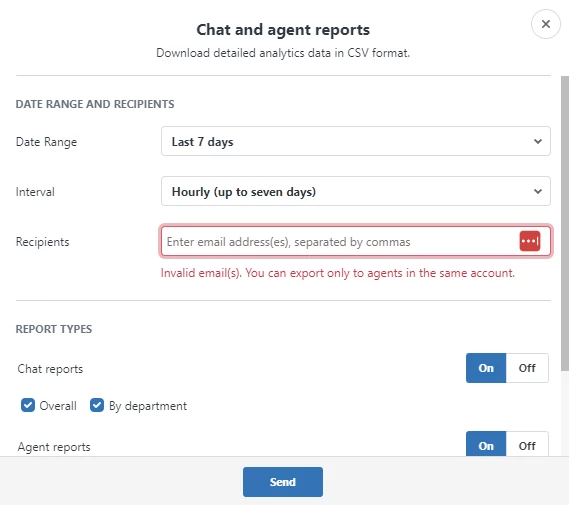
Once that is open, you can select the time frame you want. If you want hourly data, it is limited to 7 days back. If you want daily data it is limited to 90 days back. Select the time frame and interval you want, then download. The CSV files are sent to you in e-mail attachments. These files give the data you are asking for.


It is cumbersome and a hassle, and in no way a replacement for proper reporting in an actual reporting tool, but for now it is what Zendesk is able to provide, as it is apparently extremely challenging for them to provide basic KPIs in their own reporting tool.


Kelli12
  • October 25, 2023

I get how to do the export. I've done that. It doesn't provide what I'm saying I need. @tom12. Where in that export do you get information on agent status?


  • October 27, 2023

It is not very straight forward unfortunately @kelli12.

In the file "status_sessions_<insert string>" which you can find in the zip file event_analytics you will find timestamped status changes and how long was spent in that status for all agents (duration provided as seconds in the file). So you can see when they were online, offline, away or invisible. Then, after converting the timestamps to a format Excel can understand, you can either create a pivot table or import the csv file in to your favourite tool supporting csv imports to get a readable report for each agent.

It's a massive hassle, and something that Zendesk should have been able to provide years ago, but for now it's what we have.