

Feature Request Summary:
Zendesk needs to add the ability so that when a ticket exchanges assignees, if there is a Side Conversation for another group, they are able to update the conversation without the need to be a follower, requester, or be in the group.
Either the ability is added or it is a change in functionality for child tickets as it is a different ticket type entirely and should not behave like any other ticket. For example: The assignee of the ticket can always update the child tickets associated with their ticket.
Description/Use Cases:
We have many teams that work in our instance and they communicate to other teams across divisions (escalations, managers, permissions, entitlements, HR, etc).
There may be a legal issue presented in a ticket so they will reach out to HR. However the original assignee goes on vacation so they hand over their current ticket load to another Agent. That Agent needs to be able to continue the conversation with HR without the need of additional steps to do so.
Business impact of limitation or missing feature:
Right now, if the role of the assignee is tied to only being able to access tickets you are in the group of, and a Child ticket was created for a group that you do not have access to:
- You CANNOT edit the child ticket from the parent ticket
- You CANNOT access the child ticket directly
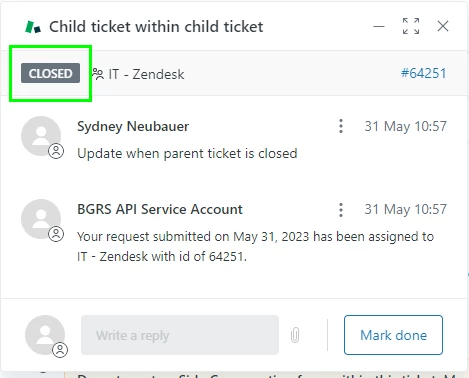
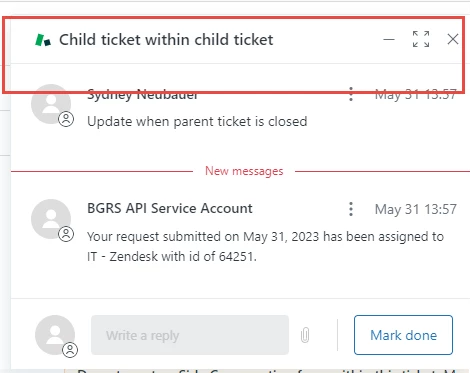
- You cannot see the status of the child ticket - this is a rather big issue as you cannot update a closed child ticket but it looks the exact same as when you don't have access. So you don't know when it is a permission limitation or the conversation is closed
- You cannot see the ticket ID associated with the child ticket
- You cannot see which group the child ticket is associated for
Child tickets are treated like any other ticket - if you do not have access to the ticket normally, you cannot edit. The idea behind it is so that other users cannot access a potentially private conversation. However, someone that does not have access to update the ticket, can still read the conversation from the parent ticket so it does not make sense as to why they cannot continue the conversation, since assignees change all the time.
The workarounds are:
- Grant them access to the entire group (the purpose of child tickets is so that they only access tickets that are relevant to their assigned ticket)
- Change their role to have access to all tickets (this would give them way too much access - and they would need to include private groups which defeats the purpose)
- Have someone on the Child ticket add the new assignee as a follower or change the requester (manual process, creates a bottleneck, loss of efficiency) - but because you cannot see what group the child ticket is for, you aren't even sure who to reach out to
| If you have access to the Child ticket, you will be able to see the status of the ticket, group, ID. And you can make updates to the conversation in any status but closed | If you do not have access, you will not be able to see the ticket ID, status, assigned group, and you can't update the ticket regardless of status. (We had to create webhook to use the API to state ID/Group |
 |
 |
