Can I update a custom field with Requester Name? | Community
Skip to main content

Can I update a custom field with Requester Name?

  • February 6, 2024
  • 11 replies
  • 0 views

Jake11

How do I create a custom ticket field and have a trigger update it to set it to hold the name of the Requester on a ticket? 

Background - I've enabled the new request list experience and one of the big drawbacks our clients are noticing, is the Requester column is no longer showing for those users who have access to see tickets across their entire org. Them being able to at a glance see who submitted what is very beneficial. I read that using a custom field with requester info could be a workaround, but how do I go about automating a custom ticket field to house the requester name? 

11 replies

  • February 6, 2024

Hey @jake11

You could use notify a webhook within a trigger to make that possible, this would involve following a few steps:

These steps are only for instructional purposes:

1. Create a webhook and select Triggers and Automation

In the name put whatever you want to call it, in Endpoint put: https://subdomain.zendesk.com/api/v2/tickets/{{ticket.id}} , Request Method PUT, Format JSON and the method you want to authenticate it with.

2. Create a custom ticket field that will store this information (the requester's name).

3. We need to create a trigger that will make a call to our webhook whenever a set of conditions is met, so you can set whatever you want this action to trigger, I only set the Ticket is Updated for test purposes:

The actions is what matters here, select Notify an active webhook and the webhook you created in step 1. Put there:

{
"ticket": {
"custom_fields": [{ "id": 19355046105108, "value": "{{ticket.requester.name}}"}]
}
}

This is important, change the id for your ticket field id.

That's done! Recording of this in action: https://vimeo.com/910604838?share=copy


Stephan12
  • February 7, 2024

Hi,

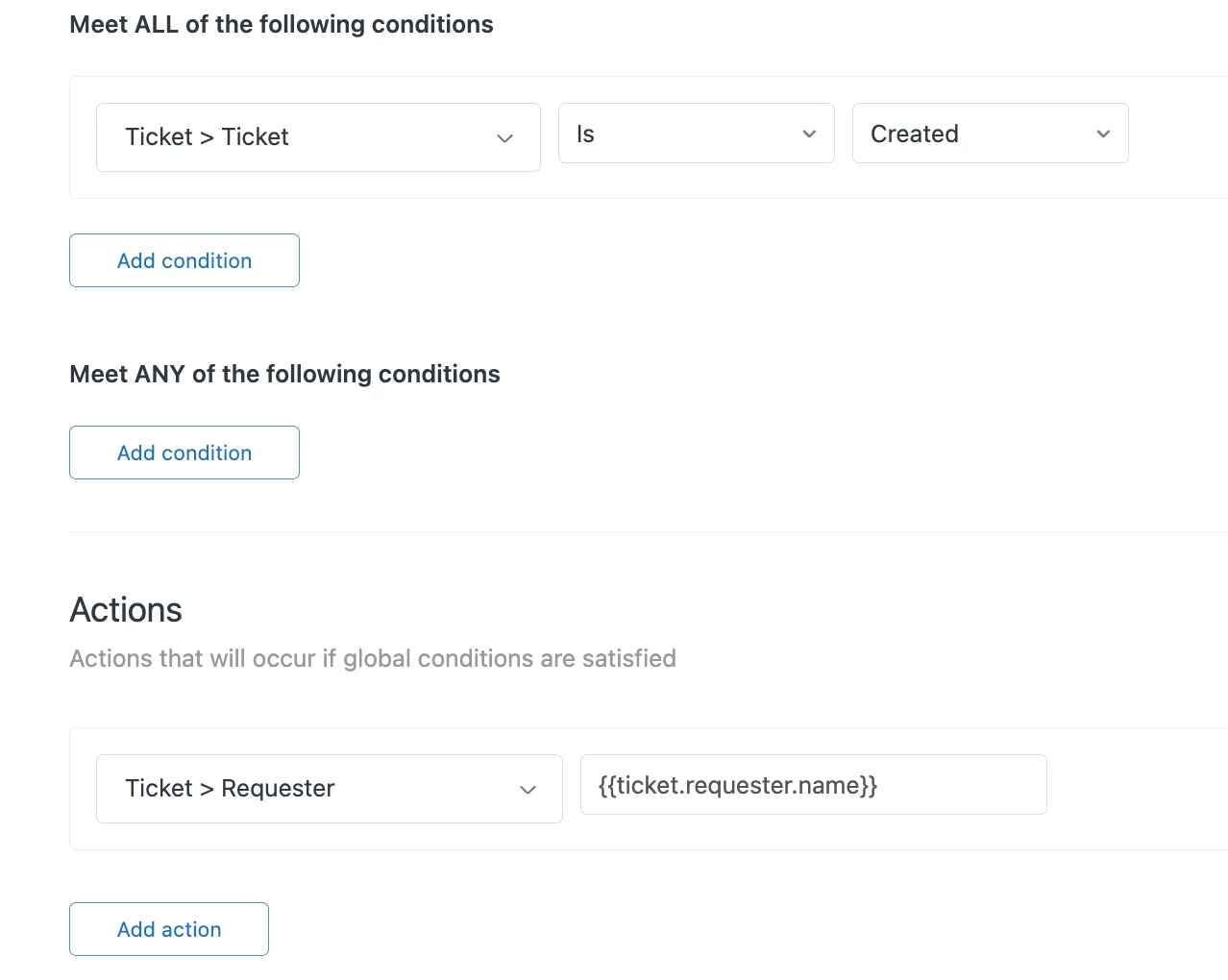
wouldn't it be also possible to create a custom field like "requester name"first and to use a trigger which fires if the ticket is "new" (status) and "created". As action we can request zendesk to set the information via placeholder {{ticket.requester.name}}.

Regards, 

Stephan


Jake11
  • Author
  • February 7, 2024

Thank you both! I'm going to try the easier approach first, but @stephan12, when I take your steps, it's actually updating it with the placeholder text itself and not the expected value. Is my syntax off?


Stephan12
  • February 7, 2024

Hi Jake, 

You have to create a custom field in advance, for example "first respond" or as mentioned before: "requester name". The ticket requester is the information you would like to add to the custom field, therefore the correct action should be:

Ticket>"custom field title"      {{ticket.requester.name}}

The new custom field should show the first "requester" after firing the trigger.

Regards, Stephan


Jake11
  • Author
  • February 7, 2024

Hi @stephan12 - Sorry for the confusion, I named my custom field "Requester" so in my screenshot, that's actually the custom field, not the standard system field.


Stephan12
  • February 7, 2024

Does it also work? :-)


Jake11
  • Author
  • February 7, 2024

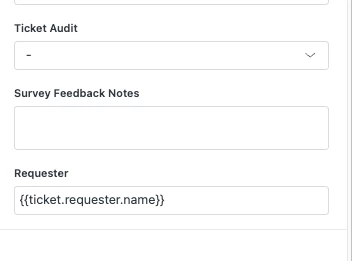
Unfortunately no, it put the placeholder text itself there, not the value from the placeholder. My custom ticket field "Requester" is a text field.

Example:


Brandon12
  • February 7, 2024

Hey @jake11,

It would have been cool if the placeholder worked, but in light of that, I second @jakub20's comment.  Keep us posted!

Brandon


Stephan12
  • February 7, 2024

Hey Jake,
I hoped this would be a workable workaround, but unfortunately the placeholder seem to be not suitable. Thank you for testing.
Webhook will be the only suitable solution.

I also faced a tool of Knots which offers additional functionality.

Regards, Stephan


Lauren26
  • February 7, 2024

Hi Jake, 

I implemented something similar to pull a custom end user field into a custom ticket field. Unfortunately the {{ }} placeholders don't work on text fields in triggers directly, instead you'll need to utilize a webhook like Kuba proposed. We also use this webhooks to be able to add internal notes to tickets via a trigger. Once you've set it up once it's not so daunting to apply it in other ways.


Jake11
  • Author
  • February 7, 2024

Hey everyone,

I already had a webhook created to help with automating some internal comments per client, so was able to leverage that + use Kuba's suggestion and it's working like a charm. 

Thanks!
Jake