
Understanding the call flow for Talk in omnichannel routing - Rollout Complete | Community
Skip to main content

Understanding the call flow for Talk in omnichannel routing - Rollout Complete

  • June 1, 2022
  • 6 replies
  • 0 views

UPDATED (20 Feb, 2023)The functionality is GA. Talk calls will be routed by the omnichannel routing engine for the Customers who opt-in to omnichannel routing. Here are more details.  


For overview information about Talk in omnichannel routing, see this article.

This article contains an example of a call using triggers, tags, and ticket fields to prioritize calls for VIP customers and transfer them to the billing group. 

Before you proceed, it's important to understand the changes to the ticket creation process. 

Currently, a support ticket for a call gets created when the agent picks up the call. With omnichannel, the support ticket for the call is created at the point it goes into the queue meaning you can run triggers on the call ticket before the call is answered. 

Using the triggers, you can prioritize and assign a group to the ticket and route the call as shown in the following example.

To set the routing to VIP customers

  1. For each VIP customer you want, go to their end user profile and add the VIP tag as shown in the following screenshot. You can use any tag name you want instead of VIP:
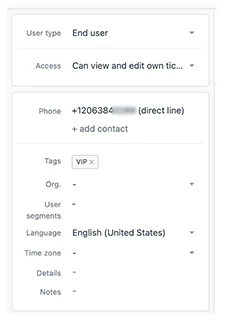
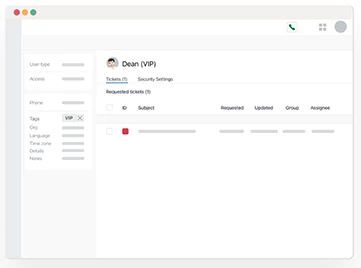
    Now, any ticket that gets created by the end user you configured will always contain the VIP tag.
    For more help with tags, see Adding tags to users and organizations.
  2. Set up a trigger to automatically assign a priority of Urgent and add the Billing group to any Talk tickets opened by a VIP customer. Assigning the ticket to a group enables you to route the call to the correct place.
    Create your trigger with the conditions and actions shown in the following screenshot:
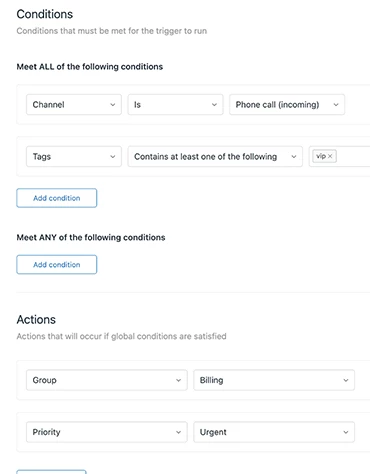
    Now, any tickets created by end users from a call and containing the VIP tag will automatically be added to the Billing group and given Urgent priority.

    For help creating triggers, see Creating triggers for automatic ticket updates and notifications.

Note: It is not mandatory to assign a group using triggers for call routing. The group you assigned in Talk routing settings still works. However, omnichannel routing currently supports only a single group for call routing; there cannot be multiple fallback groups configured in Talk settings. For more details, see  Understanding changes between existing Talk functionality and omnichannel routing

You’re finished. Next, Talk takes the following actions:

  1. Information from the call ticket including the ticket group and priority is passed to the omnichannel routing engine.
  2. Calls are ordered by priority. For example, high priority or urgent calls are added to the omnichannel queue ahead of other calls, messages, and emails with a lower priority. For more information, see Routing tickets and messaging conversations based on priority and agent status.
  3. When assigning the call, the agent in the billing group with the most capacity and status as Online is chosen. If multiple agents have the same state, the agent with the longest wait time since their last assigned call is chosen.
  4. The call is assigned to the agent.

6 replies

Lauren11
  • August 26, 2022

When talk becomes part of omnichannel routing, will it be possible that an agent still gets assigned a phone call when they have an active message? The way capacity is structured right now is individual by channel so it seems possible that an agent is in an active messaging conversation and their phone will still ring. Is this the case? Or will it work differently when talk is part of routing?


Rohan11
  • August 29, 2022

Hi Lauren,

Thanks for the question!

Yes your understanding is correct, at the moment capacity is structured on a per channel basis which means an agent serving an active messaging or email conversation can be routed a call depending on agent's status, that is, if they are Online to take calls.

However, if you want dedicated agents for a particular channel, you can create custom agent status which sets the agent Online only for one channel and the rest channels are set to Offline. Here are the details to create custom agent statuses.

Let us know if you have any feedback around this behaviour.

Thanks

Rohan


Lauren11
  • August 29, 2022

Thanks @rohan11. It seems a bit like a step backwards from when we used to use focus mode. We made some custom statuses but that seems to defeat the purpose of omnichannel routing a bit. We just want the agent given the next most important piece of work regardless of what channel it is, but not give multiple pieces of work at once, especially across live channels. 

The nature of our business is real-time and so even the idea of giving someone an "Email" ticket at the same time as they have a messaging convo or phone call is a bit problematic for us. We use APIs to create tasks for agents like "call this customer to tell them XYZ" so routing an agent an inbound call at the same time we're asking them to make an outbound call isn't very helpful for us. Maybe I will leave a comment on the capacity page but I hope there will be the ability to do overall capacity, not just by channel, sometime soon.


  • September 12, 2022

+1 to Lauren’s comment. Focus mode functionality is sorely missed and I had hoped that omnichannel and routing capacity would be the solution. However, the behavior described in this support article where agents from other groups (management for example) aren’t able to help take calls during high volume times if agents are over capacity makes this functionality not very useful.

Will focus mode be returned with messaging enabled? This is a major missing functionality for small teams who moved to messaging but were reliant on focus mode. It was fantastic while it was available.


  • October 27, 2022

We implemented omnichannel routing yesterday with the hope that it would replace focus mode which no longer works after enabling messaging. It is an extreme disappointment that it seems the developers put all the time into developing omnichannel, without considering that one person CANNOT interact with 2 people at the same time. That good sense exists in that you can only set the max capacity to 1 for phone calls - but yet messages are still being served to people on phone calls or calls being served to people on messages? 

This is a major oversight and I hope it's being worked on with high priority as ZD has taken multiple steps that force users to use messaging and then breaks existing functionality that was working well. (focus mode)


Rohan11
  • February 20, 2023

Hi Lauren, Hi Trudy,

Hope you are keeping well!

We understand the pain of missing Focus mode. The good news is focus mode functionality is on the roadmap to be implemented in the omnichannel world. The details and the timelines are yet to fleshed out, we will update once we have more details in the coming months.

Hi everyone,

We have noted the feedback from this post, and as the first phase of the functionality is GA and completely rolled out, we will soon be archiving and closing this post comments. Feel free to leave anymore feedback on Talk community.

Please refer to the help centre article below:

 Using omnichannel routing to route calls.

Thanks

Rohan