403 error when creating request via API | Community
Skip to main content

403 error when creating request via API

  • January 27, 2021
  • 23 replies
  • 0 views

Hi,

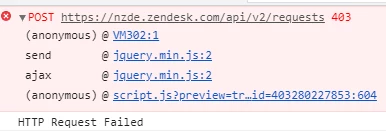
I'm creating a custom form for our end-users within Zendesk itself. When I try to call the https://subdomain.zendesk.com/api/v2/requests API to create the request, it returns with a 403 error. I'm using an api token for auth. The API call works in postman and I was able to create a request but when I try to call it in my custom form in zendesk, it gives me a 403 error.


We are on Proffesional.

{
"error": {
"title": "Forbidden",
"message": "Invalid authenticity token"
}
}


Not sure what I'm doing wrong since the call works on postman.

var myHeaders = new Headers();
myHeaders.append("Authorization", "Basic btoa(email/token:API_TOKEN)");
myHeaders.append("Content-Type", "application/json");
myHeaders.append("Cookie", "__cfduid=d3d63f8118c012940ee1e08701ec6140d1610414533; _zendesk_session=BAh7CEkiD3Nlc3Npb25faWQGOgZFVEkiJTBiMGNlNTVlOGVhNjQ4NTcyMDkxNGJjMzZjOWQxNTdhBjsAVEkiDGFjY291bnQGOwBGaQMvZ5JJIgpyb3V0ZQY7AEZpA7nELw%3D%3D--2608b56780c88cadb0776d6913aace910de8a12b; __cfruid=da3497d68006538ec0acea547c226758ea2a06fc-1611699971");

var raw = JSON.stringify({"request":{"subject":"TESTING API!","comment":{"body":"My printer is on fire!"}}});

var requestOptions = {
  method: 'POST',
  headers: myHeaders,
  body: raw,
  redirect: 'follow'

};

fetch("https://subdomain.zendesk.com/api/v2/requests", requestOptions)
  .then(response => response.text())
  .then(result => console.log(result))
  .catch(error => console.log('error', error));
23 replies

  • Author
  • January 27, 2021

@Thomas Verschoren 

Yea it's giving me the correct value. I also tried encrypting the whole thing and just pasting it but it's still giving me the error message.

Could you think of anything else? I'm just lost since it's working on Postman


  • Author
  • January 27, 2021

I also tried your code but it gave me the same error.


  • Author
  • January 29, 2021

Hey, 

So I did that. It matches what I used. email/token:api_token.

Are you using this code in Zendesk or an external app?

Is it possible that the authentication is somehow clashing with the current logged in user?


  • Author
  • February 1, 2021

Should the code then be different if using this within zendesk?


  • Author
  • February 5, 2021

Hey @Thomas Verschoren,

I think it's an issue with the logged in user or the session...

I tried logging out of Zendesk and tried the exact code on the browser console and it worked...

Any idea why this is the case?


Thanks


  • Author
  • February 8, 2021

Hey,

I am not making an external app. I'm doing this within our Zendesk Portal using the templates (e.g. new_request_page.hbs). Base on my understanding, ZAFClient is used when building an external app that incorporates Zendesk support? 

My issue is when doing this in Zendesk Portal itself. Also the 404 error only appears when doing a POST request.


Camila16
  • June 8, 2021

Bonaliza, where you able to find a solution for this? I'm having the same issue. 


  • December 2, 2021

Same issue here, not sure what to do...


Tipene
  • December 8, 2021

This is likely caused by a clash with how the fetch API handles cookies in the context of the Help Center, when logged in as an agent or admin. You can use the /api/v2/users endpoint to obtain an authenticity (CSRF) token which should fix the issue. Here’s an example of how that could look:
 

fetch("/api/v2/users/me")
.then((data) => {
  return res = data.json();
})
.then((res) => {
  const authToken = res.user.authenticity_token;

  let myHeaders = new Headers();
  myHeaders.append(
    "Authorization",
    "Basic btoa(email/token:API_Token)"
  );
  myHeaders.append("Content-Type", "application/json");
  myHeaders.append("X-CSRF-Token", authToken);

  const raw = JSON.stringify({
      "request": {
        "requester": { "name": "Jane Smith", "email": "jane@example.com" },
        "subject": "TESTING API!",
        "comment": { "body": "My printer is on fire!" },
      },
    });

  const requestOptions = {
    method: "POST",
    headers: myHeaders,
    body: raw,
    redirect: "follow",
  };

  fetch("/api/v2/requests", requestOptions)
    .then(response => response.text())
    .then(result => console.log(result))
    .catch(error => console.log("error", error));
});

 
I hope this helps! Feel free to reach out with any questions.
 
Tipene


Pan12
  • January 13, 2022

@Tipene Hughes 

I used this code, but I still does not solve my issue. 

I am using end user to login in zendesk, using email/token: token to post an API, I still get the error message:"error{title: "Forbidden", message: "Invalid authenticity token"}".

Here is my code snippet:

Can you help check whether there is something wrong? 

fetch("/api/v2/users/me")
.then((data) => {
return res = data.json();
})
.then((res) => {
const authToken = res.user.authenticity_token;
console.log(authToken);
let myHeaders = new Headers();
myHeaders.append(
"Authorization",
"Basic xxxxxxxxxxxxxxxxxxxx"
);
myHeaders.append("Content-Type", "application/json");
myHeaders.append("X-CSRF-Token", authToken);
const raw = JSON.stringify({
"organization": {
"name": "ttt"
}
});
const requestOptions = {
method: "POST",
headers: myHeaders,
body: raw,
redirect: "follow",
};
fetch('/api/v2/organizations', requestOptions)
.then(response => response.text())
.then(result => console.log(result))
.catch(error => console.log("error", error));
});


Pan12
  • January 13, 2022

Can anyone help me? I am not sure what to do now.


Andrey24
  • January 13, 2022

@tipene @pan12 I'm getting the same "Invalid authenticity token" error.

I sent a request to Zendesk support 2 days ago, but haven't received a reply yet.


Pan12
  • January 16, 2022

@andrey24

Hi  have you received response from Zendesk support? Can you share it to me? Thanks.


Andrey24
  • January 20, 2022

@pan12 still troubleshooting it with Zendesk support. I'll write you once the issue is resolved.


Elton
  • May 26, 2022

I am having this error 403 when I am trying to log in into my account as AGENT. I go until the second step verification and then it goes to the error 403. How Can I correct it and log in??


Joshua43
  • May 31, 2022
Hi Elton!
 
Thank you for reaching out to us. This can be corrected by logging in the correct credentials however, I would highly advise that you get it touch with your admins as they have control over this in your account.
 
Best,

Manuel34
  • June 10, 2022

@pan12 Your issue seems to be related to the organizations api end point. According to the documentation you need to be an admin to create organizations. If an end user tries this, then they shoudn't have the required permissions to do so.


@tipene Your approach looks nice. I didn't know about the x-csrf-token header. I think the authenticity_token property should be included in the JSON format of the user documentation.

I tried it but it sadly didn't work for me. I checked in the developer console > network what the request looks like. The basic authentication and x-csrf-token match with the data I'm plugging in but I still get a 403 error.

I'm sending the request through a ReactJS app and Axios in our Help Center.


  • August 15, 2022

This error indicates that the server has determined that you are not allowed access to the thing you've requested, either on purpose or due to a misconfiguration . It's probably because the site owner has limited access to it and you don't have permission to view it. The vast majority of the time, there's not much you can do to fix things on your (*client) end. There are four common causes for 403 Forbidden error (server side) . Here they are listed from most likely to least likely:

  • An empty website directory
  • No index page
  • Incorrect settings in the .htaccess file
  • Permission / Ownership error

If authentication credentials were provided in the request, the server considers them insufficient to grant access. The client SHOULD NOT automatically repeat the request with the same credentials. The client MAY repeat the request with new or different credentials. However, a request might be forbidden for reasons unrelated to the credentials.


Greg29
  • September 23, 2022

Hi Ahmed! A 403 is an indication that you don't have access to the resource. Do you have different permissions in the other instance?


Greg29
  • October 3, 2022

Have you enabled agent access to create requests in this new instance? If not, here are the instructions on how to do so. Let me know if that works for you!


Greg29
  • October 3, 2022
So I just tested this myself and it turns out it has nothing to do with the authentication method that you're using, rather it has to do with multibrand. When you make a request using a CSRF token from a secondary brand, it will always return a 403. Previously we have investigated this internally with respect to host-mapped instances, but I can confirm that host-mapping has nothing to do with it here.
 
I'm going to raise this with our secdev team, although I do want to note that this will likely not be a quick solution. Using a CSRF token like this is not an officially supported method for auth, so they may not prioritize this as a result. I'll update you when I hear back on this, just wanted to let you know that for the time being, we're going to say that receiving a 403 when using a CSRF token in a secondary brand is "expected." 

Manuel34
  • October 4, 2022

@ahmed11

I had this same issue and I had a very lenghty discussion regarding this with the Support team. I solved this issue by making all API requests to the main brand instead of the sub-brand (in my opinion API documentation says otherwise so this behavior is not as expected). Then it will work as it should. I have set up a trigger that fires on ticket creation to set the respective brand for the ticket so that it will be visible for the end user inside of Guide. You can use e.g. the title of the ticket to filter for the right brand if you are setting it programmatically.


Manuel34
  • October 7, 2022

@ahmed11

Yes, we are also unsure on how to do the authentication across brands right. We got it working for now on our end, but the comments are still being shown as "User was not logged in when the comment was submitted". Even though we use authentication.

To get it working, we did the following way (which at least works for now). Maybe you have another breakthrough:

  1. Visitor is on Help Center of Brand B
  2. If the visitor goes to the the custom contact forms a check is performed if the user is logged in (via the window object HelpCenter.user; If the user is not logged in, his role will be anonymous)
  3. If the visitor is logged in, display the custom contact forms, which the visitor can select and fill in
  4. On submit, the following http requests happen:
  5. GET Brand A.zendesk.com/api/v2/users/me (using the visitors email address from HelpCenter.user.email and API token)
  6. POST Brand A.zendesk.com/api/v2/requests (using the auhtenticity_token)

When we tried the subdomain Brand B on step 5, we got a 403 error.

In addition, we got the 403 when we did step 5 and 6 with the Brand B subdomain as well (we thought this was the way you're supposed to do it).