

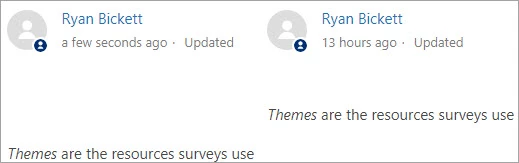
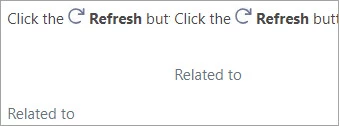
When editing an article, it's very easy to inadvertently leave empty lines at the start or end of the article. Unfortunately, this creates visual inconsistency on the published page, see images below. It would be really cool if Zendesk automatically removed blank space at the beginning and end of articles, or if it was an option to do so. This would save time for my org's Guides editors in editing and publishing content.
What problem do you see this solving? (1-2 sentences)
Less micromanaging of article layout to make using Zendesk more efficient and user-friendly.
When was the last time you were affected by this lack of functionality, or specific tool? What happened? How often does this problem occur and how does this impact your business? (3-4 sentences)
This happens regularly, I notice it a couple times a week and have to go in and fix manually. We have hundreds of articles, so it is not a trivial task to check every article for these line breaks.
Are you currently using a workaround to solve this problem? (If yes, please explain) (1-2 sentences)
No workaround, we just have to be careful and fix it when we see it.
What would be your ideal solution to this problem? How would it work or function? (1-2 sentences)
Ideal solution would be that any <p> </p> at the very beginning or end of an article would be automatically removed when the article is saved, along with the other HTML cleanup tasks that Zendesk already does. In the case that a user specifically wants this blank space, then another solution could be used such as alternate HTML, or CSS that introduces additional spacing.