
Hello Zendesk Community!
I wanted to share a recent work around I discovered relating to ticket routing when you have agents out of office who are automatically being assigned tickets.
Let me explain our scenario.
We have a Customer Success Management team who works closely with our clients and is their main point of contact with the company. I have a custom field set up on the Organization records called "Customer Success Manager." This field is used in my triggers to automatically assign all cases coming from the "CSM Request" form directly to the Customer Success Manager listed on the Requester's Organization. The system works great! EXCEPT, we have always struggled with what to do when those agents are out of office. Triggers trump the Out of Office app we have installed. Deceptively, that app creates an “Agent Out?” field that appears to be enabled in triggers to use logic against. However, it only functions for the requester of the ticket for triggers and only helps with labeling EXISTING tickets in your queue. This makes it completely useless in preventing triggered assignments to agents when the agent is out of office. We have just been monitoring queues or manually deactivating and reactivating triggers. Giant pain.
Until now!
I figured out a solution using Groups and the default group. When these tickets are being auto assigned to an agent, Zendesk uses the default group listed on the agent's profile. So, I created a separate group called "Out of Office" and made group editing accessible for the agents in question. Next, I created a trigger that fires AFTER the agent has been assigned the case. Here is what the trigger looks like:
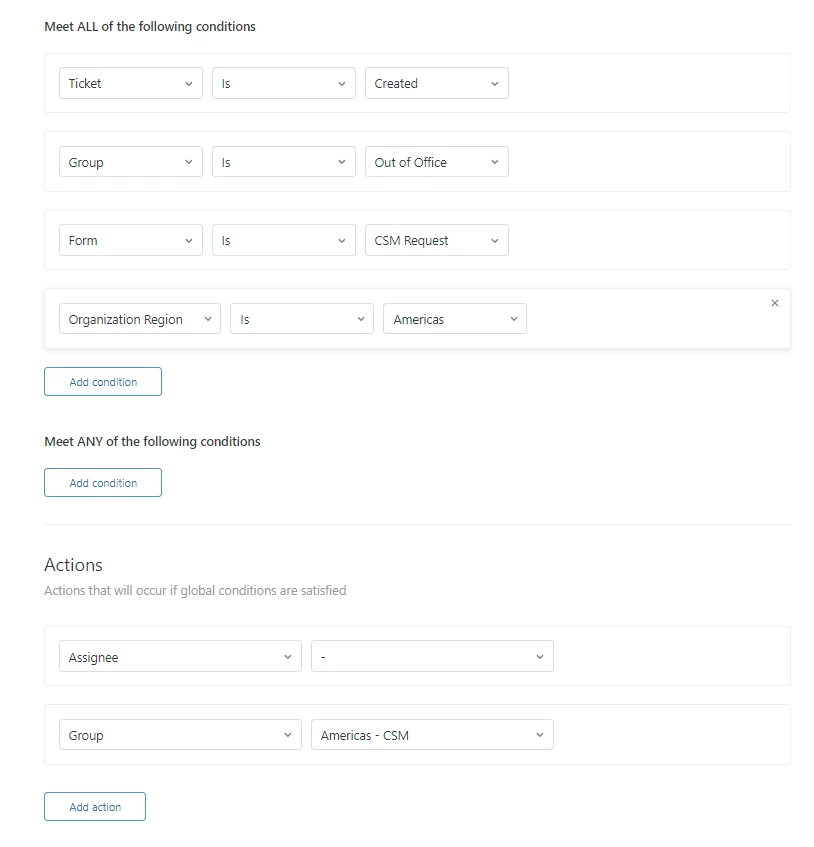
As you can see, the trigger looks for all tickets with the "Out of Office" group and using the CSM Request form. Then this trigger goes back through and removes the assignee and changes the group to the correct Customer Success Management group. Now the ticket is assigned to the main group and not an individual!
When the agent goes out of office, all they need to do is 1) change the Out of Office app to Unavailable to handle their existing tickets and 2) add the "Out of Office" group to their groups and make it their default group. Then everything works!
Important things to note:
- You must tell your agents to NEVER remove their regular group(s). Otherwise, they lose all of their existing tickets.
- It is best to remove the "Out of Office" group altogether when they return to prevent any confusion.
- You do have to create a trigger for every group you are using and it is helpful if you have various forms in play to help the logic.
It is not a perfect, native solution, but it works and saves us a lot of hassle! Hopefully this will help some of you. Feel free to respond to this post with questions!


