
We've recently made some modifications to our C-Sat automation.
This is how the new email looks...
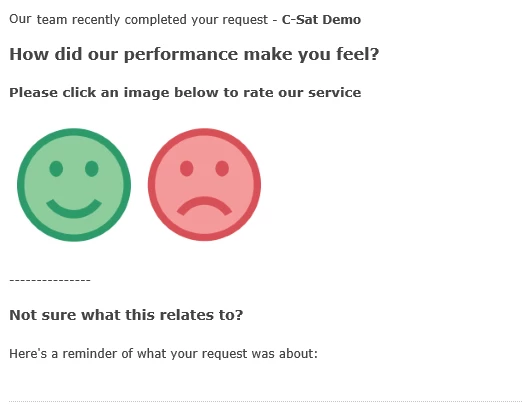
Want to know how?
- If you haven't already - activate 'Customer satisfaction surveys' (info here)
- Download the smileys below and upload these as assets to your helpcenter (or host them elsewhere)


- Navigate to Settings > Automations - and locate the 'Request customer satisfaction rating' automation
- Select to Edit this
- Change the notification to requester with the info below - don't forget to substitute your image location.
<span style="padding: 0px ; line-height: 18px; font-family: 'Lucida Grande',Verdana,Arial,sans-serif; font-size: 12px; color:#444444;">

Our {{ticket.group.name}} team recently completed your request - <strong>{{ticket.title}}</strong>


<h3 style="font-size:16px;">How did our performance make you feel?</h3>

<h5>Please click an image below to rate our service</h5>

<a href="{{satisfaction.positive_rating_url}}" alt="Happy"><img src="https://p5.zdassets.com/hc/theme_assets/YOUR IMAGE LOCATION/happy-face.png"></a><a href="{{satisfaction.negative_rating_url}}" alt="Sad"><img src="https://p5.zdassets.com/hc/theme_assets/YOUR IMAGE LOCATION/sad-face.png"></a>

---------------

<h4 style="font-size:14px; font-weight:bold;">Not sure what this relates to?</h4>

Here's a reminder of what your request was about:
</span>
{{ticket.comments_formatted}}
And that's about it! We've had good response to this.
Obviously you can modify the message and add extra rules to suit your requirements.


As Andrew mentioned, there are some limited ways that satisfaction surveys can be customized. For some examples, see Customizing your customer satisfaction survey
Additionally, Zendesk provides the ability to add customizable Satisfaction Reasons so that users can select an option for why they chose to give a Bad satisfaction rating -- see Working with satisfaction reasons
And finally, as Andrew also mentioned (thanks Andrew!), there are third-party options available that can provide greater customization options, in the Zendesk Marketplace