Tip: How to set a reminder on a ticket | Community
Skip to main content

Tip: How to set a reminder on a ticket

  • July 2, 2014
  • 76 replies
  • 0 views

Show first post

76 replies

Brett13
  • Community Manager
  • April 15, 2019

Hey Derek,

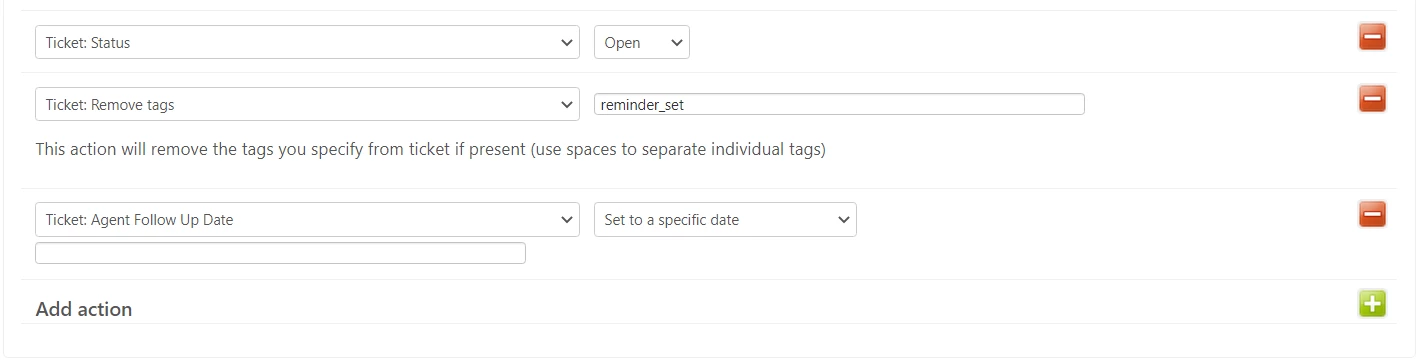
Just so we're both on the same page, could you provide a screenshot of how you're setting up your automation so I can take a look?


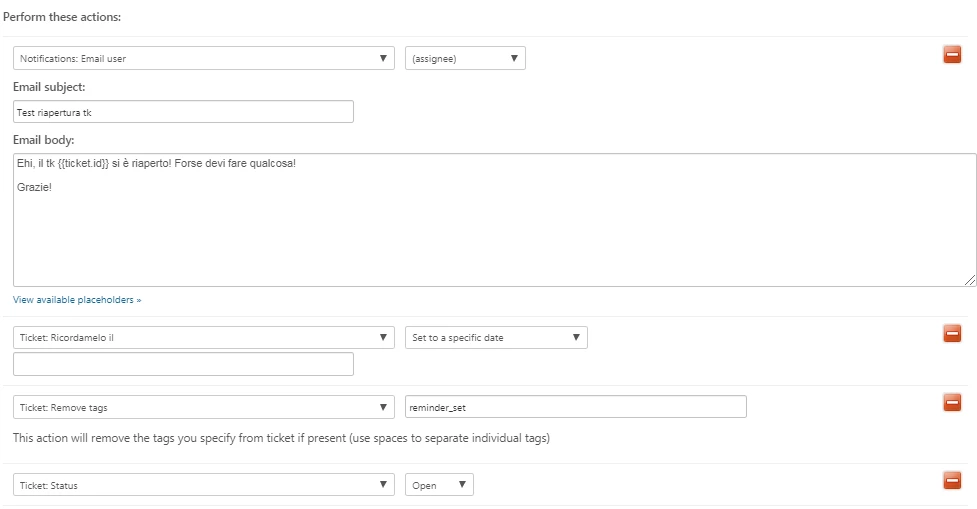
Hi all, we are stuck in the blank date issue:


Somebody who resolved the issue in the past?

Best,

Gabriele


Devan
  • June 17, 2019

Hello Gabriele,

So it seems like you are trying to set up your reminder to be continuous and not have an end date. I would recommend putting in an arbitrary date that is far into the future so you can satisfy the variable it is asking you for when setting up this reminder. This solution is depicted in this community post, but I've also included our guide on how to set reminders to in case you need further assistance. 

Let us know if this proves true in resolving this error and please reach out if we can assist you further.


  • November 14, 2019

Based on this post instruction and what I see on our control panel, this method does not work, I keep getting an error.

I am doing my testing with Support Team and I cannot complete this.


Brett13
  • Community Manager
  • November 14, 2019

Hey Christos,

Can you provide a screenshot of the automation you're attempting to set up? This should help us troubleshoot the error you're receiving.

Thanks!


  • January 14, 2020

Hello Brett,

Can you confirm what plans this workaround can be used on? Are triggers in the Zendesk starter and team plans flexible enough to set this up?

@Brett - Community Manager

Thanks!

Lee


Brett13
  • Community Manager
  • January 14, 2020

Hey Lee,

As long as your not concerned about business hours on your account and only look at calendar hours, then the triggers on starter/team should be enough.

Let me know if you run into any issues :)


Brandon12
  • April 6, 2020

Hello everyone still following this thread,

I *think* my team has found a viable workaround to the 'blank date' issue that has surfaced here.

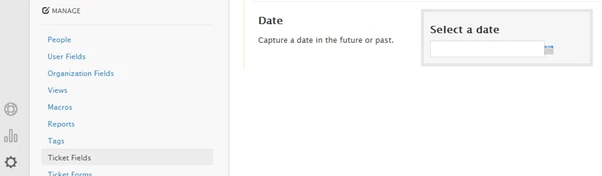
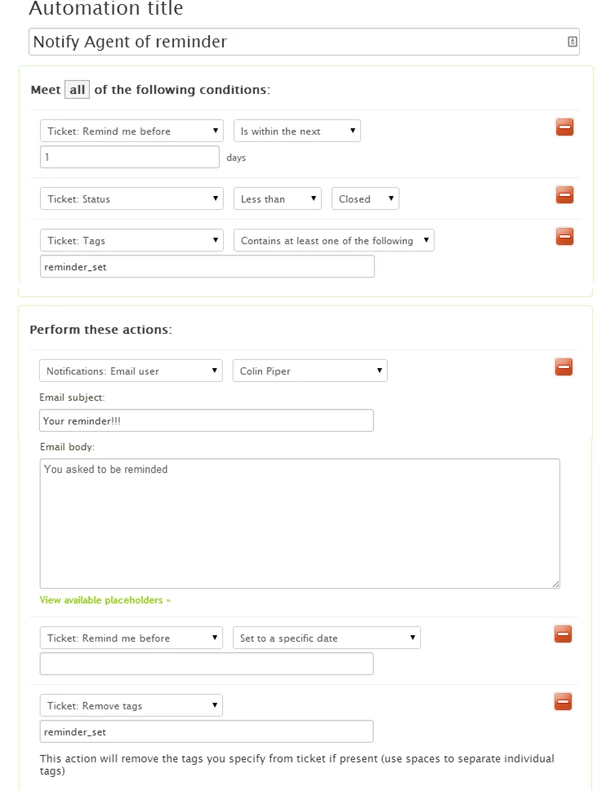
We started by adding the custom field per the original post instructions.  When we setup the automation, however, we replaced the offending line "Set to a specific date" with another action: Add tag: "Reminded." We also set a condition on the automation to nullify it "Tags does not include Reminded."

The limitation here is that you can only set one reminder per ticket.  Hope this helps!

Brandon


It should be possible to blank the date now. I just use ctrl-a (select all) or ctrl-shift-backspace to clear it. You then have to tab to the next field or click another field — that seems to make it stick. Update the ticket and the field should remain blank!


Active Feature Request (please vote):

Feature Request: Ability to set a reminder on a ticket

@Colin Piper

I just posted a Feature Request for this at the link below. If you would like to see this feature please head over there and show your support. Please make sure to add an upvote and comment even if it is simply a "+1"

Also, you may consider adding it to your post to get the feature request more visible.

https://support.zendesk.com/hc/en-us/community/posts/360046767254-Feature-Request-Ability-to-set-a-reminder-on-a-ticket


  • January 28, 2021

Hi,

The solution found by us is an automation with condition: Hours until due Date (calendar is) 4.

If you look in the Events of a ticket, you will see that the date has a time too. Ours is 10UTC (and local is 12PM). I want the reminders at 8AM, hence the 4 hours before.

(first automation was 8 hour since, because I thought the day started at 12AM midnight and needed the +8 hours)

Tested and working. 


  • July 23, 2021

Hello,

I wish I read the more recent comment on this thread first before I read https://support.zendesk.com/hc/en-us/articles/231659207?page=1#comment_4404674864282.

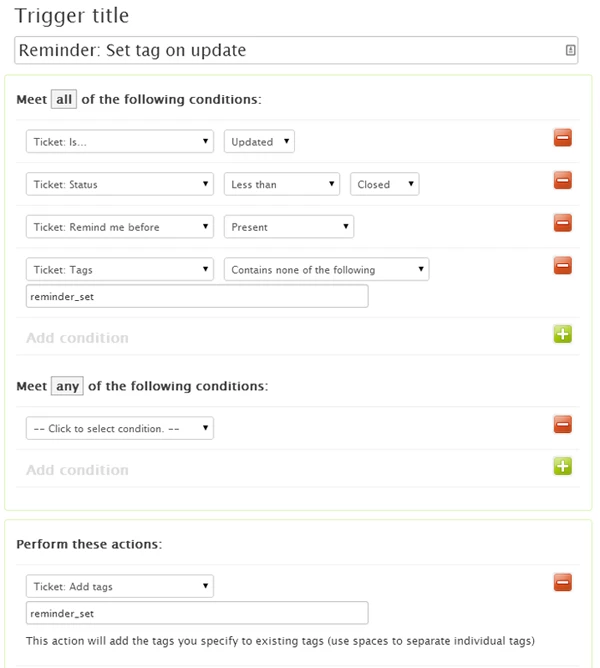
But yes you have to make sure to use a tag that matches both the condition and action as shown in the screenshot above. I'm glad did not have to add the custom field as that sounds like a nightmare and in my case could impact both customers and my agents. 


Ad17
  • September 15, 2022

How exactly do I blank out the date of the custom ticket field once the reminder date is reached if we can not add an action on the automation to "set to a specific date" to a blank field? So many people have said they get an error, but not seeing a solution. 


John38
  • October 4, 2022

@ludmila11 Were you able to do this on ticket types other than "Task"?


Salim13
  • October 13, 2022
Hi Melody,
 
I created a support ticket on your behalf, so we can investigate this further. 
 
Best,


Antoine17
  • November 8, 2022

Hello, thanks for this feature that should be in Zendesk as a standard option in my opinion.

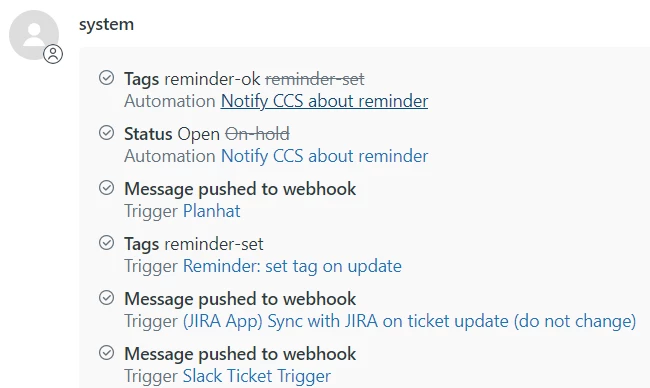
I have an issue: even if I set up the date, some tickets get reopened 1 or 2 days before. Last example: we set up the reminder for 10/11/2022 and it got reopened today (08/11/2022), without reason (I checked the events but could not find anything outside this trigger):

Did someone have the same issue? If so, how did you solve it please?


  • January 4, 2023

Hi @antoine17

I would like to check this for you. Hence, I created a ticket (11112375) for us and sent it to your email so we can continue working together. 


  • February 13, 2023

Hi ZenDesk, 


Have there been any updates on this as far as settings hours instead of just days? We need ticket reminders (same day) just hours later. Can this be done now, or do we need some kind of integration with another app if we want this capability? 


Thank you in advance! 


  • February 14, 2023
Hi Dustin,
 
Currently, this workaround still works as the same to send a reminder being open after x days. I have found a 3rd party app that might be able to do it. You can check this 3rd party app here.
 
I hope this helps. Thank you!
 

  • April 26, 2023

Related question:  Is there a way to simply create a reminder based on (static) X days since last updated date, to notify assignee? I didn't see a way to create this and don't want it to be a manual action to select remind or not. Thanks!


  • April 27, 2023

Hi @mike63,

At the moment, there's no native way of setting a reminder based on a static number of days. Aside from the option above, you may play with the time-based conditions (based on x number of hours) we have in automation (Ex. Hours since update). 


  • October 5, 2023

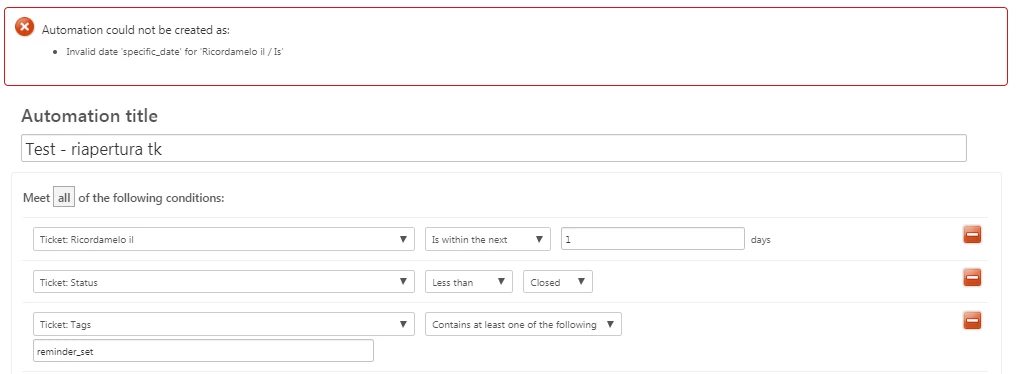
It seems like there are at least 5 people here reporting the same issue where the automation throws an error titled "Invalid date 'specific_date' for 'Remind me Before / Is' but it doesn't seem to have been addressed yet - how can we get an answer about how to fix this? I think if it's removed the automation won't work but I'd really like to employ this tip! Thank you!


Brandon12
  • October 6, 2023

Hey @hailey13 -

Thanks for bubbling this up.  You could achieve this through a webhook that updates the ticket field.  The JSON would look something like this:

API: 

Update Ticket

  • PUT /api/v2/tickets/{{ticket.id}}.json
{
"ticket": {
"custom_fields": [
{
"id": 360048278251,
"value": ""
}
]
}
}

PS - If you need a primer on Webhooks, this article is a great resource.

Hope this helps!

Brandon


  • October 17, 2023

I don't understand why Zendesk always forces its customers to use workarounds like a webhook to delete an already set date!

I want to delete the field and not add ANOTHER webhook as a workaround.

Brandon, as a group leader, do you think this is a good way to keep paying customers happy?


Brandon12
  • October 18, 2023

Hey @patrick16,

I hear you.  As part of a consulting firm that specializes in augmenting Zendesk native functionality, we are no strangers to seemingly 'simple' workflows that, for one reason or another, have been left on the cutting room floor of the Zendesk editing bay.  

Although I don't work for Zendesk, I can speculate that since leaving the field populated with the expired date has no impact on the intended workflow, and might even serve as a historical marker (ie - when was this reminder sent), it was most likely not considered as part of the original use case and as such wasn't included in the version you see today.

That said, I know that Zendesk is constantly evaluating and evolving the product, and your feedback here is being noted by the teams that are working on enhancements across the product.  The best thing I can suggest is to reply here with a specific use case for needing the field cleared post-notification, thus giving the product folks more context as to the need.

Brandon