Tip: How to set a reminder on a ticket | Community
Skip to main content

Tip: How to set a reminder on a ticket

  • July 2, 2014
  • 76 replies
  • 0 views

Show first post

76 replies

Jennifer16

Nice, Claire. Thanks for helping with the troubleshooting!


  • July 20, 2015

Thanks again Clair and everybody, works like a charm...


  • August 21, 2015

I ran into the same issue that was reported earlier where i set up the automation exactly as what was suggested but I am receiving this message. How do I resolve this?

Thanks!


  • September 14, 2015

All,

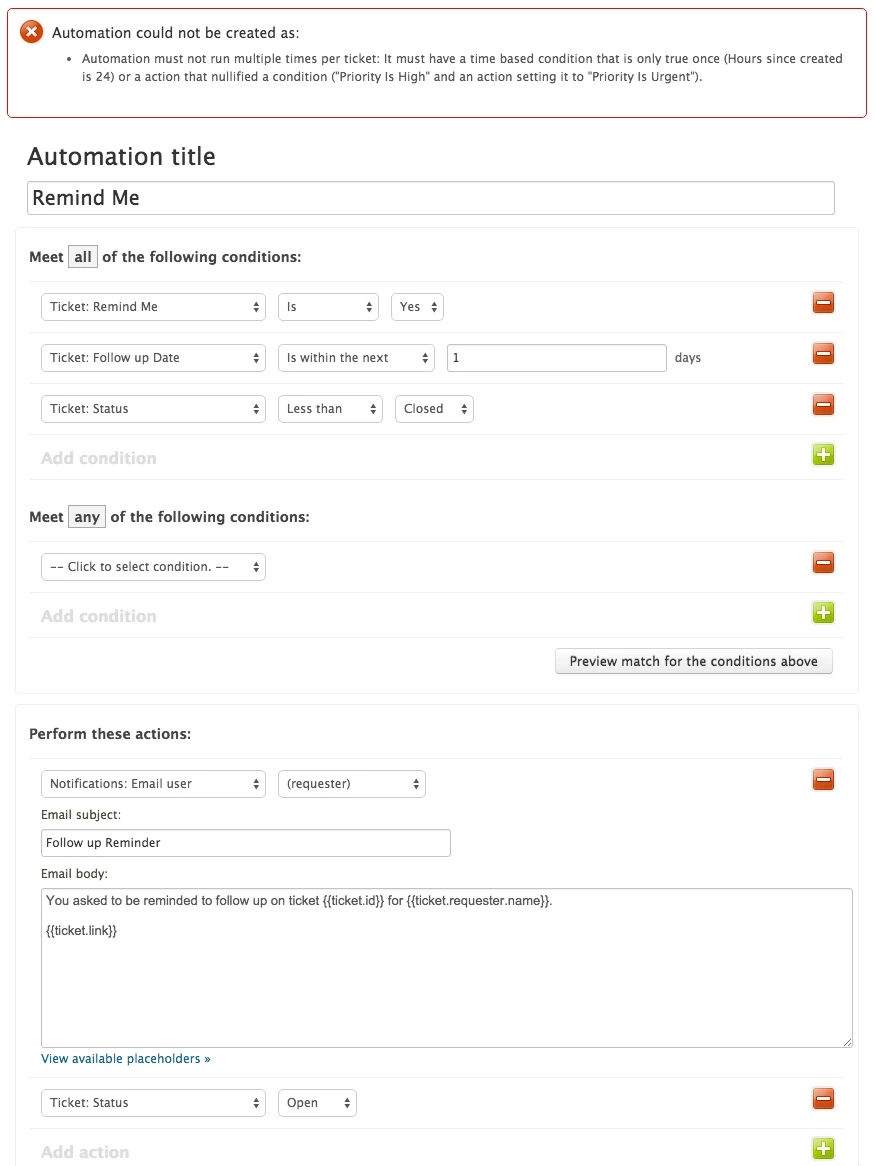
I believe that I followed Colin's steps properly, but when I click "CREATE" I get the following.

Any advise?

Automation could not be created as:

  • Automation must not run multiple times per ticket: It must have a time based condition that is only true once (Hours since created is 24) or a action that nullified a condition ("Priority Is High" and an action setting it to "Priority Is Urgent").

  • September 15, 2015

Hey Msaitow!

The message that you're getting means that there isn't anything in your conditions that will prevent the automation from running multiple times per ticket. That's not allowed, so you won't be able to create the automation until it's fixed.

Can you post a screenshot of your automation? That'll help me pinpoint exactly which condition is creating the issue.


  • December 29, 2015

Hey all! 

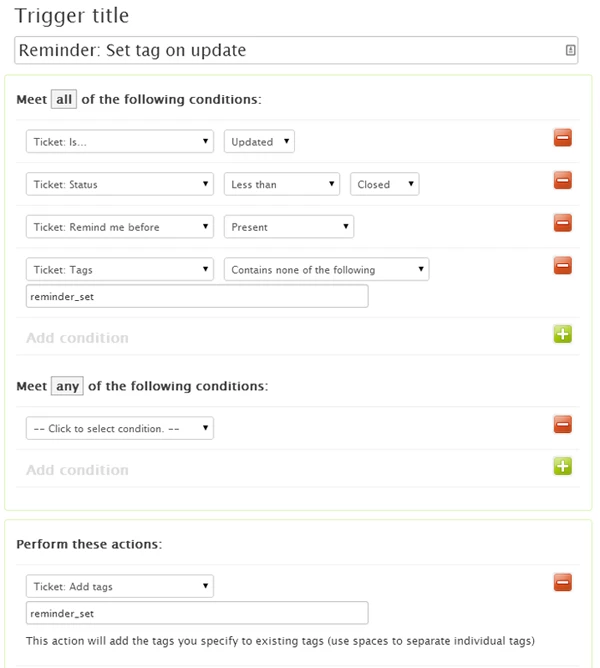
Thanks for all the great tips. We did get something that works based on the same principle: an automation that adds the reminder tag if reminder date is present, and a trigger that executes the action based on the tag and date.

However, the trigger always executes 1 day BEFORE the chosen date. Which makes sense given the condition is "within the next 1 days". 

Has anyone managed to make it work ON the specific date, nor before nor after?

Thank you!

Olivier


  • Author
  • December 29, 2015

@Oliver, sadly this is not possible. 


  • March 9, 2016


I have read this thread and other help articles trying to understand what I am doing wrong.  I feel like have copied the examples and I still can't get it to work. Help!  Super frustrated...


  • March 9, 2016

Hi David!

You can't have an automation run multiple times on the same ticket, so you need to add a nullifying condition, such as being more specific about the ticket status required to fire the automation and then having an action to change the status when the automation fires, or adding a tag to the ticket when the automation fires and setting up a condition so that it won't fire if that tag is present.

Once you've done that you'll be back in business!

Please let me know if you have any other questions!


  • March 9, 2016

Yes... I have read that over and over again.  What does that really mean—"nullifying condition".  I have followed one of the examples on the forum almost exactly and it's not working.   I am missing something.. That said from what I can tell in the forum their are others that are having the same problem.


I my  mind "Ticket type: Followup Date" "is within the next" "1 days" is a condition that can only happen once!


  • March 9, 2016

Hey David,

A nullifying condition is any ticket property that changes to prevent the automation from running more than once on any given ticket.

Because your automations run hourly, "within in the next > 1 days" is a condition that can be met multiple times in the course of a single day. That's why it's throwing that error for you.

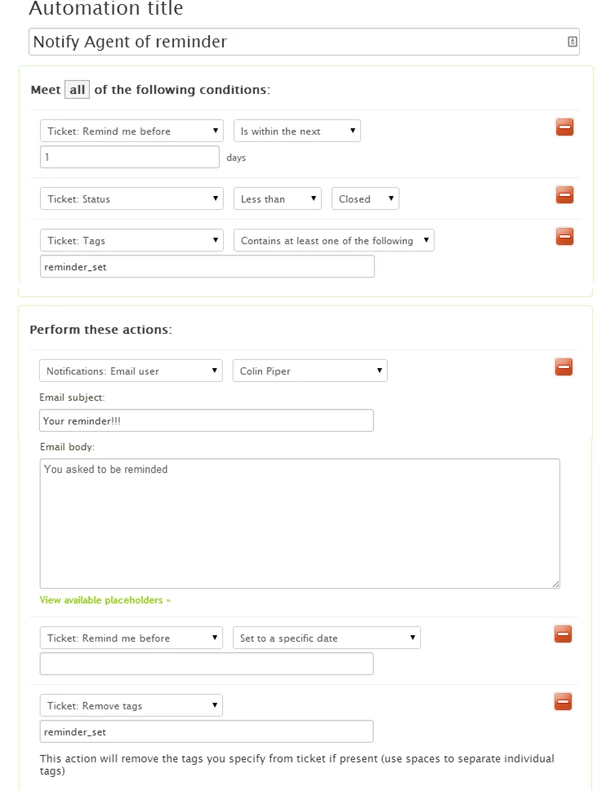
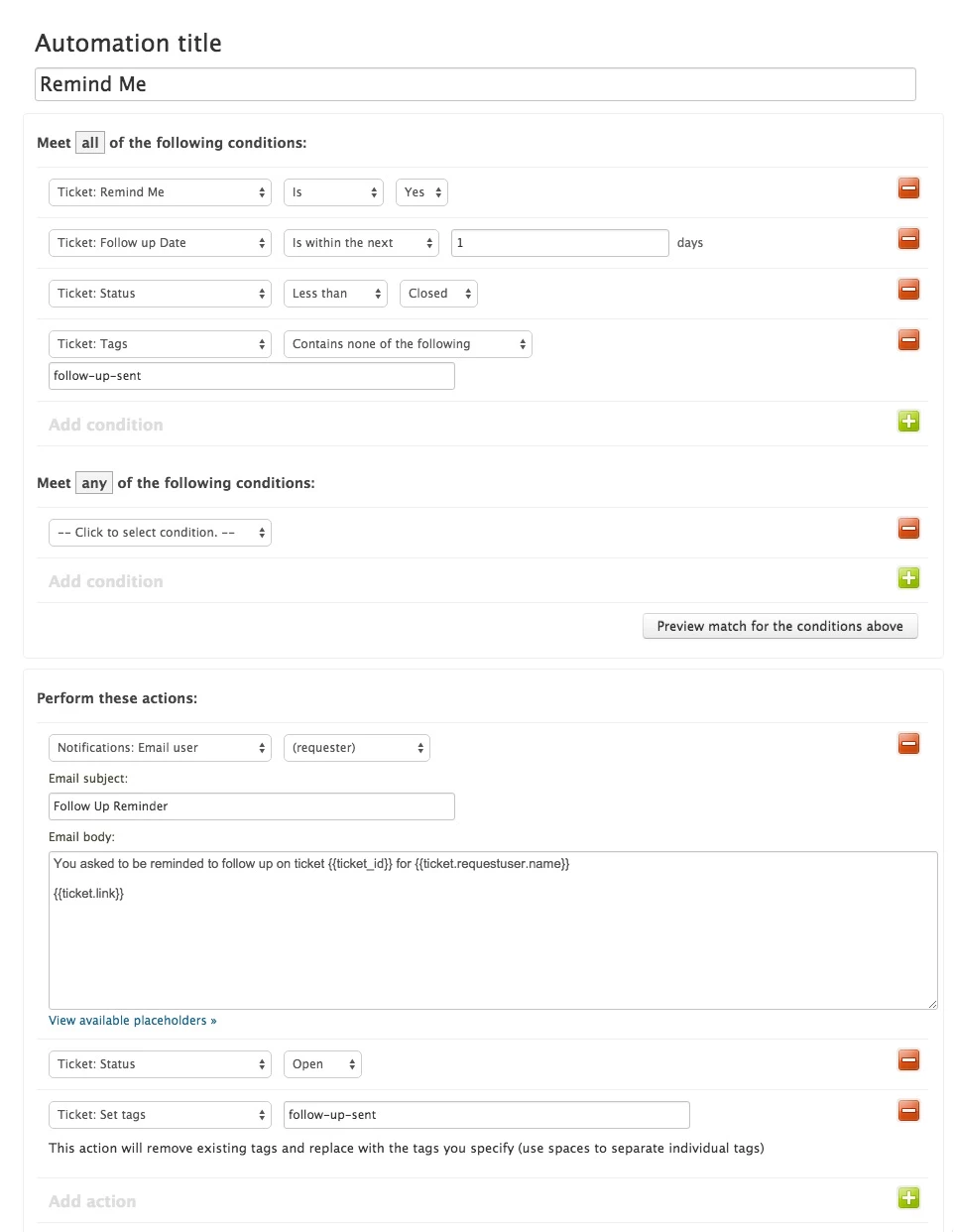
You'll see in Colin's first screen shot that he has a condition set in his automation that a specific tag cannot be present in order for the automation to run.

If you scroll down a little further, you'll see that he has an action that adds that tag to the ticket when the automation runs.

The lack of tag allows the automation to run. The fact that the tag is then added prevents the automation from running on that ticket again.

You can do the same thing with other ticket properties as well, if you don't want to use tags. You can change the status of the ticket, ticket type, ticket priority, etc.

In order for your automation to work properly, something on your ticket must be changed so that those exact conditions cannot be met again on that specific ticket.

I'm sorry that this has been frustrating for you. I hope that helps to clear things up!


  • March 10, 2016

Ok,  Thanks!  I was setting a tag in one of my first attempts but I must not have set it correctly because I was getting the same error.  So that is where I got confused.  When I went back and set a tag this time it worked!


  • March 10, 2016

Excellent! I'm glad we were able to get it sorted out. :)

Let us know if you need anything else!


  • March 18, 2016

Hi all, 

Has anyone been having problems recently with these date-based reminders?

I have set it up exactly in the way Claire described on the previous page, and it worked fine until a couple of weeks ago. 

It seems to me something is broken with the date, the second trigger doesn't seem to recognize that the reminder date is within the next 1 days and doesn't fire (the first trigger works fine and sets the tag correctly). 

Has anyone had this problem?

Thanks 

Olivier


  • May 23, 2016

Hi all,

Do you notice that your tickets a few hours earlier than 1 day before the reminder date?

My tickets usually open around 7pm, 2 days before the date we set, which is a few hours earlier than I think it should.

I know tickets always reopen 1 days before, but I assume it should be at midnight. 

Has anyone had this problem? 

Also, has no one found a solution or workaround to tickets reopening 1 day early, so that tickets reopen on the actual date we set (eg. "reopen if ticket date is in the next 0 days?").

Thanks,

Olivier


  • October 25, 2016

We would also like to have tickets re-open on a particular day. Having to set this up so that they re-open the day before is fairly inconvenient - especially because the UTC used for the automation triggers means they actually open at 5 or 6 PM a full two days before the date we've set, right as we're closing the office.

The ability to set a date and time for them to re-open would be incredibly valuable for us.


  • January 13, 2017

Hi. 

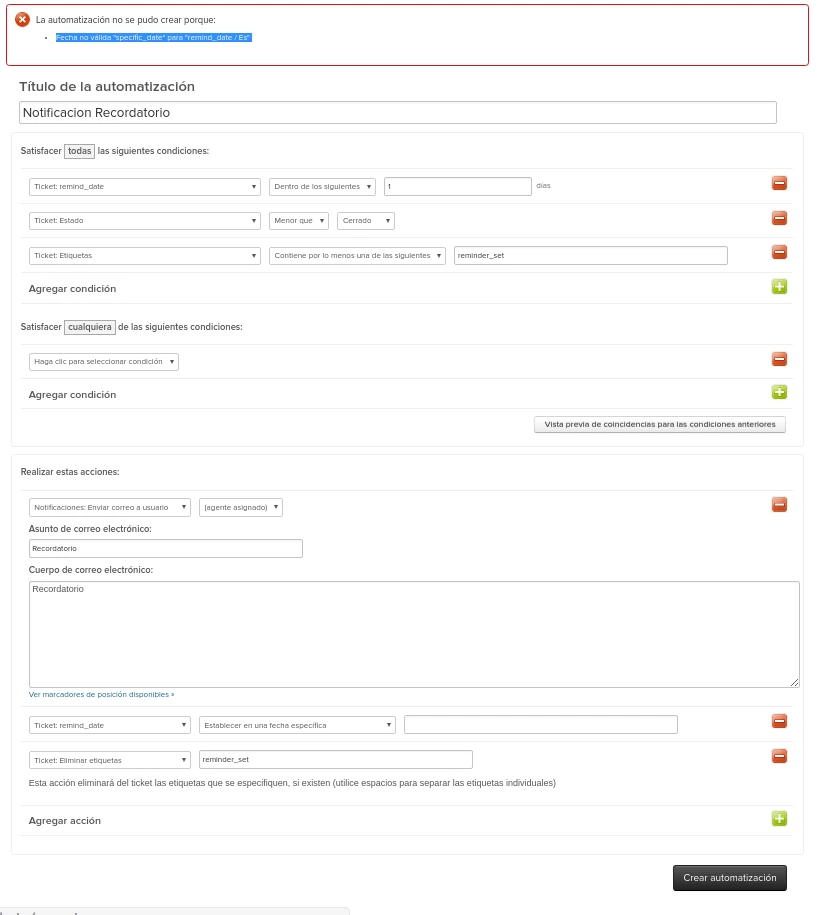
Someone mention the same error i am having, but i could not find the solution in the blog.

Can anyone help me?

Its in spanish, but the configuration seems to be the same


  • January 13, 2017

Our solution to this issue was to resort to the excellent Zendesk Appstore and purchased:-

Calendar: Attach calendar events to tickets. http://zdsk.co/1Ph9xeZ

Yes, its $2.50 per agent, but it's easy to manage and synchronizes with the agents Google Calendar.

PS. No association with the product other than being a happy customer!

Craig


  • February 10, 2017

I have a solution to this that allows us to get the reminder at midnight on the date selected in the calendar, so the Agents come in to the reminders on the correct day, not the day before! Obviously lots of automation means more things can break it, but it seems to be functional enough. But I haven't done a huge amount of testing with this so be careful. 

This will not work for time periods less than 24 hours. We had to create a separate automation for "remind me tomorrow". 

We handle tickets in a specific way, so this is tailored to us. But the concept could be adapted once you understand it. 


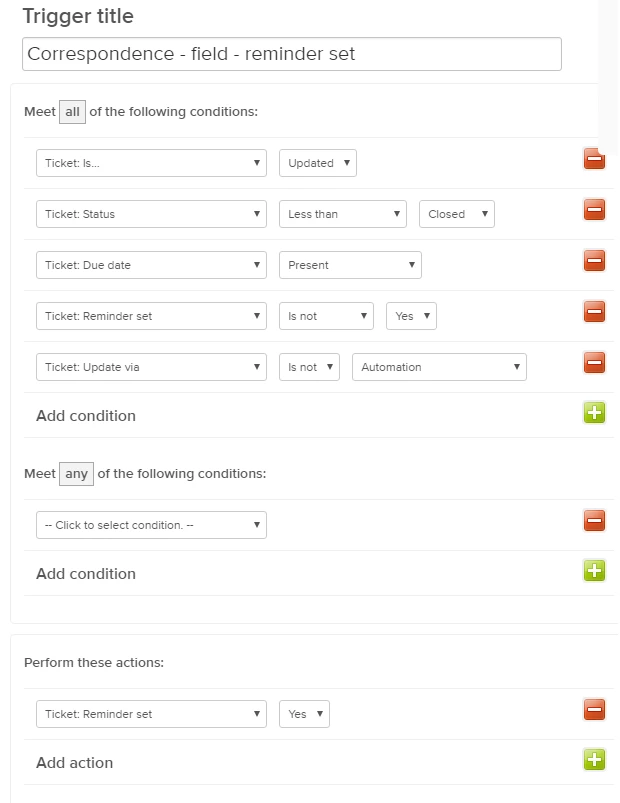
Trigger fires if - Ticket updated (not by automation), with a due date present in the date custom field. Action: ticket custom field "Reminder set" to YES.


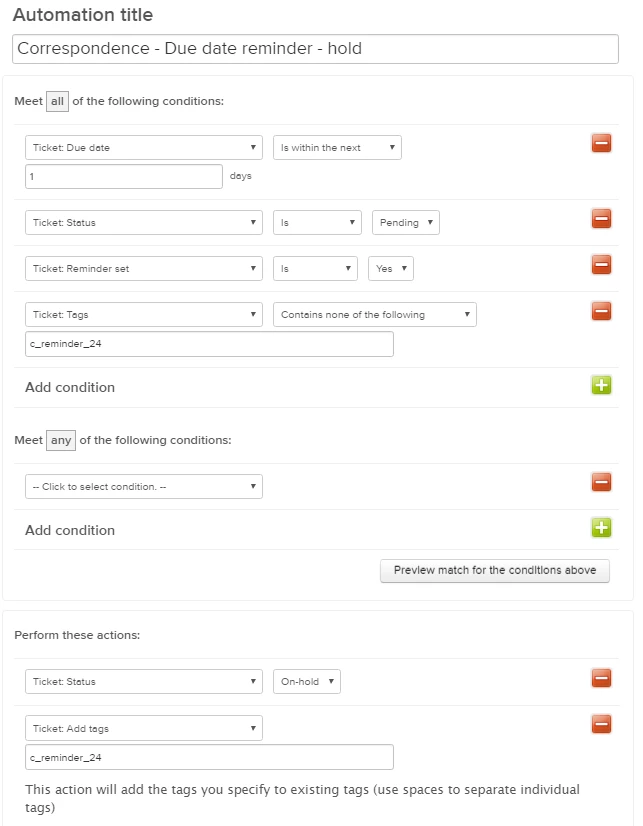
Automation fires if - field "Reminder set" to YESless than 1 day until due date. Action: adds tag c_reminder_24. Also changes ticket from Pending to On-Hold.
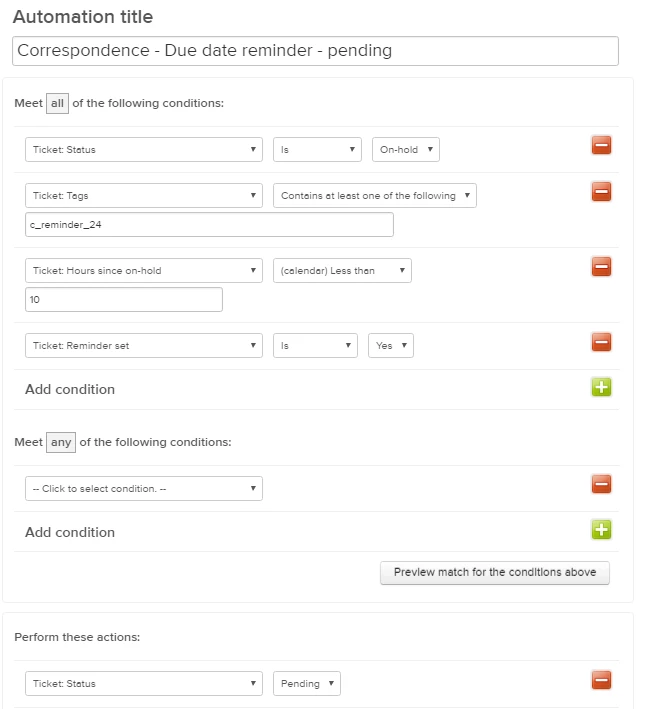


Automation fires if - field "Reminder set" to YES, tag c_reminder_24, ticket has been on hold for less than 2 hours. Action: Change to pending.


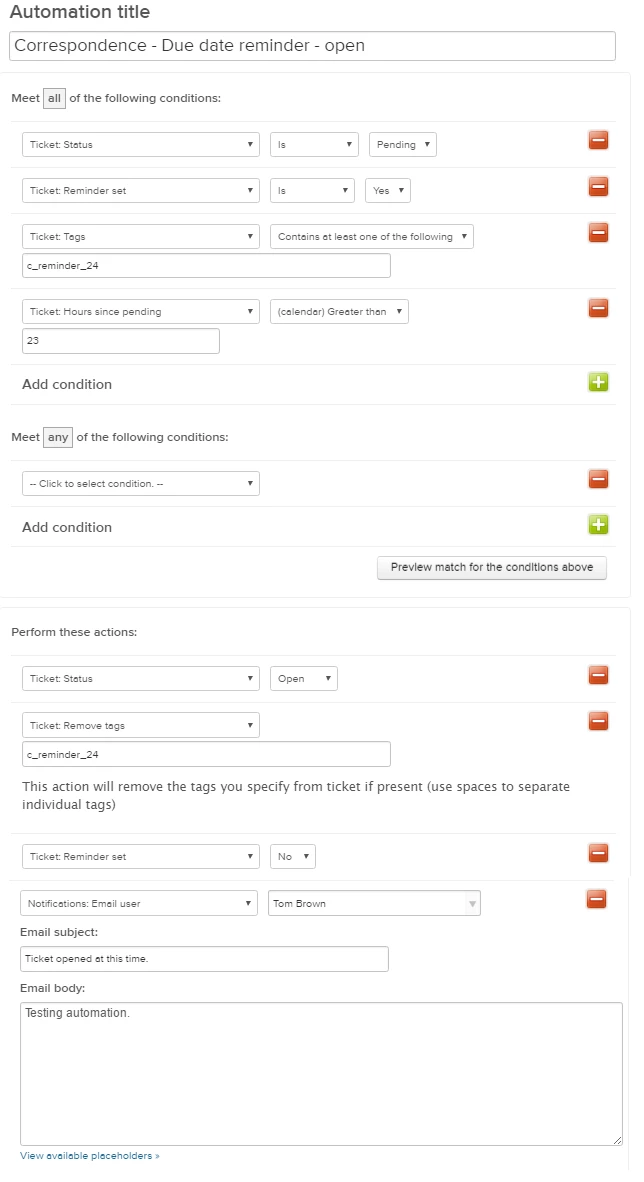
Automation fires if - ticket with tag c_reminder_24, "Reminder set" field YES, and time since pending is greater than 23 hours. Action: trigger email and change ticket to open. remove tag c_reminder_24 and set custom field to No. 


Jennifer16

Hey Tom, this looks good. Thanks for sharing your solution!


  • October 6, 2017

It would be nice if you could set "Ticket: Due date" til today so you would be able to create a today view, listing all tickets for today.


Nicole17
  • October 6, 2017

Hey Fredrik, 

Welcome to the Zendesk Community, and thanks for the feedback! I encourage you to post it in the Product Feedback area, where our Product Managers hang out. 


  • October 19, 2018

I didn't see one posted yet, so I created this feedback in the Product Feedback area:

https://support.zendesk.com/hc/en-us/community/posts/360004370788-Allow-automations-to-occur-on-a-date-set-in-a-form-field

If this interests you, please go vote! Thank you!

Lee


Nicole17
  • October 19, 2018

Thanks for coming back to share that link, Lee.


  • April 11, 2019

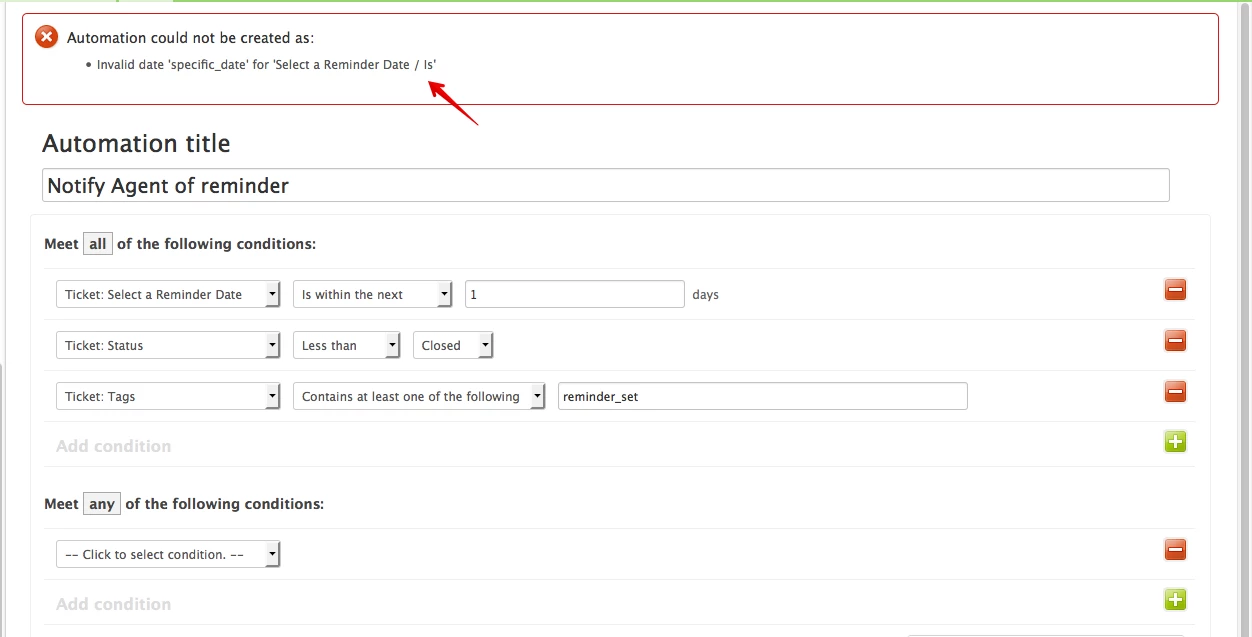
With Colin's settings, I'm getting:

Automation could not be created as:
 - Invalid date 'specific_date' for 'Remind me before / Is'

It doesn't seem to like a blank value there, and I don't see another way to blank out that date.