
Tip: How to set a reminder on a ticket | Community
Skip to main content

Tip: How to set a reminder on a ticket

  • July 2, 2014
  • 76 replies
  • 0 views

It is great to be able to put a ticket on-hold, but I am sure you have suffered from tickets remaining in that status for too long.

Sure you could create an automation to change the state back to being open after x days, but life is never as simple as there being a constant value for x. And perhaps you don't want to actually change the status, you just want to be reminded that the ticket is there. You may want to be reminded no matter what state the ticket is in (except closed!!!).

Well, I'm going to tell you one way of doing it. using a special type of custom field--a custom date field.

The high level summary of this tip is create a new custom field, allow the agents to populate it, and then send a notification to the agent when that date is reached. Before we start though there is a couple of small caveats.

  1. This is a date. Not a date and time, just a date. The date in question therefore starts at midnight, not when your business hours start.
  2. Currently, in a trigger you cannot test for a date being equal to "today". Therefore we are going to use the logic of "remind me before" a certain date (although you could easily adapt this to "remind me after").

Right, let's get on with it. 

Create a custom field

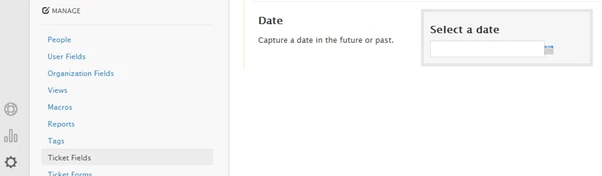
First we need a custom date field. Go ahead and create a Ticket Field and give it a suitable name. I called mine "Remind me before".

Note: If you are an Enterprise plan customer, remember that you will need to add this field to your Ticket Forms also where needed.
Create automation to notify agent of reminder

Next, we need to create an automation. We want to test whether the reminder date is within the next 1 day (we cannot set this to 0 days - I tried!) however, any automation requires a nullifying condition otherwise it will repeat every hour. The obvious solution is to set the reminder date to be blank but unfortunately this (at the time of writing) is not considered nullifying therefore we are going to have to use a tag. I have one called "reminder_set" and we will deal with this later.

For now though, create an automation similar to one the one in the screenshot. In this automation we test for the tag and when the reminder is due and then send an email, blank out the date and remove the tag.

Automation: Notify Agent of reminder
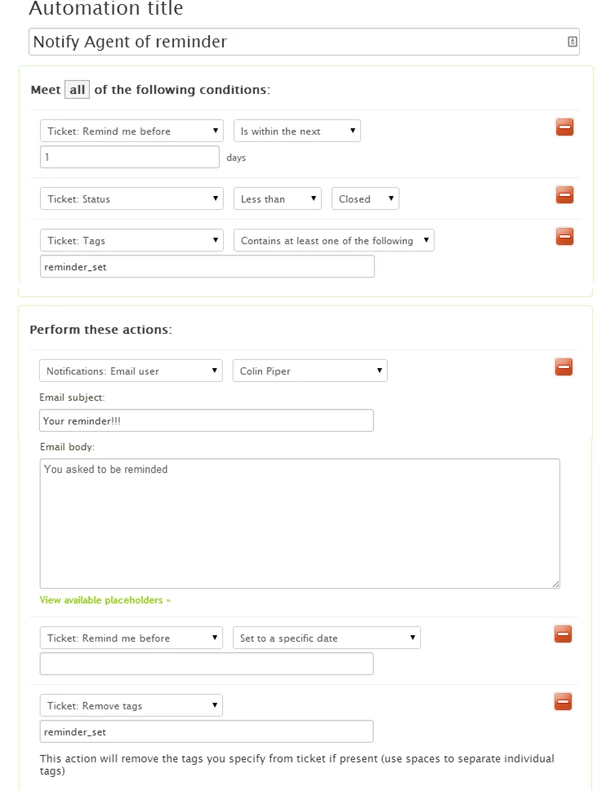
Please note that in my case I have chosen to send all reminders to me personally. You will probably want to email "(assignee)". 

Create trigger to add tag on update

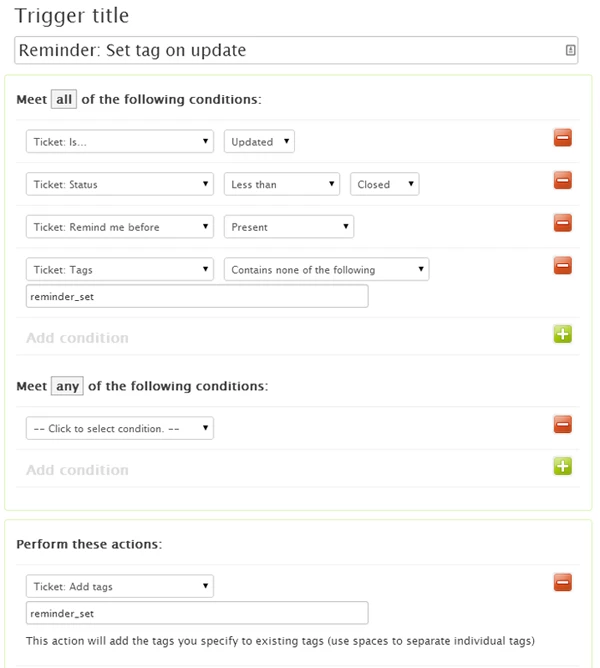
Now we just need to deal with the requirement to have the tag to nullify the conditions of the automation. This requires a trigger. This trigger will fire when a ticket is updated and if a date is present, then add the "reminder_set" tag.

Trigger: Reminder Set tag on update
Well that is it. Perhaps whilst you are there, create a ticket with a reminder to order your mother (spouse, partner, favorite member of Zendesk staff, etc) some flowers on their next birthday.  :)

Any suggestions on improving this, then please let me know. 

76 replies

  • July 2, 2014

Fantastic, thank you very much for this seemingly simple yet effective tool!


  • Author
  • July 9, 2014

Just a quick note to say that a change seems to have broken this. When I blank out the custom date the filed is populated with "undefined NaN, NaN" and the ticket cannot no longer be submitted. I have created a ticket with ZD so hope this will be resolved soon. I will post back.


  • September 6, 2014

It would be great to be able to set a reminder based on time as well as date to have greater control on reminders.


  • September 7, 2014

Hi Craig,

There's actually an active post in our Product Feedback forum about this - I would encourage you to add your vote and use case to it.

Thanks for the feedback!

(This link has been removed and feedback topic archived)


  • Author
  • September 8, 2014

We should be careful not to mix two things up. A ticket of type "task" always could have a due date and it has long been asked for this to also include a time. Any other type of ticket historically could not have a date associated with it but now can with the recent introduction of the custom date field. 

Giving a task a date and time capability would be great but that capability may not automatically apply to custom fields.


  • December 2, 2014

I cannot send the 'specific date' to empty in the automation. Is that changed?


  • December 2, 2014

Hi Heimen!

Can you please be more specific about exactly which condition or action you're working with? This will help me better pinpoint what's going on.

Thanks!


  • December 3, 2014

The date field is set to empty in the actions (in the automation). But when I do this in my Zendesk I get an error that the field cannot be empty.


  • December 4, 2014

Hi Heimen,

Are you working with the custom date ticket field? The way this is set up, based on my testing, is that this particular field has to have a value assigned to it if you're going to use it in the actions of an automation.

Hope that clears things up some. Let me know if you have any other questions!


  • January 12, 2015

Nice post Colin.

Have you had any word on if we will be able to wipe the custom date field via automation without running into the "undefined NaN, NaN" problem?

Cheers,

Dan


  • January 21, 2015

Hi Conlin,

I did a variation of your custom field with triggers and automations that would open the ticket on that day. 

I've attached two screenshots of the business rules. It doesn't seem to be working as intended. It does not open one day before the date in the custom field. Can you take a look and tell me what I am missing?


  • Author
  • January 22, 2015

I will revalidate this post as soon as I get a moment.


  • January 29, 2015

Hi guys,

I think I found a solution to this problem an have a suggestion, which seems to be working. Since my account is in German, I've edited Colin's screenshots - please forgive :)

First, I have created a costum field, as suggested. In my case, I chose a drop-down custom field called "Remind me?" with the options "yes" and "no".

Then I have used Colins Automation screenshot and slightly changed some things. You can create an automation similar to one the one in my edited screenshot:

In Perform these actions take out the whole column Ticket: Remind me before + Set to a specific date.

Besides setting the email, set the action Ticket: Remind me? to "No"

You don't have to set any trigger, since the action will get nullifyed by changing it's status to "No" as soon as the email is sent out.

When I set the date- the email arrives in my inbox the day before 8pm (+1 GET, German time). Incase I'm not working during that time, I'll see the email in my inbox the next morning - so the set date! 

I hope this helps.


Cheers,

Daniela


  • January 29, 2015

Hi Daniela!

Thanks for sharing your tip!


  • April 17, 2015

Can I set this reminder for 4 hours? For example the ticket is received at 10:00, 14:00 I need to call the customer.


  • Author
  • April 17, 2015

No, sorry. Only for a date.


  • June 3, 2015

I have set up my automation exactly as it is in the original article, however I am receiving an error when trying to save the automation


Sabel, 

If your custom field is a drop-down, how and where are you entering the date that you'd like to be reminded on?


  • July 14, 2015


I think I have sorted this using triggers. I'm going to test this over the next few days so I'll let you know how I get on! 

Create tag:

Update assignee and remove tag:


Jennifer16

Awesome, Claire! Thanks for sharing your triggers. Let us know how it works out.


  • July 16, 2015

Hi,


I am very interested in such a reminder. I tryed modding this method by using two tags, wax_on and wax_off, but I keep getting emailed by the outomation everyhour - can't figure out why... Maybe anyone can see my mistake?


I don't really need to remove reminder_on but if I don't add this I cant save the automation.

Would love to hear your thoughts...


Thanks!


ZZ55
  • July 16, 2015

Uri

I would suggest that there is another process that is updating the tags on this ticket. Check the ticket events for another automation or trigger that is fires after this one.


  • July 16, 2015

Thanks but the only thing updating this tickets is the automation and the trigger. By my logic this should not interrupt and as you can see the reminder_off is present when the automation runs but yet it does....


  • July 16, 2015

It might not be this but there is a spelling mistake in one of the reminder_off's. It reads reminrer_off. Perhaps this is causing some issues? 


ZZ55
  • July 16, 2015

Well spotted Claire.


  • July 16, 2015

I actually thought about it and used copy past to be sure. Well apparently I have missed one spot. Thank you Claire! I will update if this is now functional.


Thanks, Uri