Tip: Displaying Subsection list on Category page | Community
Skip to main content

Tip: Displaying Subsection list on Category page

  • February 21, 2019
  • 30 replies
  • 0 views

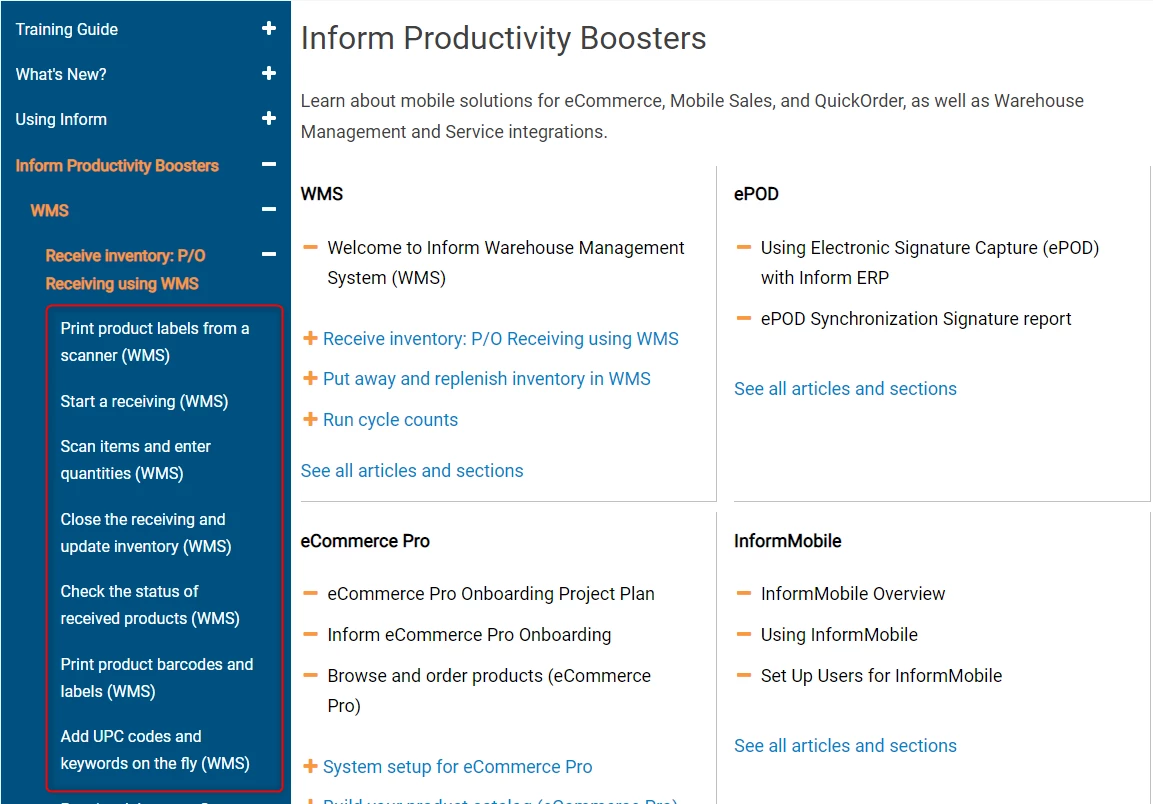
With Flexible Hierarchies, it is possible to create Sections that contain no articles, only Subsections. These Sections will appear empty on the Category page, which could be confusing for your end users, as there is no indication that more content is available.

I modified this article on July 12, 2019 to include articles first and then sections within a category, limit the number of each listed to 4, as well as provide a link to more articles and sections.Thanks to those who have used this article and pointed out other improvements. For everyone else, please look at the comments for more helpful tips. 
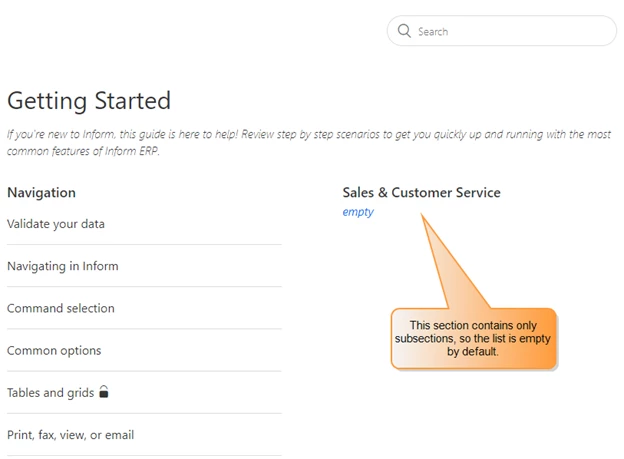
To correct this problem, you can create a new section-list class and then add code to your Categories page to display a list of subsections.

Modify your CSS

To create the new section-list class, add the following to your style.css file. I simply copied from the .article-list class. To ensure that your styling stays consistent, I recommend you do the same.

.section-list {

  list-style-type: none;

  padding-left: 18px;

  display: -webkit-box;

  display: -ms-flexbox;

  display: flex;

  -ms-flex-wrap: wrap;

  flex-wrap: wrap;

  text-align: left;

}


.section-list-item {

  -webkit-box-flex: 1;

  -ms-flex: 1 0 420px;

  flex: 1 0 420px;

  padding: 5px 0;

  max-width: 100%;

  -ms-flex-wrap: wrap;

  flex-wrap: wrap;

}


To differentiate the article-list class and the section-list class, I added fontawesome bullets: + for the sections to indicate more content, and – for the articles.

.article-list-item:before {   

    font-family: 'FontAwesome';

    content: '\f068';

    margin:0 5px 0 -15px;

    color: #e8710a;

}

.section-list-item:before {   

    font-family: 'FontAwesome';

    content: '\f067';

    margin:0 5px 0 -15px;

    color: #e8710a;

}

Modify the Categories template

In the category_page.hbs file, replace the {{#each sections}} block with the following:        

{{#each sections}}
    <section class="section">
      <h3 class="section-tree-title">
          <a href="{{url}}">{{name}}</a>
           {{#if internal}}
           <span class="icon-lock" title="{{t 'internal'}}"></span>
           {{/if}}
       </h3>


        {{#if articles}}
            <ul class="article-list">
                 {{#each articles}}
                     <li class="article-list-item{{#if promoted}} article-promoted{{/if}}">
                          {{#if promoted}}
                              <span data-title="{{t 'promoted'}}" class="icon-star"></span>
                           {{/if}}
                            <a href="{{url}}" class="article-list-link">{{title}}</a>
                       </li>
                   {{/each}}
              </ul>
           {{/if}}

           {{#if sections}}
             <ul class="section-list">
                 {{#each sections}}
                    <li class="section-list-item"><a href="{{url}}">{{name}}</a></li>
                 {{/each}}
             </ul>

             <a href="{{url}}" class="see-all-articles">
              {{t 'show_all_articles'}} and sections
              </a>

               {{/if}}

<style>
      .section-list li:nth-child(n+4) {
              display: none;
          }
</style>

<style>
        .article-list li:nth-child(n+4) {
                display: none;
         }
</style>

</section>
{{else}}
<i class="category-empty">
<a href="{{category.url}}">{{t 'empty'}}</a>
</i>
{{/each}}

Check it out, here: https://support.ddisystem.com/hc/en-us/categories/360001355173-Inform-Productivity-Boosters
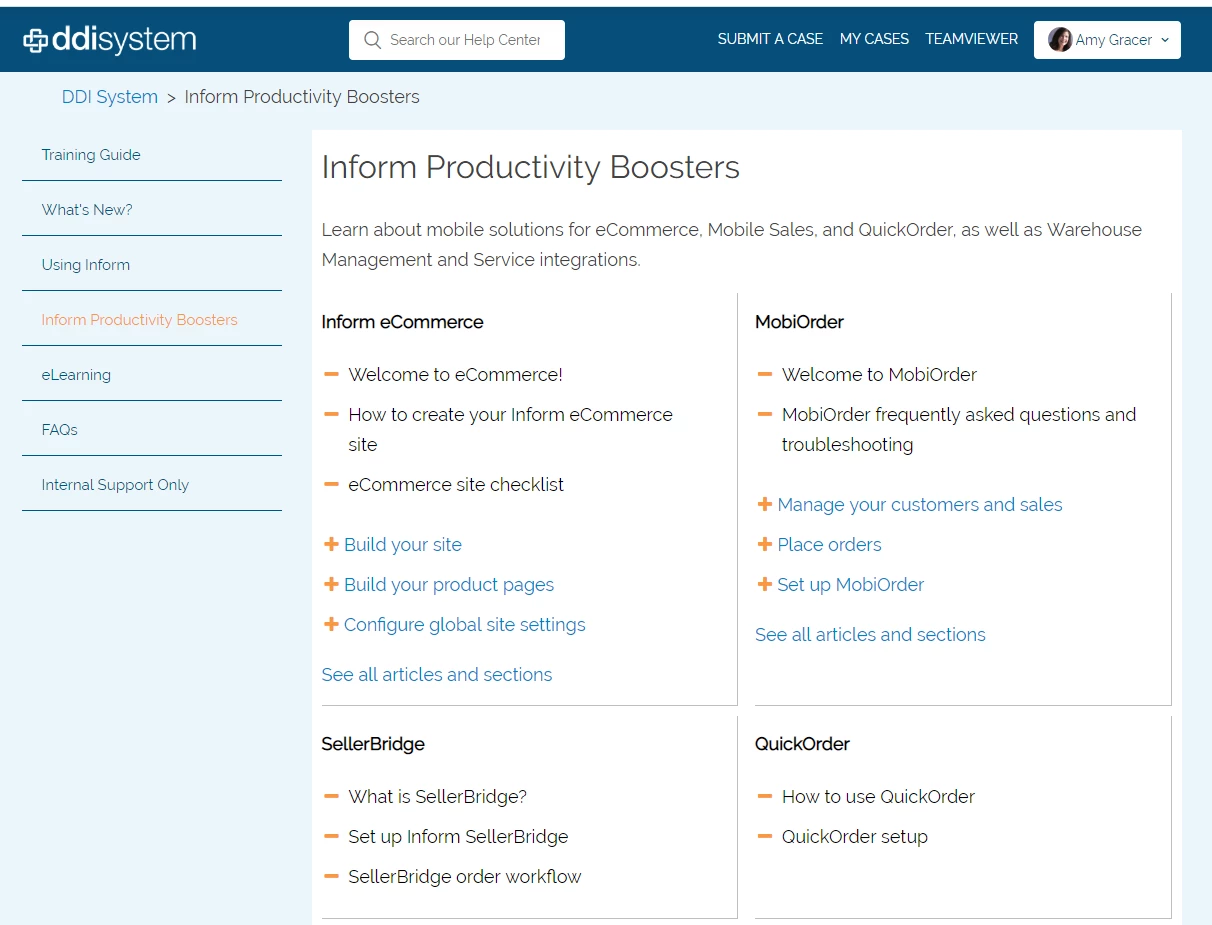
Note: I am modifying a free theme by Diziana, so I want to give them full credit for the original.  https://www.zendesktheme.com/?s=thoran&post_type=download

30 replies

Brett13
  • Community Manager
  • February 22, 2019

This is fantastic.

Thanks for sharing Amy :)


  • April 18, 2019

I am confused where to put that code snippet. Do I paste the snippet after the first {{/if}} or the second? Wherever I seem to paste it I keep getting the error: "{{ `else` }} .. is not permitted in this context" on that last {{else}}.

{{#if more_articles}}
<a href="{{url}}" class="see-all-articles">
{{t 'show_all_articles' count=article_count}}
</a>
{{/if}}
{{else}}
<p>
<i class="section-empty"><a href="{{url}}">{{t 'empty'}}</a></i>
</p>
{{/if}}
</section>
{{else}}


  • Author
  • April 18, 2019

Hi Rebecca,

I have since changed my code around a bit. 

I suggest you delete the offending {{else}} and see if it allows you to publish. 

If not, please take a look at my updated code below, starting from the section-content (beneath the section description). 

Please let me know how this works for you. I will also review the Tip above and modify the code if needed. 

Hope this helps....


{{#if section.articles}}

<ul class="article-list">

{{#each section.articles}}
<li class="article-list-item {{#if promoted}} article-promoted{{/if}}">

{{#if promoted}}
<span data-title="{{t 'promoted'}}" class="icon-star"></span>
{{/if}}
<a href="{{url}}" class="article-list-link">{{title}}</a>

{{#if internal}}
<span class="icon-lock" title="{{t 'internal'}}"></span>
{{/if}}
</li>

{{/each}}
</ul>
{{/if}}


{{pagination}}

<div class="section-tree">
{{#each section.sections}}

<section class="section">
<h3 class="section-tree-title">
<a href="{{url}}">{{name}}</a>
</h3>

{{#if articles}}

<ul class="article-list">
{{#each articles}}
<li class="article-list-item {{#if promoted}} article-promoted{{/if}}">

{{#if promoted}}
<span data-title="{{t 'promoted'}}" class="icon-star"></span>
{{/if}}
<a href="{{url}}" class="article-list-link">{{title}}</a>

{{#if internal}}
<span class="icon-lock" title="{{t 'internal'}}"></span>
{{/if}}
</li>

{{/each}}
</ul>

{{#if more_articles}}
<a href="{{url}}" class="see-all-articles">
{{t 'show_all_articles' count=article_count}}
</a>
{{/if}}


{{/if}}

</section>

{{/each}}


</div>

</section>
</div>
</div>


  • July 10, 2019

I've tried all this and it isn't working at all.

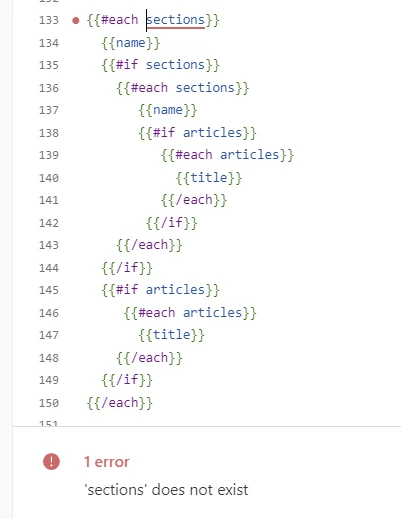
I keep getting "not possible to access 'section' in 'section.articles'


  • July 10, 2019

OK. So I figured this out.

On your category_page.hbs template you need to find this bit of code:

<div class="section-tree">
{{#each sections}}
<section class="section">
<h3 class="section-tree-title">
<a href="{{url}}">{{name}}</a>
{{#if internal}}
<span class="icon-lock" title="{{t 'internal'}}"></span>
{{/if}}
</h3>

and directly underneath it paste this bit of code:

{{#if sections}}
<ul class="section-list">
{{#each sections}}
<li class="section-list-item">
<a href="{{url}}" class="section-tree-title">{{name}}</a>
{{#if internal}}
<span class="icon-lock" title="{{t 'internal'}}"></span>
{{/if}}
</li>
{{/each}}
</ul>
{{/if}}


I then played around with the style.css and added this:

.article-list {
margin-left: 30px !important;
}

.section-list-item {
border-bottom: 1px solid #ddd;
font-size: 16px;
padding: 15px 0;
}

.section-list-item a {
color: $text_color;
}


.section-list-item:before {
content: '\002B';
margin:0 5px 0 -15px;
color: #d40054;
}

.section-list {

list-style-type: none;
padding-left: 18px;

text-align: left;

}

You can use this site to find the character that you want to appear in front of your sections and articles:https://www.compart.com/en/unicode/category/So


  • Author
  • July 10, 2019

@Heather. Thank you! I will look into what you have, compare to my implementation, and update article as necessary. I'm sorry you ran into some trouble with it the first time around, but glad you got it working well!


Brett13
  • Community Manager
  • July 10, 2019

Thanks for sharing your fix Heather :) 


  • Author
  • July 12, 2019

@Heather and @Brett, I updated the article to match my live site. I made quite a few changes between when I published this tip an when we went live last month.


  • December 10, 2019

https://support.zendesk.com/hc/en-us/community/posts/360004412767/comments/360008303313

This worked for me! What do I do if I need to change the formatting from + - to expand and collapse buttons?

TIA


  • June 18, 2020

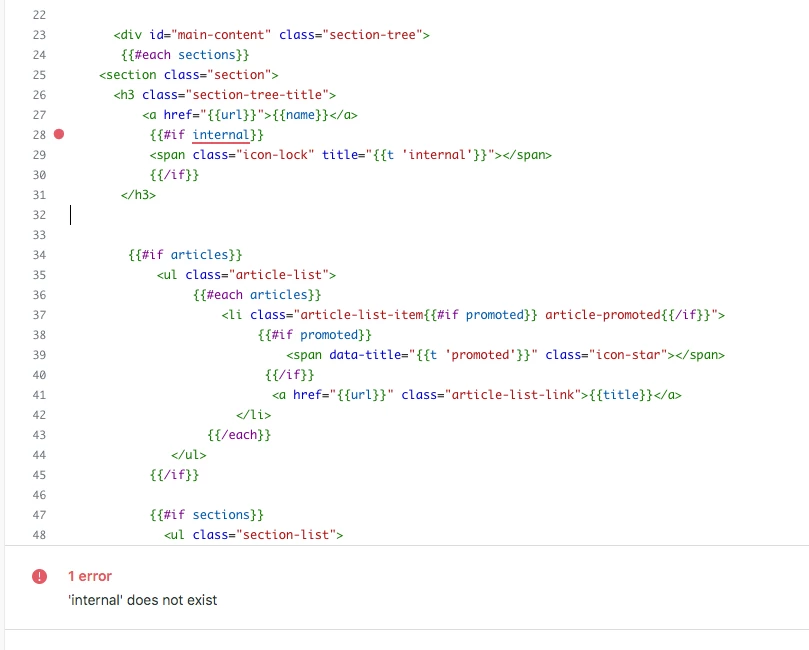
Thanks for this tip! I'm getting an error message when I try to publish, which says "internal does not exist". It seems the rest of you were able to get it working with that...and it seems to be spelled correctly....any ideas?


  • June 19, 2020

Just in case anyone else stumbles into this thread as I did, I have an update on what worked for me.

First, I realized that "internal" above means internal articles. Apparently, that option does not exist in curly brackets code for this particular context. Or maybe something else is messing it up. But everything I tried had similar errors, so this just wasn't working for me.

After more poking around, I discovered this:

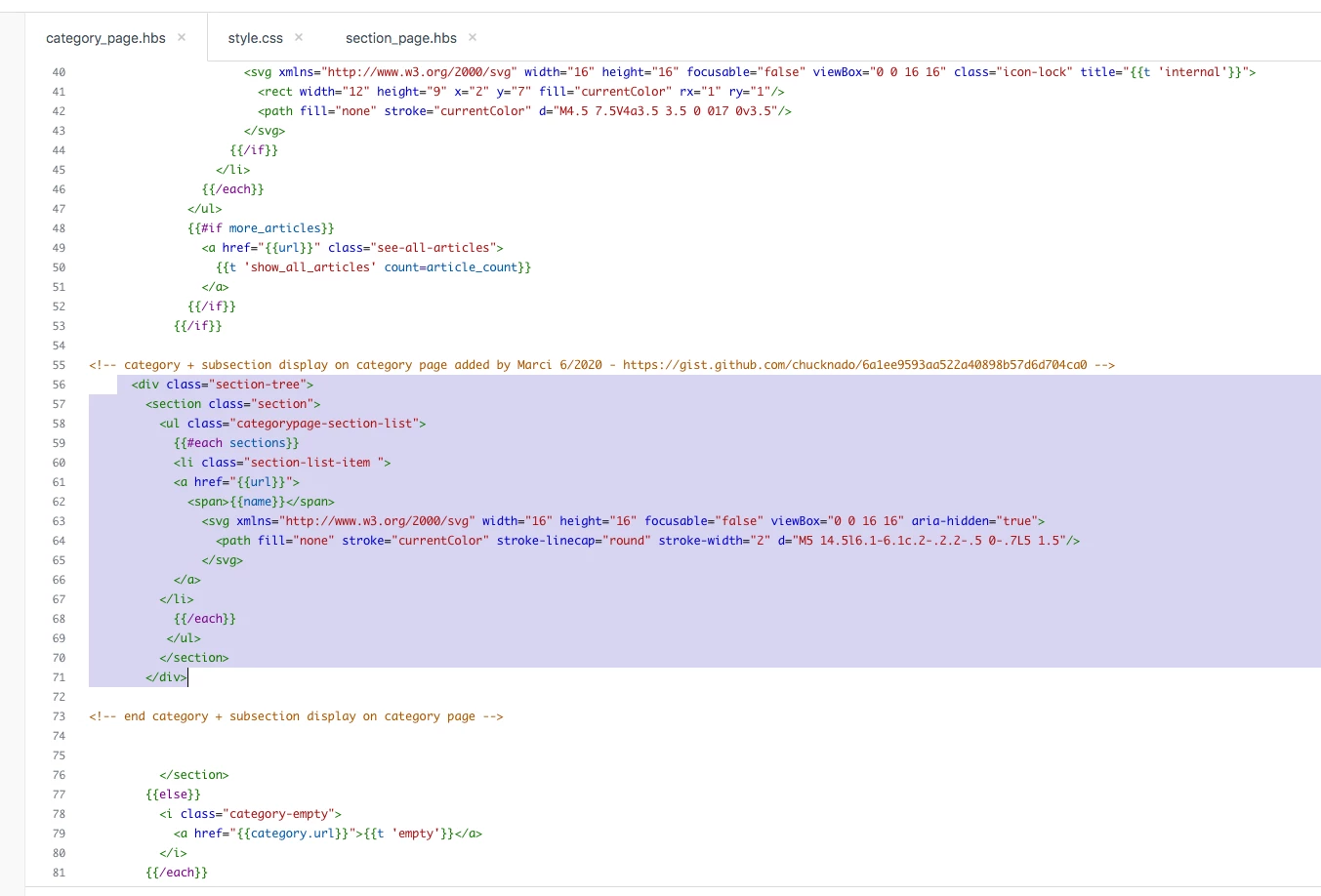
https://gist.github.com/chucknado/6a1ee9593aa522a40898b57d6d704ca0

I copied one small section of that code and pasted it into my category page template.


Under the 

{{#each sections}}

section of the code, I simply pasted this

<div class="section-tree">

{{#each sections}}
<section class="section">
<h3 class="section-tree-title">
<a href="{{url}}">{{name}}</a>
</h3>
</section>
{{/each}}
</div>


after the two nested "if" statements. This screenshot shows how I ended up modifying it to match what's on the sections page (added the svg right-chevron icon). I also added a new CSS class so I could style it almost the sections page without breaking the sections page. But the actual code to get the list of sections to appear was quite short and simple.


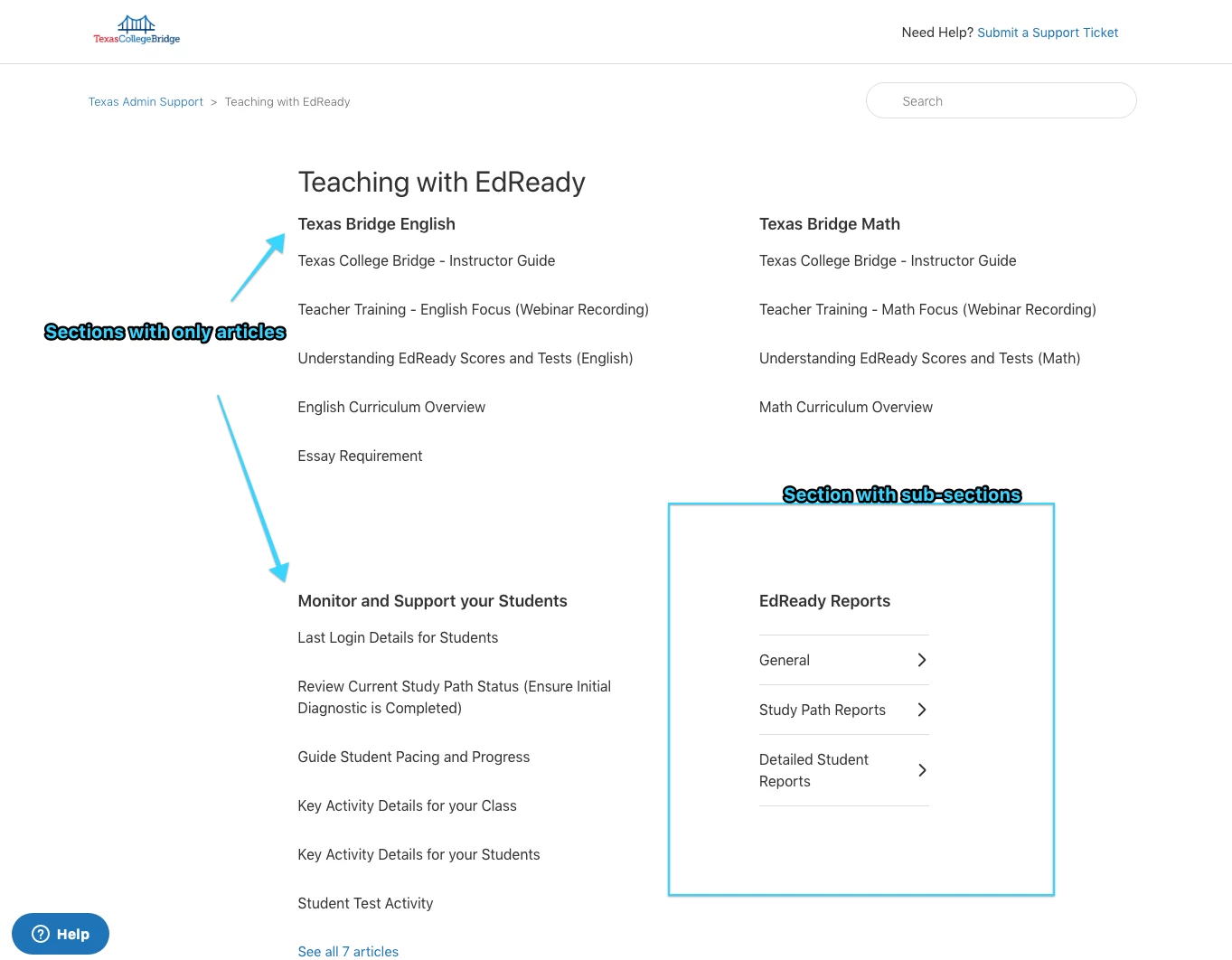
 Here is how it ended up looking on my site. (This is a barely modified Copenhagen, btw.)


Nicole17
  • June 23, 2020

Thanks for coming back and sharing your solution, Marci!


  • June 25, 2020

huge, HUGE thanks to all of y'all who contributed to this post.  You all saved me from totally destroying my own help center since I don't really know what I'm doing when it comes to updating the templates, but I have big dreams.  


  • September 30, 2021

Hi 367068348828,

Thanks for your tips, but i have another question : How do you show articles of your subsection in your category page ?

like this : 


Arno11
  • December 12, 2021

This looks just great, that you can print out both subsection titles and articles for each section in category.

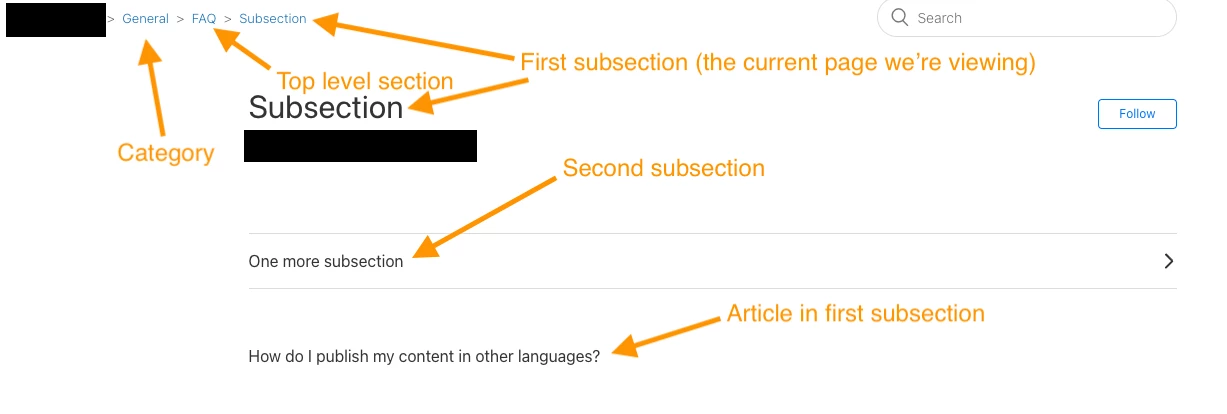
Does anyone know if this would work also for a section page, that you show all sections in that section, and for each section sub sections and articles. (Guide enterprise / deeper hierarchy).

In section page one can use section.sections to loop through each section under the section. It should return an array of sections for each section having further sub sections.

{{#each section.sections}}
    <section class="section">
        <h3 class="section-tree-title">
            <a href="{{url}}">{{name}}</a>
          </h3>

--> Below I should the loop through section.sections for this sub section,
but does not work.

          {{#if sections.sections}}
          <ul class="article-list">
             {{#each section.sections}}
                <li class="article-list-item">
                      <a href="{{url}}" class="article-list-link"> {{name}}</a>
                </li>
            {{/each}}
        {{/if}}

--> Here I loop through articles, which works fine.

...

{{/each}}

I get error: Error section_page L32:20: not possible to access `sections` in `sections.sections`

Tried multiple different syntaxes, but could not get it to work, so I started wondering, if section.sections even includes a sections array for each section in it.

Can anyone confirm, that section.sections does include also sections-array for each section in it, and whether it is possible to loop through those and print them out in the same way as in this article's example for category page? If so, a tip to correct my syntax above would be greatly appreciated.


Greg29
  • December 14, 2021

Hi Amy! I don't see anything wrong with your code here, but I did have a possible solution for you. If you are using a theme that was created before March 29, 2020, you will need to add a code snippet to the sections template. You can find more info in this article and the code snippet that you need to add is this:

{{#if section.sections}}
  <ul class="section-list section-list--collapsed">
    {{#each section.sections}}
    <li class="section-list-item">
      <a href="{{url}}">
        <span>{{name}}</span>
        <svg xmlns="http://www.w3.org/2000/svg" width="16" height="16" focusable="false" viewBox="0 0 16 16" aria-hidden="true">
          <path fill="none" stroke="currentColor" stroke-linecap="round" stroke-width="2" d="M5 14.5l6.1-6.1c.2-.2.2-.5 0-.7L5 1.5"/>
        </svg>
      </a>
    </li>
    {{/each}}
    <a tabindex="0" class="see-all-sections-trigger" aria-hidden="true" id="see-all-sections-trigger" title="{{t 'see_all_sections'}}">{{t 'see_all_sections'}}</a>
  </ul>
{{/if}}

{{#if section.articles}}
  <ul class="article-list">
    {{#each section.articles}}
    <li class="article-list-item {{#if promoted}} article-promoted{{/if}}">
	{{#if promoted}}<span data-title="{{t 'promoted'}}" class="icon-star"></span>{{/if}}
	<a href="{{url}}" class="article-list-link">{{title}}</a>
    </li>
    {{/each}}
  </ul>
{{else}}
  <i class="section-empty">
    <a href="{{section.url}}">{{t 'empty'}}</a>
  </i>
{{/if}}

Let me know if you've already done this and you're still running into issues!


Arno11
  • December 14, 2021

Hi Greg,

As the last comment by Amy was pretty old, I assumed you were responding to me. Our theme is newly created copenhagen theme I am working with and your code would work fine, but it does not seem try to do what I am trying to do. 

On a section page, I would like to print out all subsection titles, and under those all subsection titles and articles. So I would need first have "each section.sections", and inside that another each "section.sections".

Even if documentation says that section.sections is an array of section objects, I am not sure if those section objects include section.sections arrays correctly, or then I do not now how to reach them with these nested each-loops.

Br. Arno


  • December 14, 2021

Hi @ruddy

Sorry for the late response... 

This is a plugin From Diziana: https://www.diziana.com/products/multilevel-menu-plugin


  • December 14, 2021

Amy thanks for your answer


Arno try this :

{{#each sections}}

{{name}}

{{#if sections}}

{{#each sections}}

                {{name}}

                {{#if articles}}

                               {{#each articles}}

                               {{title}}

                               {{/each}}

                {{/if}}

{{/each}}

{{/if}}                   

{{#if articles}}

                {{#each articles}}

                {{title}}

{{/each}}

{{/if}}


Arno11
  • December 14, 2021

Hi, 

Tried, but section page does not identify sections at all. Thanks anyhow.


  • December 14, 2021

{{#if section.sections}}

<ul class="section-lists">
{{#each section.sections}}
<li class="section-lists-item">
<a href="{{url}}">
<span>{{name}}</span>
</a>
</li>
{{#if articles}}
<section class="articles-test" style="padding-left:15px;">
<ul class="article-list">
{{#each articles}}
<li class="article-list-item {{#if promoted}} article-promoted{{/if}}">
{{#if promoted}}
<svg xmlns="http://www.w3.org/2000/svg" width="16" height="16" focusable="false" viewBox="0 0 12 12" class="icon-star" title="{{t 'promoted'}}">
<path fill="black" d="M2.88 11.73c-.19 0-.39-.06-.55-.18a.938.938 0 01-.37-1.01l.8-3L.35 5.57a.938.938 0 01-.3-1.03c.12-.37.45-.63.85-.65L4 3.73 5.12.83c.14-.37.49-.61.88-.61s.74.24.88.6L8 3.73l3.11.17a.946.946 0 01.55 1.68L9.24 7.53l.8 3a.95.95 0 01-1.43 1.04L6 9.88l-2.61 1.69c-.16.1-.34.16-.51.16z"/>
</svg>
{{/if}}
<a href="{{url}}" class="article-list-link">{{title}}</a>
{{#if internal}}
<svg xmlns="http://www.w3.org/2000/svg" width="16" height="16" focusable="false" viewBox="0 0 16 16" class="icon-lock" title="{{t 'internal'}}">
<rect width="12" height="9" x="2" y="7" fill="currentColor" rx="1" ry="1"/>
<path fill="none" stroke="currentColor" d="M4.5 7.5V4a3.5 3.5 0 017 0v3.5"/>
</svg>
{{/if}}
</li>
{{/each}}
</ul>
</section>
{{/if}}
{{/each}}
</ul>
{{/if}}

  • December 14, 2021

I hope my copy is good enough, i'm on my smartphone 😉


Arno11
  • December 14, 2021

Hi Ruddy,

EDIT: clarified the example results below a bit.

Thanks. Working code, but this does not list the sub section titles under sections, only article titles. I would like to show the whole structure directly to the user. So user could navigate directly to a article in a section or sub section in a section. With the solution you provided, if I have a section with only sub sections in it, only empty section (just title) is shown, and user does not understand directly that there are sub sections and articles inside it.

What get is, even if there are also sections under this section:

Section 1 title
- article 11 title
- article 12 title

Section 2 title
- article 21 title
- article 22 title

What I would like to have is:

Section title
- section A title
- section B title
- article 11 title
- article 12 title

Section 2 title
- section C title
- section D title
- article 21 title
- article 22 title

Greg29
  • December 14, 2021

My apologies Arno, I definitely was responding to you and accidentally used Amy's name instead! I'm going to review the back and forth between everyone here and see where things stand right now.


Greg29
  • December 14, 2021

Alright, I'm back! One more question that I have, to be sure that we're on the same page (pun not intended), is whether you're looking at the Sections page, as opposed to the Categories page. I ask because after setting up a new Copenhagen them on my account, I was able to get what I believe it is you are looking for in your last post:

Let me know if I misunderstood your request!