Tip: Collapsible headers in articles or templates (accordions) | Community
Skip to main content

Tip: Collapsible headers in articles or templates (accordions)

  • August 18, 2021
  • 141 replies
  • 0 views

Show first post

141 replies

Eimear
  • July 14, 2022

@ifra thank you very much that worked!


Brett13
  • Community Manager
  • July 15, 2022

Is there any Guide theme customization question that @ifra can't handle??? You're awesome Ifra!!!


Ifra
  • July 16, 2022

Oh,

Thank you, Brett :)


Manraj
  • September 6, 2022

Hi! I had a question about how these might be read through a screen reader? I realize that all screen readers are different but what would typically be understood when the screen reader comes across a collapsed header, and then an open header?


Ifra
  • September 7, 2022

Hi Manraj Singh :),  if you want that the code can be readable via screen reader then rewrite code with the aria-expanded, aria-label, aria-control, role, panel IDs.

+1 for your query.

If you have another query feel free to ask.


Thanks


Yusof
  • September 9, 2022

Hello,

I'm trying to test this out on the copenhagen theme using the ZAT preview, however the accordians never open. When I click, nothing on the console shows up to indicate an error. 

There is a CORS error, however I believe that just has to do with the fact i'm using the ZAT preview. 

I copied the original code on this post. Any help will be greatly appreciated. 


Ifra
  • September 9, 2022

Hi Yusof Yaghi, just copy and paste the code with all the instructions as mentioned above then test on preview mode without using ZAT and then any bug occurs, feel free to share :), also you can share the URL of your HC so I can figure out.

Thanks


Yusof
  • September 9, 2022

Hi Ifra,

I ended up enabling jquery and got an accordion working with that. I will try to give this a shot soon again and will update you with any info I get. 


Ifra
  • September 10, 2022

Hi Yusof Yaghi, can you share the URL of your HC here? I want to see the issue.

If you don't wanna share publicly then share on my mail ID.


Rae12
  • October 11, 2022

Hi @ifra,

What an incredible thread! I've gotten my accordions up and running, however, it's not mobile-responsive. I've racked my brain and reviewed everything I can, but I just can't seem to get the accordions to show up for a screen smaller than 1024 px wide. Any help would be very much appreciated.

I'm also interested in what @salim11 asked about: Is it possible to create an anchor link for the header that also expands the panel? For example, I'm using collapsible headers in articles. I want to create a table of contents at the top of the article that links to each collapsible header. When the reader clicks on a link, I want them to be taken to the section with the panel expanded. Hope that makes sense! 


Ifra
  • October 11, 2022

Hi Alyssa :),

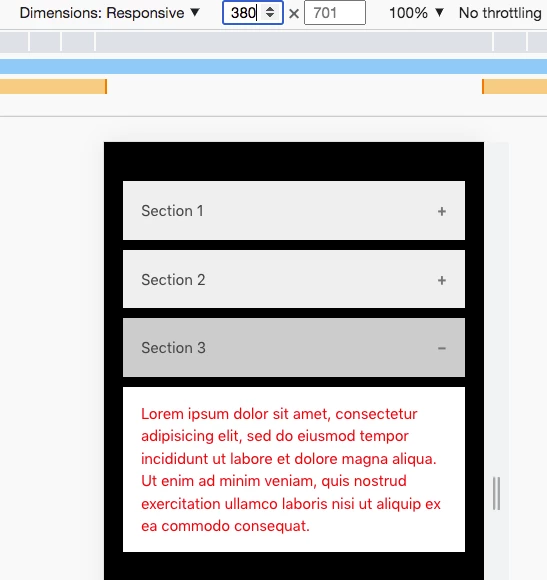
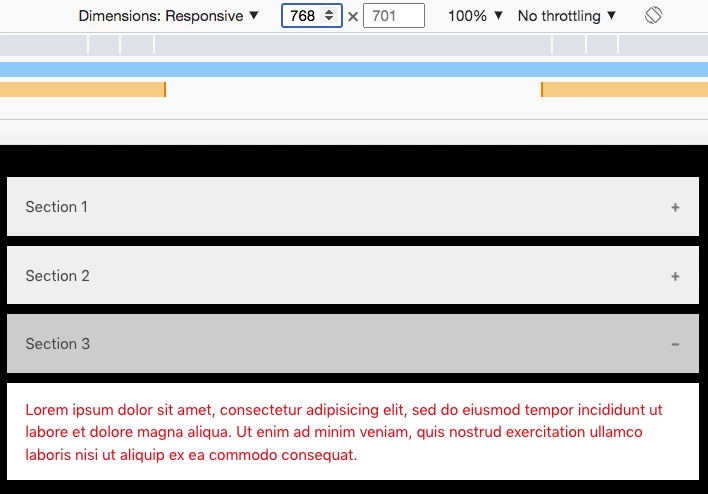
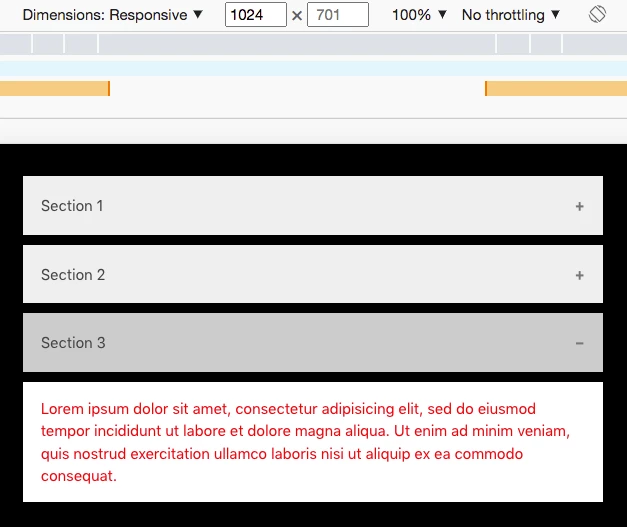
I just checked the accordions on all screens -


380px:


768px:


1024px:


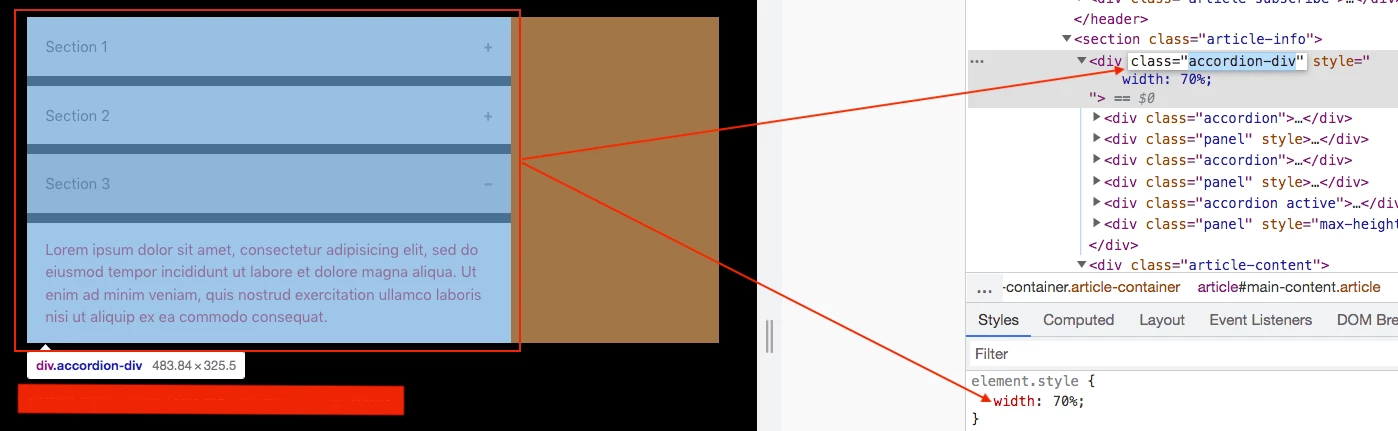
You can adjust the width of accordion wrapper using the class name, add code to your style.css file.

.accordion-div { width: 70%; }

@media(min-width:1024px){
.accordion-div { width: 100%; }
}


Screenshot:


Note: width can be 80%, 50%, 75%, ...
min-width:1024px - can be 768px or any ....


Or if you are facing any issue with your theme then share screenshot to get exact solution.


Ifra
  • October 11, 2022

@Alyssa, for your second query:


I'm using collapsible headers in articles. I want to create a table of contents at the top of the article that links to each collapsible header. When the reader clicks on a link, I want them to be taken to the section with the panel expanded. Hope that makes sense! 

Yes, it's possible. 

Create TOC for your articles, add code for the accordions, and then add the accordion panel ID to TOC links:

Accordion Panel
<p id="accordion-panel-one">Lorem ipsum dolet amet...</p>

TOC Link
<a href="#accordion-panel-one">TOC Link One</a>

Try this once :)

Thank You

Team


Sunny13
  • October 18, 2022

@ifra Thanks for all of your helpful replies in this thread. 

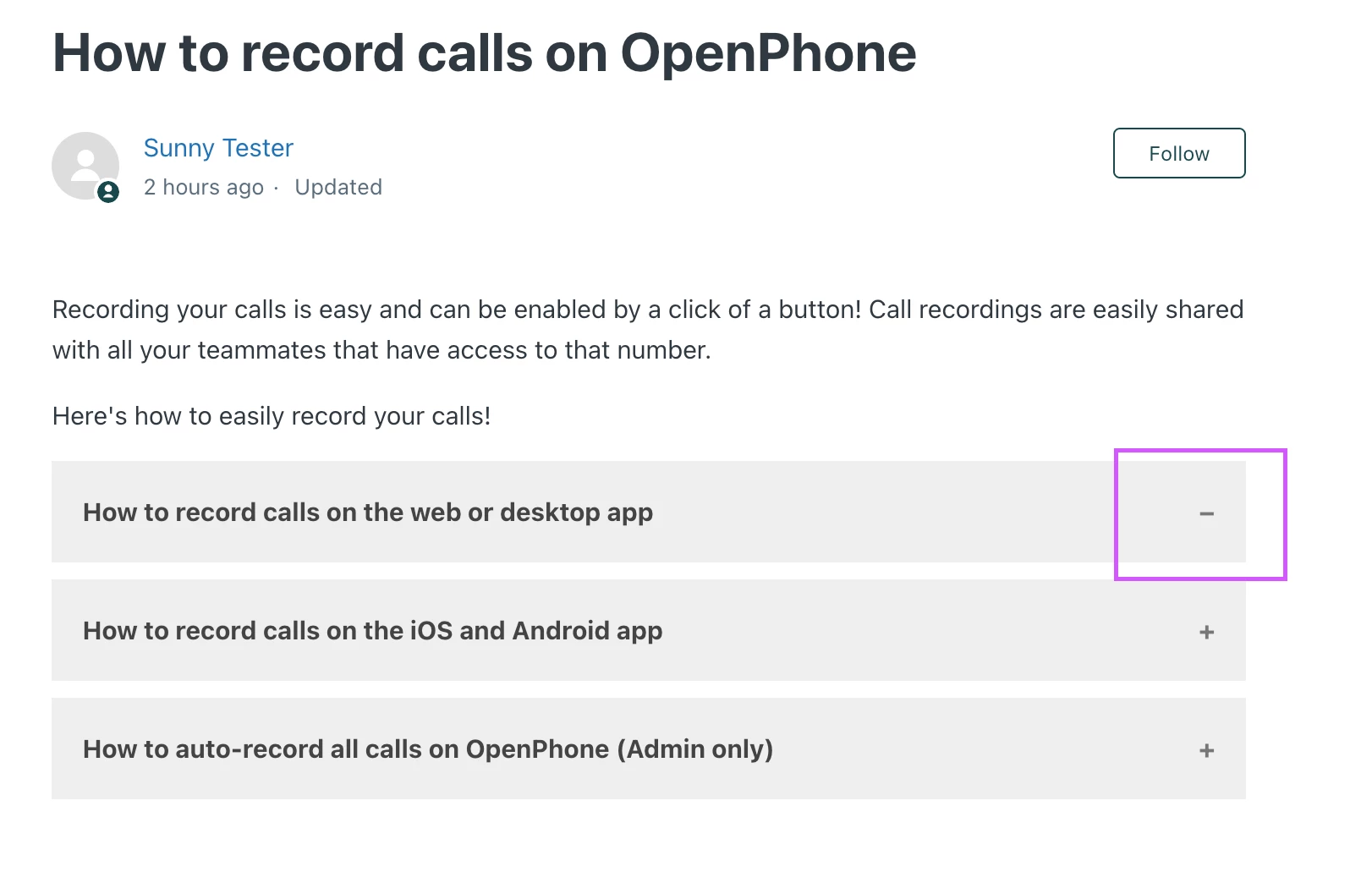
Once you collapse a header, the "-" isn't reverting back to "+". Thoughts?


Ifra
  • October 19, 2022

Sunny Tripathi

Update the script.js file code:

Current Code:

var acc = document.getElementsByClassName("accordion");
var i;

for (i = 0; i < acc.length; i++) {
acc[i].addEventListener("click", function() {

var panel = this.nextElementSibling;
if (panel.style.maxHeight){
  panel.style.maxHeight = null;
} else {
  let active = document.querySelectorAll(".accordion-div .accordion.active");
  for(let j = 0; j < active.length; j++){
    active[j].classList.remove("active");
    active[j].nextElementSibling.style.maxHeight = null;
  }
  this.classList.toggle("active");
  panel.style.maxHeight = panel.scrollHeight + "px";
}
});
}


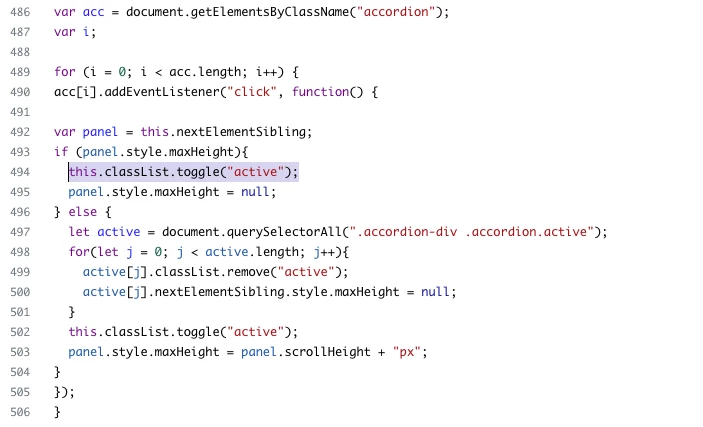
Updated Code:

var acc = document.getElementsByClassName("accordion");
var i;

for (i = 0; i < acc.length; i++) {
acc[i].addEventListener("click", function() {

var panel = this.nextElementSibling;
if (panel.style.maxHeight){
  this.classList.toggle("active");
  panel.style.maxHeight = null;
} else {
  let active = document.querySelectorAll(".accordion-div .accordion.active");
  for(let j = 0; j < active.length; j++){
    active[j].classList.remove("active");
    active[j].nextElementSibling.style.maxHeight = null;
  }
  this.classList.toggle("active");
  panel.style.maxHeight = panel.scrollHeight + "px";
}
});
}


Screenshot for the same:

Kristin24
  • November 10, 2022

I've added all of the code and (including the script.js). I see the panels in my article preview, but nothing will expand. There are no errors in my console. Any troubleshooting tips I can try?


Rae12
  • November 18, 2022

Hi @ifra

Thank you for all of your help!

I was able to get the headers to be mobile-responsive. I tried your suggestion of adding an id to the panel, and the link in the TOC leads to the area of the panel, however it doesn't expand (show) it. It still seems to be hidden. 

Here is the script.js that I'm using:

var acc = document.getElementsByClassName("accordion");
var i;

for (i = 0; i < acc.length; i++) {
acc[i].addEventListener("click", function() {

var panel = this.nextElementSibling;
if (panel.style.maxHeight){
  panel.style.maxHeight = null;
  this.classList.toggle("active");
} else {
  let active = document.querySelectorAll(".accordion-div .accordion.active");
  for(let j = 0; j < active.length; j++){
    active[j].classList.remove("active");
    active[j].nextElementSibling.style.maxHeight = null;
  }
  this.classList.toggle("active");
  panel.style.maxHeight = panel.scrollHeight + "px";
}
});
}

And here's the snippet from the article's source code:

<div class="callout">
  If you need help deleting your account, please visit this guide:
  <a href="/hc/en-us/articles" target="_blank" rel="noopener">Delete my account</a>
</div>
<ul>
  <li>
    <a href="#desktop">I'm on a desktop device</a>
  </li>
  <li>I'm using the app</li>
  <li>I'm using the mobile web</li>
  <li>Frequently asked questions&nbsp;</li>
</ul>
<div class="accordion">
  <h2>How to cancel on desktop</h2>
</div>
<div id="desktop" class="panel">
  <ol>
    <li>
      <strong><span style="font-weight: 400;">Click the </span>Settings<span style="font-weight: 400;"> link from the left sidebar navigation</span></strong>
    </li>

Ifra
  • November 19, 2022

Hey Alyssa,

Follow the below steps to get the open accordion panel after clicking on TOC link:-

i). HTML  -

 <h2 class="accordion">Section One</h2>
<div id="panel-one" class="panel" style="">
<p>Lorem ipsum dolor sit amet, consectetur adipisicing elit, sed do eiusmod tempor incididunt ut labore et dolore magna aliqua. Ut enim ad minim veniam, quis nostrud exercitation ullamco laboris nisi ut aliquip ex ea commodo consequat.</p>
</div>
<h2 class="accordion">Section Two</h2>
<div id="panel-two" class="panel">
<p>Lorem ipsum dolor sit amet, consectetur adipisicing elit, sed do eiusmod tempor incididunt ut labore et dolore magna aliqua. Ut enim ad minim veniam, quis nostrud exercitation ullamco laboris nisi ut aliquip ex ea commodo consequat.</p>
</div>
<h2 class="accordion active">Section Three</h2>
<div id="panel-three" class="panel" style="">
<p>Lorem ipsum dolor sit amet, consectetur adipisicing elit, sed do eiusmod tempor incididunt ut labore et dolore magna aliqua. Ut enim ad minim veniam, quis nostrud exercitation ullamco laboris nisi ut aliquip ex ea commodo consequat.</p>
</div>
<h2 class="accordion">Section Four</h2>
<div id="panel-four" class="panel">
<p>Lorem ipsum dolor sit amet, consectetur adipisicing elit, sed do eiusmod tempor incididunt ut labore et dolore magna aliqua. Ut enim ad minim veniam, quis nostrud exercitation ullamco laboris nisi ut aliquip ex ea commodo consequat.</p>


ii). JS code -

  var acc = document.getElementsByClassName("accordion");
  var i;

  for (i = 0; i < acc.length; i++) {
    acc[i].addEventListener("click", function() {

    var panel = this.nextElementSibling;
    if (panel.style.maxHeight) {
      this.classList.toggle("active");
      panel.style.maxHeight = null;
       } else {
      let active = document.querySelectorAll(".accordion-div .accordion.active");
      for(let j = 0; j < active.length; j++) {
        active[j].classList.remove("active");
        active[j].nextElementSibling.style.maxHeight = null;
      }
      this.classList.toggle("active");
      panel.style.maxHeight = panel.scrollHeight + "px";
    }
    });
  }

  var _w = $('li > a[href="#panel-one"]');
  var _x = $('li > a[href="#panel-two"]');
  var _y = $('li > a[href="#panel-three"]');
  var _z = $('li > a[href="#panel-four"]');
  
  $(_w).click(function() {
    $("#panel-one").css("maxHeight","100%");
   
  })
  
   $(_x).click(function() {
   $("#panel-two").css("maxHeight","100%");
  })
  
   $(_y).click(function() {
    $("#panel-three").css("maxHeight","100%");
  })
  
   $(_z).click(function() {
    $("#panel-four").css("maxHeight","100%");
  })
});


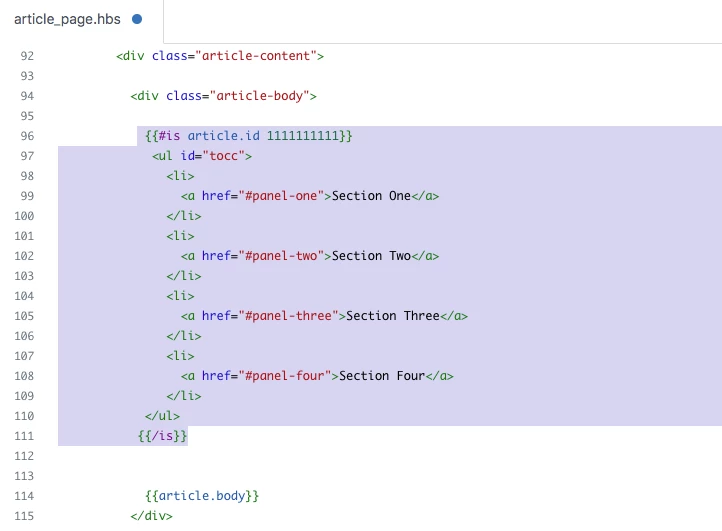
iii). Add this TOC links to article page not for all articles, only for that for which you added accordion.

article_page.hbs

 {{#is article.id 1111111111}}
             <ul id="tocc">
               <li>
                 <a href="#panel-one">Section One</a>
               </li>
               <li>
                 <a href="#panel-two">Section Two</a>
               </li>
               <li>
                 <a href="#panel-three">Section Three</a>
               </li>
               <li>
                 <a href="#panel-four">Section Four</a>
               </li> 
            </ul>
           {{/is}}


Note: Remove this given article id 1111111111 and add you article id where you added accordion.

Screenshot for the same:


Thanks

Team Diziana


I just switched to Copenhagen v2 theme and copied over the style.css and script.js additions from here for accordions (which worked so well in v1) but now they won't expand. Help?

style.css: 

.accordion {
  background-color: #eee;
  color: #444;
  cursor: pointer;
  padding: 12px;
  width: 100%;
  border: none;
  text-align: left;
  outline: none;
  font-size: 15px;
  transition: 0.4s;
  margin-bottom: 10px;
}

.accordion p {
  display: inline;
}

.active, .accordion:hover {
  background-color: #ccc;
}

.accordion:after {
  content: '\002B';
  color: #777;
  font-weight: bold;
  float: right;
  margin-left: 5px;
}

.active:after {
  content: "\2212";
}

.panel {
  padding: 0 18px;
  background-color: white;
  max-height: 0;
  overflow: hidden;
  transition: max-height 0.2s ease-out;
}
.accordion-div { width: 90%; }

@media(min-width:1024px){
.accordion-div { width: 100%; }
}

script.js:

document.addEventListener('DOMContentLoaded', function() {
  var acc = document.getElementsByClassName("accordion");
  var i;

  for (i = 0; i < acc.length; i++) {
    acc[i].addEventListener("click", function() {
      var panel = this.nextElementSibling;
      if (panel.style.maxHeight) {
        this.classList.toggle("active");
        panel.style.maxHeight = null;
      } else {
        let active = document.querySelectorAll(".accordion-div .accordion.active");
        for(let j = 0; j < active.length; j++){
          active[j].classList.remove("active");
          active[j].nextElementSibling.style.maxHeight = null;
        }
        this.classList.toggle("active");
        panel.style.maxHeight = panel.scrollHeight + "px";
      }
    });
  }
});

Ifra
  • February 16, 2023

Hi Elizabeth Barron, I just tried the code you provided above  in the latest Copenhagen Theme and accordion is working fine, can you share the URL of your HC?  I think there is something missing or any kind of issue in the console, you can check in your console as well.


@ifra our HC isn't public, so I'm not sure the URL will be of use. Can you tell me what to look for? Or what additional information I can provide you? 

Also, for context, I just downloaded the Copenhagen v2 and was adding the script.js and style.css info from above and testing in "preview." I made the new theme "live" and still had issues, so I switched back to our legacy theme.

Thanks!


Ifra
  • February 17, 2023

@Elizabeth Barron, do just one thing, go the preview mode of your theme > right click > click on "inspect" in the list > go to "console" tab > is there any red color issue. If yes, copy that and share.


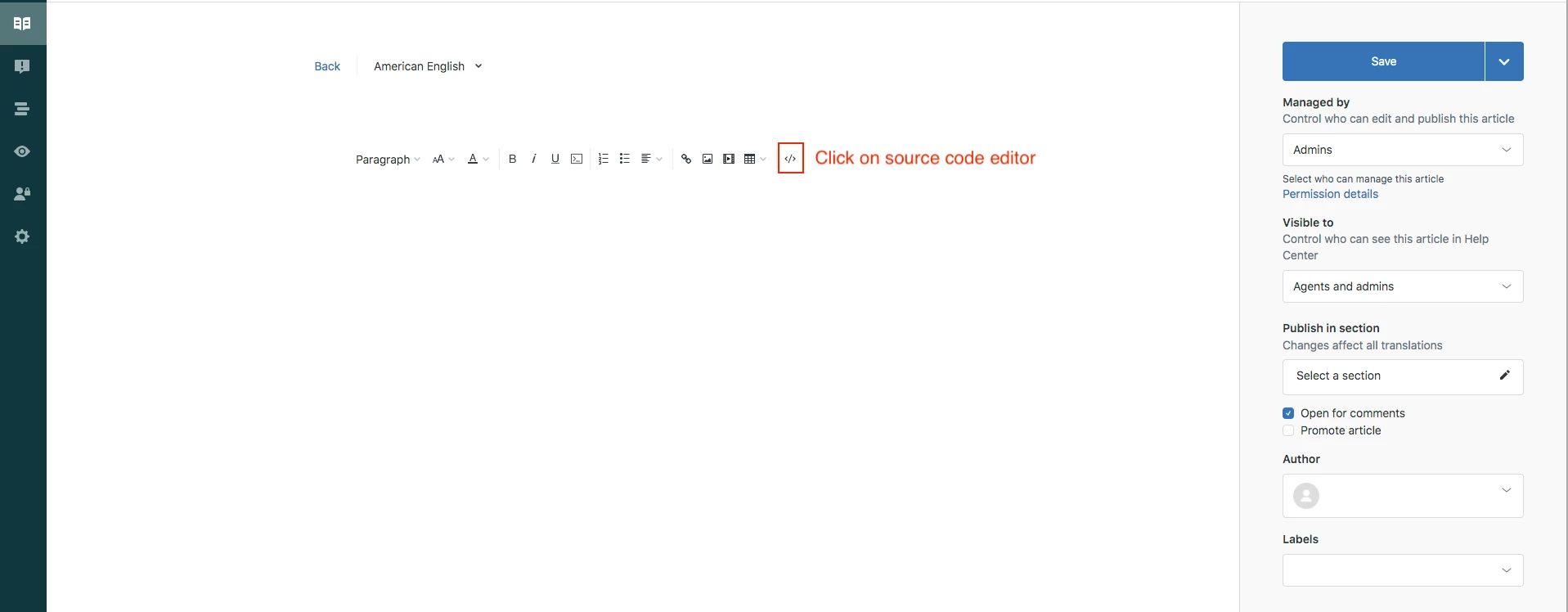
Points:

HTML for article source code:

<h2 class="accordion">Section One</h2>
<div id="panel-one" class="panel" style="">
<p>Lorem ipsum dolor sit amet, consectetur adipisicing elit, sed do eiusmod tempor incididunt ut labore et dolore magna aliqua. Ut enim ad minim veniam, quis nostrud exercitation ullamco laboris nisi ut aliquip ex ea commodo consequat.</p>
</div>
<h2 class="accordion">Section Two</h2>
<div id="panel-two" class="panel">
<p>Lorem ipsum dolor sit amet, consectetur adipisicing elit, sed do eiusmod tempor incididunt ut labore et dolore magna aliqua. Ut enim ad minim veniam, quis nostrud exercitation ullamco laboris nisi ut aliquip ex ea commodo consequat.</p>
</div>
<h2 class="accordion active">Section Three</h2>
<div id="panel-three" class="panel" style="">
<p>Lorem ipsum dolor sit amet, consectetur adipisicing elit, sed do eiusmod tempor incididunt ut labore et dolore magna aliqua. Ut enim ad minim veniam, quis nostrud exercitation ullamco laboris nisi ut aliquip ex ea commodo consequat.</p>
</div>
<h2 class="accordion">Section Four</h2>
<div id="panel-four" class="panel">
<p>Lorem ipsum dolor sit amet, consectetur adipisicing elit, sed do eiusmod tempor incididunt ut labore et dolore magna aliqua. Ut enim ad minim veniam, quis nostrud exercitation ullamco laboris nisi ut aliquip ex ea commodo consequat.</p>


script.js code, add it to the bottom of the file:

document.addEventListener('DOMContentLoaded', function() {
  var acc = document.getElementsByClassName("accordion");
  var i;

  for (i = 0; i < acc.length; i++) {
    acc[i].addEventListener("click", function() {
      var panel = this.nextElementSibling;
      if (panel.style.maxHeight) {
        this.classList.toggle("active");
        panel.style.maxHeight = null;
      } else {
        let active = document.querySelectorAll(".accordion-div .accordion.active");
        for(let j = 0; j < active.length; j++){
          active[j].classList.remove("active");
          active[j].nextElementSibling.style.maxHeight = null;
        }
        this.classList.toggle("active");
        panel.style.maxHeight = panel.scrollHeight + "px";
      }
    });
  }
});


style.css file code:

.accordion {
  background-color: #eee;
  color: #444;
  cursor: pointer;
  padding: 12px;
  width: 100%;
  border: none;
  text-align: left;
  outline: none;
  font-size: 15px;
  transition: 0.4s;
  margin-bottom: 10px;
}

.accordion p {
  display: inline;
}

.active, .accordion:hover {
  background-color: #ccc;
}

.accordion:after {
  content: '\002B';
  color: #777;
  font-weight: bold;
  float: right;
  margin-left: 5px;
}

.active:after {
  content: "\2212";
}

.panel {
  padding: 0 18px;
  background-color: white;
  max-height: 0;
  overflow: hidden;
  transition: max-height 0.2s ease-out;
}
.accordion-div { width: 90%; }

@media(min-width:1024px){
.accordion-div { width: 100%; }
}

@ifra I created a test article with the html you provided and ensured the code in my style.css and script.js were the same as above. 
I opened "inspect" and Console and saw "Uncaught SyntaxError: Unexpected end of input at script.js:498"

I went to github and got the copenhagen v2 script.js file from there and copied/pasted, then added the accordion js above to the bottom and it worked fine. Not sure what the issue with the static script.js was, but we seem to be ok now.

Thank you for your help! Knowledge of the Inspect > Console portion will be helpful in the future for troubleshooting as well.


Ifra
  • February 23, 2023

Happy to help :)


  • February 24, 2023

Hello. 

I've added the code Trapta provided at the beginning of the thread and this works perfectly in our sandbox HC.
When I tried doing it on our live environment it's not working. The accordion is here but clicking on it does not expand it. 


Ifra
  • February 24, 2023

Hii Jason Mcdonald,

Please check the console tab in your inspect tool, if there is any issue, copy that and paste it here so I can share some solution.