Support Tip: How to change the ticket Subject using a trigger | Community
Skip to main content

Support Tip: How to change the ticket Subject using a trigger

  • October 14, 2019
  • 51 replies
  • 0 views

Show first post

51 replies

Lou11
  • August 5, 2022

@scouto

What does the event for that say? Is the trigger firing? If not, we'll need to look at the conditions.


  • August 23, 2022

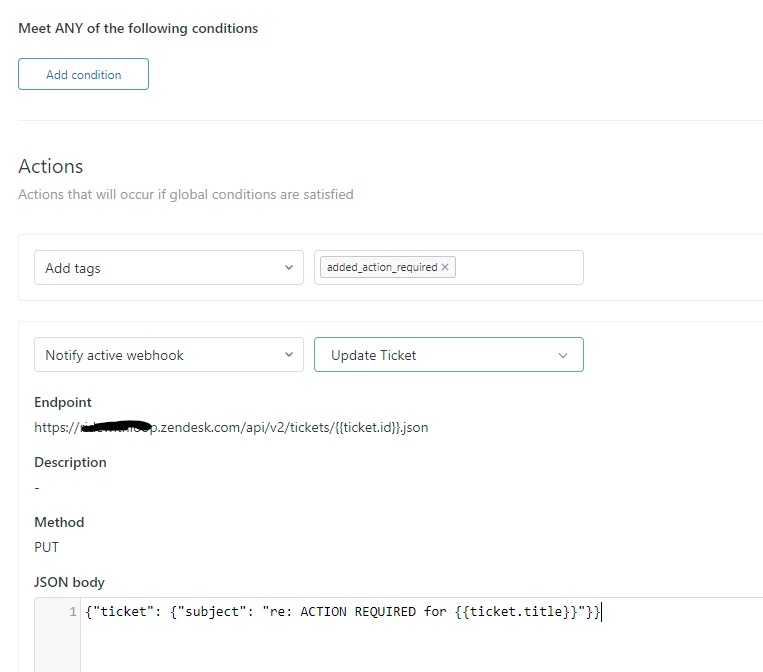
Hi Lou thanks for your help with this. The trigger was fired, the Events displays "Message pushed to webhook trigger -trigger name-"

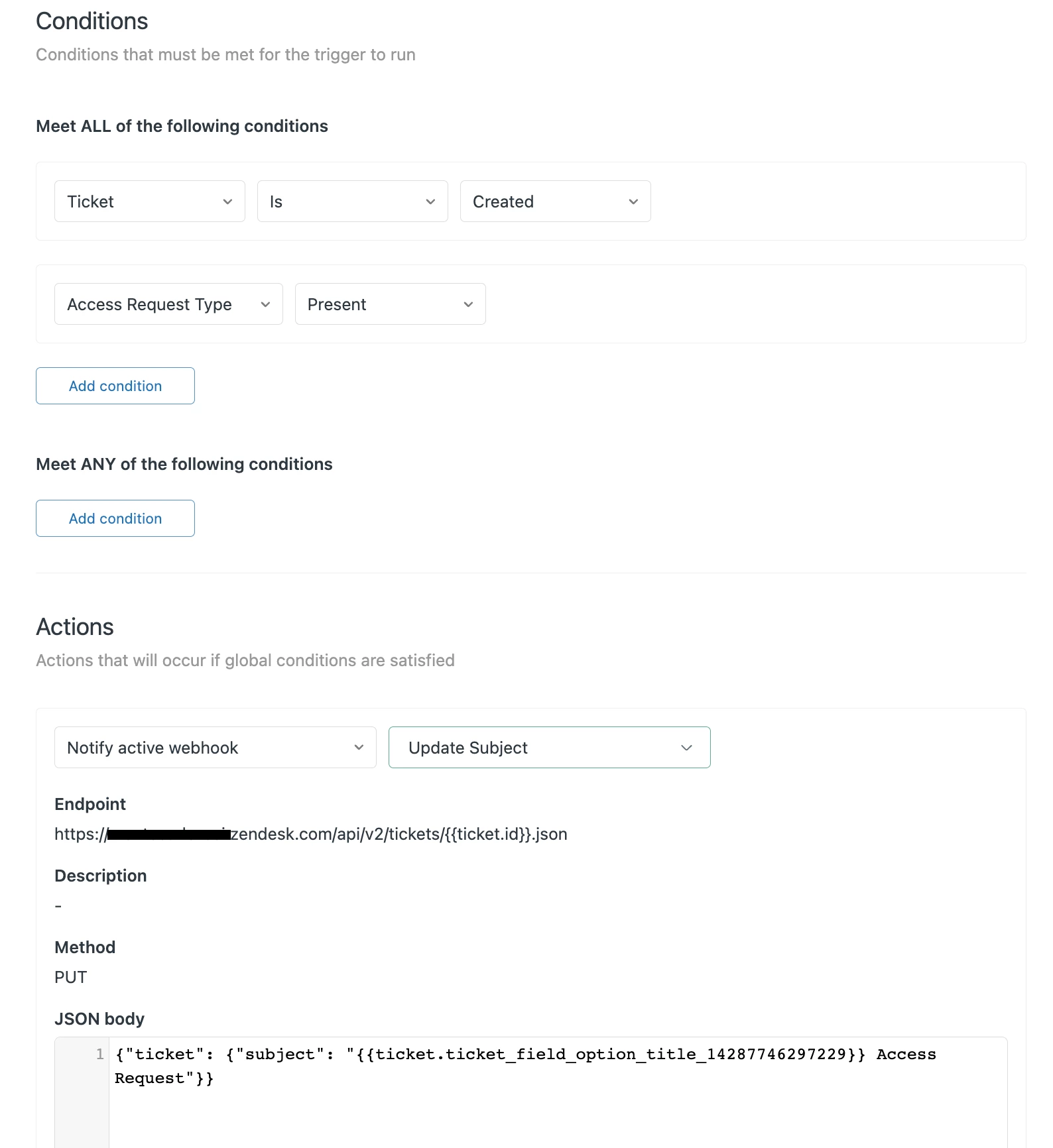
The Condition is "Status is not New" and the Action is as follows:


Lou11
  • September 15, 2022

@scouto

I'm sorry I missed this. I'm curious. What are the conditions of the trigger? I can't think of a way to have a condition where the requester changed the subject, so not sure if you can accomplish your goal.


Kevin26
  • March 2, 2023

What am I doing wrong here? Any insight? I just want to add "Action Required" to the subject line for certain situations. I set up the conditions to only apply to specific tags associated with individual macros and in order to only have it run once per ticket I have it adding that "added_action_required" tag which stops the trigger from running multiple times.

The json should be correct. Did something change with webhooks? I also had it set up to change the subject if customers wrote in from a specific web form on our help center (basically change the subject line to "New submission on {{web form name}}" and that also doesn't seem to be working anymore.


Zendesk13
  • March 2, 2023

Hi @kevin26, all is looking good indeed. Can you please double-check under your Admin Center, in Apps and Integrations » Webhooks » then click your webhook and check the status? Could be some issue with authentication, for example.


Kevin26
  • March 2, 2023

@pedro17 thank you for the reply. I checked and the webhook is active.

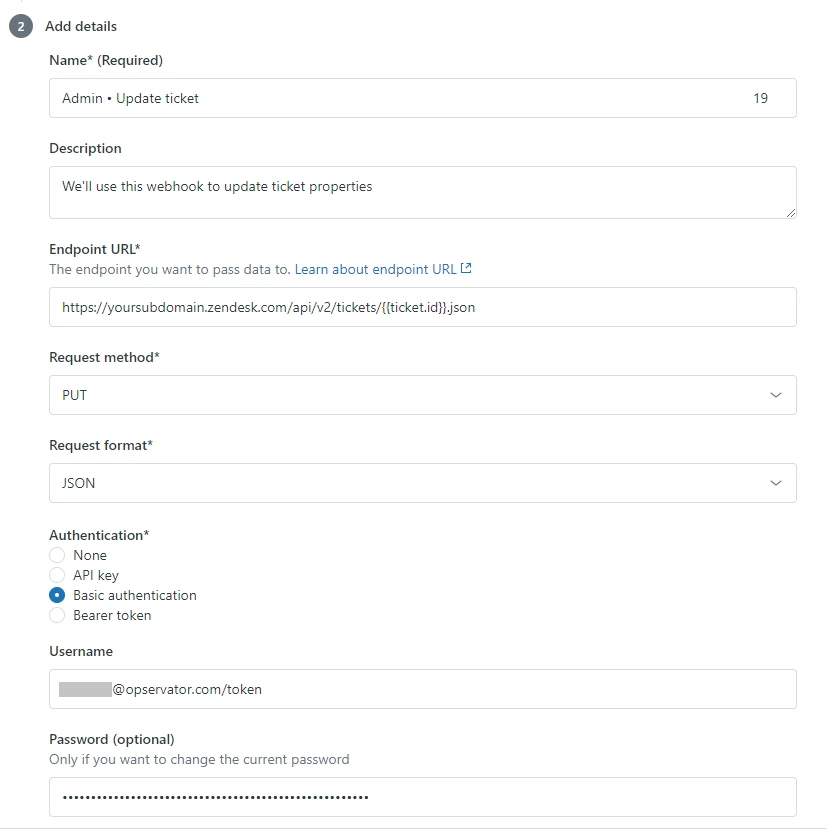
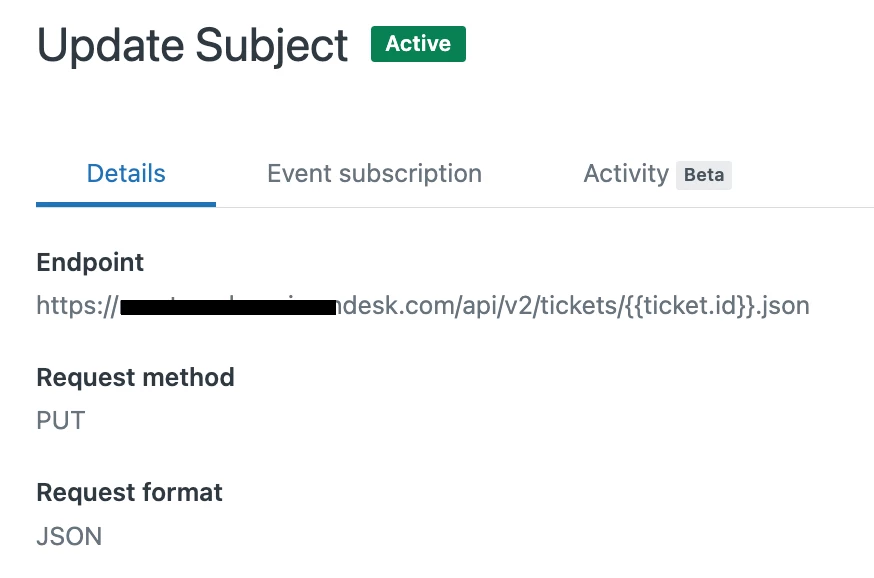
Request method
PUT

Request format
JSON
 
I am an admin but it does say "basic authentication" not sure if that's a problem.

  • April 10, 2023

Hi folks, 

Thanks for this info! Question for you - I'm using this to set the subject of our tickets upon creation with the data from a specific field. The trigger seems to successfully update the ticket subject on the agent side, but when I look in the help center, and the email notifications, I still see the old subject. Do you know how I can get the subject to change in the help center and email notifications? 


  • June 29, 2023

We have a custom form on our website that submits data into a ticket via email but it adds a string of text to the subject (and thus ticket subject) that we do not want in there.

Is there a way to adapt this to remove a specific string of text from the ticket subject and leave the rest of the subject as is?


Anne17
  • June 30, 2023
Hello Juan,

Natively this unfortunately not possible.

But I have found the following Community Post with a workaround for it:
Support Tip: How to change the ticket Subject using a trigger

  • August 4, 2023

Hello, how can I add the Ticket ID to a custom ticket field?


  • August 4, 2023

+1 for just being able to do this as a trigger.

Additionally, it looks like the layout for webhooks has changed since this article was created and it could use a refresh to match what's current in the UI.


Zendesk13
  • August 6, 2023

Hi @anna15, you're right - article updated accordingly! Thank you for the heads up 👍


Hannah12
  • December 11, 2023

Hi Friends!

I have a webhook that changes the subject of the ticket to be the custom field value chosen for the ticket topic. The problem with this is it displays more like a ticket tag than a readable subject. We use nested values (example::of::topics) that show as (example__of__topics). 

How can we get it to not display the __? Instead show example of topics if using the case study above?


  • December 11, 2023

@hannah12, I have a similar issue. Though the team doesn't complain about the underscores, it bothers me, lol. The system pulls in the tags of the fields. So to bypass this, you'd have to change the tags - which is limited itself as you can't use spaces. Also, if you change the tags after the field has been in use, it can mess with historical data and reporting. 


Hannah12
  • December 11, 2023

@nicole12 not to be dramatic but UGH. I was hoping for spaces instead of underscores. I also noticed that the fields populate in monday.com JUST LIKE THIS but Zendesk states it's a monday.com integration challenge on their end. I'm suspecting that data pulled from text box fields populate as tags in general. :( Unless someone has a REALLY creative idea to assist with this subject line issue specifically :D 


Paolo14
  • December 12, 2023
Hi Hannah,
 
This is expected if you are using the placeholder of a custom field associated with a tag. More information about custom fields is here. The placeholder will only render the exact same text if it is a multi-line or text field. 
 
In addition, the workflow of updating a ticket via a webhook trigger is not recommended due to errors that are likely to happen. You may find more information here for reference: Can I use a trigger and a webhook to update tickets?
 
Best,
Paolo | Technical Support Engineer | Zendesk

Matt70
  • March 5, 2024

Hi folks,

Am working on changing the subject line to the following but my custom field is not appearing (only the STAC - Onboarding part)

{
"ticket": {
"subject": "STAC - Onboarding - {{ticket.customField:custom_field_22563332159121}}"
}
}

I presume I'm referencing the custom field incorrectly?


Hannah12
  • March 5, 2024

@matt70

the placeholder would be {{ticket.ticket_field_22563332159121}}. So the code would be:


{"ticket": {"subject": "STAC - Onboarding -  {{ticket.ticket_field_22563332159121}}"}}


Matt70
  • March 5, 2024

Amazing - that did it, thanks so much @hannah12!


Hannah12
  • March 5, 2024

@matt70 happy to help! Glad it worked. :)


Brendan18
  • June 17, 2024

@hannah12 This is a silly way to fix your problem_with_tickets_like_this

But there are invisible space characters you can use in your tickets ( ᅠ) < I copy and pasted it into here. Incase  it gets filtered out for some reason you can google “invisible space character” to find it 

Simply edit all of your tags to reflect this


Hannah12
  • June 21, 2024

My Zen-Friends, @brendan18  @matt70  @paolo14 


I figured it out!

To get the actual field value to populates instead of the tag, use the placeholder: {{ticket.ticket_field_option_title_fieldidhere}}.

Was going through some Zendesk documentation and saw it, figured it was worth a shot and much to my surprise it WORKED!! >:) 


Vinicius11

Does anyone have the same problem as me? The trigger is simply executed, however the subject field is not changed.


Zendesk13
  • July 8, 2024

Hi @vinicius11 , I just tested the webhook and trigger as described, everything seems to work fine. Can you see if the webhook failed for some reason? Feel free to share a screenshot of the webhook's JSON body in the trigger.


Beatriz12
  • October 29, 2024

Alguém do zendesk consegue me ajudar a implementar isso? Estou tendo dificuldades.