Often, a requester will request something within an existing ticket. I cobbled something together that allows you to create a new ticket and copy CCs/followers. Be warned, this isn't trivial and you're going outside the realm of what Zendesk considers best practice.
You're going to create a ticket via the API and trigger this by notifying an external target. So, to start, create an external HTTP target. For the URL, use https://YOURDOMAIN.zendesk.com/api/v2/tickets.json but replace YOURDOMAIN with your actual domain. Method is POST. Content type is JSON. Enable basic authentication and put in valid credentials.
Now, you need to build your user interface. I used ticket fields with conditions.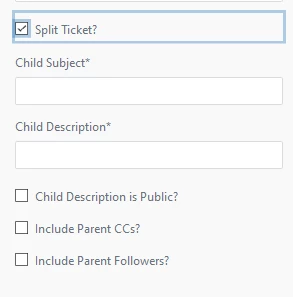
Drop all of those on your form(s). I set a condition to hide all of the fields when Split Ticket? is unchecked. I also require Subject and Description. Note that if you don't have conditional fields, requiring those fields might be problematic. If you leave them as optional you MUST fill out the description otherwise ticket creation will fail.
Next, create your trigger. These are the conditions I set:
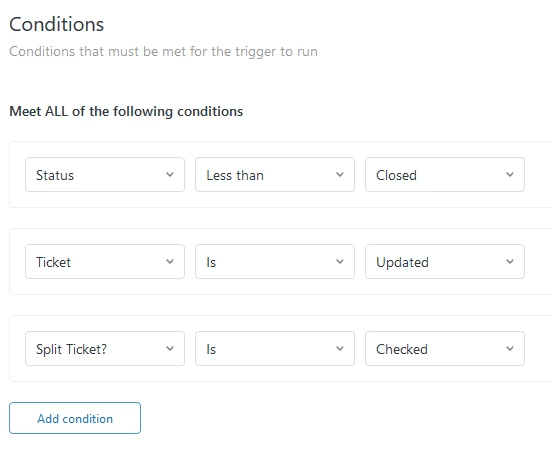
And these are the actions:
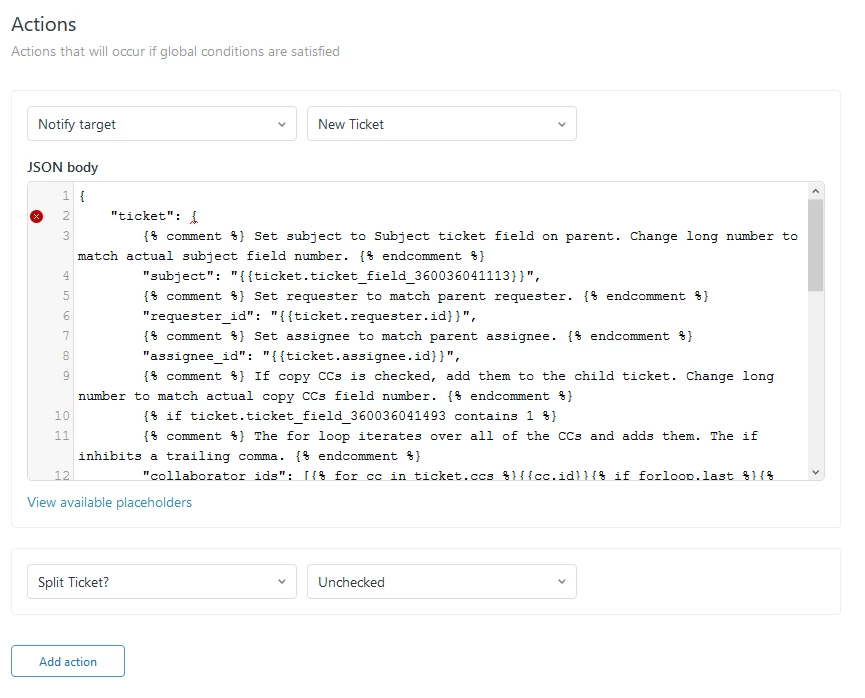
Note you want the target to be your ticket creation target. The JSON/Liquid is kind of complex, so here is what I wrote. Note: you MUST change the ticket field ID number (the 360036041113 in {{ticket.ticket_field_360036041113}} to match the ID numbers of your unique fields. Sorry, it's horrible to read. I would suggest pasting it into your favorite text editor to help.
{
"ticket": {
{% comment %} Set subject to Subject ticket field on parent. Change long number to match actual subject field number. {% endcomment %}
"subject": "{{ticket.ticket_field_360036041113}}",
{% comment %} Set requester to match parent requester. {% endcomment %}
"requester_id": "{{ticket.requester.id}}",
{% comment %} Set assignee to match parent assignee. {% endcomment %}
"assignee_id": "{{ticket.assignee.id}}",
{% comment %} If copy CCs is checked, add them to the child ticket. Change long number to match actual copy CCs field number. {% endcomment %}
{% if ticket.ticket_field_360036041493 contains 1 %}
{% comment %} The for loop iterates over all of the CCs and adds them. The if inhibits a trailing comma. {% endcomment %}
"collaborator_ids": [{% for cc in ticket.ccs %}{{cc.id}}{% if forloop.last %}{% break %}{% else %}, {% endif %} {% endfor %}],
{% endif %}
{% comment %} If copy followers is checked, add them to the child ticket. Change long number to match actual copy followers field number. {% endcomment %}
{% if ticket.ticket_field_360036106114 contains 1 %}
{% comment %} The for loop iterates over all of the followers and adds them. The if inhibits a trailing comma. {% endcomment %}
"additional_collaborators": [{% for cc in ticket.followers %}{{cc.id}}{% if forloop.last %}{% break %}{% else %}, {% endif %} {% endfor %}],
{% endif %}
"comment": {
{% comment %} Set first comment to Description ticket field on parent and add a link to parent ticket. Change long number to match actual field number. {% endcomment %}
"body": "{{ticket.ticket_field_360036041273}}\n\nThis request originated in ticket #{{ticket.id}}.",
{% comment %} If public is checked, the comment on the child will be public. Change long number to match actual public field number. {% endcomment %}
"public": {% if ticket.ticket_field_360036106034 contains 1 %} true {% else %} false {% endif %},
"author_id": "{{ticket.assignee.id}}"
}
}
}
Anyway, that's working for us now. Let me know if you have questions.



Thanks for sharing this Kevin!