Restricting Satisfaction Surveys by Date | Community
Skip to main content

Restricting Satisfaction Surveys by Date

  • October 3, 2017
  • 47 replies
  • 0 views

Show first post

47 replies

ZZ55
  • Author
  • December 5, 2018

Stacy

Ah, I don’t have access at the moment. Let’s see if someone is available to help.  ;)


ZZ55
  • Author
  • December 10, 2018

Stacy

I was able to set the ticket date field.

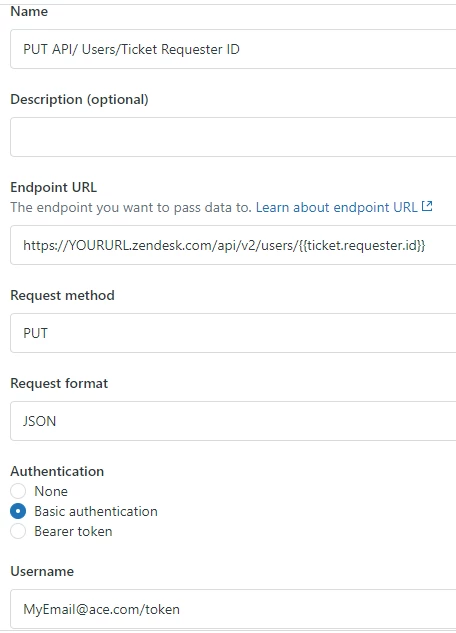
First create your HTTP target with:

URL: https://YOURDOMAIN.zendesk.com/api/v2/tickets/{{ticket.id}}.json

Method: PUT

Content Type: JSON

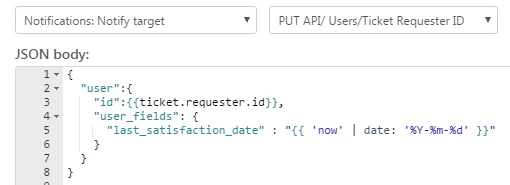
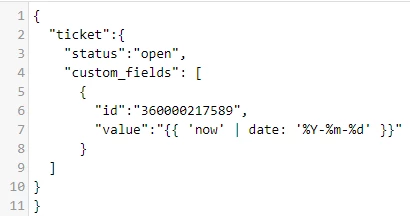
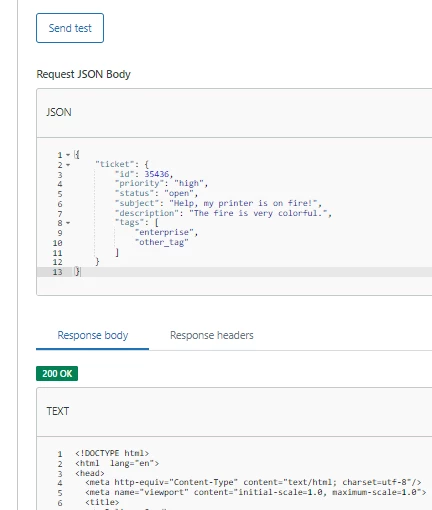
In your trigger, the JSON will be:

...which just mirrors your code with the closing bracket on line 11.

If this fails, you can go to API>Target Failures and check if a recent HTTP client call failed. This will give a clue as to the problem.

When testing, after you update the ticket and the target fires, you may need to refresh your browser to see the updated custom field value. Alternatively, close the ticket tab and re-open it again.

Please note that updating ticket fields in this way is not recommended or supported by Zendesk as it can cause technical problems.

Hope that helps.


  • December 10, 2018

Thanks. I still cannot get the field(s) to populate. I refreshed the browser and still nothing.

There are no API error messages as the code runs, the status is switched back to open, the satisfaction score date field just isn't getting populated.

As this solution is not recommended by Zendesk, I'll call it quits on this. I'll let the business know there is no solution for their ask.


  • March 26, 2019

Hi,

I can not seem to get the HTTP target to work. I am getting the following error in the API Target Failure log:

{ "error": "Couldn't authenticate you" }

I think this is related to the fact that we use Google to sign into our zendesk rather than a standard email and password. In the how-to for this article is listed that we could use an API Token to authenticate, but I can not find where to enter the token I generated. Could someone point me in the right direction for entering the API Token? 


Thanks,

Tim 


Olala
  • September 18, 2019

Hi Tim


Did you get this solved? 


I have got very same issue here.


Thanks!


Brett13
  • Community Manager
  • September 18, 2019

Hey Morvan,

If you're using Google Sign-in then you'll still want to set up a native Zendesk password you can use for this target. To set up a native Zendesk login, navigate to subdomain.zendesk.com/access/help and enter your email address to trigger a password reset email.

You'll replace subdomain with the actual subdomain of your Support account.

I hope this helps!


  • December 13, 2019

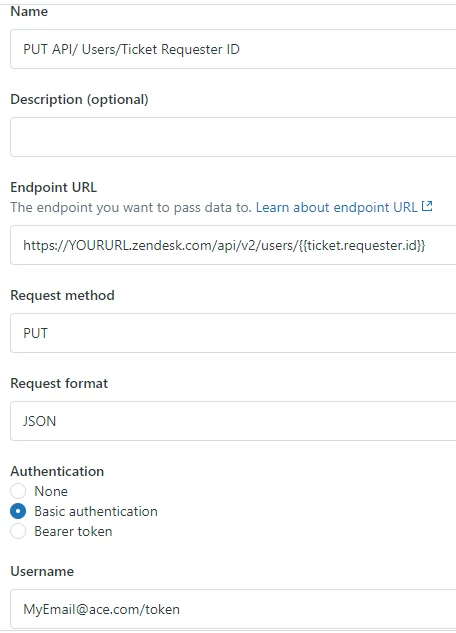
@Tim McMacken and @Morvan le boulanger, I had the same problem last week where I was creating an HTTP target, and got back status HTTP 401 Unauthorized with { "error": "Couldn't authenticate you" }. I solved it (with help from Zendesk support) as follows: In the target settings where you put in your email address, add the string "/token". Where you put in your password, paste in your token.

We use SSO to sign into Zendesk, so not sure if this solution would apply to everybody.


Dominic11
  • February 5, 2021

Hi, 

My message is a longshot as this thread might not receive attention after 2-3 years, but it's work a shot:

My target failure is 401, it says "error": "Couldn't authenticate you"

I have checked in the API and it says  HTTP client call failed.

Any ideas what the problem could be?

Kindly,

Dominic 


Brett13
  • Community Manager
  • February 12, 2021

Hey Dominic,

I'm going to create a ticket on your behalf so our Customer Care team can look into this error with you.

You'll receive an email shortly stating your ticket has been created.

Cheers!


  • July 1, 2021

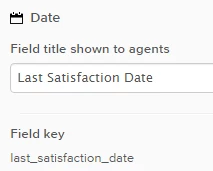
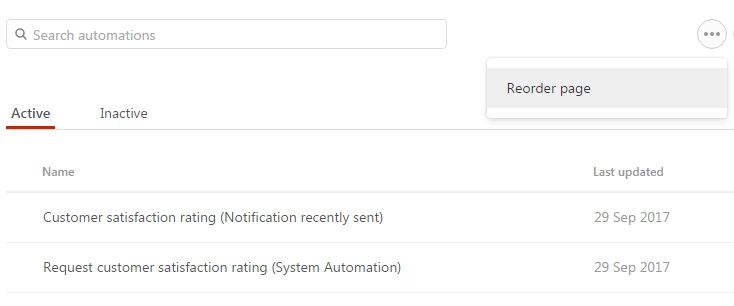
I'm not seeing the "Requester: Last Satisfaction Date" field in the automations dropdown. Was this removed??


Elaine17
  • July 2, 2021

Hi Diana,

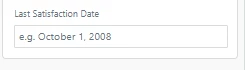
The Requester: Last Satisfaction Date field is not natively listed as one of the Conditions or Actions in creating an Automation. As stated above, you will have to create a new/custom date field by following the full instructions above in order for this date to show up in the dropdown option for Conditions or Actions.

Hope this clears it out. Cheers! :)


PAUL60
  • March 1, 2022

please update the to:

{
  "user":{
    "id":{{ticket.requester.id}},
    "user_fields": {
      "last_csat_date" : "{{ "now" | date: "%s" | plus: 7776000 | date: "%b %d, %Y" }}"
    }
  }
}


where 7776000  = 86400 s in a day * x no of days (90 in this case)


  • November 10, 2022

Hi @zz55


Is your code still functional? 

I followed every steps of the process and insert your code but nothing is happening in my user files

Thanks for your help


Chris M


ZZ55
  • Author
  • November 15, 2022

Chris-Ivan

Yes, this should work. But is it best to use a Webhook and call that from your automation.


  • November 15, 2022

Thanks @zz55,

Yes, when I notice that target wasn't possible, I used a webhook. Despite of this, my problem stayed the same... No change in the user field !


Did I miss something? Do you see a reason why it's not working?


Thank you in advance !


Chris


ZZ55
  • Author
  • November 15, 2022

Chris

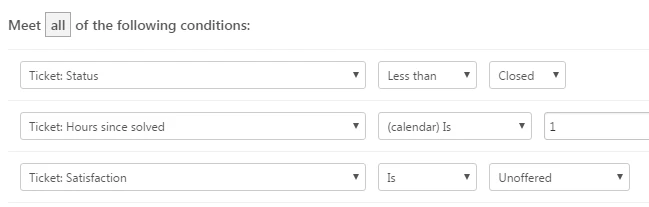
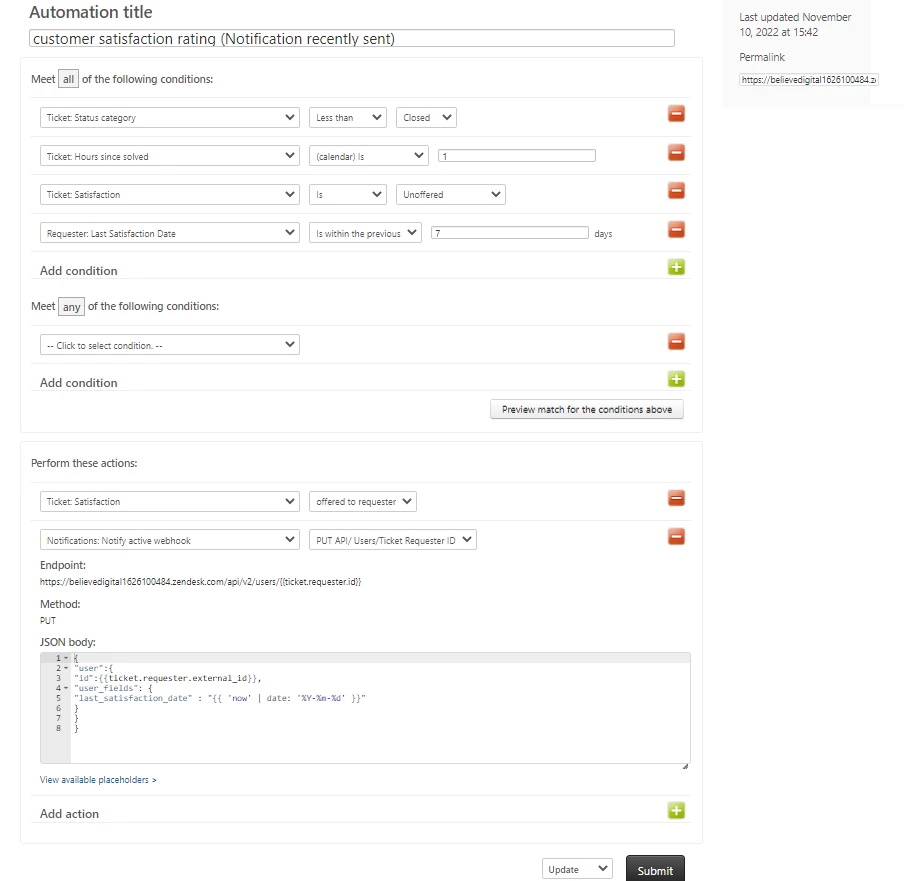
Are you sure that your automation is firing? That 7 day condition looks like it will prevent the conditions being met  

Include the webhook as an additional action in the standard automation. When the standard automation fires, the custom user field is updated with today’s date.

The new automation offers satisfaction rating for the ticket, but does not nag  the user with a notification. So no webhook call on that.


Alexander45

What I noticed on your screenshot is that according to the guide, the notify webhook is part of the standard Automation but you did add it to the "new" automation. Isn't that wrong? Should the value not be written when the CSAT was offered?


Alexander45

@zz55 

I found an issue with the guide.

There is a ) at the end of the URL, not a }

Everyone who copies that and exchanges "YOURURL" with the home URL could run into 404.

Cause the endpoint URL will then be invalid.

Webhook

...

URL: https://YOURURL.zendesk.com/api/v2/users/{{ticket.requester.id})

...


  • December 13, 2023

Hi,

Firstly thank you for all the useful info.

I have a question related to this topic. I understood how to set up a X days cool down period to not to send the CSAT out every day.

  • But my question is that is there a way that when the CSAT automation in firing to send out the emails somehow to check that the requesters does not repeat? Because, as you can see from the screenshot below I have 896 matching ticket for the CSAT automation, and there are requesters who appear more than once, so I suppose they will receive more than 1 email notification.


I mean imagine that a have several tickets with the same customer, but I don't want to send 5 emails of CSAT to that same customer, instead just 1 email notification. So my question is there any way to "exclude" if there's any duplicate of the requesters?

  • And also another thing. There are tickets which does not have reply from the requester, only the public comment sent out by the agent, if there a way to "exclude" those tickets which does not have a response from the end-user? Imagine I send a ticket to a customer, but they never reply back, obviously I don't want to send them a CSAT because that wouldn't make sense.

I hope I could explain myself.

Thanks!


Bill19
  • March 6, 2025

Hey, Can anyone confirm if "{{ 'now' | date: '%Y-%m-%d' }}" still work? It returns something like this for me: is invalid (expected a date; try YYYY-MM-DD).


When I add HH:MM:SS, such as "{{'now'|date:'%Y-%m-%dT00:00:00+00:00:00'}}", it got Jan 1, 1970. 


Bill19
  • March 12, 2025

Please ignore my previous question. 
"{{ 'now' | date: '%Y-%m-%d' }}" works with Zendesk. 

It doesn't work when I use Talend API Tester.


juan42
  • February 5, 2026

Hola
 

Como puedo obtener la fecha que fue contestada la encuesta de satisfacción, ya que en mis reportes tomo la fecha de Solved Ticket, sin embargo, en ocasiones los tickets son abiertos por distintas dudas de i cliente, pero la encuesta ya fue contestada.

Espero me puedan apoyar.