Requiring a ticket attachment if a particular dropdown option is selected | Community
Skip to main content

Requiring a ticket attachment if a particular dropdown option is selected

  • March 27, 2019
  • 61 replies
  • 0 views

Show first post

61 replies

  • April 24, 2024

@c12  yes I swapped out the XXXX's for my field ID.


  • April 24, 2024

@c12 Looks like I had misspelled one of the "formDropdownClass" fields. Although I am having an issue when testing that if there is no attachment but it's required, the attachment text reverts back to the “Attachments (optional)” text. If you have any insight that would be great! Thank you!


Prior to submitting request


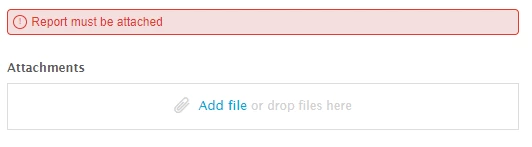
Submitted request but submission failed due to no attachment – I need it to retain the custom Attachment verbiage.


C12
  • April 24, 2024

@noelle, I copy pasted the code from my instance. You would just need to make sure that you swap out the IDs. 
In the bit where you check for a certain drop down value var formDropdownClass = I have multiple drop down options added, as I needed to have attachments mandatory for multiple forms. 


  // Can't submit supply variance or damage ticket without attachment
var startObserveMutations = function(nodeSelector, options, callbackFunction) {
   var node = document.querySelector(nodeSelector);
   if (node) {
     var observer = new MutationObserver(callbackFunction);
     observer.observe(node, options);
     return observer;
   }
 };
 
 // Callback function to execute when mutations in form attachments are observed:
 // clear or select Attachment checkbox according to attachments
 var mutationObservedForm = function(mutationsList) {
   mutationsList.forEach(function(mutation) {
     if (mutation.type === 'childList') {
       setFormAttachmentCheckbox();
     }
   });
 };
 
 // Define some variables for requiring form attachments
 var attachmentCheckboxField = 'request_custom_fields_30367309244953';
 var attachmentCheckboxId = '#' + attachmentCheckboxField;
 var attachmentErrorNotification = 'Attachments cannot be blank';
 var formDropdownClass = '.request_custom_fields_19908729240857, .request_custom_fields_30367309244953';
 var formObserveMutationOptions = { childList: true, subtree: true };
 
 // Clear or select checkbox according to attachments:
 // Set Attachment checkbox if at least one attachment is uploaded, otherwise clear it
 function setFormAttachmentCheckbox() {
   if ($('#request-attachments-pool .upload-item').length >= 1) {
     selectCheckbox(attachmentCheckboxId);
   } else {
     clearCheckbox(attachmentCheckboxId);
   }
 }
 
 // Select checkbox
 function selectCheckbox(eltselector) {
   $(eltselector).prop('checked', true);
 }
 
 // Clear checkbox
 function clearCheckbox(eltselector) {
   $(eltselector).prop('checked', false);
 }
 
 // If attachment checkbox field exists:
 //   Watch for changes to attachments
 if ($(attachmentCheckboxId).length) {
   startObserveMutations('#request-attachments-pool', formObserveMutationOptions, mutationObservedForm);
 }
 
 // Adjust attachment error notification
 var attachmentErrorElt = $(attachmentCheckboxId + ' .notification-error');
 if (attachmentErrorElt.length) {
   attachmentErrorElt.text(attachmentErrorNotification);
 }
 
 // Initial checkbox setting
 setFormAttachmentCheckbox();


That's how it looks like if no attachment is added


  • April 25, 2024

@c12  I tried your code versus mine but it ended up failing. I have 2 forms that need the same attachment message but another form that says something different. Here is my code for one of the forms that requires the attachment. I keep getting the issue where if I submit a ticket without the attachment if the dropdown selection requires it, the attachment field reverts back to “Attachment (optional)” instead of maintaining my custom verbiage.


// REQUIRE ATTACHMENTS FOR SUBMISSION PORTAL CREDENTIAL REQUEST FORM
  // Function to start observing node for mutations
var startObserveMutations = function (nodeSelector, options, callbackFunction) {
	var node = document.querySelector(nodeSelector);
	if (node) {
     var observer = new MutationObserver(callbackFunction);
     observer.observe(node, options);
   	 return observer;
  }
};

// Callback function to execute when mutations in form attachments or dropdown are observed: 
// clear or select Attachment checkbox according to dropdown
var mutationObservedForm = function (mutationsList) {
  mutationsList.forEach(function (mutation) {
    if (mutation.type == 'childList') {
      setFormAttachmentCheckbox();
    }
  });
};

// Define some variables for requiring form attachments
var attachmentCheckboxField = 'request_custom_fields_7685982184091';
var attachmentCheckboxId = '#' + attachmentCheckboxField;
var attachmentErrorNotification = 'User request template must be attached';
var formDropdownClass = '.request_custom_fields_22487999583643';
var formObserveMutationOptions = { childList: true, subtree: true };

// Clear or select checkbox according to dropdown and attachments:
// Set Attachment checkbox if no attachments required, or if attachments are required and at least one is uploaded, otherwise clear it
function setFormAttachmentCheckbox() {
  if (isFormAttachmentRequired()) {
    if ($('#request-attachments-pool .upload-item').length) {
      selectCheckbox(attachmentCheckboxId);
    }
    else {
      clearCheckbox(attachmentCheckboxId);
    }
  }
  else {
    selectCheckbox(attachmentCheckboxId);
  }
}

// Return true if dropdown option 'Add 5+ Users with Spreadsheet' is selected
function isFormAttachmentRequired() {
// Get the text of the selected option in the dropdown
  var selectedOptionText = $(formDropdownClass + ' a.nesty-input').text();
  return $(formDropdownClass + ' a.nesty-input').attr('aria-expanded') &&
         (selectedOptionText === 'Add 5+ Users with Spreadsheet');
}

// Select checkbox
function selectCheckbox(eltselector) {
  $(eltselector).prop('checked', true);
}

// Clear checkbox
function clearCheckbox(eltselector) {
  $(eltselector).prop('checked', false);
}

// If attachment checkbox field exists:
//   Select the checkbox if attachment is not required
//   Watch for changes to attachments and dropdown
if ($(attachmentCheckboxId).length) {  
  if (!isFormAttachmentRequired(formDropdownClass)) {
    selectCheckbox(attachmentCheckboxId);
  }
  startObserveMutations('#request-attachments-pool', formObserveMutationOptions, mutationObservedForm);
  startObserveMutations(formDropdownClass, formObserveMutationOptions, mutationObservedForm);
}

// Adjust attachment error notification
var attachmentErrorElt = $('.' + attachmentCheckboxField + ' .notification-error');
if (attachmentErrorElt.length) {
  attachmentErrorElt.text(attachmentErrorNotification);
}

C12
  • April 25, 2024

@noelle You can always use a second script to change the wording and remove it from the main script


 // Function to replace text
 function replaceText(element, oldText, newText) {
   if (element.innerText) {
     element.innerText = element.innerText.replace(oldText, newText);
   } else if (element.textContent) {
     element.textContent = element.textContent.replace(oldText, newText);
   }
 }


  • April 30, 2024

@c12 so remove the below


// Adjust attachment error notification
var attachmentErrorElt = $('.' + attachmentCheckboxField + ' .notification-error');
if (attachmentErrorElt.length) {
  attachmentErrorElt.text(attachmentErrorNotification);


then add this to the bottom?


 // Function to replace text
 function replaceText(element, oldText, newText) {
   if (element.innerText) {
     element.innerText = element.innerText.replace(oldText, newText);
   } else if (element.textContent) {
     element.textContent = element.textContent.replace(oldText, newText);
   }
 }

helder.custodio


Hello everyone, I carry out the process here but the attachment fields are not being hidden and the attachments are not becoming mandatory, could you help me?

style.css


#request_custom_fields_31964770778516_label,
#request_custom_fields_31964770778516 {
display: none;
}


script.js
 // Callback function to execute when mutations in form attachments are observed:
// clear or select Attachment checkbox according to attachments
var mutationObservedForm = function(mutationsList) {
  mutationsList.forEach(function(mutation) {
    if (mutation.type === 'childList') {
      setFormAttachmentCheckbox();
    }
  });
};

// Define some variables for requiring form attachments
var attachmentCheckboxField = 'request_custom_fields_32026654442260';
var attachmentCheckboxId = '#' + attachmentCheckboxField;
var attachmentErrorNotification = 'Attachments cannot be blank';
var formDropdownClass = '.request_custom_fields_31964770778516, .request_custom_fields_30367309244953';
var formObserveMutationOptions = { childList: true, subtree: true };

// Clear or select checkbox according to attachments:
// Set Attachment checkbox if at least one attachment is uploaded, otherwise clear it
function setFormAttachmentCheckbox() {
  if ($('#request-attachments-pool .upload-item').length >= 1) {
    selectCheckbox(attachmentCheckboxId);
  } else {
    clearCheckbox(attachmentCheckboxId);
  }
}

// Select checkbox
function selectCheckbox(eltselector) {
  $(eltselector).prop('checked', true);
}

// Clear checkbox
function clearCheckbox(eltselector) {
  $(eltselector).prop('checked', false);
}

// If attachment checkbox field exists:
//   Watch for changes to attachments
if ($(attachmentCheckboxId).length) {
  startObserveMutations('#request-attachments-pool', formObserveMutationOptions, mutationObservedForm);
}

// Adjust attachment error notification
var attachmentErrorElt = $(attachmentCheckboxId + ' .notification-error');
if (attachmentErrorElt.length) {
  attachmentErrorElt.text(attachmentErrorNotification);
}

// Initial checkbox setting
setFormAttachmentCheckbox();


  • December 24, 2024

@everyone Does anyone know how to make it work for multiselect fields? I'm having trouble getting it to trigger for those. This is my code for just script.js and the bolded areas are the other elements that I changed.


// REQUIRE ATTACHMENTS FOR FORM WITH MULTISELECT
$(document).ready(function() {
 // Function to start observing node for mutations
var startObserveMutations = function (nodeSelector, options, callbackFunction) {
var node = document.querySelector(nodeSelector);
if (node) {
  var observer = new MutationObserver(callbackFunction);
  observer.observe(node, options);
 return observer;
 }
};

// Callback function to execute when mutations in form attachments or dropdown are observed: 
// clear or select Attachment checkbox according to dropdown
var mutationObservedForm = function (mutationsList) {
 mutationsList.forEach(function (mutation) {
   if (mutation.type == 'childList') {
     setFormAttachmentCheckbox();
   }
 });
};

// Define some variables for requiring form attachments
var attachmentCheckboxField = 'request_custom_fields_123456789';
var attachmentCheckboxId = '#' + attachmentCheckboxField;
var attachmentErrorNotification = 'Documents selected to be submitted must be attached.';
var formMultiselect = '.request_custom_fields_987654321';
var formObserveMutationOptions = { childList: true, subtree: true };

// Clear or select checkbox according to dropdown and attachments:
// Set Attachment checkbox if no attachments required, or if attachments are required and at least one is uploaded, otherwise clear it
function setFormAttachmentCheckbox() {
 if (isFormAttachmentRequired()) {
   if ($('#request-attachments-pool .upload-item').length) {
     selectCheckbox(attachmentCheckboxId);
   }
   else {
     clearCheckbox(attachmentCheckboxId);
   }
 }
 else {
   selectCheckbox(attachmentCheckboxId);
 }
}

// Return true if dropdown options are selected
function isFormAttachmentRequired() {
 return $(formMultiselect + ' div.hc-multiselect-menu').attr('aria-checked') &&
        $(formMultiselect + ' div.hc-multiselect-menu').text() === 'Selection1','Selection2','Selection3','Selection4';
}

// Select checkbox
function selectCheckbox(eltselector) {
 $(eltselector).prop('checked', true);
}

// Clear checkbox
function clearCheckbox(eltselector) {
 $(eltselector).prop('checked', false);
}

// If attachment checkbox field exists:
//   Select the checkbox if attachment is not required
//   Watch for changes to attachments and dropdown
if ($(attachmentCheckboxId).length) {  
 if (!isFormAttachmentRequired()) {
   selectCheckbox(attachmentCheckboxId);
 }
 startObserveMutations('#request-attachments-pool', formObserveMutationOptions, mutationObservedForm);
 startObserveMutations(formDropdownClass, formObserveMutationOptions, mutationObservedForm);
}

// Adjust attachment error notification
var attachmentErrorElt = $('.' + attachmentCheckboxField + ' .notification-error');
if (attachmentErrorElt.length) {
 attachmentErrorElt.text(attachmentErrorNotification);
}

})


  • January 24, 2025

Sorry to ping this post years later. I ran the code above and I get the error message when no file has been uploaded. But could one of you explain how to remove the rest ‘Attachment (optional)’. No matter what I do, I cant seem to remove it. 


  • March 19, 2025

Hi all,


I've tried following the above and can't get it to work! My coding side of things are not great…


However I wondered, if anyone has managed to make the Attachment field mandatory based on the Form the customer has selected rather than a field? 


  • March 26, 2025

Hi @katie39


Regarding your comment above, how do you add the event listener? I was able to disable the submit button, but coding is not my strong point. Can you provide some guidance?


3. Add an event listener to the attachments area to detect changes, and only enable the submit button (and change warning text) if there is at least one file attached.

 document.getElementById('request-attachments').addEventListener('change', function(event) {
  var fileInput = event.target;
  var fileCount = fileInput.files.length;
   if (fileCount > 0) {
     attachmentLabel.text("Attachments"); 
     button.disabled = false;
   }
  });