Requiring a ticket attachment if a particular dropdown option is selected | Community
Skip to main content

Requiring a ticket attachment if a particular dropdown option is selected

  • March 27, 2019
  • 61 replies
  • 0 views

Show first post

61 replies

  • Author
  • February 21, 2020

@Carlo Ligthart I'm glad it's working for you! @Fikri Akbar Hedianto maybe this was your problem too?


  • July 14, 2020

I am also struggling to get this functioning.

Code as below

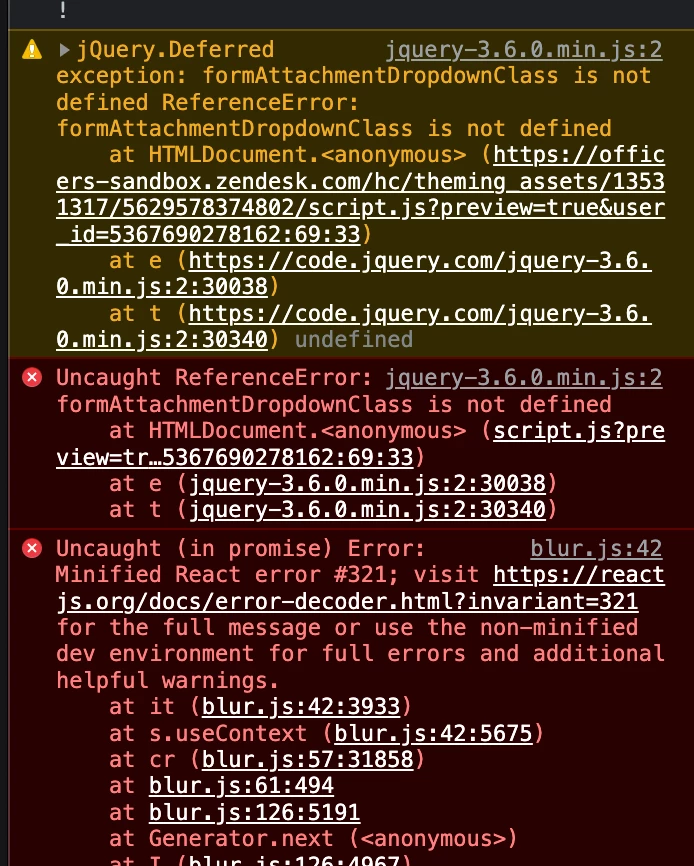
Console log output

Code implemented, changing only the elements you mentioned.


$(document).ready(function() {
// Function to start observing node for mutations
var startObserveMutations = function (nodeSelector, options, callbackFunction) {
var node = document.querySelector(nodeSelector);
if (node) {
var observer = new MutationObserver(callbackFunction);
observer.observe(node, options);
return observer;
}
};

// Callback function to execute when mutations in form attachments or dropdown are observed:
// clear or select Attachment checkbox according to dropdown
var mutationObservedForm = function (mutationsList) {
mutationsList.forEach(function (mutation) {
if (mutation.type == 'childList') {
setFormAttachmentCheckbox();
}
});
};

// Define some variables for requiring form attachments
var attachmentCheckboxField = 'request_custom_fields_360012233180';
var attachmentCheckboxId = '#' + attachmentCheckboxField;
var attachmentErrorNotification = 'Attachments required before submitting';
var formDropdownClass = '.request_custom_fields_360012190719';
var formObserveMutationOptions = { childList: true, subtree: true };

// Clear or select checkbox according to dropdown and attachments:
// Set Attachment checkbox if no attachments required, or if attachments are required and at least one is uploaded, otherwise clear it
function setFormAttachmentCheckbox() {
if (isFormAttachmentRequired()) {
if ($('#request-attachments-pool .upload-item').length) {
selectCheckbox(attachmentCheckboxId);
}
else {
clearCheckbox(attachmentCheckboxId);
}
}
else {
selectCheckbox(attachmentCheckboxId);
}
}

// Return true if dropdown option 'ABCD' is selected
function isFormAttachmentRequired() {
return $(formDropdownClass + ' a.nesty-input').attr('aria-expanded') &&
$(formDropdownClass + ' a.nesty-input').text() === 'no';
}

// Select checkbox
function selectCheckbox(eltselector) {
$(eltselector).prop('checked', true);
}

// Clear checkbox
function clearCheckbox(eltselector) {
$(eltselector).prop('checked', false);
}

// If attachment checkbox field exists:
// Select the checkbox if attachment is not required
// Watch for changes to attachments and dropdown
if ($(attachmentCheckboxId).length) {
if (!isFormAttachmentRequired(formAttachmentDropdownClass)) {
selectCheckbox(attachmentCheckboxId);
}
startObserveMutations('#request-attachments-pool', formObserveMutationOptions, mutationObservedForm);
startObserveMutations(formDropdownClass, formObserveMutationOptions, mutationObservedForm);
}

// Adjust attachment error notification
var attachmentErrorElt = $('.' + attachmentCheckboxField + ' .notification-error');
if (attachmentErrorElt.length) {
attachmentErrorElt.text(attachmentErrorNotification);
}


  • August 17, 2020

Anyone got a workaround for jQuery now not being available in Templating API v2?


Brett13
  • Community Manager
  • September 2, 2020

Hey Rhys,

I believe the only supported workflow would be to add the jQuery to the document_head as mentioned here: Importing or upgrading jQuery

I've pinged some of our moderators to see if they are aware of an alternative solution.

Cheers!


CJ99
  • April 2, 2021

Is this possible to do without requiring a drop down field to have something selected? I want to require an attachment on a form that doesn't have any drop downs. 


CJ99
  • April 9, 2021

Update: I have a working solution for my comment above! 

First, I totally didn't realize that Fikri had already posted what I asked about above. Minus that final bracket, it's a perfect working code example of requiring an attachment on a form, period, no other field requirements. @Fikri Akbar Hedianto sorry to ping you about a year old comment on a Zendesk article but your comment on this saved me hours of work and headaches, you are my hero this week!! 

Second, I am not confident the more official code example in the guide still works. I tried so many things to get it to work but also consistently got that 'formAttachmentDropdownClass is not defined', and while I'm an absolute beginner at javascript, I gotta say that I don't think it's an implementation issue, I can't see anywhere that it's being defined, either. 

Fortunately for me, and possibly for whoever is reading this comment, you can still use Fikri's code to require an attachment on a form because it never references that class, because a dropdown isn't needed for that version. 


  • May 4, 2021

Is there a way to force an attachment for only when a specific field is selected (and not from the intital form selection)?


  • January 3, 2022

@cj99 My turn to ping you in an old thread ... I am looking for a solution for this, but it seems this doesn't work on newer themes. Do you have something set up that makes attaching files mandatory? And if so, does it require an older theme?


Anastasia11

Hi guys,

Maybe anyone is familiar, if it's possible to use dynamic content in the below part (error message shown to end-user if there is no attachment selected) :

var attachmentErrorNotification = 'Attachments: cannot be blank';

Thanks in advance!


Anastasia11

Hi,

Seems that "attachment" checkbox is not hidden anymore. Can anyone please check into this and advise how this field could be hidden again?


Thanks,
Anastasia


Hi Anastasia,
 
Have there been changes to your theme's styles since the checkbox stopped hiding?  A change that conflicts with the Hide the checkbox field section could cause what you're seeing.

Saasten
  • July 18, 2022

can we make the "attachment" as a mandatory based on the value from the dropdown?


Hi Dikka,
 
This tip walks through making the attachment required after a specific dropdown value is selected.  Is there an issue you're encountering when implementing?
 

  • July 28, 2022

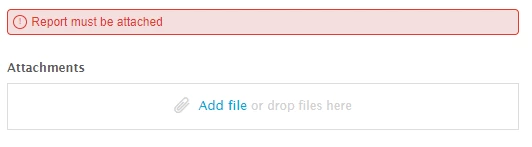
@christopher53 are you able to assist me with my issue below? This code isn't working and I'm having trouble getting it to require attachments based on a selection. The attachment checkbox doesn't work.


This doesn't seem to be working now. I'm able to fully submit a ticket without uploading an attachment when I select my option from the drop down. It's not requiring the attachment. When i show the attachment checkbox, i see that it never checks the box.


My HC is currently on the below:

Theme version 2.15.0
Templating API v2

Below is the code that are currently in the sections style.css and script.js. Items in bold and italic are what I updated to my specifics.


STYLE.CSS (pasted at the bottom of the existing code)
#request_custom_fields_7685982184091_label,
#request_custom_fields_7685982184091 {
display: none;
}

SCRIPT.JS (pasted at the bottom of the existing code)
I have multiple forms and I need this to work only for a specific form. Can someone assist? Below is the code I'm using.


// REQUIRE ATTACHMENTS FOR FORM A
// Function to start observing node for mutations
var startObserveMutations = function (nodeSelector, options, callbackFunction) {
var node = document.querySelector(nodeSelector);
if (node) {
   var observer = new MutationObserver(callbackFunction);
   observer.observe(node, options);
  return observer;
  }
};

// Callback function to execute when mutations in form attachments or dropdown are observed: 
// clear or select Attachment checkbox according to dropdown
var mutationObservedForm = function (mutationsList) {
  mutationsList.forEach(function (mutation) {
    if (mutation.type == 'childList') {
      setFormAttachmentCheckbox();
    }
  });
};

// Define some variables for requiring form attachments
var attachmentCheckboxField = 'request_custom_fields_7685982184091';
var attachmentCheckboxId = '#' + attachmentCheckboxField;
var attachmentErrorNotification = 'Attachment is required';
var formDropdownClass = '.request_custom_fields_7686337209627';
var formObserveMutationOptions = { childList: true, subtree: true };

// Clear or select checkbox according to dropdown and attachments:
// Set Attachment checkbox if no attachments required, or if attachments are required and at least one is uploaded, otherwise clear it
function setFormAttachmentCheckbox() {
  if (isFormAttachmentRequired()) {
    if ($('#request-attachments-pool .upload-item').length) {
      selectCheckbox(attachmentCheckboxId);
    }
    else {
      clearCheckbox(attachmentCheckboxId);
    }
  }
  else {
    selectCheckbox(attachmentCheckboxId);
  }
}

// Return true if dropdown option 'Option 1' is selected
function isFormAttachmentRequired() {
  return $(formDropdownClass + ' a.nesty-input').attr('aria-expanded') &&
         $(formDropdownClass + ' a.nesty-input').text() === 'Option 1';
}

// Select checkbox
function selectCheckbox(eltselector) {
  $(eltselector).prop('checked', true);
}

// Clear checkbox
function clearCheckbox(eltselector) {
  $(eltselector).prop('checked', false);
}

// If attachment checkbox field exists:
//   Select the checkbox if attachment is not required
//   Watch for changes to attachments and dropdown
if ($(attachmentCheckboxId).length) {
  if (!isFormAttachmentRequired(formAttachmentDropdownClass)) {
    selectCheckbox(attachmentCheckboxId);
  }
  startObserveMutations('#request-attachments-pool', formObserveMutationOptions, mutationObservedForm);
  startObserveMutations(formDropdownClass, formObserveMutationOptions, mutationObservedForm);
}

// Adjust attachment error notification
var attachmentErrorElt = $('.' + attachmentCheckboxField + ' .notification-error');
if (attachmentErrorElt.length) {
  attachmentErrorElt.text(attachmentErrorNotification);
}


This is great...but I am getting the error " The upload took too long, connection was lost." 

What did I do wrong?


Anonimas
  • February 2, 2023

Hi,

Where to find # for attachmentCheckboxField? I did everything as explained, but the error message doesn't pop up at all. I assume I'm missing this ID. Any suggestions?

Talking about this part:

var attachmentCheckboxId = '#' + attachmentCheckboxField;

Thanks!


raphael12
  • March 21, 2023

Hi Zendesk Community,

I did as explained: 

Made the checkbox mandatory and filled the 3 variables in the code (checkbox ID, dropdown ID and i kept abcd as a value) and for any other value than abcd i keep getting "checkbox checked required" error message..

I get that;


Jan20
  • March 27, 2023

I'm sorry, but I can't believe this is not a standard feature available via forms.

This is such a basic use case which thousands of customers will require, and we have to build some complicated, messy workaround on our own in order to realize it.

It baffles me how expensive this tool is for the amount of features it offers.


Katie39
  • May 25, 2023

Here's a simpler way to enforce that users upload an attachment before submitting a request. These changes should be added to the script.js. 

1. Disable the submit button on the form you wish to enforce attachment upload.

const button = document.querySelector('[value="Submit"]');
button.disabled = true;

2. Change the attachments default label to let the user know an attachment is required.

$('label[for="request-attachments"]').html('<b>Attach file template to proceed</b>.');  

3. Add an event listener to the attachments area to detect changes, and only enable the submit button (and change warning text) if there is at least one file attached.

 document.getElementById('request-attachments').addEventListener('change', function(event) {
  var fileInput = event.target;
  var fileCount = fileInput.files.length;
   if (fileCount > 0) {
     attachmentLabel.text("Attachments"); 
     button.disabled = false;
   }
  });

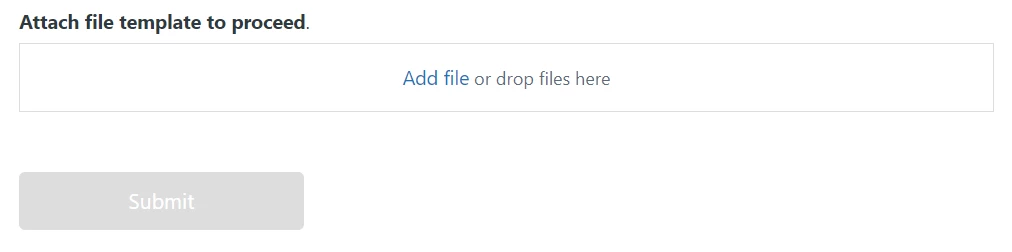
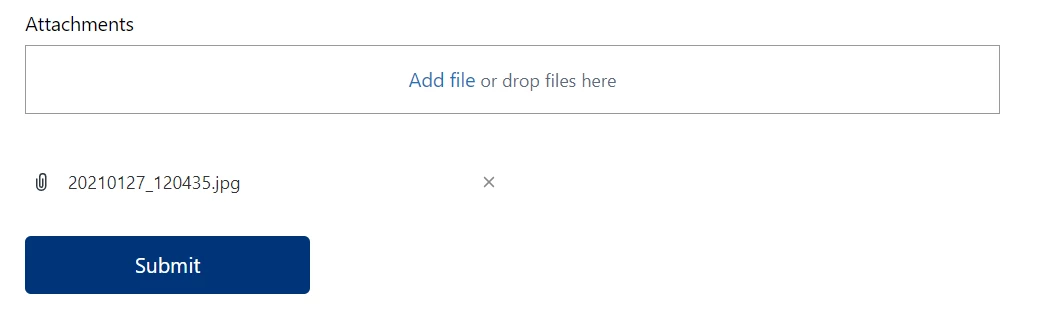
Here's how it looks on the submit a request page, before and after attachment upload:

Before:

After:

Hope this helps someone else!


  • November 28, 2023
 

Hello everyone,

I followed the procedure but my code does not work. I am a beginner and I would like to make it mandatory to add the attachment to send the form. Attached is my script:

$(document).ready(function () {
    
  // Function to start observing node for mutations
var startObserveMutations = function (nodeSelector, options, callbackFunction) {
var node = document.querySelector(nodeSelector);
if (node) {
   var observer = new MutationObserver(callbackFunction);
   observer.observe(node, options);
  return observer;
  }
};

// Callback function to execute when mutations in form attachments or dropdown are observed: 
// clear or select Attachment checkbox according to dropdown
var mutationObservedForm = function (mutationsList) {
  mutationsList.forEach(function (mutation) {
    if (mutation.type == 'childList') {
      setFormAttachmentCheckbox();
    }
  })};
          
// Define some variables for requiring form attachments
var attachmentCheckboxField = 'request_custom_fields_15233785880850';
var attachmentCheckboxId = '#' + attachmentCheckboxField;
var attachmentErrorNotification = 'Test';
var formDropdownClass = '.request_custom_fields_15106539093266';
var formObserveMutationOptions = { childList: true, subtree: true };

// Clear or select checkbox according to dropdown and attachments:
// Set Attachment checkbox if no attachments required, or if attachments are required and at least one is uploaded, otherwise clear it
function setFormAttachmentCheckbox() {
  if (isFormAttachmentRequired()) {
    if ($('#request-attachments-pool .upload-item').length) {
      selectCheckbox(attachmentCheckboxId);
    }
    else {
      clearCheckbox(attachmentCheckboxId);
    }
  }
  else {
    selectCheckbox(attachmentCheckboxId);
  }
}

// Return true if dropdown option 'ABCD' is selected
function isFormAttachmentRequired() {
  return $(formDropdownClass + ' a.nesty-input').attr('aria-expanded') &&
         $(formDropdownClass + ' a.nesty-input').text() !=='';
}

// Select checkbox
function selectCheckbox(eltselector) {
  $(eltselector).prop('checked', true);
}

// Clear checkbox
function clearCheckbox(eltselector) {
  $(eltselector).prop('checked', false);
}

// If attachment checkbox field exists:
//   Select the checkbox if attachment is not required
//   Watch for changes to attachments and dropdown
if ($(attachmentCheckboxId).length) {
  if (!isFormAttachmentRequired(formAttachmentDropdownClass)) {
    selectCheckbox(attachmentCheckboxId);
  }
  startObserveMutations('#request-attachments-pool', formObserveMutationOptions, mutationObservedForm);
  startObserveMutations(formDropdownClass, formObserveMutationOptions, mutationObservedForm);
}

// Adjust attachment error notification
var attachmentErrorElt = $('.' + attachmentCheckboxField + ' .notification-error');
if (attachmentErrorElt.length) {
  attachmentErrorElt.text(attachmentErrorNotification);
}

Can you help me ?


Sheena11
  • March 18, 2024

Can you provide me the code to add the error notification for another option as well.

// Return true if dropdown option 'ABCD' is selected
function isFormAttachmentRequired() {
  return $(formDropdownClass + ' a.nesty-input').attr('aria-expanded') &&
         $(formDropdownClass + ' a.nesty-input').text() !=='';
}

Like this for another option in the same dropdown I need to add this Mandatory field error code

please help @simon26 @noelle


Brandon12
  • March 27, 2024

To extend the functionality of the given code snippet to add an error notification for another dropdown option, we will modify the `isFormAttachmentRequired` function to check for the selection of the additional option as well. Assuming the additional option you want to include is 'EFGH', the code can be updated as follows:


// Return true if dropdown option 'ABCD' or 'EFGH' is selected
function isFormAttachmentRequired() {
 // Get the text of the selected option in the dropdown
 var selectedOptionText = $(formDropdownClass + ' a.nesty-input').text();
 // Check if the dropdown is expanded and if the selected option is 'ABCD' or 'EFGH'
 return $(formDropdownClass + ' a.nesty-input').attr('aria-expanded') &&
        (selectedOptionText === 'ABCD' || selectedOptionText === 'EFGH');
}


This code modification does the following:
- Retrieves the text of the currently selected option in the dropdown using jQuery.
- Checks if the dropdown is expanded (using the `aria-expanded` attribute) and if the selected option text matches either 'ABCD' or 'EFGH'.

With this change, the `isFormAttachmentRequired` function will now return `true` if either 'ABCD' or 'EFGH' is selected, which can then be used to trigger the mandatory field error code for these options.

Remember to replace `'ABCD'` and `'EFGH'` with the actual text of the options you are interested in, and ensure that `formDropdownClass` correctly represents the class of your dropdown element in the HTML structure of your Zendesk form.


C12
  • April 1, 2024

I got this code working for my instance (Copenhagen theme). Added to script.js.

You need to create a check box (call it whatever you want. I called mine Attachments) and make it mandatory to submit a ticket.


Add the Checkbox to the form you want to use at the very bottom. Copy the ID for both the drop down menu where you need attachments and check box and remove the X's with the corresponding IDs.

 // Can't submit damage ticket without attachment
var startObserveMutations = function(nodeSelector, options, callbackFunction) {
 var node = document.querySelector(nodeSelector);
 if (node) {
   var observer = new MutationObserver(callbackFunction);
   observer.observe(node, options);
   return observer;
 }
};
// Callback function to execute when mutations in form attachments are observed:
// clear or select Attachment checkbox according to attachments
var mutationObservedForm = function(mutationsList) {
 mutationsList.forEach(function(mutation) {
   if (mutation.type === 'childList') {
     setFormAttachmentCheckbox();
   }
 });
};
// Define some variables for requiring form attachments
var attachmentCheckboxField = 'request_custom_fields_XXXXXX';
var attachmentCheckboxId = '#' + attachmentCheckboxField;
var attachmentErrorNotification = 'Attachments cannot be blank';
var formDropdownClass = '.request_custom_fields_XXXXXX';
var formObserveMutationOptions = { childList: true, subtree: true };
// Clear or select checkbox according to attachments:
// Set Attachment checkbox if at least one attachment is uploaded, otherwise clear it
function setFormAttachmentCheckbox() {
 if ($('#request-attachments-pool .upload-item').length >= 1) {
   selectCheckbox(attachmentCheckboxId);
 } else {
   clearCheckbox(attachmentCheckboxId);
 }
}
// Select checkbox
function selectCheckbox(eltselector) {
 $(eltselector).prop('checked', true);
}
// Clear checkbox
function clearCheckbox(eltselector) {
 $(eltselector).prop('checked', false);
}
// If attachment checkbox field exists:
//   Watch for changes to attachments
if ($(attachmentCheckboxId).length) {
 startObserveMutations('#request-attachments-pool', formObserveMutationOptions, mutationObservedForm);
}
// Adjust attachment error notification
var attachmentErrorElt = $(attachmentCheckboxId + ' .notification-error');
if (attachmentErrorElt.length) {
 attachmentErrorElt.text(attachmentErrorNotification);
}
// Initial checkbox setting
setFormAttachmentCheckbox();    

Lastly, add this to style.css hide the check box field in the form. Replacing the X's with the checkbox ID


#request_custom_fields_XXXXXX_label,
#request_custom_fields_XXXXXX {
display: none;
}

  • April 23, 2024

@c12 your code seems to be missing the piece where the attachment is required IF a specific option is selected in a field. I believe all the people who are having issues are people who already added the attachment field and hid it. But the requirement to have the attachment is not working when a specific option is selected. This code actually worked for me for about a year and some time inbetween something changed and is no longer working.

@brandon12 wondering if you can help. I added the codes to the style.css and the script.js and it's still showing the attachment as optional. I also have two other forms that would require attachments and those are not working as well. I'm On Copenhagen version 2.16.1 Templating API v2. Any help would be great! Thanks!


 Added jQuery to document_head.hbs


Selection to trigger attachment requirement

Result. The “Attachment” field is still listed as optional

Entered in style.css 

#request_custom_fields_XXXXXX_label,
#request_custom_fields_XXXXXX {
display: none;
}


Entered in script.js

// REQUIRE ATTACHMENTS ON ABC FORM 
$(document).ready(function() {
  // Function to start observing node for mutations
var startObserveMutations = function (nodeSelector, options, callbackFunction) {
var node = document.querySelector(nodeSelector);
if (node) {
   var observer = new MutationObserver(callbackFunction);
   observer.observe(node, options);
  return observer;
  }
};

// Callback function to execute when mutations in form attachments or dropdown are observed: 
// clear or select Attachment checkbox according to dropdown
var mutationObservedForm = function (mutationsList) {
  mutationsList.forEach(function (mutation) {
    if (mutation.type == 'childList') {
      setFormAttachmentCheckbox();
    }
  });
};

// Define some variables for requiring form attachments
var attachmentCheckboxField = 'request_custom_fields_XXXXXX';
var attachmentCheckboxId = '#' + attachmentCheckboxField;
var attachmentErrorNotification = 'User request template must be attached';
var formDropdownClass = '.request_custom_fields_XXXXXX';
var formObserveMutationOptions = { childList: true, subtree: true };

// Clear or select checkbox according to dropdown and attachments:
// Set Attachment checkbox if no attachments required, or if attachments are required and at least one is uploaded, otherwise clear it
function setFormAttachmentCheckbox() {
  if (isFormAttachmentRequired()) {
    if ($('#request-attachments-pool .upload-item').length) {
      selectCheckbox(attachmentCheckboxId);
    }
    else {
      clearCheckbox(attachmentCheckboxId);
    }
  }
  else {
    selectCheckbox(attachmentCheckboxId);
  }
}

// Return true if dropdown option 'Documentation' is selected
function isFormAttachmentRequired() {
// Get the text of the selected option in the dropdown
  var selectedOptionText = $(formDropdownClass + ' a.nesty-input').text();
  return $(formDropdownClass + ' a.nesty-input').attr('aria-expanded') &&
         (selectedOptionText === 'Documentation';
}

// Select checkbox
function selectCheckbox(eltselector) {
  $(eltselector).prop('checked', true);
}

// Clear checkbox
function clearCheckbox(eltselector) {
  $(eltselector).prop('checked', false);
}

// If attachment checkbox field exists:
//   Select the checkbox if attachment is not required
//   Watch for changes to attachments and dropdown
if ($(attachmentCheckboxId).length) {  
  if (!isFormAttachmentRequired(formAttachmentDropdownClass)) {
    selectCheckbox(attachmentCheckboxId);
  }
  startObserveMutations('#request-attachments-pool', formObserveMutationOptions, mutationObservedForm);
  startObserveMutations(formDropdownClass, formObserveMutationOptions, mutationObservedForm);
}

// Adjust attachment error notification
var attachmentErrorElt = $('.' + attachmentCheckboxField + ' .notification-error');
if (attachmentErrorElt.length) {
  attachmentErrorElt.text(attachmentErrorNotification);
}
 
})

C12
  • April 23, 2024

@noelle Did you swap out the XXXXX for your field ID? 
e.g.:


var attachmentCheckboxField = 'request_custom_fields_XXXXXX';
var attachmentCheckboxId = '#' + attachmentCheckboxField;
var attachmentErrorNotification = 'User request template must be attached';
var formDropdownClass = '.request_custom_fields_XXXXXX';


#request_custom_fields_XXXXXX_label,
#request_custom_fields_XXXXXX {