

The default handling for Suspended Tickets doesn't have a bulk mode, but in some cases the agents or admins want to take care of a number of suspended tickets in bulk, without entering each one, which saves time when lots of suspended tickets appear at once. This application allows anyone with access to quickly manage and delete or recover suspended tickets.
Problem Statement
As ticket volumes increase, it can become time consuming to manage the volume of suspended tickets, and if a malicious user sends in tickets in bulk, cleaning them up can be tedious. Adding a management app like this creates an interface designed for bulk management of the suspension queue.
Screenshots
Prompt
This should be a Side Navigation App, to provide enough room to see the details.
We are making an app to handle bulk management of suspended tickets.
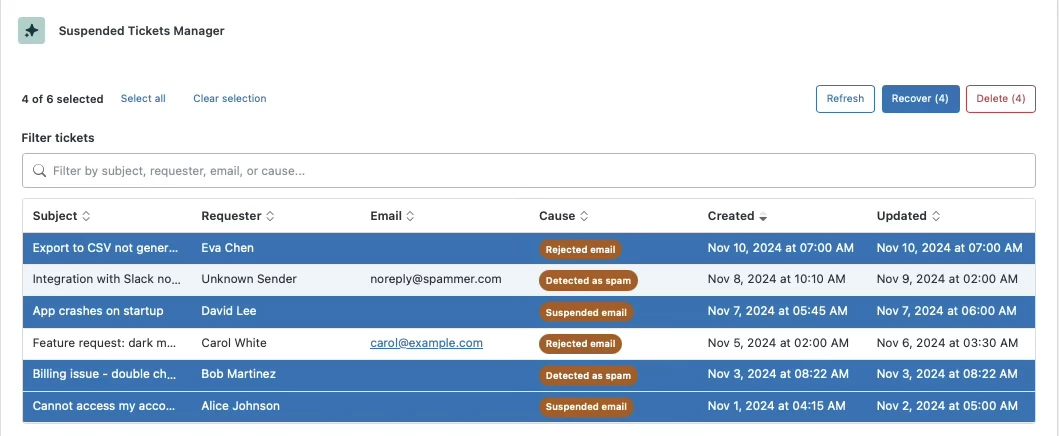
Create an app that displays all tickets in the Suspended Tickets queue.
Allow users to select one or more tickets from the list to recover using the 'recover many' endpoint or delete them in bulk.
Add filtering and sorting on any displayed field.
Hide the checkbox for the row level selection and make any click on the row select it.
Make the rows that are selected visually distinct with a different background color.
Make every email a routeTo() link if there is an existing user.
Designer's Notes
You can test suspended tickets by sending an email from any source and putting “Out of Office” in the subject and body. This type of email is automatically suspended.
Other causes for suspension are discussed in this article
Enhancement Options
The application can be further customized to handle specific workflows.
Some examples of optional enhancements:
- add a button that automatically recovers certain suspension causes or deletes keywords.
- remember your filter and sort criteria.
- add a tag to all recovered tickets (which would let you work with your triggers and automations)