

An app which gives agent an at-a-glance view of CSAT for their entire brand for some time period, including trends. It keeps them from having to leave Zendesk, search for tickets or guess what the trend is. The article gives the prompt used to generate one version of this app.
Problem Statement
When working on a ticket for a customer, an agent may want to know the sentiment over time of the customer, as well as comments made on the customer's tickets after the ticket closed. Doing so may take them away from the customer's current reply and might involve hunting through older tickets and checking for comments. If this retreival can be automated to keep the agent focused on the customer , it will improve response time and provide agents with real-time help in understanding this customer in-depth.
Screenshots
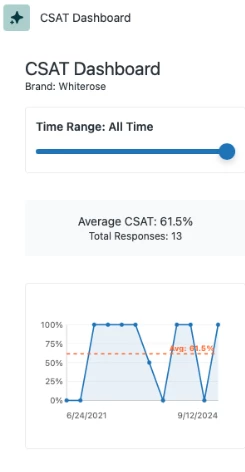
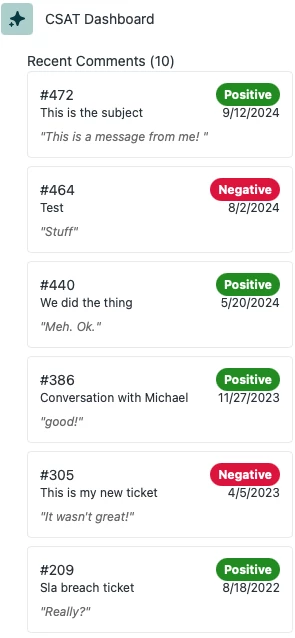
Prompt
We are making CSAT Dashboard for agents to understand the sentiment of Customer Satisfaction over time.
- Always search for the brand of the current ticket and display information immediately. IF the brand changes, update the display
- The app will allow the agent to select the time-frame for the dashboard, with small increments like 1 day, 1 week, 1 month, and longer ones further out, the last of which will be all time.
- This should use a slider. It should be at the top, with the other controls. If range changes, the display will re-draw but the CSAT data should only need to be loaded once.
- Make sure you're using the search query "satisfaction>offered" to find all the satisfaction ratings. Good and goodwithcomments should count as positive while bad and badwithcomments should count as negative.
- The app will show the average CSAT score for the period selected and a graph of the change over time, with a midline at the current CSAT average. The graph should be a prominent line graph near the top of the app.
- The app will allow for filters for scores with comments, positive ratings and negative ratings.
- Underneath this will be a list of all tickets with comments (both good and bad) in chronological order. Clicking on a ticket will routeTo() that ticket to see what it says.